Online documents and cloud file storage

Online documents
View, co-edit, and share documents online with your colleagues and external users. Create text documents, spreadsheets, and even presentations – all inside Bitrix24 document management software.
Digital document management
Supports docx, pptx, xlsx, txt, csv
Integrated with Dropbox, Google Drive, OneDrive
Chat history search

Real-time editing
Create and edit text documents, spreadsheets, and presentations in real-time. Invite other users (whether they have a Bitrix24 account or not) to co-edit documents online.

Real-time collaboration
No matter how many people are co-editing a document, you can always see who's worked on it recently and what changes have been made.

Online document management
Manage documents via a single dashboard where you can view recent activity and changes. Tweak access permissions and enable document lock to prevent files from accidental editing.


Ready to use online documents in Bitrix24?
File storage software
Bitrix24 web file storage software allows you to create, edit, and share any work-related files. Easily accessible from both desktop and mobile devices, integrated with Google Docs and Office 365, Bitrix24 Drive is a great fit for your project management needs.
24/7 access from any device
Safe and secure storage for your data
Integrated with Office 365 and Google Docs
Online documents
Configurable access permissions

Ideal for online collaboration
Store important files and documents, co-edit and share them online with your team and external users. Create a group folder for your department or project and invite your teammates to collaborate online.

Configurable access permissions
Certain files and folders in your company should not be accessible to everyone (e.g., whether it's your top-secret project data or sales figures). With the Bitrix24 file storage and sharing software, you can restrict access to files and/or lock them to avoid accidental changes.

Integrated with popular apps
Edit and store documents online via native integration with Google Docs, Office 365, or MS Office Online. If you already have some files stored on your Google Drive or Dropbox, you can easily connect them to your Bitrix24 Drive and migrate the files in just a few clicks.


Ready to manage your files with Bitrix24?
What makes Bitrix24 better than 99% of other solutions on the market?
- Replaces all your current SaaS solutions
- Free forever for unlimited users
- Easy to migrate your data from other systems
- Integrated with all your favorite services and apps
- Used, loved, and trusted by 15,000,000+ organizations worldwide
- 100% flat fee: predictable costs, no per-user pricing

Knowledge base
A single place for you to store all your corporate knowledge and wisdom, Bitrix24 Knowledge Base can be easily edited and expanded by all your team members.
Easy to create, edit, and share
Add videos and images
Business document management
Customizable access permissions
Ideal for projects and corporate knowledge
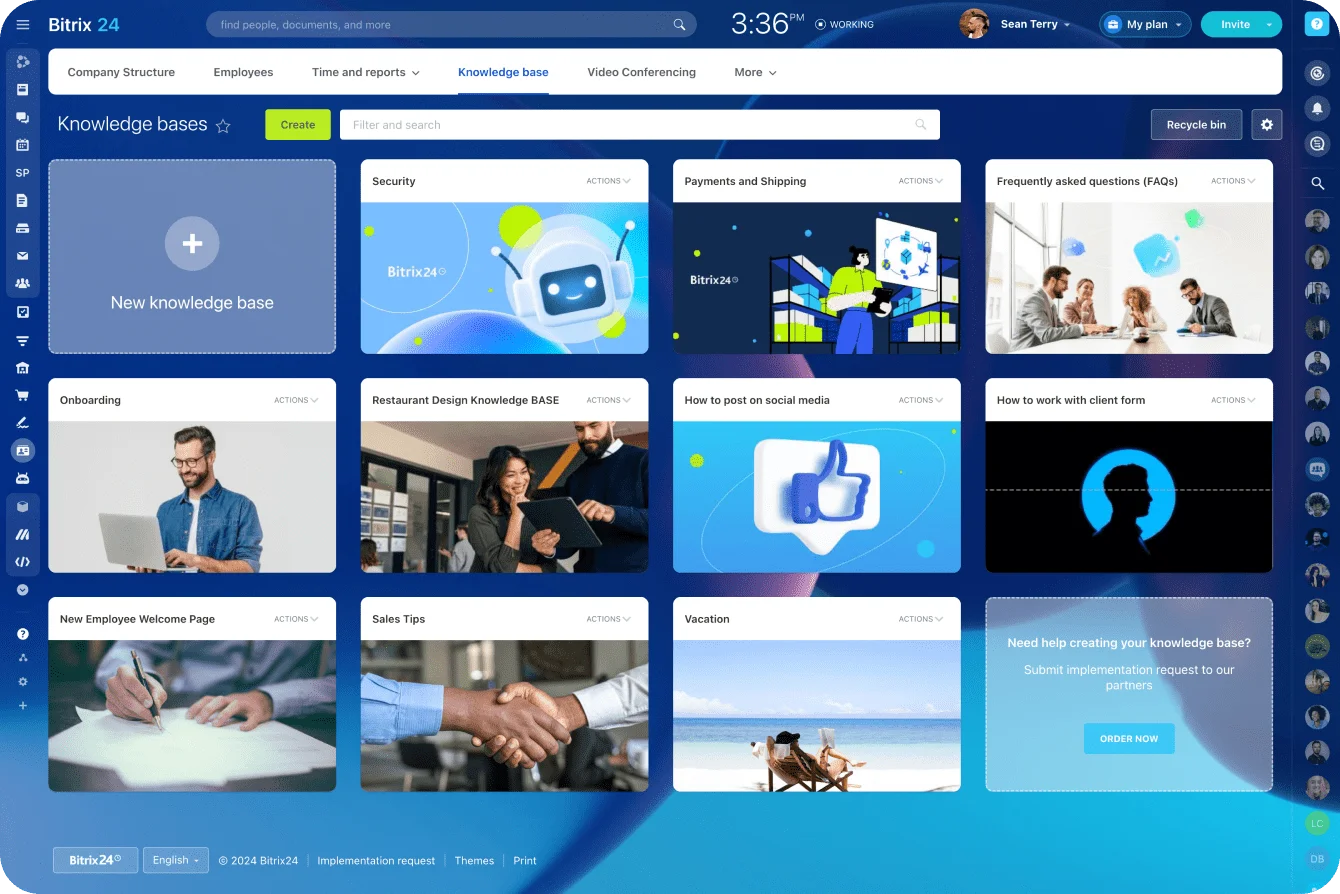
Easy to create, edit, and share
Anyone can create a knowledge base in Bitrix24 – just pick a template and start filling it up with articles, images, videos, or other types of content. Edit on the go and see the changes apply instantly.

Ideal place to store corporate knowledge
People come and go, but information must stay inside your company. Whether it's instructions, checklists, or manuals, you can store and edit them in Bitrix24, organizing content in the most intuitive way.

Customizable access permissions
In the Bitrix24 document management solution, you can restrict access to certain information by configuring permission settings for a specific knowledge base or for all of them at once.


Ready to use knowledge bases in Bitrix24?
Collab
Collab is a simple and convenient way for you to collaborate with external users (freelancers, contractors, clients, etc.). All the project-related chats, video calls, files, and tasks stay inside your account, which allows for easier control and tighter security.
One shared workspace
Chat, video calls, tasks, calendar
Ideal for external users
Seamless and secure collaboration
No file ever gets lost

Seamless collaboration
Collaborate with external users in a compact, shared workspace that features chat, video calls, tasks, drive, calendar, and other tools.

Safe and secure
No need to use a third-party solution to exchange messages, share files, organize video calls, set tasks, and track work progress. All the project-related work stays inside your account.

Always under your control
Users inside a collab have limited access to your account, while you get to track every action and monitor work progress in real time.

More than just online documents & file storage
Explore the full potential and amazing capabilities of Bitrix24.


Enhance your Bitrix24 experience
Go beyond the standard functionality and migrate your data easily using apps, add-ons, and extensions from the Bitrix24 Market.
- 1 Integrations with WhatsApp, telephony, etc.
- 2 One-click data migration to Bitrix24.
- 3 550+ apps and solutions in the catalog


Ready to get started?
Used and trusted by over 15,000,000 organizations around the world, Bitrix24 is a perfect choice for your business
Start for free Request assistance from Bitrix24 partners