From Chaos to Clarity: The Ultimate Welcome Guide to Mastering Bitrix24

We’ve all been there: the "Sunday Scaries" hit, and you realize your business is currently held together by three different spreadsheets, a frantic WhatsApp group, two project management apps you haven't updated in weeks, and a mountain of sticky notes. For the modern entrepreneur, the digital landscape often feels less like a streamlined highway and more like a cluttered attic.
If you’re reading this, you’ve likely just discovered Bitrix24, or you’re standing on the threshold, wondering if this is finally the "one ring to rule them all."
Spoilers: It is. But like any high-performance machine, success is about knowing which knobs to turn first. This isn't just a software manual; it’s your roadmap from operational chaos to a business that practically runs itself. Whether you're a solopreneur trying to look like a ten-person agency or a team lead at a growing startup, welcome to the "clarity phase" of your career.
What Exactly is Bitrix24? (The Digital Headquarters)
In the tech world, we use big words like "comprehensive ecosystem" and "omnichannel CRM." But let’s strip away the jargon.
Bitrix24 is your digital headquarters. Imagine if your entire office — the filing cabinets, the conference room, the sales floor, and the breakroom — lived on a single screen. On that screen, you can see who is working, chat with your team, track every penny of a $50,000 deal, and automate your invoices.
It is an all-in-one workspace designed to replace the "Frankenstein’s Monster" of disconnected apps. Instead of paying for dozens of disconnected apps, you have one login and one source of truth. It covers four main pillars:
- Collaboration: HD video calls, chats, and a "News Feed" that eliminates internal email clutter.
- CRM: A powerful system for tracking leads, deals, and complete customer history.
- Tasks & Projects: Kanban boards and Gantt charts to keep every project moving forward smoothly.
- Sites & Stores: An intuitive website and online store builder that automatically captures leads directly into your CRM.
Navigating the "First Day" Hurdles: Newbie FAQ
Walking into a feature-rich platform can feel like stepping into a cockpit. Based on our FAQ archives, here is the "human-to-human" guide to the questions we hear most often from new pilots.
"I just registered. What is my first move?"
First, breathe. Your first move should be claiming a professional Bitrix24 address. Once inside, head straight to your Profile to set your time zone. Trust us — nothing kills a deadline faster than a meeting scheduled for 3:00 AM by mistake because your settings were still on "Default."
"Free vs. Paid: What’s the catch?"
There is no catch. The Free plan is a legendary "forever" playground with unlimited users and basic tools. As you grow, you’ll look at the Basic, Standard, or Professional plans. The shift isn't just about "more storage"— it's about automation. Paid plans allow the software to do the heavy lifting, like auto-assigning leads or sending recurring invoices.
Pro Tip: Bitrix24 charges per organization, not per user. You can add 40 people to a 50-user plan without your bill increasing by a single cent.
"How do I find anything in this interface?"
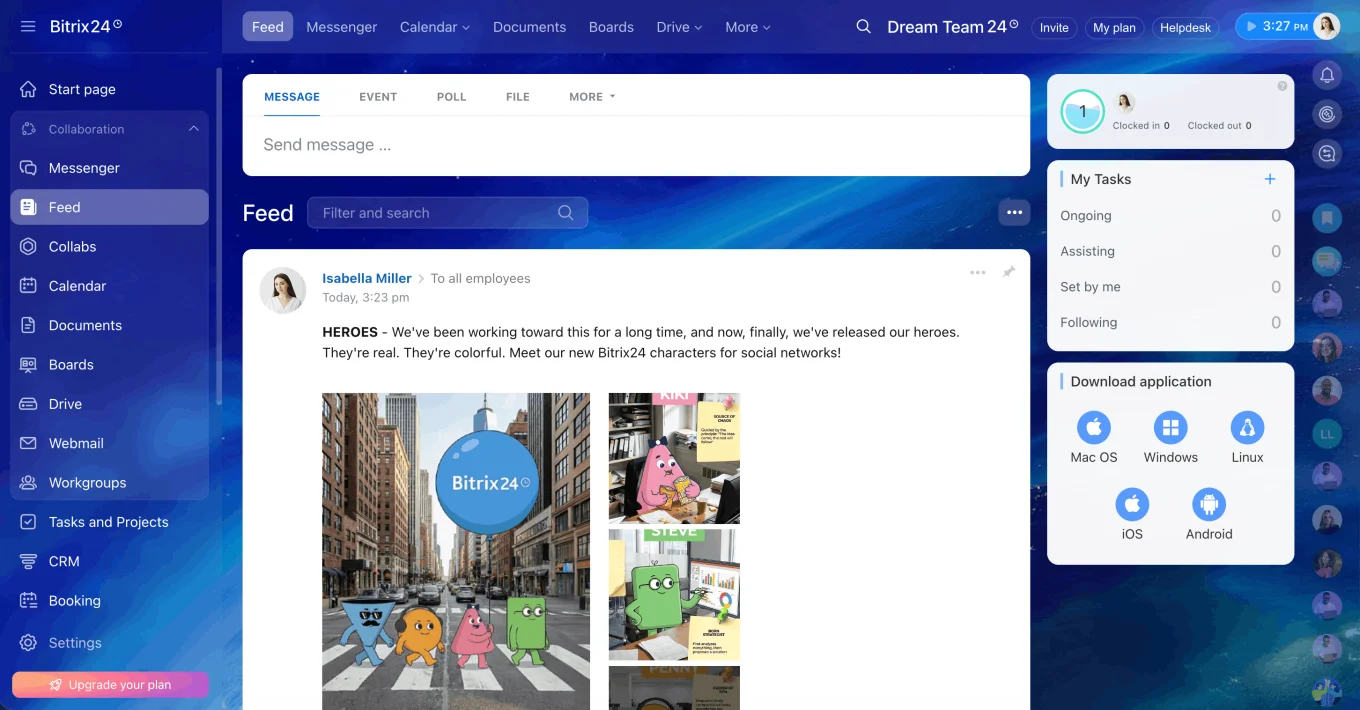
Look to the left-hand sidebar. This is your office hallway. You can actually drag and drop these items to prioritize what you use. If you’re a sales-first company, move CRM to the top. If you’re a creative agency, put Tasks & Projects first. And remember: the Search Bar at the top is universal — type "Create Task" or a client's name, and it will take you right there.
The Tangible Win: Why Your Business Needs This
Bitrix24 isn't just about "features"; it’s about solving the friction points that keep you awake at night.
-
For Freelancers & Startups: Eliminating Task Chaos. When you’re wearing every hat in the company, things fall through the cracks. Kanban boards allow you to visualize your workflow. You can see at a glance if you have too many "In Progress" projects and not enough "Invoiced" ones.
-
For Small Businesses: Professionalism on Autopilot. Use CRM forms on your website. When a lead fills one out, they get an auto-reply, a lead is created, and a task is assigned to your rep. You look like a Fortune 500 company while you’re out getting coffee.
-
For Mid-Sized Businesses: Bridging the Departmental Gap. As you grow, the "Sales vs. Marketing" or "Sales vs. Fulfillment" silos begin to form. Bitrix24 acts as the glue. When a salesperson closes a deal, the system can automatically create a project for the fulfillment team, carrying over all the client's notes. No more manual handovers or "he said, she said."
-
For Enterprises: Governance and Global Scale. Large organizations need more than just tools; they need control. With Bitrix24 Enterprise, you get multi-department structures (separate spaces for different branches), advanced security permissions, and the ability to host the software on your own servers. It provides the agility of a startup with the security and data sovereignty required by global corporations.
-
For Teams: The Death of the "Status Update" Meeting. No more "Where are we on the Jones report?" In Bitrix24, transparency is the default. You can see the progress bar, the attached drafts, and the time spent in real-time.
Scenario: Your First 48 Hours
Imagine it’s Monday morning. You’ve just signed up. Here is what a "win" looks like by Tuesday evening:
-
Day 1: You customize your sidebar and invite your core team. You create a Project Workgroup for your biggest client, upload the brand assets, and tag your partner: "Review these concepts by EOD."
- Day 2: You connect your business email. A lead comes in via your new web form, and Bitrix24 automatically creates a "Deal" in your CRM. You jump on a built-in video call to discuss the project, taking notes directly in the CRM record.
By Wednesday, you aren't searching for info; you're just doing the work. That's the moment you stop managing chaos and start building momentum — when the tool fades into the background and your business takes center stage.
Ready to clear the clutter?
The beauty of Bitrix24 is that it grows with you. You don't need to master all 30+ tools on day one. Start with the chat, master the tasks, and let the CRM do the heavy lifting.