Keeping Track of Clients Without a CRM - and the Point Where That Stops Working


TL;DR (Quick Summary)
You can track clients by hand far longer than most teams assume, as long as the record stays shared, current, and visible to everyone who needs it. It breaks when follow-ups, handoffs, and renewal dates drift into private inboxes, personal calendars, and memory.
- Why simple tools outlast expectations → they fit while one person owns each relationship and the volume stays low
- Fix the manual setup before calling it broken → most teams outgrow a messy sheet, not the format, so settle ownership, statuses, and dates first
- The real failure mode is invisible risk → nothing looks broken while the information that matters leaks out of the shared record
- How to read the breaking points → watch for multiple owners per account, recurring renewal dates, several service lines, and a growing "follow up later" pile
- What a CRM fixes that a better spreadsheet can't → shared history, follow-ups tied to the account, and ownership you can verify
- Choose on coordination, not readiness → move when keeping the picture accurate costs more than the tracking saves
Takeaway: Stay manual while the whole team can see who owns each client and what's next; switch when keeping that picture accurate costs more than the tracking saves.
A spreadsheet fails the first time someone other than the owner needs to know what's happening with an account and can't find out without asking. Client count has little to do with it. What matters is how many people now depend on the same information.
Get the timing right and you avoid two expensive mistakes: the run of missed renewals that comes from staying manual too long, and the half-used CRM you bought before there was a problem to solve.
This article shows you how long your current setup can realistically carry you, the signs it's started costing you clients, and what to have in place so the switch works the first time.
Why spreadsheets, inboxes, and notebooks work longer than people expect
Small operations run fine on basic tools because the work is still small. Volume is modest, one person owns the relationship, and the context that matters fits in a shared sheet or a good memory.
There's no setup tax, either. Everyone already knows how a spreadsheet works, notes go in fast, and nobody has to design a pipeline or agree on required fields before talking to a client.
For an early-stage service business, that flexibility earns its keep: offers, pricing, and who-does-what change month to month, and a light tracker absorbs the changes without turning every tweak into an admin project.
Personal knowledge works until other people need it
Notebooks and private notes survive because they fit owner-led work. A founder carries the important things in their head: which client watches response time, who wants quarterly reporting, which stakeholder always raises budget.
That holds right up to the moment someone else needs the same knowledge. A team where each salesperson owns their accounts end to end runs comfortably on private tracking. Add an account manager, a support contact, or a delivery lead, and several people suddenly need the same history, and what lives in one person's head gets hard to share or verify.
Client Tracking Spreadsheet + Automation Starter Pack
Enter your email address to get a comprehensive, step-by-step guide

Make a simple client-tracking setup reliable before you call it broken
Most teams that say they've outgrown spreadsheets have outgrown a messy spreadsheet, not the format. Give the current system a fair run before you replace it.
One exception, so you don't waste a week: if several people already touch each account, renewals already recur, and handoffs already happen weekly, you're past the point a better spreadsheet fixes. The work worth doing then isn't polishing a tracker you're about to abandon; it's settling the fields, statuses, and update habits you'll carry into a CRM.
Start with one shared record
Pick one place the team checks first: a spreadsheet, a database-style sheet, or a shared doc.
The failure mode here is unofficial versions. When sales keeps one tracker, operations another, and account managers their own notes, nobody can say which record is current. Private side-sheets show up for a reason worth reading: someone doesn't trust the shared record, or finds it slower than their own notes. Fix the reason. Ban the side-sheet without fixing it and the real account state just moves somewhere one person can see and the rest can't.
Each record needs a small, consistent set of fields. The columns below, in this order, cover what a colleague would need to take an account over cold. The example row is illustrative, there to show the format and the kind of validation worth setting up.
|
Column (in order) |
Example entry |
Simple validation |
|---|---|---|
|
Client name |
Acme Co. |
Text, kept unique |
|
Primary contact |
Jane Doe, Ops Lead |
Text |
|
Owner |
(team member) |
Dropdown of team members |
|
Status |
Active delivery |
Dropdown, fixed list of statuses |
|
Last interaction |
2026-09-03 |
Date, YYYY-MM-DD |
|
Next action |
Send Q4 renewal proposal |
Text |
|
Next-action due date |
2026-09-17 |
Date, YYYY-MM-DD |
|
Renewal / review / contract date |
2026-12-01 |
Date, YYYY-MM-DD |
|
Link to notes or key documents |
(URL) |
Link |
Two rules head off most of the mess: a dropdown for Status, so the labels stay consistent, and one date format across every date column, so nothing gets logged as "June-ish."
Consistency beats field count. A renewal that reads as a real date in one row, a vague "soon" in another, and a private calendar entry in a third won't protect anyone from a missed deadline.
Make statuses useful
"Active" covers too much to be useful. An account onboarding since yesterday needs different handling than a two-year retained client or one three weeks from renewal. A good status tells the reader what kind of attention the account wants.
Split accounts into stages that mean something:
- Onboarding
- Active delivery
- Waiting on client
- Review due
- Renewal approaching
- At risk
The labels matter less than a shared definition for each. Agree what "at risk" means once, out loud, or three people will use it three ways and the status stops meaning anything.
Set simple ownership and update rules
Give every client one named owner. That owner doesn't do every task; they make sure the record stays current and every next action has a name and a date against it.
Agree when updates happen:
- After a significant client meeting
- When an important request arrives
- When ownership changes
- When the next action changes
- When a renewal or review date is confirmed
A rule like that dies quietly unless it has a rhythm. A default that works: the owner updates the record within a day of any real client contact, the team scans the whole tracker once a week, and a manager uses that weekly pass to catch next-action dates that have slipped or passed with nothing logged.
Treat those cadences as recommendations, not benchmarks. What breaks "update when something happens" is that nobody owns "when," and nobody owns "who checks."
Pro Tip: Don't log every minor interaction. Log what a colleague would actually need if they had to take the account over tomorrow.
A working system passes a three-question test. Open any client record:
- Who owns the relationship?
- What happened last?
- What needs to happen next?
If answering means digging through email, chat, and someone's private notes, the shared tracker isn't doing its job.
The real failure mode: invisible risk
Manual systems don't collapse. They erode. The spreadsheet's still there, so everyone assumes tracking still happens, while the information that matters quietly relocates.
A common version goes like this. A client's renewal date lives only in the account owner's calendar. The owner moves teams, the calendar entry goes with them, and the renewal passes without a word until the client mentions they're already talking to another supplier. No single person dropped the ball. The date just sat somewhere the rest of the team couldn't see.
That's rarely a cheap mistake.
Fred Reichheld's 2001 Bain analysis found that in financial services, a 5% increase in customer retention produced more than a 25% increase in profit. Your margins will look different, but the direction holds: a client who lapses because a date went untracked costs far more than the minutes it takes to keep that date in view.
And size doesn't protect you, either. In October 2003, Microsoft let its registration of hotmail.co.uk lapse, and a private individual bought the domain the same day. He tried to hand it back by phone and email, and Microsoft only paid attention once The Register called to ask why a stranger owned it. The company's eventual statement promised processes "to ensure there is no recurrence," (which is roughly what every team says after its first missed renewal).

Risk gets scattered across different tools
A contract date on one person's calendar. Meeting context in a notebook. A follow-up promise buried in an email thread. A status updated with no next action recorded. Each gap is nothing on its own. The damage is that nobody sees them together.
The patterns repeat:
- Two people contact the same client because neither saw the other's outreach
- A client references a past conversation the current owner can't find
- A handover leaves the replacement with fragments instead of a history
- A promised follow-up vanishes because no owner or deadline was recorded
More people create more coordination work
Every new person raises the cost. A relationship that began with one founder grows to include sales, delivery, finance, support, and leadership, each generating messages, decisions, commitments, and dates.
Reassembling the full story takes longer every quarter, and that time goes somewhere: the McKinsey Global Institute estimated in 2012 that the average knowledge worker spends nearly 20% of the workweek looking for internal information or tracking down the colleague who has it. On an account with no shared record, that's most of what a handover becomes.
A manager ends up chasing a few people before a weekly client review. Someone covering a colleague's leave rebuilds the account from old email threads before they'll risk calling the customer. That reconstruction time is the first sign a light system is turning expensive.
Pro Tip: Watch how often "what's happening with this account?" gets asked. If the answer lives in a person instead of the record, you've found the visibility gap.

Use these breaking points to tell whether your current setup has stopped scaling
There's no client count that triggers a CRM. A dozen complicated accounts demand more coordination than a hundred simple ones. Watch how the work changes, not how much of it there is.
More than one person regularly serves each client
Once sales hands off to delivery, or support and account management both work the same customer, shared history stops being optional. The account can't ride on one person's memory. Vacations, departures, and handovers expose that fast: if coverage means forwarding a long email chain and booking a briefing call, the tracking system already generates work instead of saving it.
Important dates repeat across many accounts
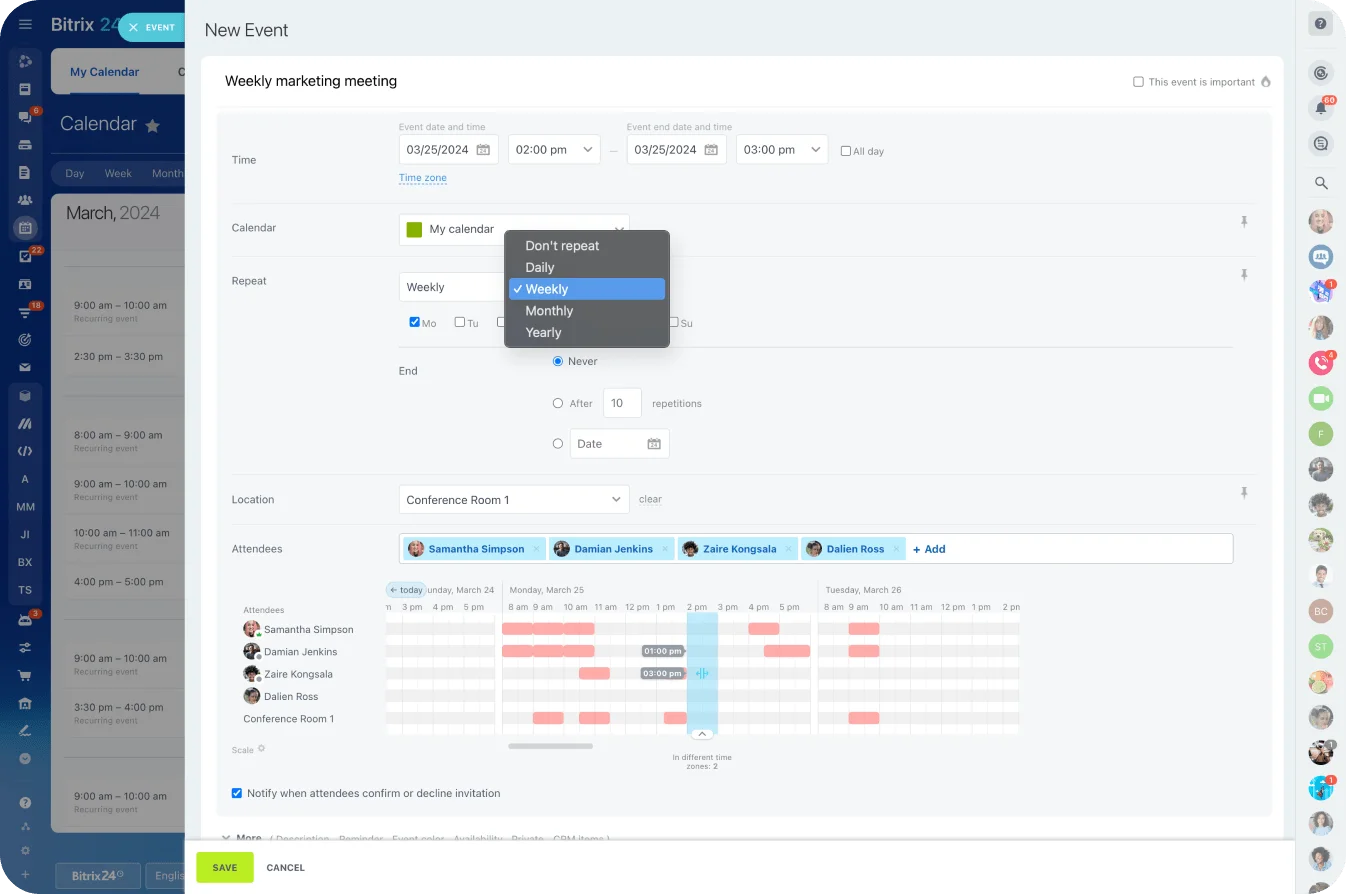
Renewals, reviews, check-ins, contract milestones, service deadlines: these turn client tracking from a contact list into a timing problem. One missed date is recoverable. Watching dozens by hand, every week, isn't. An account manager holds renewal dates for a few big clients easily; stretch that across a growing book and the odds one surfaces too late climb every month.
A shared Bitrix24 calendar puts recurring meetings, review dates, and follow-up reminders where more than one person sees them.
Clients buy several services
Sell a client a second service and you've quietly signed up for a second relationship with them. Different stakeholders, deliverables, open requests, and renewal dates per service mean one "active" status can't describe the account anymore. The team needs to see:
- What the client has bought
- Who owns each part of the relationship
- Which work is open
- What's been promised
- Which commercial dates are close
Warm prospects keep disappearing
Manual tracking also strains under prospects who aren't ready yet. A few "follow up next month" notes are easy to hold. A pile of them, each due on a different week, isn't.
The "follow up next month" note is where warm prospects quietly die. Someone writes it, the month turns over, a louder deal takes the slot, and by the time anyone scrolls back the prospect has signed with whoever called them back first. Without a next-action date that surfaces on its own, the list only grows, and the oldest entries are the ones nobody ever works.
Watch for internal warning signs
Your setup has hit its limit when:
- People ask colleagues for account history instead of checking a shared record
- Managers can't see what needs attention this week without chasing updates
- Follow-up quality swings by person because everyone runs their own reminders
- Coverage breaks when someone's out, because their inbox is the client history
- Important dates need manual cross-checking across calendars, sheets, and email
- Nobody's sure which tracker is the current one
Some friction is normal. Repetition is the tell. When the same coordination problems surface across different clients and different people, the system's the problem, not the people.
What a CRM fixes that a better spreadsheet usually cannot
A CRM tracks client and prospect activity, ownership, timing, and history in one shared system. A spreadsheet holds the same facts. The difference shows the moment that information has to trigger and coordinate work rather than just sit there.
Shared account history
A CRM keeps interactions, notes, ownership, and follow-ups attached to the client record. Someone stepping into an account sees recent activity and open work in one place instead of hunting for it across tools.
In Bitrix24 CRM, for example, customer details sit alongside sales activity and related messages, so the team works from one account view instead of maintaining separate trackers.
Follow-ups become part of the workflow
Manual systems lean on someone remembering to set and check reminders. A CRM ties the next action to the account itself: a callback, a renewal conversation, a quote chase, a review, an internal task. That pays off when a manager wants upcoming work across the whole team without polling each person.
When client follow-up spawns internal work, linking CRM records to Bitrix24 task management keeps commitments, owners, deadlines, and delivery actions in view.
Ownership becomes easier to verify
A CRM makes responsibility explicit. A manager sees who owns a record, what's happened on it, and where follow-up is pending, which surfaces gaps before a client has to chase. Handovers get cleaner too: the next owner works from the record instead of reconstructing the relationship from other people's inboxes.
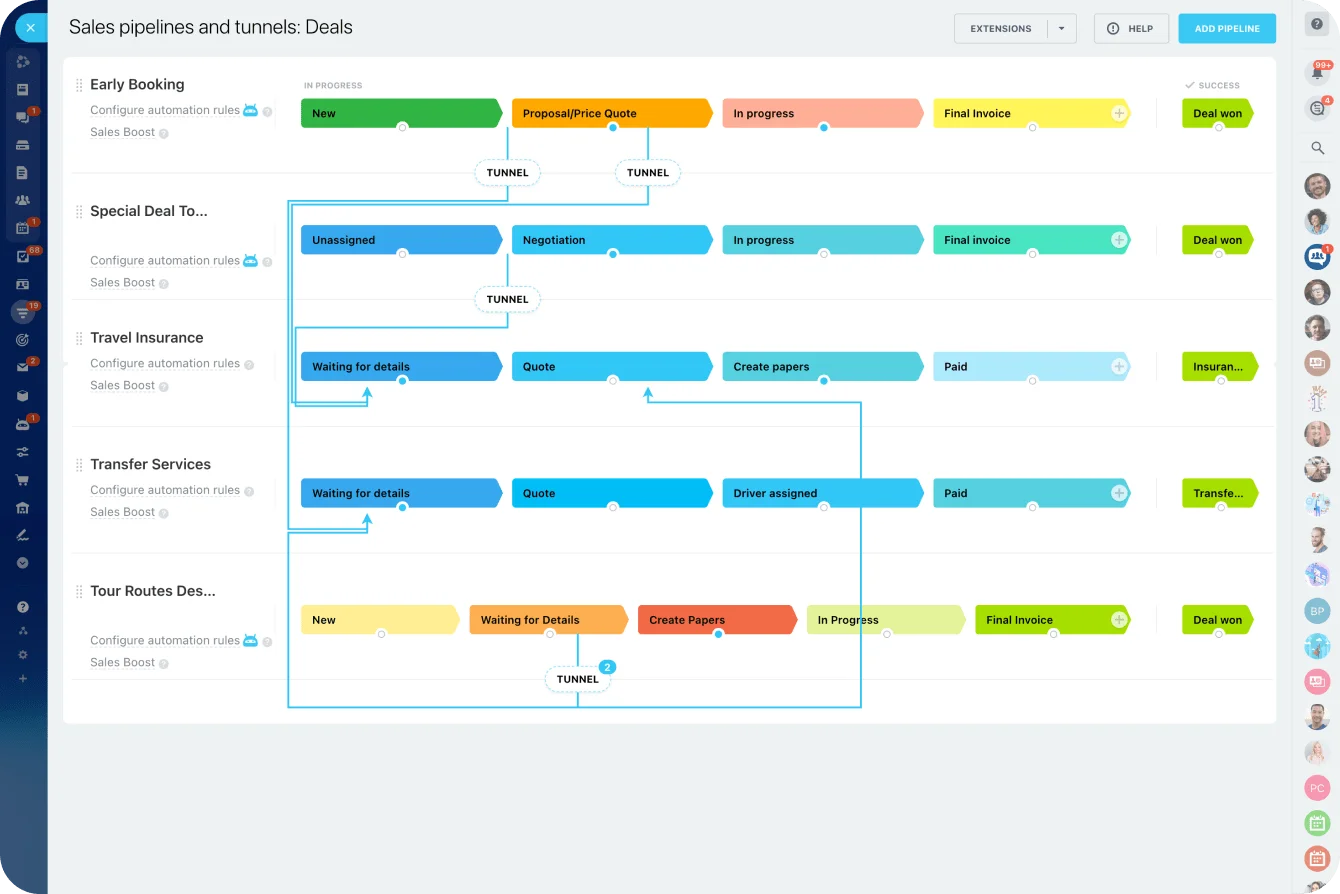
For sales teams, a shared pipeline makes stage and next step visible across every open opportunity. Bitrix24 offers sales pipeline management for tracking stages, ownership, activity, and upcoming actions in one view.
A CRM still needs discipline
Software won't fix an unclear process. If nobody agrees what a status means, when records get updated, or who owns the next action, those gaps walk straight into the CRM. This is how rollouts fail: a half-updated CRM earns less trust than the spreadsheet it replaced, because everyone can see it's incomplete and quietly drifts back to their own notes.
A simple system people believe beats a sophisticated one they don't.
That's the case for fixing the manual process first. The fields, ownership, and habits you settle in a spreadsheet become the backbone of the CRM setup later.
Migrating without the mess
Pro Tip: Before migrating, delete fields nobody fills and pin down what every status means. Messy data is harder to clean once it's inside a CRM.
Migration itself is mostly mapping and importing: each row becomes a company or contact, each deal becomes a record with its own stage, and most tools pull straight from a cleaned CSV. What actually derails teams is the opposite of missing data: over-customizing before anyone's used the thing, and leaving required fields undefined so records save half-empty. Decide which handful of fields are mandatory before the import, not after.
If some client information needs to stay in tools the team already runs, check whether the CRM connects to them before assuming everything has to move.
Bitrix24, for example, keeps an integrations directory covering Gmail, Google Calendar, Google Drive, and Microsoft tools.
Choose on coordination, not readiness
The decision is operational. One question settles most of it: can the current system still give everyone involved enough to run their client relationships without guessing?
Stay manual when the system is still working
Keep the spreadsheet when:
- Client volume is modest
- One person owns most relationships
- Few recurring dates need watching
- The team uses one shared tracker, consistently
- Handoffs are rare
- Managers can see upcoming work at a glance
- Follow-ups aren't slipping
Adding administration before you have a problem that needs it just buys you overhead.
Consider a CRM when coordination becomes fragile
Move when:
- Several people work the same client
- Renewals and recurring follow-ups need active watching
- Managers spend real time chasing account updates
- Client history is scattered across systems
- Handoffs keep needing manual briefings
- Warm prospects are getting forgotten
- Ownership and accountability have gone fuzzy
Cost shouldn't be what decides it. The one capability this whole piece turns on, a shared client record with clear ownership and visible next actions, comes with the Bitrix24 free plan for one or two users, with CRM, tasks, and shared calendars included, so a small team can test whether shared tracking solves its coordination problem before paying for anything. Beyond that, plans are priced per organization rather than per seat.
When the requirements grow into several pipelines, automation, or reporting, weigh what you actually need against the Bitrix24 pricing plans. A team that needs basic client records wants something very different from one running full workflow management.
FAQ
Can a shared spreadsheet be enough for a very small team if we use it consistently?
Yes. It works when ownership is clear, updates actually happen, and the sheet shows last activity, next action, and key dates in one place. The catch: it has to be the record the team truly runs on, not a tidy-looking reference propped up by private inboxes and memory.
What is the first sign that missed follow-ups are a system problem rather than an individual mistake?
Repetition. A single forgotten email happens to everyone. When follow-ups keep dropping because next actions are vague, dates live elsewhere, or nobody can tell who's responsible, the process is the problem, and the same failure showing up across several people or accounts confirms it.
If we move to a CRM later, what information should we already be tracking?
The same fields the shared record already needs: who owns the account, the main contact, current status, the last interaction, the next action and its due date, and the next renewal or review date, plus a link to where the notes live. Keep those clean and you've got a working manual system now and a far easier migration when you move.
Keep every client follow-up visible
Bitrix24 brings CRM, tasks, calendars, and account history together so teams track ownership, renewals, and next steps without guesswork.
Get Started NowThe owner is the worst judge of the system
Ask an account owner whether the tracker works and they'll say yes, because their memory quietly fills every blank the sheet leaves. The honest verdict comes from whoever last had to pick up an account cold: the colleague covering a vacation, the new hire inheriting a book of clients, the manager prepping for a review with ten minutes' notice.
They're the ones paying for the gaps, and they're rarely asked.
So run the check from their side. Hand someone an account they've never touched and see whether the record alone gives them enough to call the client with confidence.
If it does, your manual setup has more runway than any software demo will suggest. If they reach for the team chat to ask the owner first, you've found where the coordination cost lands, and that's the cost a CRM exists to absorb.
Takeaway: What keeps a manual system alive is a shared, current view of who owns each client, what happened last, and what's next. Hold that and you can stay manual for years; lose it and a CRM just inherits the confusion.