Build a Content Calendar That Survives Reality: Slots, Owners, and Rework


TL;DR (Quick Summary)
A content calendar built on due dates survives right up until the first piece slips. Manage publishing slots instead: protected capacity you fill from ready inventory, a named owner on every handoff, review time booked as real work. Do that and a small team holds its cadence without rescuing late content every week.
- Publishing slots instead of fixed due dates → cadence holds when a single piece slips
- Committed slots kept apart from flexible inventory → shift priorities without rebuilding the calendar
- Explicit ownership at every handoff → work stops stalling in the gaps between stages
- Review and revision time built into the calendar → approval timelines stop being fiction
- Rework rules that protect the slot → one troubled draft stops eating the capacity meant for others
- Buffer treated as an operating rule → room stays open for revisions and urgent asks
- A weekly control routine → problems surface before publish week
Takeaway: A content calendar is capacity management in disguise. Protect the slots, name the owners, and control the rework, and consistent publishing no longer depends on everything going right.
Most content calendars are lists of due dates, and that's why they fall apart. Each date quietly assumes a piece will move cleanly through briefing, drafting, review, production, and publishing, on time, first attempt. Small teams don't work that cleanly. One late draft lands on the next review window, the review shoves the production task, the task pushes the publish date, and three pieces are late where one slipped.
The teams that publish on a steady cadence protect something the calendar rarely shows: capacity.
And the squeeze here is well documented. In the Content Marketing Institute's 2025 B2B research, 54% of marketers cited lack of resources as a challenge, while 33% reported problems managing workflows and content approvals.
Build the calendar around that capacity, and a late review, a changed brief, or an urgent request becomes a quick swap instead of a moved publish date.
This article gives you the slot structure, owner map, review windows and rework rules that make the swap possible, plus a short weekly check that keeps the system honest.
Plan around publishing slots, not a fragile list of due dates
A date-heavy calendar breaks the first time one thing slips, because every date downstream leans on the one above it. Plan in slots and the slip stays contained.
Slots earn their keep once handoffs cross people. A one-person operation, where the same person briefs, writes, edits, and publishes, doesn't need any of this. The payoff starts the moment a draft passes through a reviewer, an approver, or a producer with their own priorities, because that's where dates slip and nobody owns the gap.
What a publishing slot actually is
A slot is protected publishing capacity tied to a channel, format, and cadence: one blog post a week, a customer story a month, two newsletter issues a month, a single campaign article during launch week. The piece assigned to it changes. The slot stays put.
Manage the slot separately from the content
The operating goal shifts to "publish one blog post in this week's slot," and the specific article filling that slot becomes swappable.
Example-in-action: This week's slot is one blog post, set to publish Thursday. The piece lined up for it, a product deep-dive, needs an SME to confirm technical claims, and that SME is buried in quarter-end work until next week. Rather than let Thursday slip, the team publishes a finished evergreen explainer that's already edited and approved. The deep-dive keeps its brief and its reviewer and moves to a later slot once the SME frees up. Cadence holds. One piece moved, not the whole schedule.
The same dynamic shows up any time content depends on busy internal experts. A team writing thought-leadership with sales leaders as reviewers loses a slot every quarter-end unless it can push a ready piece forward in place of the blocked one.
Set capacity from actual throughput
Set capacity from what the team moves through the full workflow, briefing to publish, in a normal cycle. If that's two blog posts and one newsletter a month, that's your capacity. A full backlog doesn't create production time.
Before you approve next month's schedule, ask one question: if every planned slot were filled, could the team finish the work without borrowing evenings, skipping review, or dropping other responsibilities?
If the answer is no, the calendar is overloaded before the month starts.
Pro tip: Track completed output across several normal cycles before you raise planned capacity. One unusually productive stretch makes a misleading baseline.
30-Day Content Calendar Template With Owner Accountability Map
Enter your email address to get a comprehensive, step-by-step guide

Set up a slot architecture that separates committed work from flexible inventory
Not every slot carries the same weight. A launch date is a promise. A vague "evergreen post" three weeks out is a placeholder. Put them on one undifferentiated calendar and the placeholder starts to look like a promise nobody actually made.
Use four types of slots
Four types cover most editorial work:
- Must-publish campaign slots for launches, events, promotions, and time-bound announcements
- Recurring evergreen slots for standard posts, newsletters, and educational content
- Reactive or opportunity slots for news responses, product moments, and timely ideas
- Spillover reserve capacity for late pieces, revisions, and substitutions
Every slot needs an objective, an audience, a format, an owner, a latest viable publishing window, and a substitution rule.
Illustrative one-month slot map for a team that publishes four pieces a month:
- Week 1, evergreen: a how-to or educational post from the backlog
- Week 2, must-publish: the feature-launch article, tied to the release date
- Week 3, reactive: held open for a timely angle, defaulting to a ready evergreen if nothing lands
- Week 4, reserve: spillover for a piece that slipped, a revision that ran long, or a substitution
Only two of those four carry a hard commitment. That's the point. The team can reshuffle the flexible slots all month without touching the launch date.
The latest viable publishing window is the last date a piece can go live and still do its job. For an evergreen post, it's wide; next week is fine. For a launch article, it's narrow and fixed at both ends: publish before the product ships and you leak the release; publish a week late and the news value is gone.
Google has shown how the early end bites. In September 2023, weeks before its Pixel launch event, the Pixel 8 Pro turned up on Google's own 360-degree phone simulator, colors, new temperature sensor and all. The page came down, but not before people had screenshots.
A conference recap runs on a window of days after the event. Naming that date up front tells you how much slip each slot can absorb, and which pieces have no room at all.
Use different planning horizons
Near-term and future work carry different levels of commitment.
|
Planning layer |
How to manage it |
|---|---|
|
Near-term slots |
Locked and actively moving through production |
|
Mid-range slots |
Reserved by type, with topics still changeable |
|
Backlog ideas |
Stored separately until promoted into a real slot |
Near-term slots cover work already in production, with briefs, owners, and review dates attached. Mid-range slots reserve capacity without pretending the topic is settled; a slot three weeks out can read "evergreen product education" until priorities sharpen.
Don't turn ideas into fake commitments
Drop every promising idea onto a future date and you build a calendar that lies. Leadership reads it as resourced, committed work. The content team reads the same rows as placeholders. That gap is where trust breaks: someone plans a campaign around a post that was never more than a line in a backlog.
Keep the backlog separate, so the line stays visible. An idea becomes scheduled work the moment it gets a real slot and the capacity to produce it.
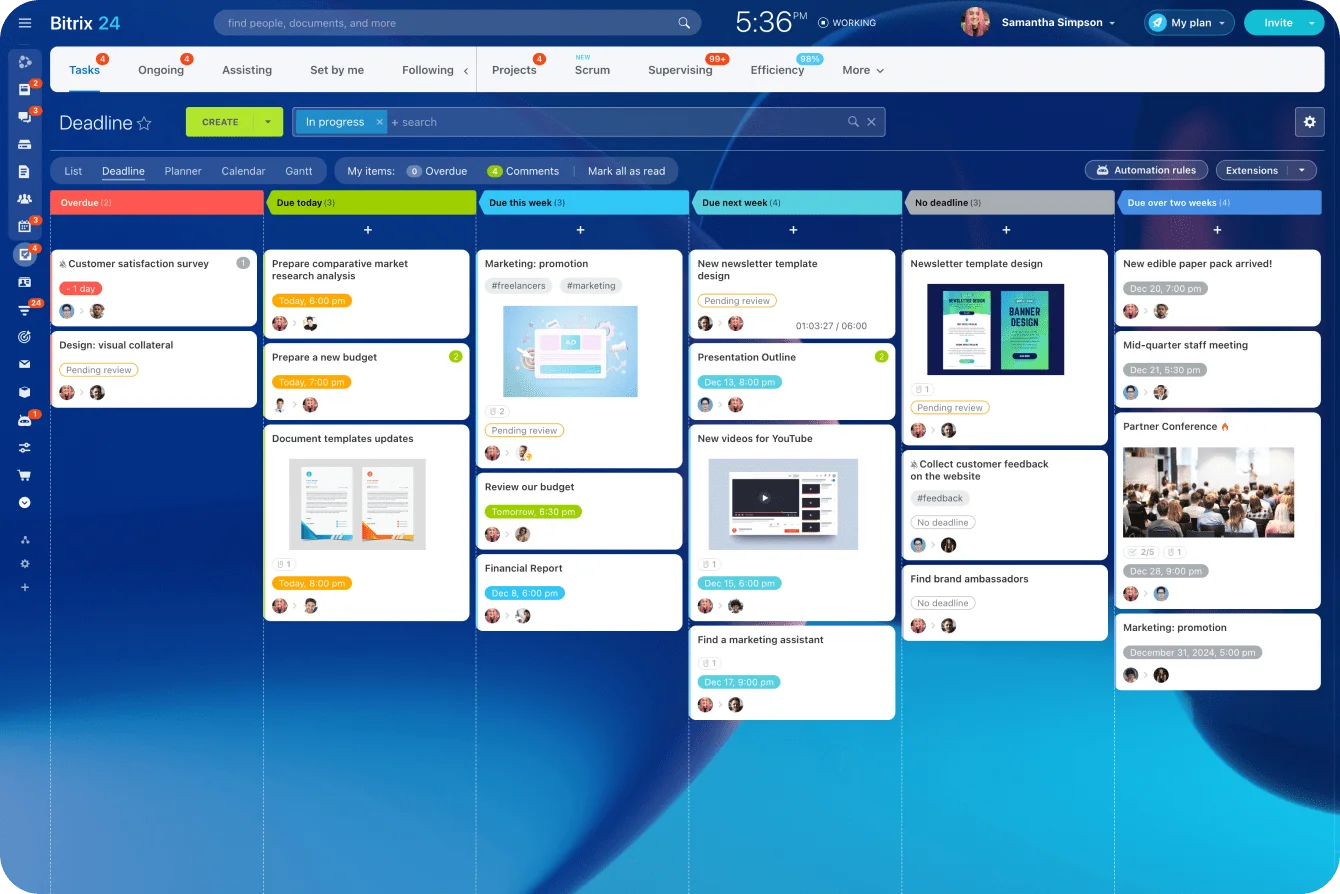
Seeing those stages helps. Bitrix24 Tasks and Projects supports Kanban and other task views, so a team can split work by stage and see at a glance what's moving, waiting, or blocked. Kanban and Gantt views are included on every plan, including Free, and the paid tiers charge one flat rate per organization (which matters for a small team that wants the structure without a per-seat bill).
Make ownership explicit at each handoff so work does not stall between stages
Calendars break in the gaps between stages, where a piece sits and nobody owns moving it. A reviewer comments on a draft; the content owner stays responsible for making the review happen, gathering the feedback, and pushing the piece forward. Those are different jobs, and confusing them is how work stops.
Define the workflow stages
For a small editorial operation, the stages run roughly:
- Intake
- Brief approval
- Draft
- Subject-matter review
- Editorial review
- Revisions
- Final approval
- Production
- Publish
Keep it as simple as the team needs. Just make responsibility visible at every step.
Separate owner, reviewer, and approver
Three roles have to stay distinct. The owner moves the piece to the next stage. The reviewer supplies required input inside an agreed window. The approver decides whether it advances. Blur them and work stalls: a draft goes to an SME "for thoughts" with no deadline, no list of what to check, and no named final approver, and it sits while the content manager and the writer each wait for the other to act. The slot keeps getting closer.
A compact owner map keeps the roles straight. It's illustrative, and titles vary by team, but every stage needs one name in the first column.
|
Stage |
Moves it forward |
Provides input |
Signs off |
|---|---|---|---|
|
Intake |
Content manager |
Requester |
Content manager |
|
Brief approval |
Content manager |
Stakeholders |
Content lead |
|
Draft |
Writer |
n/a |
n/a |
|
SME review |
Content owner (chases) |
SME |
n/a |
|
Editorial review |
Editor |
n/a |
Editor |
|
Revisions |
Writer |
Editor, SME |
n/a |
|
Final approval |
Content owner |
n/a |
Approver (e.g., marketing lead or legal) |
|
Production |
CMS owner |
n/a |
n/a |
|
Publish |
CMS owner |
n/a |
Content owner |
The failure hides in any stage with no name in the first column. Drafting and editorial review usually have clear owners. Review and approval are where the gaps open, because "the SME" or "leadership" isn't a person with a deadline.
Define the handoff itself
Every active item shows six things: its current stage, current owner, next owner, deadline for the current action, required output, and the escalation path if that deadline passes.
"Please review" gives the reviewer nothing to act on. "Confirm the product claims and flag factual errors by Wednesday" names the job and the date.
The escalation path matters as much as the deadline. Say SME review was due Wednesday and Thursday morning brings nothing. The owner doesn't keep waiting. The path is set in advance: a reminder to the SME with the specific ask and a firm cut-off, then, if it's still quiet by end of day, a note to the SME's manager or a call to swap the slot. A missed deadline triggers an action, not a longer silence.
In Bitrix24 task management, you assign the work, set the deadline, keep the discussion on the task, and watch workload. One task carries the piece; subtasks or checklist items carry review, revision, CMS production, and QA.
Watch for silent handoffs
The silent handoff is the easy one to miss. A writer marks a draft complete, and the reviewer never registers that the next move is now theirs. Make the transfer explicit: an assignment, a notification, an agreed workflow step, or the piece sits untouched while everyone believes they've done their part.

Build review and revision time into the calendar instead of pretending it will be quick
The draft is the easy part to schedule. Review is where the time goes. Compliance wants wording changes. An executive challenges the angle. An SME corrects a product detail. Three stakeholders comment separately and contradict each other. Book all of that as a quick final check and the delays are guaranteed.
Access to reviewers is a real constraint. In the same CMI 2025 research, 33% of B2B marketers named accessing subject-matter experts as a challenge, down from 39% the year before. When a third of teams struggle to reach the people who sign off on accuracy, review time belongs on the calendar as its own line.
Give each review stage a default window
These are starting defaults to calibrate against your own reviewers, not sourced benchmarks:
- Editorial review: 1 business day
- SME review: 2 business days
- Legal or compliance review: 3–5 business days
- Executive sign-off: 2 business days
- Revision round after consolidated comments: 1–2 business days
Treat them as planning assumptions, not guarantees. They make delay visible and give everyone the same expectation for when work moves: the writer knows when feedback is due, the reviewer knows the deadline, the owner knows when to chase.
The windows only work if someone owns the escalation. A default nobody enforces is just decoration. What makes it bite is the follow-up.
Schedule backward from publication
Start at the latest viable publishing date and walk back:
Publish → production and QA → final approval → revisions → editorial/SME review → draft → brief approval
Unrealistic schedules show up immediately. A campaign article that has to publish Tuesday needs production and QA before that, sign-off before that, revisions and SME review before that. Walk it back and the real "draft ready by" date is obvious.
Counted in working days, that same walk-back looks very different by complexity. These counts are illustrative, using the default windows above to show the arithmetic:
- Low complexity, an evergreen post with one editor: production and QA (1 day), editorial review (1 day), a light revision (1 day). Draft ready about 3 working days before publish.
- Medium complexity, one SME in the loop: add SME review (2 days) and a fuller revision round (1–2 days). Draft ready 7–8 working days out.
- High complexity, SME plus legal or compliance: add legal review (3–5 days) and a second revision pass. Draft ready roughly 12–15 working days before publish.
The figures depend on your reviewers. The lesson holds regardless: a high-complexity piece scheduled like a low-complexity one is late the day it's briefed. The calendar surfaces that before the piece turns urgent.

Match the workflow to the risk
Different assets need different review paths. An evergreen article checked by one editor moves fast. A product announcement with technical claims needs product and legal input. A customer story waits on external approval. Assign lead time to match the dependencies.
Bitrix24 project management helps when an asset splits into dependent tasks: copy, design, approval, CMS work, launch activity. The slot stays visible while each part gets its own owner and deadline.
Pro tip: Ask reviewers for one consolidated round of feedback. Comments trickling in over several days eat more calendar time than the rewrite itself.
Create rework rules that protect the calendar when a piece needs another round
A typo fix and a rebuild are not the same job, and the calendar has to tell them apart. Major rework quietly eats capacity meant for other pieces, as long as the team keeps treating the draft as almost done.
Run the rework trigger checklist
Before you commit more time to a piece's original slot, check for these. Any one of them means stop and reassess:
☐ A major angle change after drafting
☐ Missing source material that blocks factual completion
☐ Product or policy changes that invalidate part of the draft
☐ Leadership feedback that shifts the message or structure
☐ New legal or compliance requirements
☐ A brief signed off before key stakeholders weighed in
Make a triage decision
The content owner picks one of four paths:
- Keep the slot and cut scope: shorten the piece, drop examples, narrow the angle.
- Swap in a ready backup and protect the slot with alternate content.
- Move the piece to a later slot when the subject still holds.
- Kill it when the value has dropped or the dependencies won't resolve.
The classic mistake is pushing a troubled draft while leaving its publish date untouched. The revision then overlaps the next draft, production gets rushed, and the next scheduled piece starts late. One stuck piece, three late ones.
Maintain replacement-ready inventory
A real backup sits close enough to publication that moving it forward doesn't start a second fire. The honest test is simple: a backup that still needs a day of writing is a second deadline in disguise. Plenty of teams keep a backlog of "ready" pieces that turn out to be half-drafts or stale explainers, and they find out in the exact week they need the swap.
As a working standard, hold two to three replacement-ready pieces at any time, each far enough along to need only a light edit before publishing. Calibrate the number to your team; it's a guide, not a rule.
Give each backup a freshness date. An evergreen how-to sits for months. A stat-heavy or product-tied piece goes out of date, so attach a review date and a "ready" backup won't publish with a figure or a feature that no longer holds.
Define when a piece leaves active production, too. Missing inputs, a reopened strategy, or a draft that needs redevelopment sends it back to backlog or redevelopment status.
Use buffer discipline as an operating rule, not leftover time
Capacity and maximum utilization are two different numbers. A small team can run flat out and clear a lot of content. Build the calendar to that ceiling and nothing's left for revisions, urgent asks, production cleanup, a sick day, or a slow reviewer. Buffer is capacity you reserve on purpose for normal variation.
Protect three kinds of buffer
Buffer lives in three places. Leave some publishing slots open. Hold replacement inventory that can move forward on short notice. And cap how many active pieces any one person carries at once.
The principle matches work-in-progress limits: limiting active work makes bottlenecks visible and pushes a team to finish what's open before starting more. For editorial work, that means a hard ceiling on how many pieces an editor owns at once, even when every one of them has a future deadline.
Concrete starting policies to calibrate, not benchmarks:
- Plan slots at 70–85% of maximum throughput, leaving headroom for what you can't predict
- Keep two to three swap-ready pieces in inventory at all times
- Cap concurrent active pieces per person: a writer at 3, an editor at 5, a manager at 6
Make urgent requests pay for capacity
The test comes when someone asks for "one quick article." There's no such thing. An urgent request still burns writing, review, editing, and production time, and that empty-looking calendar cell is probably already holding space for a revision or a late approval.
Make the trade explicit:
- Which slot moves?
- Which backup gets consumed?
- Which active piece pauses?
- Whose workload goes up?
If nobody can say what the request displaces, its cost hasn't been counted.
Pro tip: Label protected buffer right on the calendar. Blank space reads as available; a cell marked "revision / spillover reserve" reads as spoken for.
Run a weekly calendar control routine to keep the system reliable
A calendar drifts out of date within a week if nobody tends it. Keep the control check short and pointed at decisions, and look at the pieces most likely to move the cadence rather than reading every row.
A 15–20 minute agenda holds it together:
- Upcoming slots and at-risk pieces (about 5 minutes)
- Blocked reviews or approvals, and who to escalate (about 5 minutes)
- Swaps and defer decisions (3–5 minutes)
- Incoming requests competing for capacity (2–3 minutes)
Leave the healthy items alone. Spend the time on exceptions.
Ask decision questions
The meeting exists to answer questions like these:
- Which slots are still safe?
- Which pieces need swapping?
- Which reviewer needs escalation?
- Which work should leave active production?
- Which incoming request gets deferred?
- Which backup piece do we prep next?
The failure mode is a meeting that reads out what everyone already knows. The writer says the draft's done. The reviewer says they'll look tomorrow. Nothing on the calendar changes. Use the time to decide about work at risk.
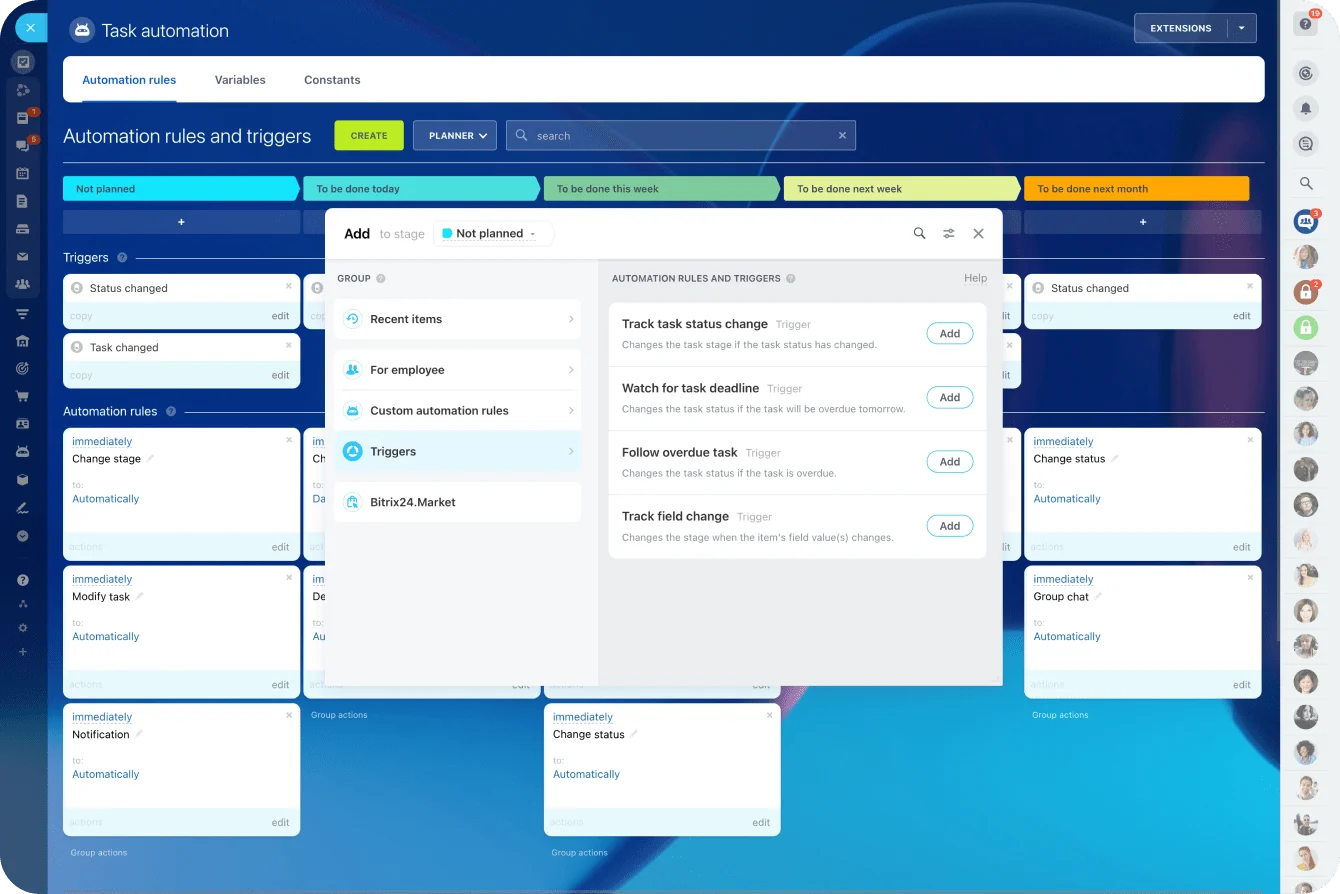
A recurring check runs well on a schedule. Bitrix24 task automation can recreate the same review activity each week, and rules and triggers can handle routine task actions.
Track a small number of useful metrics
Track five things, no more:
- Slot fill rate, whether planned slots get publishable content
- On-time progression by stage, where items stall
- Revision frequency, which content types or stakeholders trigger repeat rounds
- Publish consistency, whether the cadence holds
- Causes of slips, the operational reason behind each delay
Set targets you'll hold the routine to. For example: slot fill around 95%, on-time stage progression around 85%. The math is plain. Slot fill rate is publishable pieces delivered divided by planned slots, so 4 of 4 is 100% and 3 of 4 is 75%. On-time stage progression is the handoffs that hit their agreed date divided by total handoffs. A target under 100% is deliberate: it leaves room for the normal variation the buffer exists to absorb.
Use the numbers to find the bottleneck
The metrics point at specific fixes. If drafting is reliably on time but SME review slips, more writing capacity won't help. If one content type keeps going through several revision rounds, look at its brief, its reviewer instructions, and its approval path. If slot fill drops while the backlog stays full, the problem sits between idea selection and final approval, and the production workflow is the thing to fix.
Bitrix24's standard task reports show scheduled, completed, in-progress, and overdue activity. Record editorial stages and slip reasons consistently, and recurring bottlenecks stop hiding.
Keep your content calendar moving
Plan slots, assign owners, manage approvals, and track workloads in Bitrix24 so your team keeps publishing when priorities shift.
Get Started NowThe calendar is a capacity system
Every failure mode here comes back to one habit: treating a slot's date as the commitment, when the commitment is the capacity behind it. Leave the owner vague and work stalls in the gaps. Skip the review buffer and approvals blow the date. Skip the rework rule and one troubled draft pulls the next three down with it.
Teams that lose this thread end up running the most expensive version of the job: a full backlog, a calendar nobody believes, and a Thursday scramble every week.
The tooling for this is unglamorous. A board shows what's moving, waiting, or blocked. Checklists carry review, revision, and QA inside a single task, so nothing slips through a silent handoff. A recurring task fires the weekly control routine on schedule.
In Bitrix24, Kanban boards are on every plan, including Free, and paid plans charge one flat rate per organization, so adding the SME and the legal reviewer doesn't change the price, up to the plan's user limit.
Takeaway: A content calendar only works as a capacity plan: protected slots, a named owner at every handoff, review time booked as real work, and rules for when a draft needs another round. Get those right and a late draft costs you one swap.