Before You Buy a Growth Platform, Map the Work It Has to Remove


TL;DR (Quick Summary)
- Growth platforms get compared by feature count, which is the wrong test.
- Map three to five workflows that repeatedly cost your team time, then make each vendor prove the platform removes those exact steps under real conditions.
- A platform earns its budget by absorbing the work your team repeats every week, not by adding another system to maintain.
Takeaway: A platform earns its budget only when it removes real, recurring work — judge every feature by the task it replaces, not the capability it adds.
The demo looked perfect: routing, attribution, dashboards, an AI scoring layer, all of it clicking through in one tidy session.
Months after signing, your RevOps specialist still works an unassigned-leads queue every morning, an analyst still renames "Webinar," "webinar," and "Webinar Event" before the monthly report, and someone still chases approvals to push a campaign live.
The platform did everything it promised. Problem is, it removed almost none of the work.
That's the real cost of buying by feature list. A campaign moves through planning docs, CRM fields, routing rules, and sales follow-up before it ever becomes revenue, and every point where those pieces don't connect turns into someone's standing task: transfer this data, chase that decision, repair the record before the report runs.
So before you shortlist a vendor, answer a sharper question: what recurring work do you need this system to absorb?
This article gives you that map, plus the questions that separate a platform from a promise.
Before you compare platforms, define the work you need removed
Most teams treat growth software as a category contest. They compare feature breadth, analyst rankings, or whoever shipped the newest AI layer, then assume the longest capability list wins.
Nobody stops to define which recurring tasks the business actually needs the system to take over.
That omission is where the money leaks. When the handoffs between planning, CRM, routing, and reporting don't connect, a person bridges the gap by hand. Every missing connection turns into a weekly chore for someone.
Document operational friction first
Before you look at a single vendor, find the work that eats time or creates risk on repeat. Ask:
- Who has to follow up before a campaign can launch?
- Which records need correcting before reporting?
- Where does information get copied from one system to another?
- Which exceptions pull in marketing operations?
- What breaks when the person who "knows the process" is out?
- Which tasks repeat every day, week, campaign, or reporting cycle?
A well-known platform can still be the wrong fit if it leaves campaign managers chasing approvals, RevOps repairing source data, and sales managers settling ownership disputes after every launch.
Judge value by work removed
The best option removes the most expensive friction in your specific environment: repeated coordination, preventable data errors, and shaky cross-functional handoffs. Test how much of that coordination disappears after implementation, not how many new functions light up in the interface.
Pro tip: Ask people to show you the last campaign, lead, or report that needed manual repair. A real example surfaces the hidden steps nobody mentions when you ask general questions about their frustrations.
Once you know which work creates the burden, map how that work moves through the business.
Growth Platform Fit Scorecard: Jobs-to-Remove Mapping Template
Enter your email address to get a comprehensive, step-by-step guide

What it means to map workflow pain before buying a growth platform
Workflow mapping documents recurring work across campaign planning, lead management, source tracking, automation, reporting, and handoff quality. A useful map fits on one page. It shows where work happens, who touches it, which systems are involved, what breaks, and what the team does when the normal path fails.
Build a lightweight workflow map
For each major workflow, capture:
- What triggers the process
- Who owns moving it forward
- Which systems store or change the information
- Who receives the work next
- Which approvals or rules decide what happens
- What pushes the process off its normal path
- Who fixes those exceptions, and how
- How the team knows the process is finished
Book 60 to 90 minutes per workflow. Put the people doing the work in the room alongside department leads or system administrators. A campaign manager, CRM administrator, SDR, and analyst will describe different versions of the same process, and those differences are the point: they show where ownership and expectations are unclear.
Look for repeated effort and recurring failure
Watch for patterns like these:
- Campaign assets scattered across email threads, chats, project tools, and shared drives
- Approvals that hinge on someone remembering to follow up
- Lead source values that need cleanup before every report
- Forms that apply different field formats to similar records
- Leads that route instantly from one source but sit unassigned from another
- Dashboards that need spreadsheet reconciliation before leadership sees them
- Automation rules that hold up until a field is blank, duplicated, or entered differently
A sales team tracking leads by hand invents workarounds: color-coded spreadsheets, a quick message to the sales manager. Those keep things moving, and they make performance depend on one person's memory and availability.
Define "work removed" in observable terms
Work is removed when the team can point to a step that no longer needs a human under normal conditions. For example:
- A campaign template creates the standard tasks, owners, and deadlines on its own.
- An approval request reaches the right stakeholder without a coordinator chasing it.
- Form data lands in the CRM already in the required format.
- A qualified lead gets an owner and a follow-up task without manual triage.
- A report runs on governed fields instead of a separate cleanup spreadsheet.
- An exception creates a visible task instead of failing silently.
Feature-led buying asks whether a platform includes routing, attribution, automation, dashboards, or AI scoring. Workflow-removal buying asks whether those functions replace real effort under the conditions your team actually works in.
Relief starts when a line item on the feature list replaces a task on someone's plate.

Why workflow-first platform selection matters for marketing teams
Buying around real pain cuts costs that never show up as their own budget line. Rework, launch delays, attribution disputes, lead leakage, and reporting cleanup all burn paid hours, even buried inside existing headcount.
A workflow-first review also separates platform limits from management problems. When launches stall because nobody owns final approval, that ownership gap has to close before any software can support the process.
It creates a shared definition of value
One broken workflow looks different from every seat:
- Marketing sees delayed launches and endless approval chasing.
- Sales sees leads that arrive incomplete, late, or badly routed.
- RevOps sees inconsistent fields and fragile automation.
- Leadership sees dashboards that each team reads differently.
A workflow-first evaluation ties these symptoms back to the process that produces them, and it gives every department a concrete reason to back a platform or block it.
It exposes missing context
A handoff can succeed technically and still fail in practice. The record reaches the right CRM, but the sales rep lacks the campaign, product, intent, or prior-interaction context needed to respond well.
Salesforce's 2026 State of Marketing research, based on nearly 4,500 marketers, found that 69% struggled to respond promptly because they couldn't reach the context they needed.
Moving a record between systems won't fix that. The information has to arrive complete, current, and usable.
It creates a realistic capacity case
The right platform lets a team support more campaigns, segments, and handoffs without piling on the same administrative work. Saved time rarely converts straight into lower headcount. In most teams it shifts into strategy, analysis, testing, or customer follow-up, so the business case should say where the recovered capacity goes instead of pretending every saved hour is a direct cost cut.
Smaller teams gain the most here. When one marketer plans campaigns, updates the CRM, builds reports, and answers sales questions, a handful of recurring manual tasks swallows a big share of the week.

How a workflow-first evaluation actually works
A useful evaluation compares current-state work against a defined desired state. It tests whether a platform clears bottlenecks in planning, routing, tracking, automation, reporting, and handoff. Run it as a sequence:
Current task → failure mode → business impact → platform mechanism → residual manual work
Buyers skip that last step. A platform can hold a mechanism for the problem and still demand heavy monitoring, custom cleanup, or daily exception handling.
Step 1: Baseline the current task
Write down who does the task, how often, and which systems are involved. For example:
- A campaign manager checks asset readiness twice a week.
- A RevOps specialist reviews unassigned leads each morning.
- An analyst cleans campaign names before the monthly report.
- A sales manager settles territory conflicts when ownership rules overlap.
A rough estimate from a few recent examples is enough to compare the current workflow with the proposed one.
Step 2: Identify the failure mode
Describe what goes wrong in operational terms. "Lead routing is inefficient" is useless. This is specific:
“Leads from partner forms arrive without the region field the territory rule needs, so they sit unassigned until operations reviews them.”
That gives a vendor something real to solve.
Step 3: Test the platform mechanism
Make the vendor demonstrate your scenario, not a generic routing or dashboard tour. For regional lead assignment, test:
- Missing location data
- Conflicting territory rules
- Existing contacts with a different owner
- Duplicate submissions
- Partner or reseller leads
- Leads tied to named accounts
- After-hours submissions
- Failed enrichment or integration calls
Step 4: Count the residual work
Work out what still needs a human after configuration. If an operations specialist has to clear an exception queue every morning, estimate the volume and the time. If the workflow needs quarterly rule maintenance, name who owns it. If reporting depends on people entering fields correctly, document how you'll check compliance.
The platform can still be the right call, and the leftover work belongs in the evaluation and the rollout plan.
|
Evaluation area |
Feature-led buying |
Workflow-led buying |
|---|---|---|
|
Implementation effort |
Focuses on setup claims |
Checks configuration load, migration work, testing, and ongoing administration |
|
Reporting trust |
Looks at dashboard availability |
Tests source quality, field governance, lifecycle consistency, and reconciliation needs |
|
Campaign speed |
Assumes more functions increase speed |
Examines approvals, dependencies, ownership, and launch coordination |
|
Sales alignment |
Reviews whether a CRM integration exists |
Validates routing accuracy, response expectations, context, and exception handling |
|
Automation value |
Counts available workflow functions |
Measures how many repeated steps disappear and how often humans must intervene |
This changes vendor conversations. You test real operating scenarios and watch whether the platform absorbs the hard parts or just makes them configurable.
Pro tip: Send every vendor the same three workflow scenarios before their demo. Require the standard path, one common exception, and the administrator's maintenance view. That beats separate feature tours by a wide margin.
The core workflows a growth platform should reduce or absorb
A growth platform can sit alongside specialist systems, as long as it cuts the effort needed to keep core workflows working, visible, and consistent.
Campaign planning and launch coordination
Campaign planning runs more manual than most teams admit. The brief lives in a doc, assets sit in a shared drive, approvals happen in chat, and launch dates hide in a separate calendar or spreadsheet. That setup breeds familiar problems:
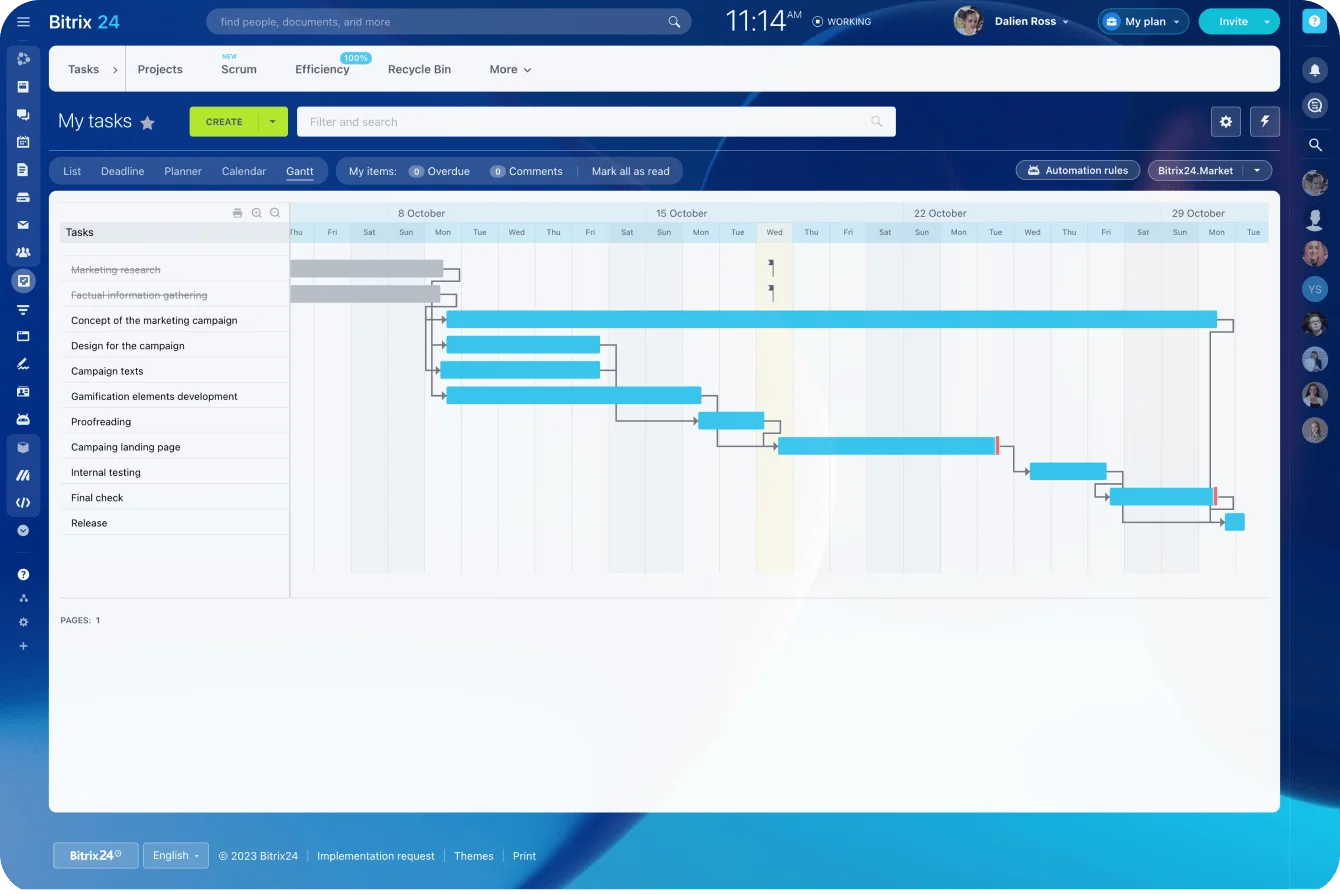
- Stakeholders approve an outdated version of an asset.
- The landing page is ready, but nobody checked tracking.
- A launch date moves and the dependent tasks don't.
- Nobody knows whether legal or brand sign-off is done.
- Status meetings exist to collect information that should already be visible.
Bitrix24 task management turns a campaign process into a reusable project template with owners, deadlines, checklists, files, and task dependencies. The work it removes is status collection. Instead of pinging five contributors to ask whether their piece is done, the campaign owner reads one operating record and focuses on late tasks, missing approvals, and changed dependencies.
Setup still takes discipline. Templates bloat when teams cram in every possible task regardless of campaign type. Start with the work that shows up in most launches, then add conditional tasks for specific channels, regions, or review requirements.
Lead routing, source tracking, and automation
Lead operations are where small process gaps get expensive. This layer has to:
- Normalize field values
- Apply ownership rules
- Trigger follow-up actions
- Deduplicate contacts
- Preserve source information
- Flag records that can't follow the standard route
A demand gen team runs one routing process for website forms, another for event lists, a third for partner leads. When the logic isn't consistent, operations becomes the human translation layer between sources and sales.
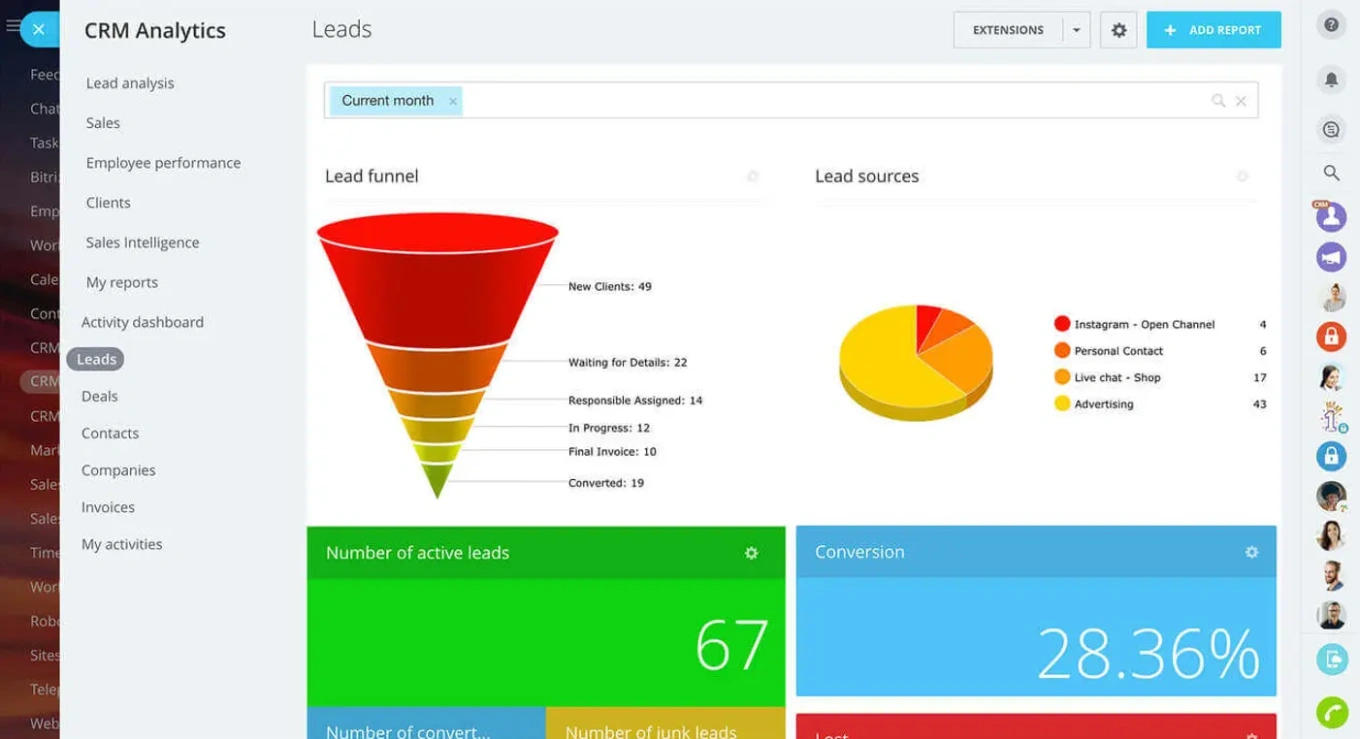
Bitrix24 CRM automation supports lead and deal records, custom fields, ownership, pipelines, and follow-up activity. Automation rules create recurring or event-based work, like assigning a follow-up task when a record hits a defined stage.
A platform having automation doesn't mean it works. Test whether a valid record can travel from capture to ownership to follow-up without anyone checking an inbox, updating a spreadsheet, or nudging a salesperson.
Checking the integration itself
When data arrives from other tools, check the integration before assuming the connection removes manual work:
- Field mapping
- Sync direction
- Update frequency
- Duplicate behavior
- Error reporting
- What happens when a request fails
An integration that needs weekly exports, manual corrections, or repeated duplicate cleanup connects two systems without removing much work.
Reporting and handoff quality
Reliable reporting starts long before the dashboard. Campaign names, source values, lifecycle stages, ownership fields, and close reasons have to go in consistently the whole way through. A workable reporting setup defines:
- Which fields are required
- Where each value comes from
- Who owns the definition
- Which values are allowed
- How missing or invalid entries get flagged
- How often the team reviews data quality
- Which report is the accepted source for each decision
Bitrix24 analytics and reporting tools report on CRM records and fields, which cuts the need to shuttle the same operational data into a separate reporting process. The output still depends on how those fields get defined and maintained. The platform calculates from the data it receives; the organization has to settle conflicting definitions like "qualified lead."
Sales handoff improves when reps get complete, correctly owned, timely records carrying the context they need to act. The workflow also has to make failures visible. A lead that can't be assigned should land in an exception queue or spawn a task, not vanish into the database.
Common mistakes when choosing a growth platform
Counting features instead of removed steps
A platform can technically support routing, attribution, or automation and still demand heavy setup and monitoring. Teams buy the capability and keep most of the labor. During evaluation, ask how many current steps actually disappear. If an "automated" process still needs someone to export data, review it, correct records, and reimport the file, almost no work is gone.
Ignoring data and process dependencies
Weak naming conventions, inconsistent lifecycle stages, unclear ownership, and poor CRM hygiene block value even when the software works exactly as designed. Automation is especially unforgiving of vague rules. It can't assign a lead when sales territories overlap and nobody has agreed which rule wins. Before implementation, assign owners for:
- Field definitions
- Campaign naming
- Lifecycle stages
- Routing logic
- Duplicate management
- Integration errors
- Automation changes
- Reporting definitions
Testing only the happy path
Demos show one clean lead, one source, one owner, one successful route. Real operations serve up duplicate records, blank fields, partner submissions, multi-touch sources, territory conflicts, reassigned accounts, and failed integrations.
Ask the vendor to show how the system detects, records, and recovers from failure. A silent automation error is worse than a manual process, because the team assumes the work happened when it didn't.
Pro tip: Drop one deliberately incomplete record into your proof of concept. Watch what the platform does, what the user sees, and how an administrator finds the failure.
Buying for a process the team can't support yet
Teams sometimes pick a platform built for the process they wish they had, not the one they can run today. A complex scoring model won't help while the underlying activity and firmographic fields sit incomplete. A detailed attribution model won't settle reporting disputes while campaign naming and lifecycle definitions stay inconsistent.
Choose a platform that fits the process you want, and pair it with a credible transition plan covering ownership, training, data cleanup, and staged rollout.
Treating implementation as a one-time project
Rules, campaigns, products, territories, and teams all change, so the platform needs ongoing maintenance. Decide who will:
- Review failed automations
- Approve new fields
- Update routing rules
- Test integrations after changes
- Retire outdated workflows
- Train new users
- Audit reports and definitions
Without an operating owner, even a well-configured platform slowly fills with duplicated fields, abandoned workflows, and rules nobody will touch.
Real-world business use cases: What "removing work" looks like in practice
Use case 1: Campaign operations
Current friction
A team running frequent multichannel campaigns bleeds time to approval delays, asset confusion, and status chasing. A coordinator spends part of every Monday collecting updates from copywriters, designers, channel owners, and reviewers, then circles back later in the week to confirm final files, tracking links, and approvals are in place.
Work removed
Put the brief, asset links, owners, approvals, and launch dependencies in one project, and the coordinator reviews exceptions instead of collecting every status by hand. Gone: update chasing, manual deadline reconciliation, and repeated checks across scattered documents and threads.
Remaining risks
The workflow still breaks when:
- Tasks carry no deadlines.
- Reviewers don't record approvals.
- Several asset versions all look final.
- The project template holds outdated steps.
- Launch changes never reach the dependent tasks.
Use case 2: Inbound lead management
Current friction
A demand gen team leans on spreadsheets, inbox rules, or a sales manager to route incoming leads by territory, segment, or product line. That creates delays and ties assignment quality to whoever happens to be free to review the records.
Work removed
A workflow that captures the required data, checks ownership rules, creates or updates the CRM record, assigns the lead, and generates a follow-up task turns manual triage into automatic execution.
The exception path matters just as much. Leads with missing regions, unclear company names, conflicting account owners, or duplicate contact details need a visible destination. Otherwise automation clears the easy records while the hard ones quietly pile up.
Measures to track
- Percentage of records routed without intervention
- Number of unassigned records
- Time from submission to ownership
- Number of duplicate records created
- Volume of leads entering the exception queue
Tracking average assignment speed alone can hide a small, valuable group of leads that get no owner at all.
Use case 3: Attribution and reporting
Current friction
A marketing operations team burns days before a leadership review reconciling campaign names, UTM values, CRM stages, and revenue figures. Most of that cleanup traces back to small inconsistencies:
- "Webinar," "webinar," and "Webinar Event" register as separate campaign types.
- A source field gets overwritten during import.
- Sales advances an opportunity stage but leaves the close reason blank.
- A contact ties to multiple campaigns with no agreed attribution rule.
- Regional teams run different lifecycle definitions.
Work removed
Standardized metadata, required fields, validation rules, and shared reporting definitions shrink the end-of-month cleanup. The platform earns its place when the report runs on governed operational data.
Move the same reconciliation steps into a shiny new reporting interface and the work stays exactly where it was.

Operational impact, scalability, and the limits of platform consolidation
What a good workflow fit changes
When a platform fits the workflow, teams support more campaigns, regions, segments, and stakeholders, because routine coordination and data movement run on their own. Capacity climbs as the work per launch, lead, or report drops, and the team spends less time gathering updates and fixing predictable errors.
No platform fixes unclear ownership, weak process design, poor CRM governance, or conflicting lifecycle definitions on its own. Point automation at an unstable process and it repeats the confusion faster and at larger scale.
When consolidation helps
Fewer systems can reduce:
- Duplicate data entry
- Integration maintenance
- Permission management
- Vendor administration
- Context switching
- Conflicting records
- Training requirements
Consolidation works best when the chosen platform fits your high-volume workflows and handles common exceptions without heavy customization.
When specialized tools remain useful
A specialized stack wins when a workflow has unusual requirements, leans on deep channel-specific functions, or changes too fast for a broad platform's standard model. The tradeoff is coordination. Every extra tool adds another connection, permission model, data structure, and failure point.
|
Decision lens |
Consolidate into one platform |
Keep a more specialized stack |
|
Complexity |
Lower tool count and fewer handoffs |
More integration and vendor management |
|
Workflow fit |
Broad coverage that may be uneven in specialized areas |
Stronger fit for specific use cases |
|
Implementation load |
Can rise when too many workflows are included at once |
Can rise through migration and system coordination |
|
Governance |
More centralized ownership and definitions |
Ownership may be distributed across teams |
|
Adaptability |
Easier when workflows follow shared patterns |
May handle unusual exceptions more effectively |
|
Failure risk |
One platform problem may affect several workflows |
Failures may be isolated but harder to diagnose across systems |
The practical question: does consolidation remove more operating work than it creates? A smaller tool count means little if teams need new spreadsheets and manual checks to paper over a weak workflow fit.
FAQ: Evaluating growth platforms around workflow pain
What if our biggest problem is reporting trust, not campaign execution?
Reporting problems start upstream. Inconsistent source tracking, varying lifecycle stages, missing required fields, or records that lose information between systems all show up in the dashboard as distorted numbers.
Trace one metric back to its source and document every field, rule, and handoff used to calculate it. That tells you whether the culprit is the reporting tool, the data feeding it, or conflicting business definitions.
Can a smaller team benefit from this approach, or is it only for mature RevOps organizations?
Smaller teams benefit more, precisely because fewer people are around to absorb manual coordination. Keep the mapping simple: pick the three workflows that eat the most time each week, then document their normal steps, frequent failures, and repair work. No enterprise process office required.
Assigning leads by hand every morning or cleaning the same report each month is already enough evidence to start.
How do we compare platforms when our workflows are messy or still changing?
Even a shifting workflow holds recurring patterns. Separate the temporary mess from the steps, exceptions, and handoffs that keep demanding attention. Test adaptability, exception handling, permission controls, field governance, and residual manual work. Ask how an administrator changes a rule, how those changes get tested, and whether old configurations can be audited.
When workflows are evolving, the better platform lets the team adjust rules without rebuilding the whole process or spawning a pile of undocumented workarounds.
How many workflows should we evaluate?
Start with three to five high-volume or high-risk workflows. Documenting every marketing and sales process just delays the decision without improving it. Strong candidates:
- Campaign launch and approval
- Inbound lead capture and assignment
- Sales handoff
- Campaign source tracking
- Monthly reporting
- Customer or account data updates
Choose by business impact and frequency, not by which workflow is easiest to demo.
How do we know whether the platform has actually removed work?
Set a baseline before implementation, then review the workflow again after launch. Track practical measures:
- Number of manual handoffs
- Frequency of spreadsheet exports
- Volume of unassigned or failed records
- Time spent preparing recurring reports
- Number of status meetings needed for a campaign
- Percentage of cases needing administrator intervention
- Time from a process trigger to the next required action
Targets differ by workflow. The real test is whether repeated human effort, preventable errors, and coordination delays have dropped in a way you can measure.
Remove the busywork from growth operations
Bitrix24 connects CRM, tasks, automation, and reports so teams cut manual handoffs, clean up data, and move leads faster.
Get Started NowEvery feature is a promise until it removes a task
Every capability on a vendor's slide is a promise until it replaces a task someone repeats. Judge the platform by that swap and the comparison gets simple: which handoffs disappear, which failures become visible, and what your team stops having to check, copy, chase, or repair.
Skip the exercise and you pay twice, once for the software and again for the people still doing the work it was supposed to absorb.
Bitrix24 puts CRM, task and project management, automation, and reporting in one place, which makes it worth testing when your goal is cutting the coordination between marketing, lead management, sales follow-up, and reporting.
Bring your three messiest workflows, sign up for Bitrix24 for free, and see how much of that work it actually removes.