When a Learning Curve Becomes a Business Cost


A difficult software rollout rarely announces itself as a failure. The system goes live, employees attend training, and usage numbers begin to climb. Meanwhile, managers keep answering the same questions, new hires take weeks to become independent, and teams quietly rebuild familiar processes in spreadsheets.
That’s when a learning curve stops being a temporary inconvenience and starts becoming an operating cost.
This article shows you how to identify that point before it damages the return on your software investment. You’ll learn which costs and KPIs to track, how to separate necessary complexity from poor usability, and when the real problem is the platform, the implementation, or the workflow itself.
What a learning curve means in business terms
In business terms, a learning curve is the time, effort, and organizational support required for users to reach competent, productive use of software.
It isn’t only about whether people can log in or find the right menu. It’s about how long it takes before they can complete meaningful work correctly and consistently.
That distinction matters because enterprise software isn’t judged like a consumer app. Consumer usability often means casual ease. Enterprise usability means employees can perform high-value tasks with low error rates, even when the system includes permissions, workflow rules, reporting, integrations, and complex data.
Productive usability matters more than surface simplicity
The issue is productive usability: how efficiently real users can do the work that drives revenue, compliance, customer outcomes, or operational control.
|
Concept |
What it means |
What it measures |
|---|---|---|
|
Learning curve |
The total effort required to become competent in the system |
User difficulty and support burden over time |
|
Onboarding time |
The period needed to introduce a new user to the software |
Initial training duration and setup speed |
|
Adoption rate |
The percentage of intended users actively using the platform |
Behavioral uptake across the organization |
|
Proficiency ramp |
The speed at which users move from basic use to effective independent performance |
Operational readiness and skill progression |
|
Time-to-value |
The time between deployment and realized business benefit |
Commercial payoff from the investment |
These terms overlap, but they aren’t interchangeable.
A platform can have fast onboarding but a long proficiency ramp. It can also be technically deployed without producing reliable business value.
A sales team may log calls and update deal stages while still keeping private spreadsheets, skipping required fields, and relying on managers to build every report. The CRM is being used, but the team hasn’t reached independent, consistent use.
Why steep learning curves matter to ROI and operational efficiency
Steep learning curves affect ROI because software only creates value when people use it effectively inside live workflows. If users are slow, uncertain, or dependent on help, the organization absorbs both direct and indirect costs.
Direct costs are easier to see
These usually include:
- Extra training sessions
- More internal support
- Longer implementation assistance
- Admin time spent correcting setup issues
- Manager time spent answering repeat questions
These costs are visible because someone owns them. HR tracks training. IT tracks tickets. Managers feel the interruption.

Indirect costs often do more damage
The hidden costs are harder to measure, but they’re often larger.
Employees complete tasks more slowly. Errors increase. Data quality falls. Processes that were supposed to become standardized remain inconsistent.
A support agent who needs help updating a customer case loses time on one ticket. A sales rep who avoids CRM updates weakens the forecast. A project manager who builds a private tracker creates another version of the truth.
Those small moments compound across teams.
The KPIs that reveal the cost
Usability should be tied to business metrics, not treated as a soft preference. The most useful KPIs usually include:
- Time-to-productivity: how long it takes a user to perform their job at expected output levels
- Cost per onboarded user: training, support, setup, and supervision cost per employee
- Support ticket volume: how often users need help to complete routine tasks
- Feature adoption: whether high-value capabilities are actually used
- Payback period: how long it takes before the software investment starts generating net business value
Ten extra minutes per task can look harmless. Across 80 sales reps or 200 operations employees, it becomes a material labor cost that slows data entry, weakens reporting, delays decisions, and extends the software’s payback period.
McKinsey reports that 70% of organizational transformations fail, with weak engagement and capability building among the contributing factors. The research isn’t specific to software projects, but the lesson applies: going live doesn’t mean employees can use the system effectively.
Pro Tip: Track “first independent completion,” not just training attendance. For example, measure when a new sales rep can create a contact, log an activity, update a deal, and generate their own pipeline view without help. That tells you more than whether they attended a webinar.
Learning Curve Cost Calculator: ROI, Ramp-Time, Error Rate
Enter your email address to get a comprehensive, step-by-step guide

How learning curves turn into business costs
The mechanism is straightforward. When software is hard to learn, users spend less time completing core tasks and more time decoding the system around those tasks.
They search for the right feature. They guess at workflow logic. They undo mistakes. They switch to manual workarounds when the platform feels too slow or confusing.
The everyday friction points
These moments create cost because they consume labor without increasing output:
- A salesperson spends 15 minutes finding the right report instead of contacting prospects.
- A finance analyst rechecks entries because field labels are unclear.
- A support agent asks a supervisor how to update a case because the workflow changes depending on hidden rules.
- A project manager exports data to a spreadsheet because the dashboard doesn’t match how the team actually works.
None of these moments looks dramatic on its own. Together, they reduce the return the business expected from the platform.
The failure often travels further than the person who first encounters it. A sales rep can’t find the correct field, so they record the detail in a note. The customer-success manager never sees it, asks the client for the same information again, and then messages sales for clarification.
One unclear action has now created duplicated work, a poor customer interaction, and another internal interruption.
A simple cost model
The hidden burden becomes easier to see when it is separated into five categories:
- Lost user hours from slower task completion
- Support hours from trainers, admins, and managers
- Error correction time from rework and data cleanup
- Deployment drag from slower rollout across teams
- Delayed value capture because target workflows aren’t fully adopted
If a 100-person team loses even 30 minutes per week to software friction, that’s 50 hours weekly. Add support overhead, delayed reporting consistency, and underused features, and the platform’s real operating cost can be far higher than its license price suggests.
That’s the shift from learning issue to cost center: the software is reducing the economic return of the process it was meant to improve.
The core drivers behind software learning curves
Not all learning curves come from the same source. Some are rooted in the product itself. Others come from how the software is implemented, configured, and introduced to users.
Product-level drivers
At the product level, several factors tend to shape difficulty:
- Interface complexity: screens are crowded, menus are unclear, or common actions take too many clicks
- Workflow inconsistency: users have to relearn patterns across modules
- Terminology mismatch: the software uses labels that don’t match business language
- Configuration depth: too many options appear before users need them
- Dependence on tribal knowledge: routine use depends on tips from experienced colleagues
A CRM may have excellent reporting, but if reps don’t understand the difference between a lead, contact, company, deal, and activity in that specific setup, data quality will suffer.
A project management tool may support advanced dependencies, but if every project manager names tasks differently, the reporting layer won’t mean much.
Implementation-level drivers
Organizational conditions matter too. A capable product can still feel difficult if change readiness is low, documentation is weak, role-based training is missing, or no internal champions are available to reinforce good usage habits.
In those cases, users are learning more than software. They’re also trying to decode new processes, new expectations, and new internal rules at the same time.
This is where a knowledge base helps. Instead of relying on one admin or manager to answer repeat questions, teams can document common workflows such as “how to qualify a lead,” “how to close a task,” or “how to request approval”, making the next action obvious when someone gets stuck.
Pro Tip: Write help content around real jobs, not software menus. “How to update a delayed client project” is more useful than “How to use task status fields.” Users think in work outcomes, not feature names.

Common misconceptions about software complexity and user adoption
One common assumption is that users will naturally adapt over time. Sometimes they do. Often, they settle into partial usage instead.
They learn enough to survive, then build habits around shortcuts, avoidance, and informal workarounds. The platform becomes present in the workflow without becoming fully effective.
More time automatically fixes adoption
Time helps when users are practicing the right workflow. It doesn’t help much when they’re building bad habits.
If a sales rep spends months updating only the minimum fields needed to avoid manager follow-up, the issue is weak process design, unclear expectations, or a tool that doesn’t make the right behavior easy enough.
More features justify more friction
More features only justify a steeper learning curve when those features are widely used and commercially important.
In many organizations, most users rely on a narrow set of recurring workflows. If the system is difficult for those core tasks, unused advanced features don’t offset the cost.
Training can fix everything
Training is useful when users need context, repetition, or role-specific guidance. It’s much less effective when the underlying design creates persistent friction.
If the system forces frequent task switching, hides important functions, or uses ambiguous logic, more training mostly teaches users how to cope with poor usability.
Example-in-action: One operations team responded to every recurring mistake with another training session. Attendance stayed high, but the same approval errors returned because users had to open three screens and remember an undocumented exception to complete a routine request. The company spent months retraining people before admitting that the workflow itself was the problem.
That distinction matters in software selection. A company shouldn’t confuse trainability with usability. Trainability reduces initial confusion. Usability reduces recurring friction.
Nielsen Norman Group recommends testing with five users in a small qualitative usability study, then correcting the problems and testing again. That isn’t a substitute for quantitative research or a full enterprise pilot. It is, however, a practical way to expose workflow confusion before a broad rollout.
Pro Tip: Before buying or expanding software, ask five real users to complete three common tasks while someone observes silently. Don’t explain the system. Watch where they pause, guess, or leave the workflow. Those moments are future support costs.
Real-world business use cases where learning curves affect outcomes
Learning curves affect different departments in different ways. The cost usually appears in the daily workflow first, then shows up later in performance metrics.
CRM and sales teams
In CRM environments, steep learning curves often show up as incomplete records, inconsistent pipeline updates, and weak forecasting. Leadership sees low confidence in reporting. Sales managers see reps avoiding the system. Reps see admin drag that pulls time away from customer conversations.
A sales team tracking deals manually will often keep two versions of the truth: the official CRM and a private spreadsheet.
Example-in-action: On one rollout, reps updated the official pipeline just before forecast meetings while tracking the deals they actually trusted in personal spreadsheets. Management didn’t discover the gap until two apparently healthy opportunities had already gone cold. The CRM had been live for months, but the forecast still depended on whatever each rep remembered to disclose.
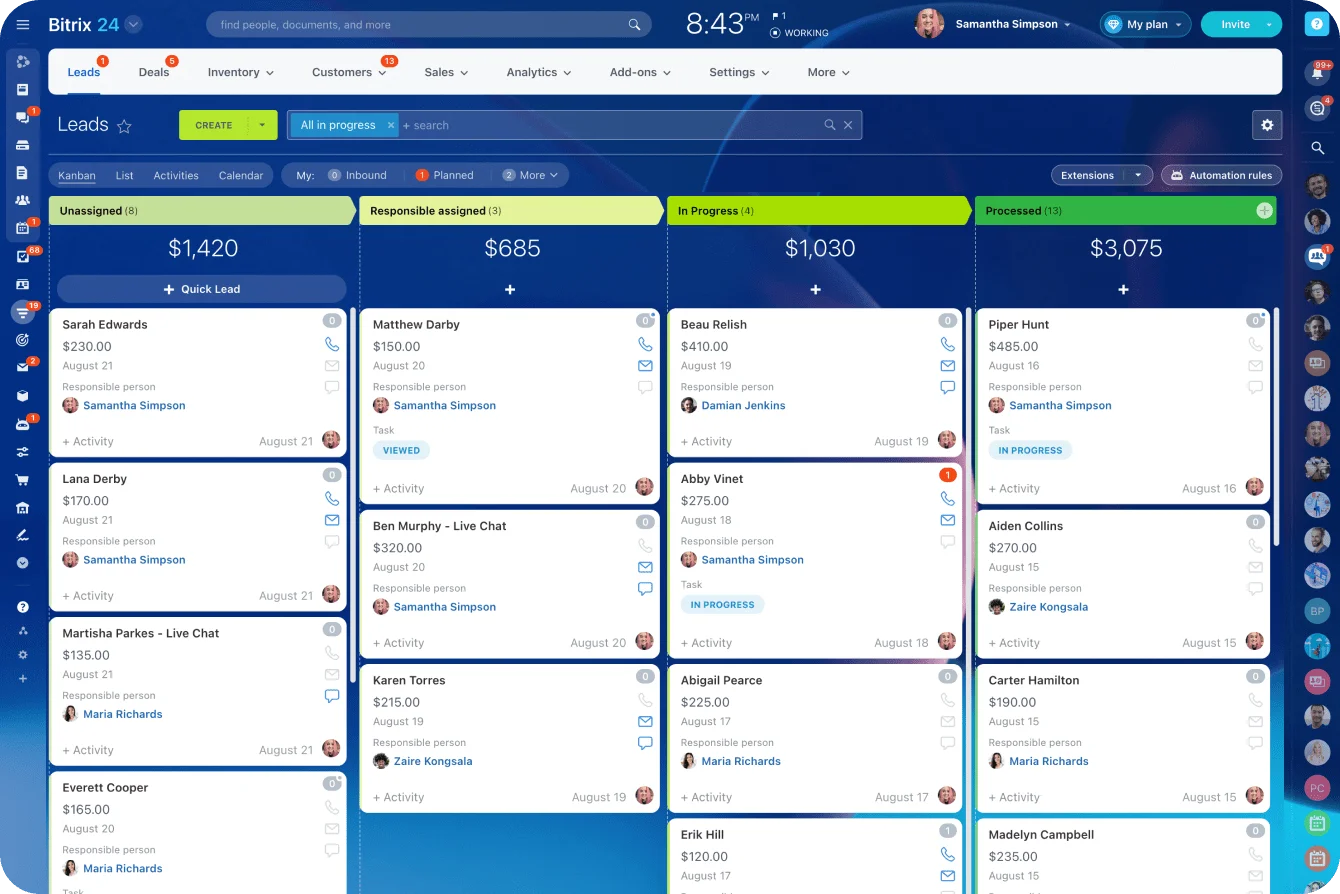
This is where clear pipeline stages, required fields, activity tracking, and analytics and reports can reduce confusion. The goal is to make the correct workflow easier than the workaround.
ERP and finance operations
In ERP deployments, the cost is usually broader. Finance, procurement, inventory, and operations all depend on shared process logic. If users struggle with transaction flows or data-entry rules, the result isn’t slower work alone. It can disrupt approvals, reconciliation, and reporting cycles across departments.
A finance team might know the policy for purchase approvals but still lose time if the system doesn’t make the approval path clear. Employees submit requests incorrectly. Managers send them back. Finance cleans up the record later.
That isn’t a one-time training problem if it happens every month.
Analytics platforms
Analytics platforms create a different pattern. High-flexibility tools can be powerful, but value stalls if business users can’t reliably build, interpret, or trust outputs without specialist help.
In that case, the platform may serve analysts well while leaving broader teams dependent and slow. The cost shows up as report queues, repeated data requests, and meetings where teams argue about definitions instead of making decisions.
Project management tools
Project management tools reveal a visible trade-off. Some platforms offer deep customization, automation, and portfolio control but require substantial setup discipline. Others sacrifice some configurability in exchange for faster team-wide adoption.
The right choice depends on whether the business needs control depth or broad behavioral consistency more urgently.
In Bitrix24, teams can use task management features including task lists, Kanban boards, Gantt charts, calendars, and workgroups inside the same workspace. That can help different teams use the view that suits their work while retaining shared task records.
The risk to avoid is over-configuring too early. If every team creates its own fields, statuses, and naming rules, reporting becomes harder later.
Customer support systems
Customer support systems show the cost in daily operations. If agents can’t quickly route tickets, apply standard responses, or retrieve account context, handle times rise and service quality becomes uneven.
Executives experience this as delayed ROI. Managers experience it as ramp delays and queue pressure. Frontline teams experience it as constant friction inside repetitive work.
Across all these categories, the decision comes down to how much flexibility the business needs, how quickly each user group must become productive, and what level of recurring support the organization can absorb.
Scaling implications, operational trade-offs, and practical limits
A learning curve that seems manageable in a pilot can become expensive at scale. As more users join, training costs grow, local workarounds spread, and governance becomes harder to enforce.
Small inconsistencies in how teams use fields, workflows, or reporting logic can eventually weaken the visibility the system was meant to provide.
What changes at scale
Scaling adds pressure in several ways:
- More users need training
- More managers need to enforce process rules
- More departments create local exceptions
- More data depends on consistent usage
- More reports depend on shared definitions
- More workarounds become harder to detect
This becomes especially important in multi-team environments. If one region uses the platform one way and another region uses it differently, reporting quality deteriorates. Process control weakens. Cross-functional coordination becomes slower because the same tool no longer supports a shared operating model.
When complexity is justified
Steeper learning curves aren’t always unacceptable. In some cases, they’re justified.
Highly specialized workflows, regulated processes, or strategically important capabilities may require software depth that naturally takes longer to master. The right test is whether the business benefit clearly outweighs the operating burden.
A practical evaluation framework should balance four factors:
|
Evaluation factor |
What to assess |
Business implication |
|---|---|---|
|
Functional fit |
Does the product support the workflows that matter most? |
Prevents underpowered software selection |
|
Implementation burden |
How much configuration, customization, and change management is required? |
Shapes rollout cost and delivery risk |
|
Proficiency ramp |
How long until each user group can work independently and accurately? |
Affects labor efficiency and adoption speed |
|
Long-term operating cost |
How much ongoing support, retraining, and governance will the system require? |
Determines whether ROI holds after launch |
That framework shifts selection away from feature comparison alone. The real decision is what the organization can realistically absorb and operate well over time.
Where Bitrix24 fits in the evaluation
Bitrix24 is most useful when a meaningful part of the learning burden comes from scattered work. A team may struggle because customer data lives in one tool, tasks in another, files in a third, calendar events elsewhere, and approvals in private messages.
Reduce the number of systems employees must learn
Bringing CRM records, tasks, calendars, communication, documents, and workflow tools into one workspace can reduce the number of interfaces employees must learn and the amount of context they must reconstruct. A user can move from a customer record to an assigned task or related conversation without manually piecing the workflow together across separate systems.
That doesn’t make configuration discipline optional. Teams still need clear roles, naming conventions, permissions, stage definitions, and workflow ownership. A connected platform can reduce tool switching, but it can’t repair a process that nobody has properly defined.
Automate only after the workflow is clear
Once the workflow is stable, task automation can remove repeat administration through recurring tasks, templates, rules, and triggers. CRM automation can also create follow-up tasks or employee alerts when a record reaches a defined stage.
For example, a sales team could create a follow-up task when a deal moves into a proposal stage. A project team could use a recurring task template for a monthly client review. The automation is useful because the action and owner are already agreed, not because automation itself makes an unclear process better.
Automation should come after the workflow is understood. Automating a messy process usually makes the mess harder to see.
Companies should also evaluate cost honestly. License price is only one part of software cost, but it still matters. Reviewing pricing plans alongside training, admin time, implementation work, and expected adoption speed gives a more realistic view of total cost.
FAQs: Measuring and managing learning curve costs
How can a company estimate the cost of a software learning curve before full rollout, and which early indicators are most reliable?
The best early indicators are task completion time, first-week error rates, support dependency, and the gap between trained use and independent use.
In pilot groups, companies should watch how long it takes users to complete a small set of core workflows without assistance. That gives a more realistic signal than training attendance or positive demo feedback.
Early support demand and inconsistent workflow completion are usually more predictive of future operating cost than stated user satisfaction.
A simple pilot scorecard can include:
-
Time to complete each core task
-
Number of errors or corrections
-
Number of times the user asks for help
-
Number of steps completed outside the system
-
Confidence rating after the task, not before it
What if a platform is powerful but only difficult for one department or user segment? Does that still make it a poor software investment?
Not necessarily. The question is whether the affected user segment is central to value realization.
If the difficult group is small, specialized, and well supported, the investment may still be sound. But if that segment controls data quality, adoption momentum, customer execution, or compliance-critical workflows, local difficulty can create company-wide drag.
A software investment can succeed overall while still being a poor fit for a specific team. That mismatch needs to be priced in honestly through extra training, admin support, workflow redesign, or a lighter process for that team.
How should teams evaluate steep learning curves in regulated, technical, or highly customized environments where simplicity is not always realistic?
In those environments, simplicity is often the wrong benchmark. A better benchmark is whether the software makes complex work learnable, reliable, and governable for the people who must use it.
Teams should ask whether complexity is essential to the job or created by avoidable design and implementation choices.
If the learning curve supports necessary control, traceability, or precision, it may be justified. If it mainly reflects poor workflow design, excessive customization, unclear terminology, or weak training, it’s still a preventable cost.
When should a company fix the workflow instead of replacing the software?
A company should fix the workflow first when users are confused by internal process rules rather than the software itself.
For example, if no one agrees on when a lead becomes qualified, replacing the CRM won’t solve the problem. If every project manager uses different task statuses, switching project management tools may simply move the confusion elsewhere.
Replacement makes more sense when the product creates recurring friction even after the process is clear. Warning signs include routine tasks taking too many steps, important actions hidden behind confusing menus, weak permissions control, poor reporting structure, or heavy dependence on manual workarounds.
Reduce Software Friction Across Your Team
Bitrix24 unites CRM, tasks, chats, files, and automation so teams learn fewer tools, work faster, and keep processes consistent.
Get Started NowMeasure the repeated cost, not the first-week discomfort
A difficult first week doesn’t make software a bad investment. The real warning is what remains months later: repeated questions, skipped fields, shadow spreadsheets, manual corrections, and managers still stepping in to keep routine work moving.
That’s the point where a learning curve has become an operating cost.
When that cost comes from work being split across CRM records, tasks, conversations, files, and calendars, Bitrix24 can bring the workflow into one shared workspace and reduce the amount employees have to piece together for themselves.
Sign up for Bitrix24 for free and remove one recurring source of software friction before it becomes part of how your team works.