Operational CRM Explained: How to Turn Closed-Won Deals Into Tasks, Docs, and Approvals Automatically


Your sales team just closed a deal. The pipeline looks healthy, the forecast improves, and the momentum feels real. Then the handoff begins - in a spreadsheet, through scattered emails, and across folders that may or may not be where they belong. The sale is complete, but delivery is still being held together by memory, routine, and manual follow-up. That is the "closed-won chaos" problem.
An operational CRM addresses it by linking the commercial side of the business to the work that follows the sale - assigning tasks, generating documents, routing approvals, and notifying the right stakeholders. At its core, an operational CRM is the execution layer of the CRM: it does not just track customer relationships, it ensures they progress.
This model is built for companies where the gap between "deal won" and "delivery started" translates directly into lost time, missed steps, and operational friction. It fits B2B service firms, SaaS companies with onboarding workflows, agencies managing client kickoffs, and any organization where a closed deal triggers coordinated actions across multiple teams.
What Does Operational CRM Actually Mean?
Most CRM conversations focus on tracking leads, managing contacts, and forecasting revenue. That is the analytical side - understanding what happened and predicting what might happen next. An operational CRM flips the focus. It is less about reporting and more about doing.
The operational CRM definition in plain terms: it is the part of your CRM system that triggers real work when deal stages change. A deal moves to "closed-won," and your CRM automatically creates a project, assigns onboarding tasks, generates a statement of work, and kicks off an approval workflow for finance. No one had to remember. No one had to ask.
This distinction matters because many teams treat their CRM as a database with a pipeline view. They track deals effectively but hand off delivery through email or spreadsheets. The operational CRM bridges that gap.
Operational CRM vs Analytical CRM vs Collaborative CRM
These three CRM types are often discussed together, but they solve different problems.
- An analytical CRM focuses on data - customer segmentation, sales forecasting, and campaign performance. It answers "what is happening?" and "what might happen?"
- A collaborative CRM focuses on communication - shared inboxes, interaction history across departments, unified contact records. It answers "who said what to whom?"
- An operational CRM focuses on execution - automating the processes that follow customer interactions. It answers "what should happen next, and who is responsible?" CRM automation after a sale is where it shines.
|
CRM Type |
Primary Focus |
Key Question It Answers |
Best For |
|---|---|---|---|
|
Analytical |
Data and insights |
What happened? What might happen? |
Forecasting, segmentation, reporting |
|
Collaborative |
Cross-department communication |
Who interacted with this customer? |
Support teams, multi-channel businesses |
|
Operational |
Process execution and automation |
What needs to happen next? |
Post-sale delivery, onboarding, and approvals |
Most mature CRM platforms include elements of all three. For companies struggling with the handoff between sales and operations, the operational side deserves the most attention.
Why “Closed-Won” Is Where Chaos Starts
Sales teams have clear processes. There is a pipeline, stages are defined, and everyone knows what "qualified" or "proposal sent" means.
Once a deal closes, that clarity often vanishes. Delivery teams might not know a deal has closed until someone tells them. The scope agreed during sales might live in an email thread that no one else can find. Finance needs to send an invoice, but does not know the payment terms.
This closed-won deal workflow problem is not about bad people. It is about bad systems. When the transition from sales to operations depends on manual actions - forwarding emails, creating tasks by hand, remembering who needs to know what - things slip. The post-sale CRM process becomes a bottleneck instead of an accelerator.
Late onboarding frustrates new clients, missed approvals delay revenue recognition, and unclear ownership leads to duplicated effort. Teams that experience this repeatedly build workarounds - personal checklists, reminder emails, "just making sure someone is on this" Slack messages. Those workarounds are a signal that your CRM stops being useful at the moment it should matter most.
Is your CRM ready? Check the guide
Enter your email to download a guide that will help you get started with any CRM system.
5 Things That Should Happen Automatically After a Deal Closes
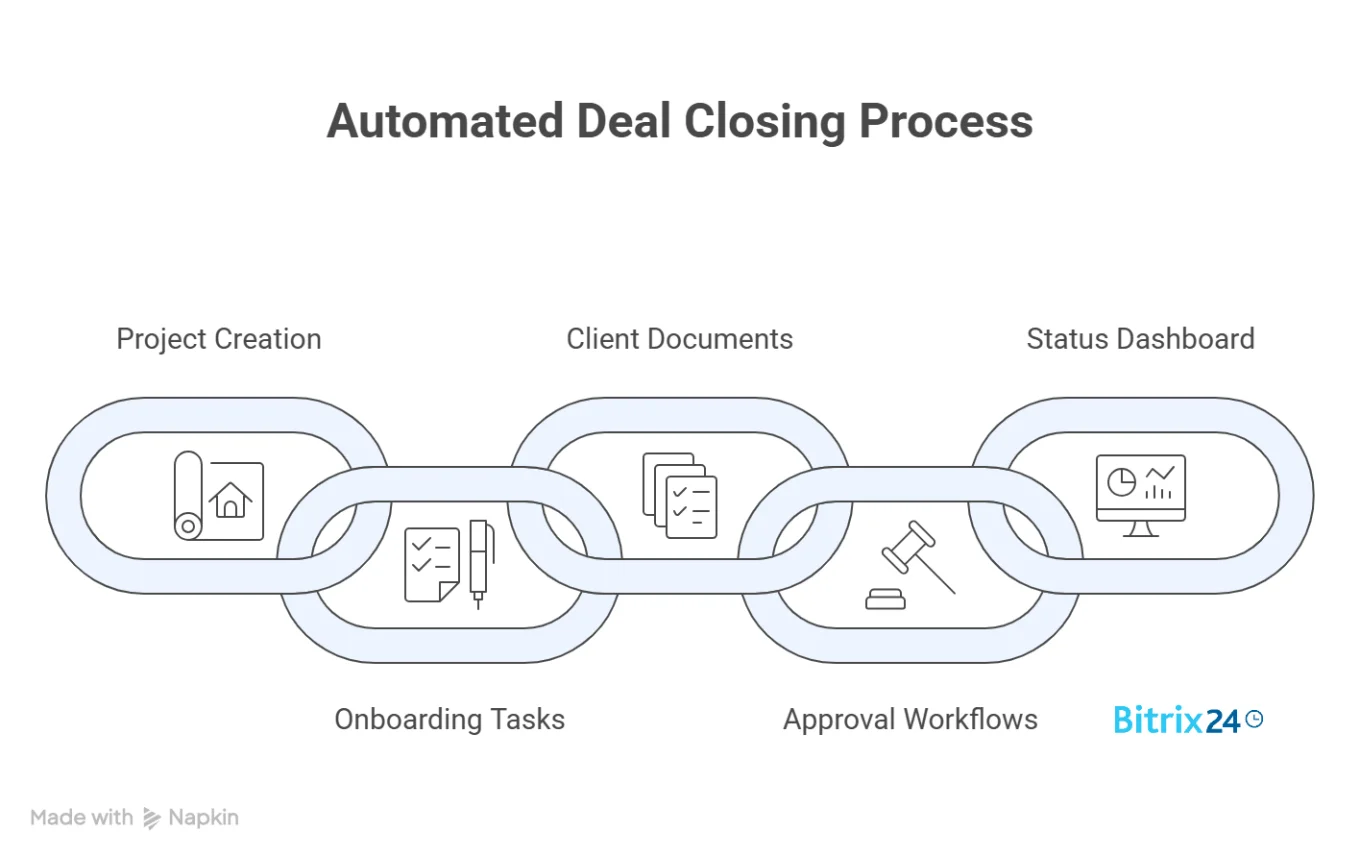
Moving from sales to operations automation does not require a complete system overhaul. It starts with identifying the repeatable actions that follow every closed deal and wiring them into your CRM workflow automation. Here are five that most B2B companies need.
1. A Project Is Automatically Created From a Pre-Loaded Template
The first thing that should happen after a deal closes is that a project appears - with the right structure, the right name, and the right team assigned. This is not a blank project; it is a templated one, pre-loaded with phases, milestones, and default task groups based on the deal type.
This is the core of deal-to-delivery automation. The CRM stage change triggers project creation, pulling deal data (client name, scope, value, timeline) directly into the project. No copy-pasting from the deal record.
2. Onboarding Tasks Are Assigned With Deadlines
Once the project exists, onboarding tasks should populate automatically - each one assigned to the right person with a deadline calculated from the deal close date. CRM task automation handles this: welcome email sent by the account manager (day 1), kickoff call scheduled by the project lead (day 3), access credentials provisioned by IT (day 2), and so on.
Speed is not the only benefit here. It is accountability. Every task has an owner and a due date from the moment the deal closes. There is no ambiguity about who does what.
3. Client Documents Are Generated and Sent
Statements of work, welcome packets, and service agreements - these follow a predictable pattern. The client name, project scope, pricing, and terms are already in the CRM. An operational CRM pulls that data into document templates and either sends them automatically or queues them for a quick review before sending.
This eliminates the "I'll draft the SOW this afternoon" delay that turns into two days.
4. Approval Workflows Are Triggered for Finance and Legal
Some actions after a closed deal need human sign-off - budget allocation, contract countersigning, and resource assignment for large accounts. An operational CRM should route these approvals automatically, with all the context attached.
Finance sees the deal value, payment terms, and billing schedule. Legal sees the contract version and any non-standard clauses flagged during sales. Neither team needs to go hunting for information.
5. A Status Dashboard Updates for All Stakeholders
Sales wants to know that delivery has started. The account manager wants to see the onboarding progress. The CEO wants a pipeline-to-delivery view. When CRM and project management are connected, a single dashboard can show where every closed deal stands in delivery - without anyone compiling a status report.
Deals do not disappear into a black box after closing. Every stakeholder sees the current state, and the data updates itself as tasks are completed and milestones are reached.
How to Start Without Over-Automating
There is a real temptation to automate everything at once - map out every process, connect every trigger, and build every workflow. That approach usually fails because no one has tested whether the underlying process was solid first.
A better path is the one-process-at-a-time approach.
Step 1: Pick one high-friction handoff. Look for the transition that causes the most complaints, delays, or errors. For many companies, it is the gap between deal close and project kickoff.
Step 2: Document exactly what happens now. Write down every manual step - who does what, in what order, using which tools. You will almost certainly find steps that are redundant or owned by no one.
Step 3: Automate the repetitive parts first. Task creation, document generation, notification routing - these are low-risk, high-impact automations. Leave judgment-heavy steps (like custom scope reviews or exception handling) to humans for now.
Step 4: Test with real deals for two to four weeks. Run the automation alongside your manual process. Compare outcomes and fix what breaks.
Step 5: Expand gradually. Once one workflow is stable, move to the next handoff point - maybe the approval chain for finance, maybe document generation for legal. Each one becomes easier because you have a working pattern to follow.
This approach reflects the reality that many operational CRM implementations fail because they attempt to automate processes that are not yet well defined.

Operational CRM Comparison: No-Code Rules vs API-Level Automation
Not every company needs the same depth of automation. The right setup depends on team size, technical resources, and the complexity of your processes.
|
Factor |
No-Code Rules and Triggers |
API and Custom Integrations |
|---|---|---|
|
Setup complexity |
Low - visual builders, drag-and-drop |
High - requires development resources |
|
Best for |
Standard workflows, small to mid-size teams |
Complex multi-system processes, enterprise |
|
Flexibility |
Moderate - works within platform capabilities |
High - can connect any system with an API |
|
Maintenance |
Low - business users can modify rules |
Higher - needs developer involvement for changes |
|
Time to launch |
Days to weeks |
Weeks to months |
|
Typical use cases |
Task creation, notifications, field updates, simple approvals |
ERP sync, custom document generation, multi-platform orchestration |
Most companies should start with no-code automation. Rules like "when deal stage changes to closed-won, create project from template X" are available in most modern CRM platforms without writing a single line of code. For advanced scenarios - syncing CRM data with an ERP or triggering custom invoice generation in a billing system - API-level integrations fill the gap.
Here is the key point: automation that works across departments does not require building everything from scratch. Start with built-in tools. Graduate to API connections only when those hit a real limit.

Operational CRM Limitations: Where Automation Breaks Down
An operational CRM is not a magic fix, and pretending otherwise does not help anyone make good decisions.
Automation fails when the underlying process is inconsistent. If your sales team closes deals with varying scopes, inconsistent naming conventions, and no standard handoff checklist, automating that mess just produces automated mess faster. Clean up the process before you automate it.
Highly customized deliverables resist templating. Consulting firms, creative agencies, and custom software shops often run projects where every engagement is different. Operational CRM automation works best for the repeatable parts (kickoff tasks, document generation, notifications), but cannot replace human judgment on scope definition for unique projects.
Small teams sometimes over-automate. A five-person company where everyone sits in the same room does not need a seven-step approval workflow triggered by a CRM stage change. The overhead of building and maintaining automations has to justify itself in terms of time saved.
Cross-department automation requires cross-department buy-in. Sales, operations, finance, and legal all need to agree on what the automated process looks like. If finance insists on email sign-offs instead of using the CRM's approval feature, the automation chain breaks at that link.
Data quality is a prerequisite. Automations that pull deal data into projects, documents, and tasks will faithfully reproduce whatever is in the CRM record - including typos, missing fields, and incorrect values. Garbage in, garbage out applies with extra force when the garbage arrives automatically.
Turn Your CRM Into Your Operating System With Bitrix24
Bitrix24 connects CRM pipeline management directly to project and task automation, so a closed deal can trigger project creation, task assignment, document generation, and approval workflows without switching platforms. It also enables cross-department workflows, connecting sales, operations, finance, and legal in a single system with shared data and process visibility. The built-in workflow automation handles the sales-to-operations handoff with no-code rules that business users can configure, including document templates, approval chains, and automated notifications tied to deal data, while the REST API covers advanced scenarios for deeper integration. Dashboards and real-time tracking ensure that every stakeholder can see how post-sale execution progresses without manual reporting.
Stop losing time between "deal won" and "delivery started." Sign up for Bitrix24 and see how an operational CRM turns closed deals into completed work.
Boost Efficiency with Bitrix24
Experience seamless transition from sales to service with Bitrix24's operational CRM. Automate tasks, eliminate bottlenecks and deliver real value, without any code.
Get Started NowFAQs
What is an operational CRM?
An operational CRM is the component of a customer relationship management system that automates execution-level processes - task creation, document generation, approval routing, and notifications - triggered by changes in deal stages or customer interactions. It focuses on making things happen rather than tracking what has already happened.
Is CRM automation after a sale no-code, or does it require developers?
CRM automation after a sale is typically no-code for standard workflows. Most modern platforms offer visual rule builders where you set triggers (such as a deal moving to "closed-won") and define actions (create a project, assign tasks, send notifications) without writing code. For advanced scenarios involving external systems, REST API integrations fill the gap, but many teams never need them.
Can CRM workflow automation work across departments - from sales to delivery to finance?
CRM workflow automation can work across departments. You can connect CRM stage changes to project creation for operations, approval requests for finance, document workflows for legal, and notifications for account management. The key is that each department agrees to use the same system or connected systems rather than relying on separate manual processes.
How do we start automating without over-automating?
Starting automation without over-automating requires a focused approach: pick one high-friction process (usually the deal-close-to-project-kickoff handoff), document every manual step, automate only the repetitive parts first, test with real deals for a few weeks, and then expand gradually.
What is the difference between an operational CRM and an analytical CRM?
The difference between an operational CRM and an analytical CRM comes down to purpose. An analytical CRM focuses on data - reports, forecasts, customer segmentation, and performance measurement. An operational CRM focuses on action - automating the processes that follow customer interactions, such as creating projects after a sale or routing approvals to finance. Most CRM platforms include both capabilities, but they serve different needs.
How does a closed-won deal workflow typically break down?
A closed-won deal workflow breaks down most often at the handoff between sales and operations. Common failure points include no one being notified that the deal has closed, scope details trapped in email threads, project setup delayed by manual action, and approval requests sent without context. Operational CRM automation addresses each of these by triggering structured actions the moment a deal stage changes.
What should happen automatically when a deal closes in a CRM?
After a deal closes, the next steps depend on your business, but common actions include creating a project from a template, assigning onboarding tasks with deadlines, generating client documents, routing approvals to finance or legal, sending stakeholder notifications, and updating the dashboard.
Does deal-to-delivery automation work for companies with highly custom projects?
Deal-to-delivery automation works for the repeatable portions of custom projects - kickoff tasks, document templates, notifications, and approval routing. It cannot fully template engagements where every scope is different. Agencies and consulting firms benefit most by automating the predictable infrastructure around each project while leaving scope and resource decisions to human judgment.
What data quality issues should we fix before automating CRM workflows?
Data quality issues to fix before automating CRM workflows include: incomplete deal records (missing client contact info, scope, or payment terms), inconsistent naming conventions, outdated or duplicate contacts, and fields that reps skip because they are not required. Automation amplifies whatever is in your CRM - clean records produce clean output, sloppy records produce automated errors.