How to Build an HR Request Management System That Replaces Email Threads for Good


Every HR team has a version of this story. Someone sends an email asking for a laptop. The email gets forwarded to IT, CC'd to the hiring manager, and then sits unanswered for three days because nobody is sure who actually approves equipment purchases. By day four, the new hire is working off a personal device, and the original request is buried under 47 unrelated messages. An HR request management system exists to stop exactly this kind of breakdown - replacing scattered emails and Slack messages with a single queue where every request has a clear owner, a defined process, and a visible status.
This article outlines what an HR request management system replaces, how to build one that covers approvals, onboarding, and internal services, and where this approach runs into its limits.
What an HR Request Management System Actually Replaces
An HR request management system is a centralized platform where employees submit, track, and receive responses to workplace requests - from time-off approvals to equipment orders to onboarding tasks. It reduces dependence on informal channels (email, chat, verbal asks) with structured intake forms, automated routing, and status tracking.
Who uses it: HR teams, office managers, IT departments, and any function that handles recurring employee requests.
When it applies: Organizations with more than 20-30 employees, where informal request handling starts creating delays, duplicate work, or lost requests.
What outcome it delivers: Shorter response times, clear ownership for every request, and an audit trail that shows exactly where each item stands.
Think of it as the difference between a restaurant where customers shout orders across the room and one with a proper ticketing system in the kitchen. Both can technically get food to the table - but only one does it reliably when the place is full.

The real cost of email-based HR requests
The problem with email threads for HR requests isn't just inefficiency. It's invisibility. When a leave request lives in someone's inbox, nobody else on the team knows it exists. There's no dashboard showing how many open requests are pending, which ones are overdue, or where bottlenecks keep forming.
Here's what typically goes wrong:
- Requests get lost when people are out sick or on vacation
- Approval chains break because nobody knows who's next in line
- New hires wait days for access credentials, equipment, or basic orientation materials
- Employees ask the same questions repeatedly because there's no self-service option
- HR has no data on request volume, resolution time, or recurring issues
An HR ticketing system solves this by turning every request into a trackable item with an assigned owner, a deadline, and a status that anyone with the right permissions can check.
HR Request Detox Kit: Why Email Fails and What Works Instead
Enter your email address to get a comprehensive, step-by-step guide

Building an HR Request Queue That Actually Works
Setting up an HR request management system isn't about buying software and hoping people use it. It requires defining categories, routing logic, and visibility rules so the system does the heavy lifting instead of your HR team.
Standardized request forms by category
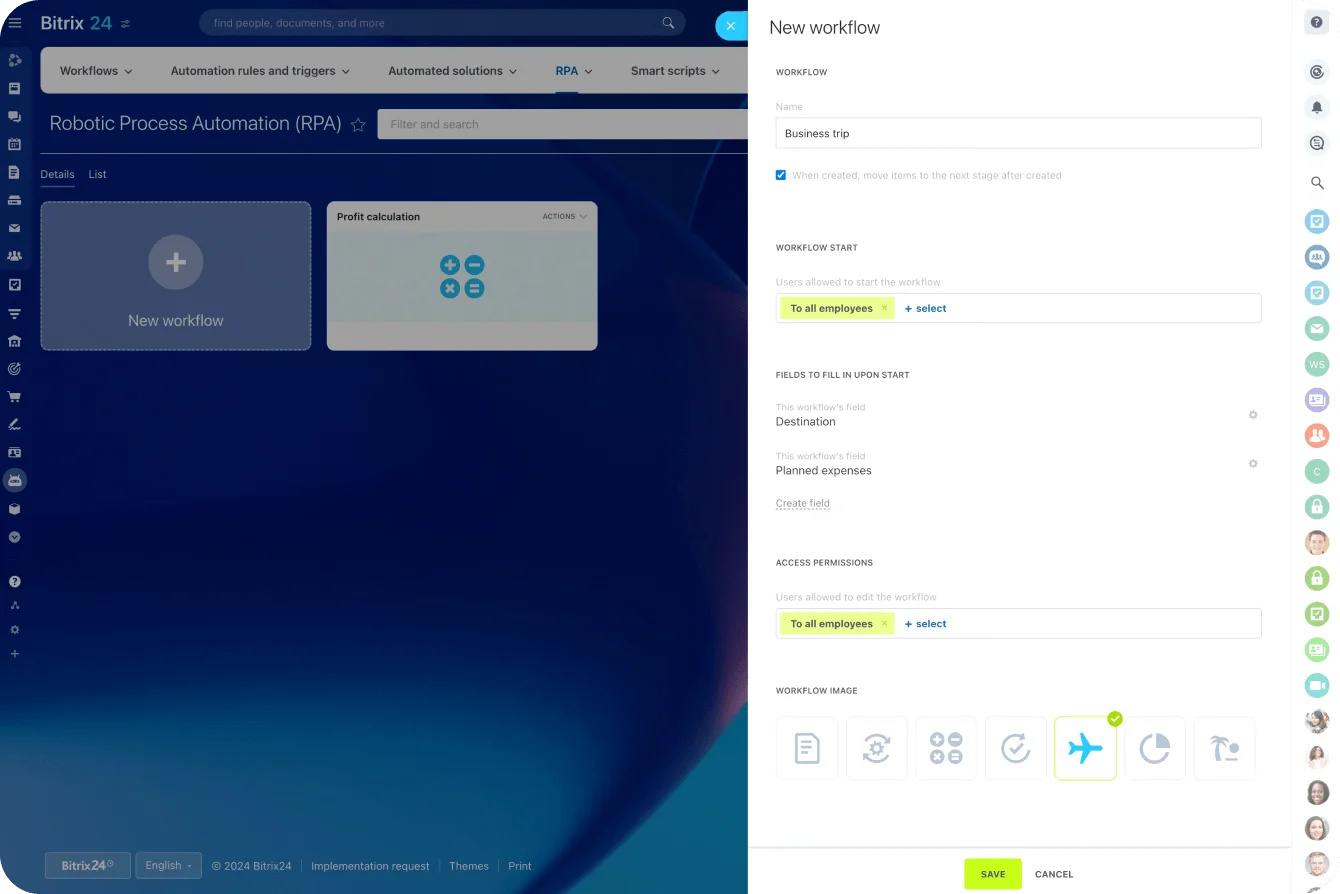
The first step is sorting requests into clear categories. Most HR operations deal with a handful of recurring types: time-off requests, equipment orders, onboarding tasks, policy questions, document requests, and internal service needs, such as room bookings or parking passes.
Each category needs its own intake form with the right fields. A leave request approval system needs dates, the type of leave, and the manager’s name. An equipment request needs the item description, urgency level, and cost center. A policy question might just need a text field and a topic dropdown.
The goal is to collect the right information upfront so the person handling the request doesn’t have to send multiple follow-up emails asking for details. Well-designed forms cut response time by eliminating the back-and-forth that slows everything down.
Approval routing with clear owners
Once a request comes in, the system needs to know where to send it. An HR approval workflow defines who reviews what, in which order, and what happens if the approver is unavailable.
For a time-off request, the routing might look like this: the employee submits the form, the direct manager receives a notification, the manager approves or rejects, and HR gets a copy for record-keeping. For an equipment purchase over a certain amount, you might add a finance approval step.
The key principle: every request must have exactly one owner at any given time. Shared ownership is no ownership. If a request is left in a group inbox with five people, the odds of all five assuming someone else will handle it are high.
Automated routing eliminates the guesswork. When an employee submits a request, the system checks the category, the employee's department, and the approval rules - then sends it directly to the right person with a deadline attached.
Onboarding checklists triggered automatically
New hire onboarding is where email threads cause the most damage. A typical onboarding process involves HR, IT, the hiring manager, facilities, and sometimes legal - all of whom need to complete tasks in a specific sequence. When those tasks live in emails, things fall through the cracks fast.
An employee onboarding system built on structured checklists fixes this by turning onboarding into a repeatable template. Each new hire triggers the same checklist - with tasks automatically assigned to the right people and deadlines calculated from the start date.
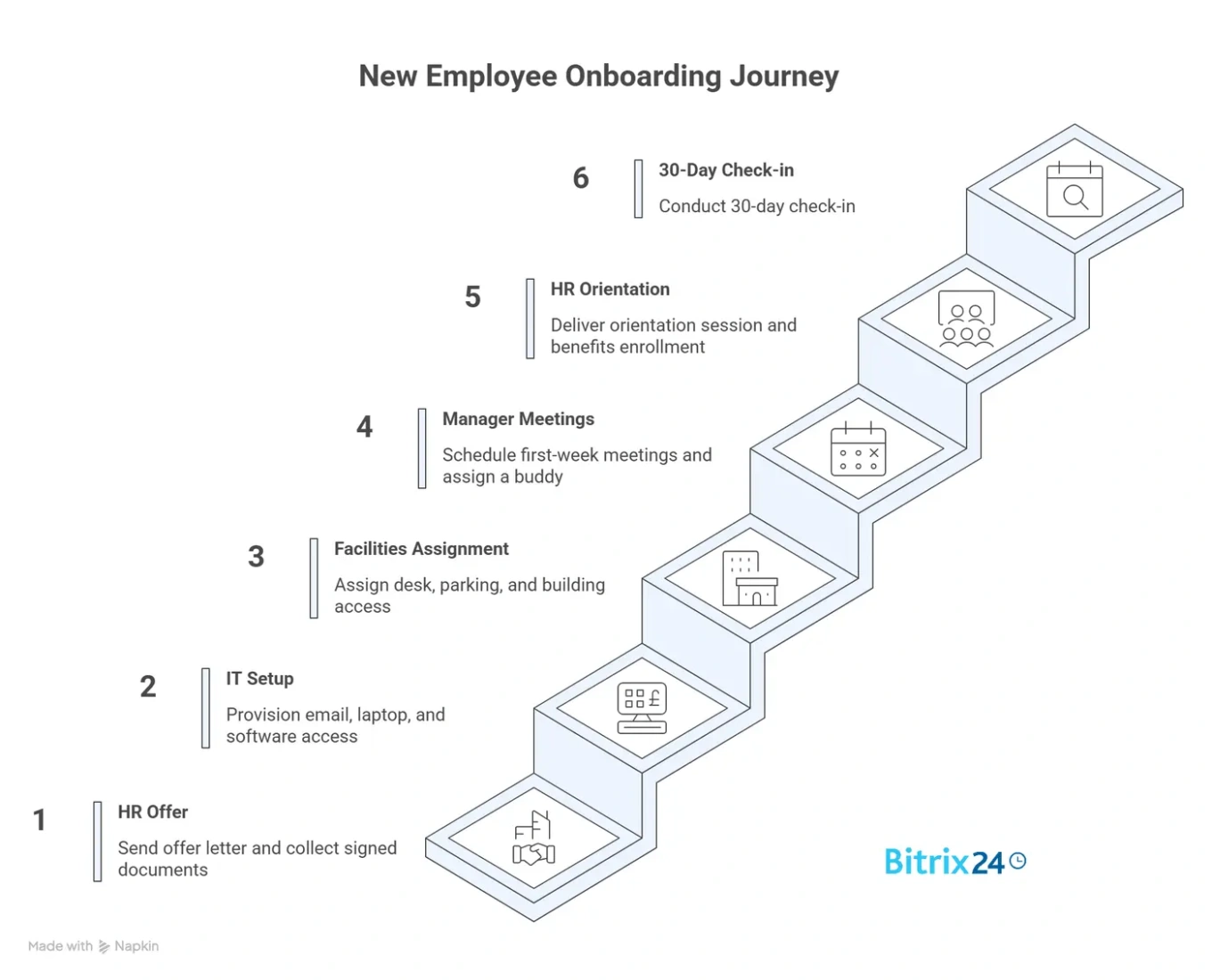
A well-built onboarding checklist might include:
- HR: Send the offer letter and collect signed documents
- IT: Provision email account, laptop, and software access
- Facilities: Assign desk, parking, and building access
- Manager: Schedule first-week meetings and assign a buddy
- HR: Deliver orientation session and benefits enrollment
- Manager: Conduct 30-day check-in
Onboarding checklist software makes this template reusable. Instead of recreating the process from scratch every time, you clone the template, assign it to the new hire, and the system handles task distribution and reminders. The result is a consistent experience that doesn't depend on whether someone remembered to CC the right people.
Status visibility for employees and managers
One of the biggest complaints about email-based HR processes is the black hole effect. You send a request and hear nothing. You follow up a week later. Someone says they'll look into it. Another week passes. At no point do you know whether your request was received, approved, stuck in a queue, or accidentally deleted.
An HR self-service portal changes this by giving employees a dashboard where they can see every request they've submitted, its current status, and who's handling it. Managers have a similar view for their direct reports. HR has an overview of all open requests across the organization.
This visibility does two things. First, it reduces the number of "just checking in" messages that clog up HR inboxes. Second, it creates accountability - when everyone can see that a request has been sitting untouched for five days, the pressure to act on it increases naturally.
Internal service catalog
Beyond standard HR requests, most organizations have a range of internal services that employees need to access: business cards, conference room bookings, travel approvals, training registrations, and relocation support. An internal HR service desk consolidates all of these into a single catalog.
The concept is straightforward. Employees browse a list of available services, select the one they need, complete the relevant form, and submit it. The request gets routed to the right team, tracked in the same system, and resolved with the same visibility as any other HR request.
This catalog approach works well for employee request management because it removes a common barrier: not knowing who to ask. When there's a centralized service catalog, employees don't need to figure out whether room bookings go to facilities, office management, or the admin team. They just submit the request, and the system routes it.
HR Request Management System: Email Threads vs. Structured Queue
|
Aspect |
Email threads |
HR request management system |
|
Request intake |
Unstructured - free-text emails to various recipients |
Standardized forms with required fields |
|
Ownership |
Unclear - often shared or assumed |
Assigned automatically based on category and rules |
|
Status tracking |
Manual - requires following up by email |
Real-time dashboard for employees, managers, and HR |
|
Approval routing |
Forwarded manually, often with missing context |
Automated with defined chains and escalation |
|
Onboarding |
Ad hoc emails between departments |
Repeatable checklists triggered by hire date |
|
Audit trail |
Scattered across inboxes |
Centralized log with timestamps and actions |
|
Reporting |
None without manual effort |
Built-in metrics on volume, resolution time, bottlenecks |
|
Employee experience |
Frustrating - low visibility, slow responses |
Self-service with clear timelines |
Making HR Process Automation Work in Practice
The technology side of an HR request management system is usually the easy part. The hard part is getting people to actually use it - and keep using it after the novelty wears off.
A few things that help with adoption:
- Start with one high-pain category. Don't roll out an entire HR automation tools suite at once. Pick the request type that causes the most complaints - usually time-off approvals or equipment requests - and build that first. Once people see the improvement, expanding to other categories gets easier.
- Make the old way harder than the new way. If employees can still email HR directly and get a response, they will. The HR team needs to redirect email requests to the system consistently. A simple auto-reply that says "Please submit your request through [link]" goes a long way.
- Build templates before you build workflows. Workflow automation is powerful, but automating a bad process just makes it fail faster. Map out the request categories, approval chains, and escalation rules on paper first. Then translate them into the system.
- Track the right metrics. Average resolution time, requests per category, overdue items, and first-response time are more useful than vanity metrics like "total requests submitted." These numbers tell you where the system is working and where it needs tuning.

HR Request Management System Limitations and When to Use Alternatives
No HR request management system handles every situation well. Knowing where the approach breaks down is just as useful as knowing where it works.
- Highly sensitive requests - Harassment reports, accommodation requests, and complaints about management shouldn't flow through a standard ticketing system. These need confidential channels with restricted access, separate from the general request queue.
- Tiny teams - For organizations with fewer than 15-20 employees, a formal request management system might add more overhead than it removes. When HR is one person who sits three desks away, a quick conversation is often faster than a form submission.
- Complex, multi-step processes - Some HR processes (immigration sponsorship, performance improvement plans, workplace investigations) involve too many variables and exceptions for a standardized queue. These are better handled through dedicated case management rather than a general request system.
- Union or regulatory environments - Organizations with collective bargaining agreements or industry-specific regulations may face constraints on how requests are submitted, tracked, and documented. The system needs to align with those requirements, which can limit automation options.
- Resistance from HR staff - Some HR professionals see request management systems as dehumanizing, reducing personal interactions to ticket numbers. This concern is valid for sensitive matters, but for routine requests, the system frees up time that HR can redirect to work that actually needs a human touch.
Streamline Your HR Request Management System With Bitrix24
The goal of a structured system isn't to replace conversations - it's to ensure those conversations aren't wasted on basic status updates.
If your HR team is still managing requests through email chains, shared spreadsheets, or Slack messages, you're spending time on logistics instead of people.
Bitrix24 brings HR automation, task management, and reliable workflows into a single platform - so every request has a clear owner, a defined process, and a visible status from submission to resolution. Using built-in forms and business process automation, requests are captured in a unified way and routed automatically based on predefined rules, departments, and approval chains.
Set up onboarding checklists that trigger automatically, route approvals to the right people without manual forwarding, and give employees a self-service view of their requests. Role-based access controls ensure that sensitive HR requests remain confidential, while notifications, reminders, and escalation rules keep every request moving without manual follow-up. Everything lives in one place, and nothing falls through the cracks.
Sign up for Bitrix24 and replace the chaos with a system that works.
Optimize Your HR Operations
Transform your HR processes with Bitrix24, combining automation, task management, and robust workflows for better efficiency and visibility of every HR request.
Get Started NowFAQs
Can Bitrix24 run internal requests and approvals?
Bitrix24 can handle internal requests and approvals across multiple categories. You can manage HR requests - from onboarding and equipment orders to time-off and approval workflows - using a combination of built-in workflows, automated task creation, and notification rules. Each request follows a defined path with clear ownership at every step.
Does Bitrix24 include an employee directory and org structure?
Bitrix24 includes an employee directory and organizational structure tools as standard features. You can maintain employee profiles with contact details, job titles, and department assignments. The org chart reflects your company's hierarchy and ties into access permissions, so request routing can follow reporting lines automatically.
Can onboarding be a repeatable checklist?
Onboarding can absolutely be set up as a repeatable checklist in Bitrix24. You build onboarding templates that combine tasks, checklists, and links to your knowledge base, then trigger them automatically when a new hire is added. Each task gets assigned to the right person with a deadline, so the whole process runs consistently without manual coordination.
What types of HR requests can be managed without email?
The types of HR requests that can be managed without email include time-off approvals, equipment and access provisioning, document requests, policy questions, training registrations, room bookings, and any internal service that follows a repeatable pattern. Any request that currently lives in someone's inbox can be moved to a structured queue with intake forms, routing rules, and status tracking.
How does an HR request management system differ from a help desk?
An HR request management system differs from a general help desk in scope and routing logic. Help desks typically handle IT support tickets from a single queue. HR request systems manage multiple request types across different teams - from leave approvals and onboarding to internal services - each with its own approval chains, SLAs, and confidentiality requirements.
What is the first step in setting up HR process automation?
The first step in setting up HR process automation is mapping your current request types and approval chains. List every category of request your HR team handles, who approves each one, what information is needed upfront, and what the expected turnaround time is. This inventory becomes the blueprint for your forms, routing rules, and automation triggers.
How long does it take to implement an HR request management system?
Implementation time for an HR request management system depends on scope and complexity. For a single request category (like leave approvals), most teams can go live within a few days to a week. A full rollout covering onboarding, approvals, and internal services typically takes two to six weeks, including template creation, user training, and testing.
Who should own the HR request management system internally?
Ownership of an HR request management system should sit with whoever is responsible for HR operations - typically an HR manager or operations lead. This person defines the request categories, maintains approval routing, monitors performance metrics, and handles escalations. IT supports the technical setup, but day-to-day ownership belongs to HR.
Can small businesses benefit from HR automation tools?
Small businesses can benefit from HR automation tools once they reach the point where informal processes start causing delays or lost requests - usually around 20-30 employees. At that size, the time saved on routing, tracking, and follow-ups outweighs the setup effort. Smaller teams with fewer than 15 people may find that a shared spreadsheet or simple task board is enough.