CRM for Healthcare: Patient, Referral, and Follow-Up Workflows in One Place

When hospital leads live in spreadsheets, inboxes, and sticky notes, good opportunities disappear quietly. Your rep leaves a cath lab demo energized, but the contact sits in an email thread. A service line director requests a trial, yet no one owns next steps. Referrals stack up at the front desk while coordinators chase missing insurance details. By the time anyone notices, a competitor has the PO — or the patient gave up.
Those misses are expensive. They lengthen device evaluation cycles, waste rep and coordinator time, and clog clinical schedules with no-shows. You lose visibility into territory coverage and forecasting. Data drifts across personal devices, raising privacy risks and audit headaches. Most importantly, patients wait longer for care while your team works harder than it should to achieve less.
Bitrix24 is healthcare CRM software that gives medical device teams and clinical practices a single, reliable system for leads, referrals, and follow-ups. Capture hospital contacts instantly, route them to the right owner, and automate the steps from demo to trial to PO. For clinics, centralize intake, eliminate referral leakage, and turn interest into scheduled visits with consistent SLAs. Whether cloud or self-hosted, you get granular permissions, audit trails, and a complete timeline of every email, call, note, and task.
With a dedicated healthcare CRM system, you replace chaos with consistency:
- Structured pipelines for hospital evaluations, practice scheduling, and service tickets
- Automated cadences that keep reps and coordinators on time without manual chasing
- Shared visibility so leadership sees coverage, forecast, and real conversion rates
- Governance controls to protect sensitive data and align to your internal policies
See the truth: coverage, forecast, and ROI
If you can’t see it, you can’t improve it.
Dashboards you will actually use:
- Territory coverage: Accounts touched this week, contact density by role, and whitespace by specialty or procedure volume. Spot hospitals with no recent rep interaction.
- Pipeline health: Average days in stage, conversion by stage (e.g., value analysis to capital committee), and win rates by product line. See which reps beat SLAs — and who needs support.
- Referral performance: Source‑to‑appointment conversion, time‑to‑first‑contact, no‑show rates, and coordinator turnaround. Identify intake bottlenecks and fix them.
- Activity and SLA adherence: Call/email volume, response times, and overdue tasks by priority so managers can remove blockers in real time.

Fast, low-risk rollout for healthcare teams
You don’t need a six‑month IT project to stop lead leakage and referral chaos.
A practical rollout plan:
- Choose deployment: Bitrix24 Cloud for speed, or Self‑hosted for maximum control and on‑premise options.
- Import data with confidence: Clean spreadsheets, map fields, and bring in accounts, contacts, and open referrals. Built‑in de‑duplication prevents messy starts.
- Train by role: Short, focused paths for reps, coordinators, and managers. In‑app guidance and a searchable knowledge base accelerate adoption.

One workspace for sales, clinical, and service teams
Growth in healthcare is a team sport.
Sales can run hospital evaluations in their pipeline with fields for demo dates, trial objectives, and value analysis requirements.

Never lose a hospital lead again
You invest in conferences, lunch‑and‑learns, and lab demos.
Every interaction — badge scan, business card, referral from a KOL, inbound web form — is captured as a lead and auto‑assigned by territory, product line, or account tier.

Turn referrals into scheduled visits, not paperwork
In too many clinics, referrals arrive by fax or portal and then vanish into clipboards and desk piles.
A unified referral inbox pulls from forms, secure email, partner portals, and quick manual entry.

Security, consent, and governance you can actually control
Protecting sensitive data is non‑negotiable in healthcare.
You define who sees what.

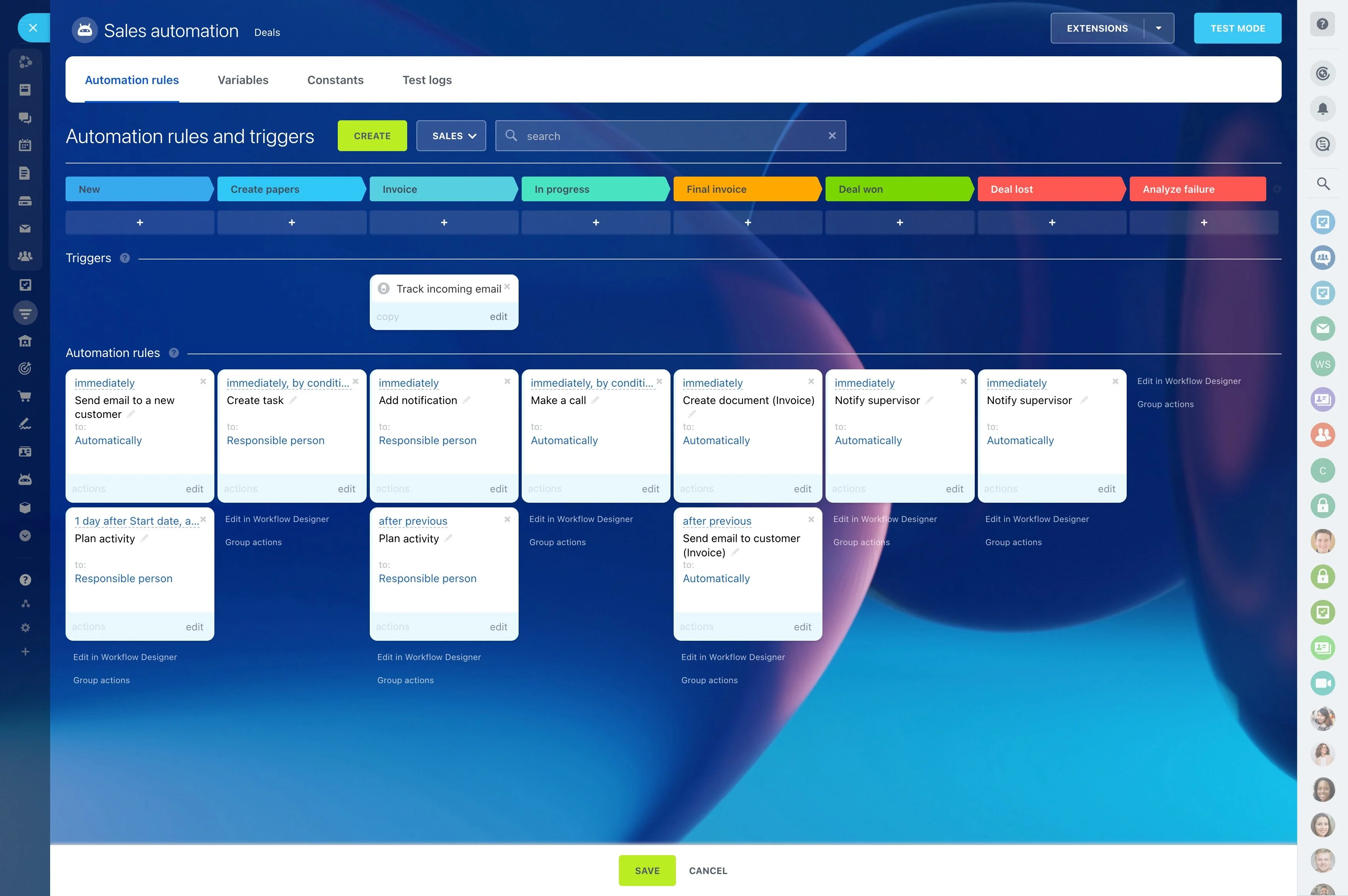
Automations that protect every handoff
Revenue leaks happen in the gaps — after an event, between a trial approval and the first case, or when a referral sits unclaimed.
Dynamic fields — specialty, indication, device model, language preference — tailor messages and tasks to the context.
- Lead‑to‑rep routing: Assign by territory or product. If untouched in 2 hours, escalate to a backup. After 24 hours, alert the manager and update the dashboard.
- Trial orchestration: When an evaluation is approved, auto‑create tasks for shipping, clinical training, and IT setup; due dates align to OR schedule or site constraints.
- Post‑op workflows: After a case date, send satisfaction surveys, capture outcomes notes, and schedule follow‑ups with surgeon champions.
- Referral SLAs: If a patient hasn’t booked within 48 hours, send a second message; after 5 days, notify the referral coordinator; after 10 days, inform the referrer with status.
Integrate with EHR, email, and telephony without drama
Your CRM shouldn’t fight the tools clinicians and reps already use.
Common integration patterns:
- Email and calendars: Sync Outlook/Exchange or Google Workspace so meetings, invites, and conversations attach to the right hospital account or patient case.
- Telephony and SMS: Use built‑in telephony or connect your provider. Log call outcomes automatically and link recordings to records according to your policy.
- Forms and web: Embed lead and referral forms on your site or partner portals. Route submissions to the correct pipeline with source attribution for marketing.
- EHR/EMR exchange: Use REST API, webhooks, SFTP/CSV, or middleware (Make, Zapier, or custom connectors) to push/pull non‑diagnostic data like appointment statuses, referral updates,…
