Starting a Marketing Company: The Operational Setup Before the First Client


TL;DR (Quick Summary)
Most agencies start selling before they've built anything to deliver with, and it shows the moment work starts: scope creep, dropped handoffs, late invoices, thin reporting. Stand up the operating system before the first client signs and your early months go to the work instead of the firefighting.
- What should you sell, and how? → One to three offers you can deliver the same way every time, each with its boundaries written down.
- How light can the tool stack be? → Seven jobs, one home each, integrated so a won deal opens a project without anyone remembering to do it.
- What does intake need to capture? → Enough to qualify the lead and to start delivery, access included, before the contract is signed.
- Why does the proposal-to-project handover matter? → It's the point where promises become work; skip it and delivery rebuilds the deal from memory.
- When do you set up tracking and time capture? → Before the first billable task, so effort gets measured while it's still visible.
- How should invoicing work? → Billing that mirrors the contract, with triggers written down so no one improvises them mid-month.
- What will the first retainer client expect from reporting? → What happened, what changed, what's next, plus the blockers that need a decision.
- How do you know the setup works? → Push one fake client through it end to end and fix whatever breaks at the joins.
Takeaway: Build the delivery system before you sell, or you'll build it under pressure with a paying client watching.
The first client usually arrives before the agency is ready for them. A referral comes through, the proposal goes out that afternoon, and by the time the contract is signed nobody has decided where the brief lives, how revisions are counted, or when the first invoice goes out. The work starts anyway, and the systems get built in the gaps between client calls.
Every rule you improvise with a paying client watching becomes a precedent you then have to defend or walk back.
This article gives you the operating setup a one-person agency needs before its first contract, with the templates, checklists, and default rules already filled in so you can copy them instead of writing them from scratch. It's a long one, so grab a coffee. Your future self (three clients deep) will thank you!
Decide what your agency will sell and how each offer will be delivered
Don't launch with a menu that tries to cover every marketing problem. Start with one to three offers you can deliver repeatedly without rebuilding the process every time.
Define the boundaries first
A workable early menu is narrow: paid search management, landing page copy, a monthly content package. "Full-service marketing" is the hard one to run, because every proposal becomes a different mix of strategy, creative, media, reporting, and meetings, and no two deliveries look alike.
For each offer, define:
- What's included
- What's excluded
- What requires a separate fee
- How many review rounds are included
- Expected turnaround times
- What the client must provide
- What you'll measure
Sell "monthly campaign management" without saying whether it includes landing pages and you've planted an argument. The client reads landing page edits as campaign optimization. You meant ad management.
Nobody's wrong, and that's the problem: the gap surfaces halfway through the month, as a scope conversation neither of you scheduled.
Research into project scope creep found that communication was among the major causes reported by all stakeholder groups in the study. Clear service boundaries remove some of that ambiguity before work starts.
The line new agencies skip is the exclusion list. Writing down what's included feels productive, so everyone does it. Writing down what's excluded feels negative, so it gets left off, and that's the half that would have prevented the fight. "Two rounds of revisions" protects you only if the proposal also says the third round bills at your hourly rate. An inclusion without its matching exclusion is just an invitation to assume.
Day-One Agency Ops Kit: SOPs, Templates, Tool Stack
Enter your email address to get a comprehensive, step-by-step guide

Pick a delivery model that matches the work
A one-off project has a defined body of work and an endpoint. A retainer covers recurring work or ongoing management. A hybrid starts with a setup project, then rolls into ongoing optimization. Pick the one that matches how the work actually flows.
An email marketing retainer repeats the same monthly loop of planning, drafting, build, approval, send, and review. A website messaging project runs once, from discovery to final handoff. At this stage you only need the shape.
Turn each offer into a reusable scope framework
Document deliverables, review rounds, turnaround times, meeting limits, client dependencies, and success measures.
A client dependency is anything they have to provide before work can move:
- Brand assets
- Account access
- Product information
- Approvals
- Consolidated feedback
Keep success measures honest. Managing ads, you might track spend, leads, conversions, and agreed platform metrics. Writing copy, your first measure is delivery against milestones, with performance data arriving later, once there's enough traffic to read. Don't promise a measurement standard your service can't support in month one.
Here's the whole thing filled in for a single offer. The figures are illustrative, there to show the shape of a finished framework, not prices or turnaround times to copy.
Illustrative example: "Paid Search Starter Retainer"
- Included: management of one Google Ads account (up to three campaigns), monthly keyword and bid review, ad copy testing, conversion tracking checks, one monthly performance report, one 30-minute review call.
- Excluded: landing page design or copy, additional ad platforms (Meta, Microsoft, LinkedIn), display or video creative, tag and analytics implementation from scratch.
- Priced separately: landing page copy, a second ad platform, one-off campaign builds for a product launch.
- Revision limits: two rounds of ad copy revisions per monthly cycle; further rounds at the standard hourly rate.
- Turnaround assumptions: new ad copy drafted within three business days of an approved brief; account changes actioned within two business days of sign-off.
- Client dependencies: admin access to the ad account, analytics access, a monthly consolidated feedback message, product and offer information for new campaigns.
- Success measures: month one reports on account cleanup and tracking confirmation; performance measures (spend efficiency, leads, cost per lead) start once the account has enough data to read.
Every line in it becomes something concrete somewhere else: a task in the project template, a clause in the proposal, a field on the intake form.
Pro Tip: Build the scope framework and the project template together. If something appears in the proposal but has no matching task, milestone, approval step, or owner in delivery, you've found a handoff gap before a client does.
|
Offer element |
What to define early |
|---|---|
|
Included and excluded work |
Deliverables, recurring tasks, and work requiring a separate fee |
|
Delivery model |
Project, retainer, or hybrid |
|
Client dependencies |
Approvals, assets, access, and internal contacts |
|
Scope controls |
Review rounds, turnaround assumptions, and meeting limits |
|
Success measures |
Operational and performance indicators you can actually report |
Set up the minimum operating stack before you start selling
You need the smallest set of tools that lets you track prospects, sign agreements, run work, log time, store files, invoice, and report, without the information scattering across inboxes and loose documents.
Give every type of information one home
Seven categories cover it. CRM and intake hold lead status and contact history. A proposal or e-signature tool holds the signed agreement. Project management holds work status and task ownership. Time tracking holds effort by project and activity. File storage holds approved assets and working files. Accounting holds invoices, payments, and receivables. A reporting layer holds the client-facing summary.
Integration matters more than feature count. If a signed deal flows straight into project setup, that's one manual handoff you can't forget, because there's nothing to remember.
All seven fit a small budget. Three starter stacks, with rough monthly costs at a one-person scale (check current pricing, since tiers move):
- Point tools, assembled: HubSpot's free CRM or Google Forms for intake, PandaDoc or Dropbox Sign for agreements, Trello or Asana for projects (both free to start), Toggl Track or Harvest for time, Google Drive for files, Wave or Zoho Invoice for billing, Google Sheets or Looker Studio for reporting. Call it $0 to $40 a month while you're solo, climbing as you add paid seats and the e-signature tool. The catch: these don't talk to each other, so a won deal won't open a project by itself.
- A lighter services-only start: Google Drive plus Loom for files and async walkthroughs, a free CRM, a free invoicing tool. Cheapest to start, most manual to run.
- One consolidated platform: A single system carrying CRM, projects, files, and reporting removes the seams between categories, which is exactly where handoffs get dropped. Bitrix24's free plan covers basic CRM and Kanban or Gantt tasks for one or two users. Past that, the paid plans charge one flat price per organization rather than per seat (Basic includes five users), so a contractor or two doesn't move the bill. Sales automation, task automation, time tracking, and the analytics tools sit on the Professional tier.
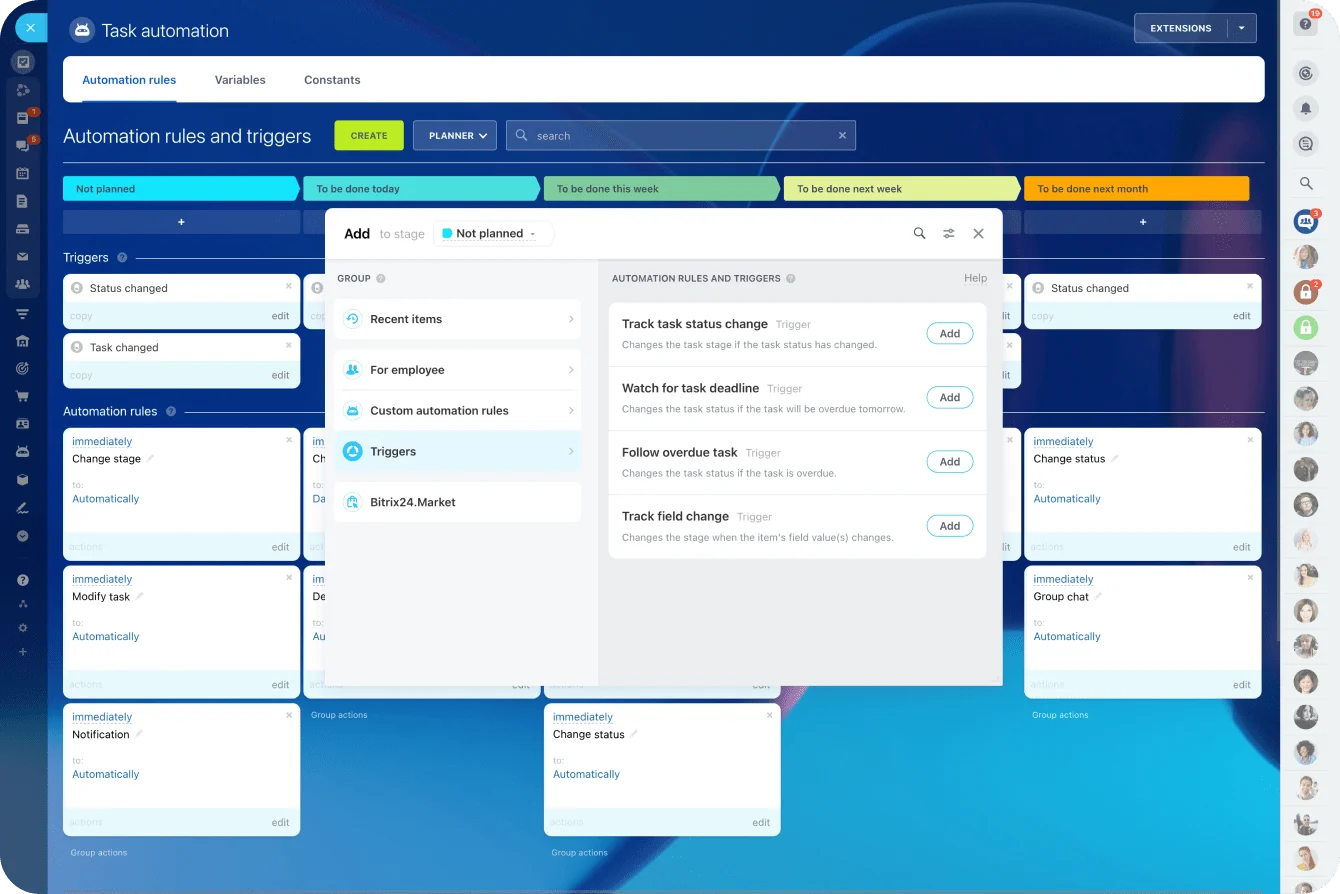
Stay with separate tools and an automation layer like Zapier or Make bridges the gaps, both with free tiers that cover a trickle of handoffs ("deal marked won" opens a project task; "invoice paid" updates a CRM field). It works, right up until it doesn't.
The way this fails is quiet: a Zap breaks on a plan change or a renamed field, nothing errors loudly, and you find out weeks later when three projects were never created and nobody logged time against them. The person who wired it up is often the founder, and the founder is busy. The more tools you run, the more of this undocumented glue you're minding instead of doing client work. That's the honest case for consolidating once you're past the first client or two.
If you want fewer systems, Bitrix24 can act as the CRM for leads and client records while keeping sales activity connected to the work that follows.
Create basic operating conventions
Set folder and naming rules before the first client shows up, with consistent homes for contracts, client assets, working files, approved deliverables, and reports.
A predictable structure beats a memorable one. One folder tree per client, numbered so it always sorts the same way:
/Clients/
/ACME/
/01_Contract/
/02_Assets/
/03_Deliverables/
/04_Reports/
And a naming pattern that puts the client and the date where your eye lands first:
ACME_SOW_2026-01-15_v1.pdf ACME_Monthly-Report_2026-09.pdf
ACME_LP-Copy_2026-02_v2.docx
Far easier to find six months later than this:
FINALreport-new-v3
Which convention you pick matters less than sticking to one. Insist on the YYYY-MM-DD date format, though: it sorts chronologically on its own. Version numbers spare you the final, final-real, final-USE-THIS spiral every agency knows by heart.
Decide which system owns each status
Plenty of founders keep several versions of the truth without meaning to. The CRM says the deal is won. The proposal still reads unsigned. The project board shows kickoff done. Accounting has no invoice on file. All four are wrong in a different direction.
Pick one system to own each status, then make the others follow it.
Pro Tip: Write your sources of truth in a one-page internal guide. You shouldn't have to remember whether the official client deadline lives in email, the contract, or the project board.
Keep the stack light enough that you'll actually use it. A small system updated every day beats a feature-heavy one you quietly abandon.
Build a client intake process that qualifies leads and collects what delivery needs
Intake is where selling and delivery first touch. Capture only enough to book a call and you pay twice: once qualifying poor-fit leads later, and again when you reach kickoff still missing what delivery needs.
Collect delivery information early
Your intake form or discovery checklist should capture business goals, budget context, timeline, key stakeholders, current channels, existing assets, the approval process, required platform access, and any known technical or operational constraints.
Turned into questions you can paste straight into a form:
- What do you want to achieve in the next 90 days?
- What's your rough monthly budget for this work, including ad spend if relevant?
- Which channels are you running now, and which tools sit behind them?
- What access will we need, and who controls it (ad accounts, analytics, CMS, email platform)?
- Who are the decision-makers, and who signs off on work?
- What does your approval process look like, and how fast does feedback come back?
- When do you need this live or delivered?
- What assets do you already have (brand guidelines, creative, product information)?
If your service depends on analytics access, an ad account, product feeds, a CMS, or existing creative, ask before the contract is signed. A paid search agency finds out at kickoff that nobody on the client side has admin rights to the ad account, and delivery stalls until that's fixed. Catch it in discovery and both sides have time to act.
Set qualification rules
Decide what makes a lead worth progressing. Fit with what you actually offer, a realistic timeline, budget alignment, access to decision-makers, willingness to hand over materials, sane expectations on results and communication.
A rubric turns that into a fast yes or no. Set your own must-have thresholds and treat a miss on any one as a reason to pause, not proceed.
As an illustration, the must-haves are budget at or above your floor for the offer they're asking about, a decision-maker in the conversation rather than a relay, a timeline you can hit at current capacity, and willingness to grant the access and assets the work needs. Everything else- channel fit, how warm the referral is, expansion potential- is a tiebreaker.
New founders flinch at rejecting a lead while the pipeline still feels thin. It feels counter-intuitive. But a client who needs constant exceptions eats time that was never in the price. Worry less about the lead with the small budget and more about the one who misses a must-have and whom you talk yourself into anyway because the month looks quiet. That's the account that shows up later in your time data as the one that "takes too much time."
Standardize the discovery workflow
Define the workflow once:
- How fast a new inquiry gets a response
- Who owns that first response
- What the discovery call covers
- Where the notes live
- What moves a lead to the next stage
A simple agenda covers goals, current situation, constraints, stakeholders, success criteria, timeline, required assets, and next steps.
In Bitrix24, the CRM can hold contact history, deal stages, activities, and lead information, so discovery context doesn't stay trapped in one person's inbox or notebook. That pays off at handoff, when delivery shouldn't have to re-ask the client questions they already answered during sales.

Create a proposal-to-project handover that avoids scope and communication gaps
The handover is the hinge. The proposal wins the deal; the handover decides whether you can deliver what the proposal promised. Leave the commitments in a PDF or someone's memory and delivery opens by reconstructing the agreement from scratch.
Standardize the commercial document
Use one proposal and statement-of-work structure, then tailor the scope per client. Spell out deliverables, assumptions, revision limits, meeting cadence, reporting cadence, payment terms, client responsibilities, and what counts as additional work.
Assumptions earn the most attention. Write them as conditions with consequences, not hopes. If the timeline rides on the client sending assets within three business days, say so, and say what happens when they don't. Three examples of language that holds up later:
- "This timeline assumes the client provides admin access to the advertising and analytics accounts within three business days of signature. Delays in access move the go-live date by the same number of days."
- "Each deliverable includes two rounds of revisions. Additional rounds bill at [hourly rate]."
- "Feedback is provided as a single consolidated response per deliverable. Conflicting or piecemeal feedback that forces rework beyond the included rounds is treated as additional work."
Skip this and client delays quietly become agency delays, on your reputation, not theirs.
In New York State, some of this is now the law. Under the Freelance Isn't Free Act, in force statewide since August 2024, a one-person business hired as an independent contractor is entitled to a written contract once the work reaches $800 (counting everything from the same client over 120 days), itemizing the services, the rate, and the date you'll be paid. The state's Department of Labor even publishes a model contract. If you're a solo founder there, the scope document is partly a legal requirement, and the same rules apply to you the moment you hire a freelancer yourself.

Create a hard acceptance sequence
Run the same sequence every time:
- Proposal or SOW approved and signed.
- Deposit or first invoice issued per the agreed terms.
- Required commercial conditions met.
- Kickoff scheduled.
- Internal project created.
- Client onboarding checklist started.
Without it, one client starts before payment, another kicks off from an email thread, a third reaches kickoff before anyone opened a project for them.
Pro Tip: Build a "ready for kickoff" gate. Don't mark a client ready until the signed agreement, the payment condition, the project record, the primary contacts, and the essential access are all checked off.
Convert sales context into delivery inputs
The handover checklist carries the sales context into delivery: business and project goals, agreed scope, key deadlines, channels involved, approval contacts, required access, meeting rhythm, reporting commitments, and any risks flagged in discovery.
Kept as a one-page internal template with fields ready to paste into a project task:
CLIENT:
Goals (business + this engagement):
Scope boundaries (in / out / priced separately):
Key dates & deadlines:
Channels involved:
Approval contact(s) + sign-off process:
Access needed (and who grants it):
Meeting cadence:
Reporting cadence + format:
Assumptions (from the SOW):
Risks flagged in discovery:
Success measures:
Those risks are the usual suspects: missing analytics, slow legal review, thin creative, unclear ownership on the client side.
If you're on Bitrix24, a won deal can move into project management, which gives delivery one place for tasks, deadlines, ownership, files, and project communication.
Keep the handover proportionate
This isn't a long internal meeting. In a one-person shop, the salesperson and the delivery lead are the same person, and you should still document the handover.
Founders resist it because handing work off to yourself feels absurd. What you're actually producing is the written record you'll be reading in month four, three accounts deep, when you genuinely can't remember which client agreed to net-15 and which one insisted on a weekly call.
Set up project tracking and time capture before any billable work starts
Project tracking shows what's next, who owns it, and what's stuck. Time capture shows what that work actually costs you in hours. Stand both up before the first billable task.
Start from templates
Build a default project template per service, with milestones, recurring tasks, owners, due dates, review stages, and client feedback checkpoints.
Milestones should name real delivery stages: onboarding complete, strategy approved, first draft submitted, revisions complete, campaign launched, report delivered. "Working" and "in progress" tell you nothing about where things actually stand.
A project and a retainer want different shapes.
A project (website messaging), by milestone:
- Onboarding complete: access granted, assets received, kickoff held.
- Discovery: stakeholder input gathered, existing messaging reviewed.
- Messaging framework approved: client signs off on positioning before drafting.
- First draft submitted: full copy delivered for review.
- Revisions complete: agreed rounds used, final copy locked.
- Handoff: final files delivered, project closed.
A retainer (email marketing), as a repeating monthly cycle:
- Monthly planning (recurring, start of month)
- Copy drafting
- Build and QA
- Client approval checkpoint
- Sending
- Performance review and report (recurring, end of month)
The shape drives the setup. A project template runs once, start to close. A retainer template is a cycle you clone every month, so the recurring tasks and the monthly report have to be baked in, not remembered.
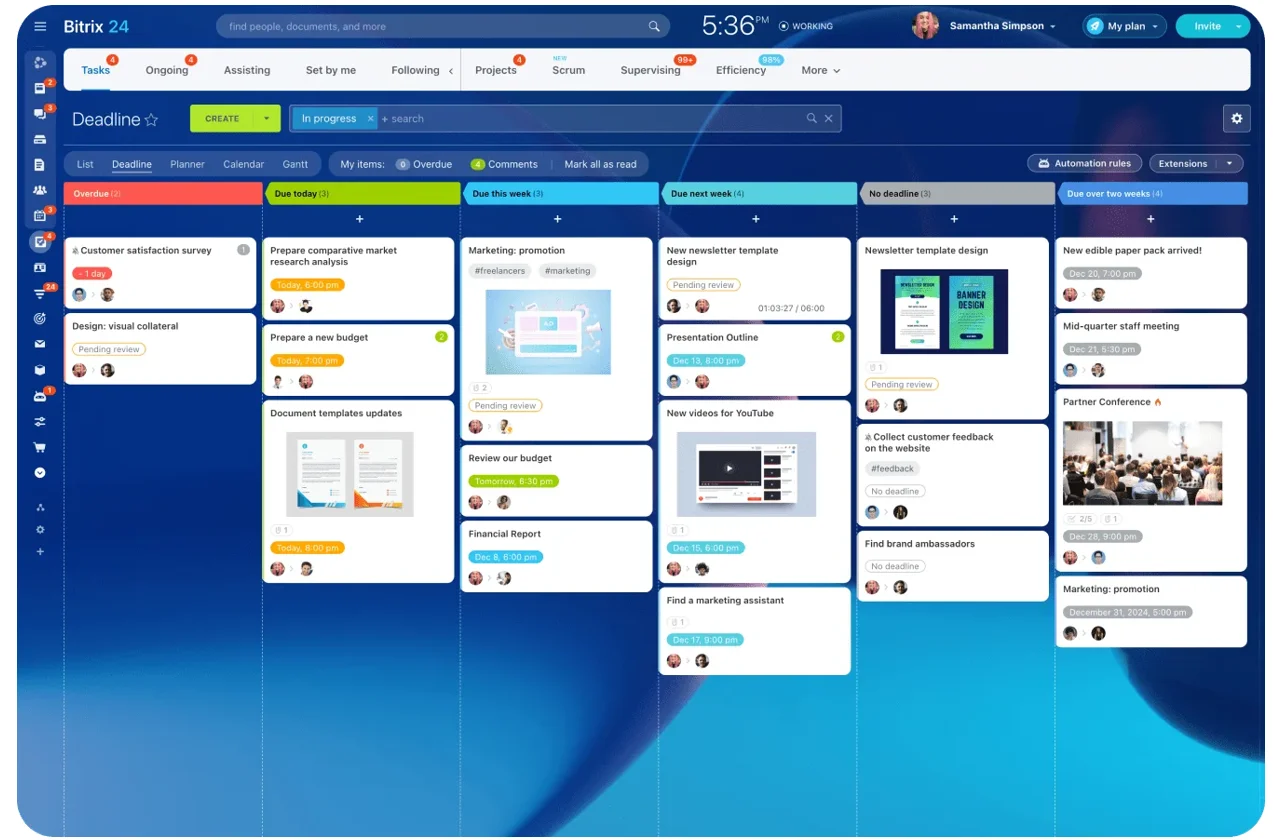
Bitrix24 task management can keep tasks, owners, deadlines, project stages, and time tracking on the same workflow.
Capture the work clients don't see
Track time even on retainers and fixed fees. You can't price or staff a service well until you know what it actually takes to deliver.
Keep the categories short: strategy, production, revisions, meetings, reporting, client administration. And map them onto the tasks in your templates, so "revisions" in the time tracker is the same thing as the revision stage in the project. When they drift apart, the time data stops telling you which part of the work is eating your hours.
Then set the rules. For a solo founder, that's about as simple as it gets: run a timer for any focused block over 15 minutes, allow manual entry for short interruptions logged the same day, log twice daily, and review the week's totals per account each Friday. Logging as you go beats reconstructing a whole week from memory on a Friday afternoon.
Don't lose invisible work
The classic miss is logging three hours on the deliverable and forgetting the 30-minute call, the internal QA, the revisions, the file wrangling, the follow-up messages. That work never gets recorded, and it still burns capacity.
Good time data also makes scope talks concrete. When a small retainer keeps swallowing hours of extra revisions and client admin, you can point at the category doing it instead of gesturing at a vague sense that the account drags.
Be blunt about why this matters on fixed-fee work. On a flat fee, the unbilled hours stacking up around the edges do more damage than a low rate ever will. Client administration is the category that surprises people. None of it feels like work while you're doing it. All of it shows up when you total the month.
Prepare invoicing and payment workflows that match how your work is sold
Your billing flow has to match the commercial model in the agreement. Deposit plus milestones? Invoice against the milestones. Retainer billed monthly in advance? Set that schedule before delivery starts.
Define billing by offer type
Project work tends toward a deposit before kickoff, milestone payments through the middle, and a final payment before handoff. Retainers run monthly in advance, monthly in arrears, or on a fixed date each month. The proposal, the contract, the project setup, and the invoice schedule should all describe the same arrangement, word for word.
The line items make the difference concrete. Illustrative, not price guidance:
Project invoice, deposit:
Website messaging project, 50% deposit due on signature $X,XXX
Balance due on final handoff (invoiced separately)
Project invoice, milestone:
Website messaging project, milestone 2 (messaging framework approved) $X,XXX
Retainer invoice, monthly in advance:
Paid Search Starter Retainer: service period 1–31 March 2026 $X,XXX
Naming the service period on a retainer invoice does more than it looks like it does. It's what heads off the "wait, which month is this for?" reply when you bill in advance and the work hasn't happened yet.
Make invoice triggers explicit
Write down the mechanics so nobody improvises them later:
- What triggers the invoice
- Who sends it
- When it goes out
- Where payment status is recorded
- When reminders fire
- What happens when payment goes overdue
- Whether delivery pauses for non-payment
A deposit invoice fires the moment the deal is signed. A milestone invoice waits for the project owner to confirm the milestone landed. A retainer invoice generates on the same date every month. None of it should be a fresh decision each time.
For the parts founders leave undecided, a workable default: state your accepted payment methods on the invoice (ACH and card, say), set a reminder cadence of a friendly note at 3 days overdue, a firmer one at 7, and a final notice at 14, and if you charge a late fee, keep the language neutral and put it in the contract, not as a surprise on the invoice. (Tax is a placeholder here on purpose, since it turns entirely on where you and the client sit; confirm your local requirements before anything goes out).
Don't let invoicing become optional admin
Late invoices are the norm among small businesses. Intuit QuickBooks' 2026 US research found that 59% of businesses surveyed had at least some invoices overdue by 30 days or more. Payment terms tracked closely with who waited: 55% of businesses on net-30 had overdue invoices, against 26% of those requiring immediate payment.
New agencies sit on an invoice because they don't want to seem pushy. If the terms are already agreed, sending the invoice on schedule is just following the contract. The awkwardness is entirely on your side of the table: the client signed these terms and is expecting the bill. Deposits on signature and retainers billed in advance are the agency version of immediate terms, and they're far easier to set in the first contract than to renegotiate with a client who's got used to net-30.
Design the weekly reporting your first retainer client will expect
Your first retainer client wants three things from a report: what happened, what changed, what's next. None of that needs a dashboard, and a dashboard nobody opens loses to a six-line email they read on their phone.
Build around decisions, not data volume
A useful weekly report holds work completed, the metrics that matter, what changed, what you think caused it, what's planned next, the decisions or approvals you need from the client, and any current blockers.
As a one-page template with fixed sections:
WEEKLY REPORT | [Client] | week of [date]
1. Work completed this week
2. Metrics (this week vs last)
3. What changed and why we think it changed
4. Planned next week
5. Decisions or approvals needed from you
6. Current blockers (with owner)
Tie the metrics to what you can measure reliably and to the work you actually do.
Example-in-action: For paid search: impressions, clicks and CTR, cost per click, conversions, cost per acquisition, plus the campaign changes you made that week. For content: pieces published with dates, the status of in-progress pieces, early engagement (views, time on page), and the next approvals you're waiting on.
Send it the same way every week so it becomes a habit on both sides. A short email with the report inline, or a shared Google Doc or slide the client can open, both do the job. The point is that the cadence and the format don't move week to week.
Don't promise an attribution dashboard while the client's analytics still needs weeks of cleanup. Report what you can stand behind.
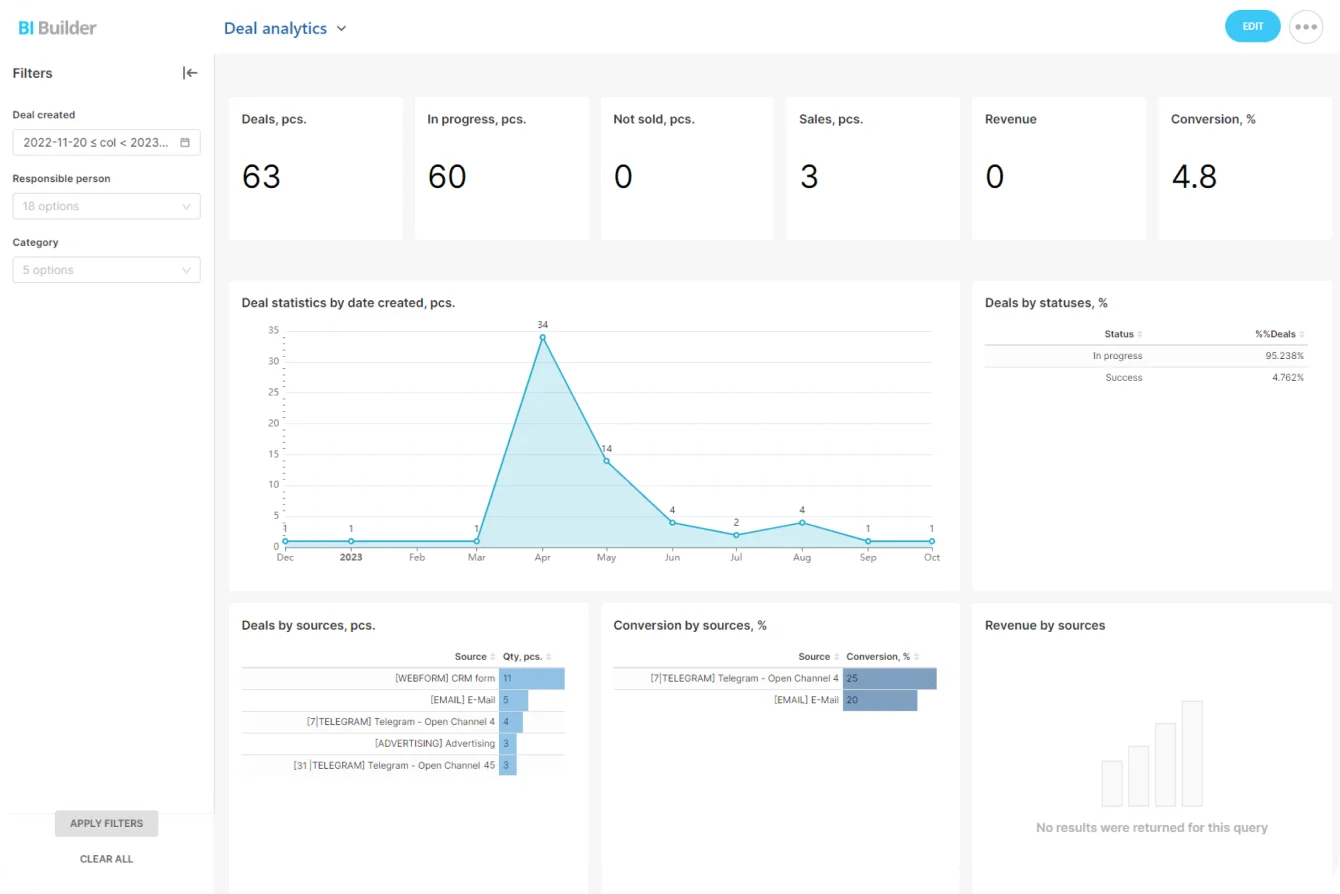
Bitrix24 analytics and reporting tools can supply CRM, funnel, channel, and sales data where those metrics fit the relationship.
Use reporting to move work forward
A weekly report shouldn't be a passive archive of performance. Use it to flag whatever's holding delivery up:
- A landing page waiting on approval
- Analytics access still not granted
- Missing campaign creative
- A client decision blocking the next milestone
Name the dependency and the owner. That turns the report into a recurring account-control point instead of a document the client skims and forgets. The blockers section outperforms the metrics section in the early months, because it puts the delay on the record. When access still isn't granted in week three, a report that's said so every week is the difference between "the agency is slow" and "we flagged this three times."
Run a test client through the whole setup before a real one signs
Run one fake engagement through the whole pipeline:
- Submit your intake form.
- Create a test lead.
- Complete discovery notes.
- Produce a mock proposal.
- Run the handover.
- Create the project.
- Log sample time.
- Issue a test invoice.
- Produce the weekly report.
The weak connections show up fast. Discovery information that never reaches the project template. Time categories that don't match the work you sell. A report expecting a metric nobody configured. An invoice with no clear owner.
Give the dry run a pass/fail checklist, so you're testing the joints between tools, not just the tools:
- Does a signed proposal, or a won deal, create the project without re-entering anything?
- Do the intake fields actually surface where delivery will look for them?
- Do your time categories match the tasks in the project template?
- Does the invoice trigger fire with the right line items and service period?
- Does the weekly report pull its metrics without you rebuilding them by hand?
A fail on any of these is cheap to fix now and expensive to fix on a Friday afternoon with a paying client waiting.
FAQ
How many offers should I launch with?
One to three, each narrow enough that you can deliver it the same way every time. A wide "full-service" menu means every proposal is a bespoke build, which is the hardest thing to run before you have a repeatable process.
Do I really need paid tools before I have a client?
No. The free and low-cost stacks above cover all seven categories for roughly nothing while you're solo. Spend on the things that remove manual handoffs, like an e-signature tool and, eventually, a system that opens a project from a won deal on its own.
Should I track time if I only sell retainers and fixed fees?
Yes, and this is the one people skip. You can't price or staff a service until you know what it actually takes in hours, and the hours that sink flat-fee work are the invisible ones: calls, QA, revisions, client admin. Track them or keep guessing.
When is Bitrix24 the right call versus assembled point tools?
Point tools are fine at the very start. The case for consolidating onto one platform gets stronger the moment you're maintaining automations to keep separate tools in sync, or adding people, since Bitrix24's paid plans charge a flat monthly price per organization rather than per seat. Check the tier before you plan around a feature: the free plan covers basic CRM and tasks for one or two users, while deal-to-project automation, time tracking, and analytics start on Professional.
What's the single most common early mistake?
Selling before the delivery system exists. The scope arguments, dropped handoffs, and late invoices that follow are all symptoms of the same thing: promises made in sales that nothing in delivery was built to keep.
Build a Client-Ready Agency Workflow
Bitrix24 connects CRM, tasks, files, time tracking, and reports so new agencies avoid dropped handoffs and late admin.
Get Started NowThe bottom line
Everything here turns on one idea: the problems that sink new agencies are setup problems wearing a delivery costume. The scope fight, the handoff that drops half the context, the invoice sent three weeks late, the report that can't find its own numbers, each traces back to a system that didn't exist when the deal was signed.
Build the plumbing while you have the calm to do it well, and your first client meets an agency that runs, not one improvising in real time.
Wait, and you'll build the same system anyway, just under pressure, in front of someone paying you.
Bitrix24 gives you one place to run it, with CRM, projects, files, and reporting connected so a won deal becomes live work without a manual handoff. Start on the free plan while you're solo, and move to Professional once you want the won-deal automation and reporting doing the handoff for you. Set it up before the first client, not after.
Takeaway: Before your first sale, build a process you can repeat without reconstructing it from memory every time a new client signs.