Closed Won Is Not the Finish Line: Automate What Happens After a Deal Converts


TL;DR (Quick Summary)
- Closed Won triggers a handoff, and when that handoff runs on chat messages and copied notes, delivery stalls and nobody owns the next step.
- The fix is a controlled post-sale workflow that checks readiness, creates the records, assigns owners, preps billing, and holds customer-facing work behind approval gates.
- Treat Closed Won as the start of execution, not the end of the sale.
Takeaway: Treat Closed Won as the start of execution, not the end of the sale — a deal that flips to Closed Won with no owner, no record, and no billing task is just a problem that hasn't surfaced yet.
A rep posts in the team channel: deal closed. Emojis pile up.
Two days later, the customer asks when kickoff is. Nobody built the delivery workspace, nobody owns the account, and finance hasn’t seen the billing terms.
That’s the post-sale handoff gap: Closed Won in the CRM, but no clear operational next step.
A structured workflow fixes it by checking readiness, creating the right records, assigning owners, preparing billing, and holding customer-facing work until approvals are complete.
Here’s how to build that workflow in Bitrix24, where automation tends to break, and what to keep under human control.
Closed Won creates work: the post-sale handoff bottleneck
The problem usually isn’t that nobody knows a deal has closed. It’s that the work created by that deal has no single owner, system, or sequence.
Where the handoff stalls
In the gap between sale and delivery, manual work piles up.
Sales messages operations to announce the win. Operations builds an implementation project by hand. Customer success chases the rep for a kickoff contact. Finance digs through a contract attachment for billing terms. Delivery rebuilds the customer’s requirements from CRM notes and old emails.
The common thread is that there’s no controlled handoff. Information gets copied between systems, ownership stays unclear, and the next step depends on someone remembering to act.
Why small delays add up
Every one of those steps is coordination, and coordination eats the day. In Asana's 2019 Anatomy of Work Index, a Sapio Research survey of 10,223 knowledge workers, people reported spending 60% of the workday on coordination: chasing status, hunting for information, and reshuffling priorities.
A manual handoff is made entirely of that work. The bill comes due as slower time-to-kickoff, half-built projects, late invoices, and customer questions the delivery team can't answer yet.
Post-Sale Automation Playbook: 14-Day Customer Onboarding Workflow
Enter your email address to get a comprehensive, step-by-step guide

What a post-deal automation workflow actually is
A post-deal automation workflow is a rules-based sequence that fires on a commercial event and then does the downstream work across sales, operations, finance, and delivery. It turns a deal status into action.
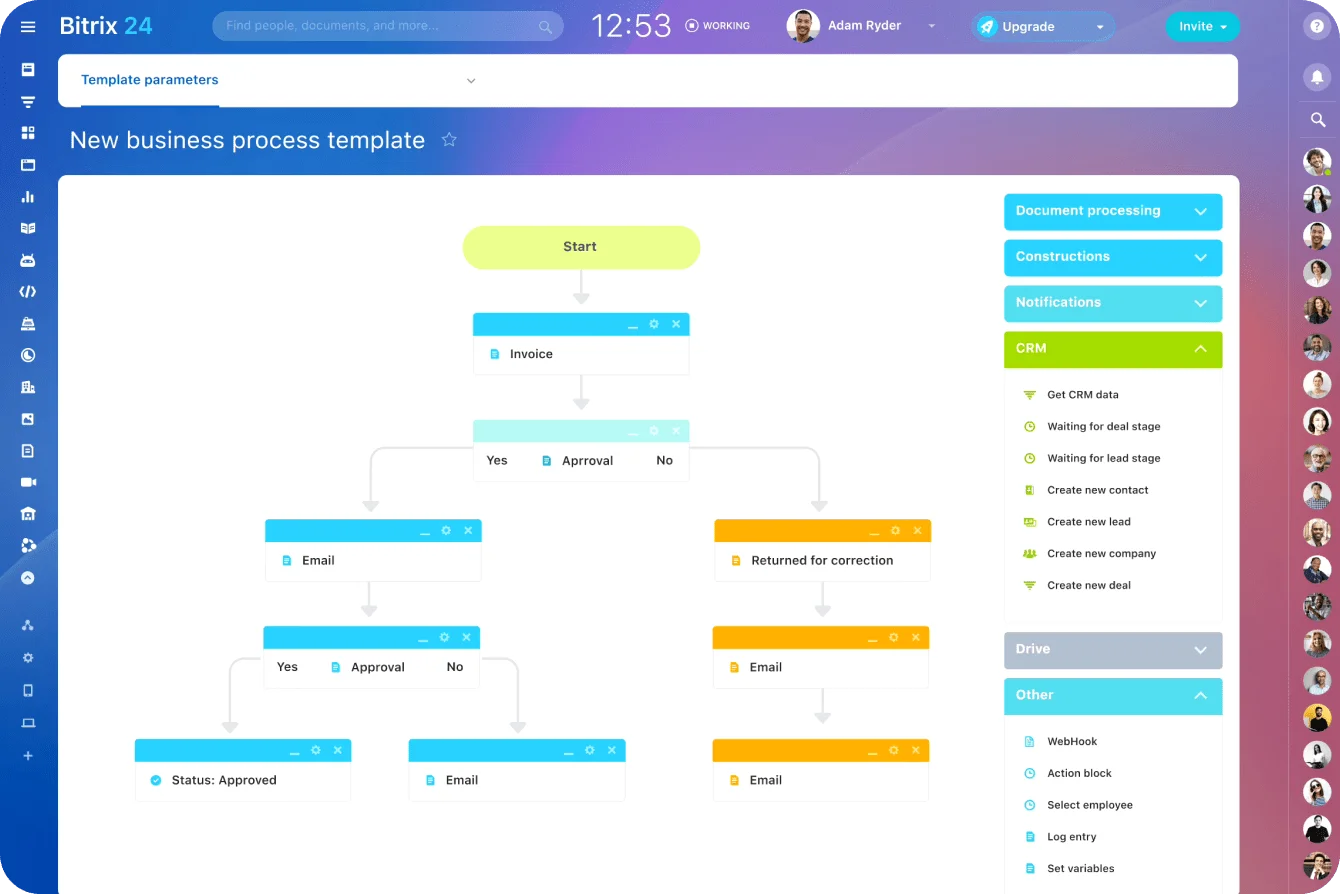
From signal to execution
A basic workflow moves through a fixed set of actions:
- Check that required fields are complete.
- Confirm the order or contract is signed.
- Create an onboarding record or implementation project.
- Pick the right task or project template.
- Assign the primary delivery owner.
- Create billing setup and finance review tasks.
- Prepare kickoff materials.
- Notify the right teams once the records and tasks exist.
Notifications come last, after the records, tasks, and owners exist. An alert that lands before the work is built just tells someone to go do it by hand.
Take the team that fires off a "New customer handoff" email after every close. Someone still has to open the systems, copy the information, assign the tasks, and pick the template. Automating that email automates the announcement. The handoff is still manual.
How Bitrix24 supports the workflow
In Bitrix24 CRM, automation rules fire when a CRM item hits a defined stage. Task automation then creates and assigns the internal work that follows. The rule runs off structured fields and conditions, not a rep's memory of a side checklist. Stage-based rules create tasks with assignees, participants, deadlines, and the CRM context attached.
Where AI fits
AI handles the prep:
- Summarize customer goals from meeting notes and CRM activity.
- Pull implementation requirements out of an order form into structured fields.
- Flag special terms that need human review.
- Draft a scope recap for the delivery team.
- Build a first-pass task list from the service package sold.
- Set a readiness flag showing whether delivery can start.
Keep the output reviewable. A clean-looking summary can still drop a customer dependency or misread a commercial term.
Why traditional Closed Won handoffs break down
Most post-close problems trace back to incomplete source data. Sales closes deals on the fields that drive pipeline and forecasting. Delivery and finance need a different set: real start dates, confirmed scope, technical contacts, product or SKU mapping, billing schedules, onboarding prerequisites, and special terms.
Different teams fill the gaps differently
When that information is missing, each team improvises. Sales assumes operations can reverse-engineer the plan from call notes. Operations waits on finance to confirm what gets invoiced. Finance waits on operations to confirm what was sold. Implementation discovers the remaining gaps while preparing for kickoff.
Often, the information already exists. The problem is that it’s buried in a format or system the next team can’t readily use.
Information is stored in the wrong places
A typical deal record scatters information like this:
- Product details in structured CRM fields.
- Scope in a proposal.
- Payment terms in a contract attachment.
- Technical requirements in meeting notes.
- Customer contacts in an email thread.
- Internal commitments in the rep's private notes.
Even when every detail exists somewhere, the handoff fails because nobody knows which copy is the real one.
A SaaS company has the billing contact recorded cleanly, while the implementation contact is buried in a discovery-call transcript. Finance moves ahead. Kickoff scheduling stalls, because delivery doesn't know who to invite.
The workflow depends on individual memory
A handoff that runs on "the rep will send the details" breaks the moment the rep’s busy, on PTO, or heads-down on the next deal.
The errors are predictable:
- Projects get created from the wrong template.
- Milestones go missing in manual setup.
- Account ownership lands late or on the wrong person.
- Billing tasks sit open because the payment terms aren't clear.
- Kickoff scheduling stalls on unconfirmed customer contacts.
- Delivery works from notes that don't match the signed agreement.
It shows up in the numbers: close-to-project-creation time, handoff error rates, setup rework, delayed billing, and customer escalations.
Pro tip: Add a separate Ready for Delivery field or approval state. Closed Won stays the commercial milestone; Ready for Delivery confirms the agreement, contacts, billing details, and operational requirements are actually complete.

The first-action automation framework after a deal converts
The first actions after conversion run in a fixed order:
- Validate deal readiness.
- Create the delivery record.
- Assign internal owners.
- Open billing and finance tasks.
- Generate kickoff prep.
Order matters. Build every downstream record before checking the source data, and you've just copied bad information into five systems instead of one.
1. Validate deal readiness
Before anything launches, confirm the agreement is executable and the required fields exist.
Typical checks include:
- Signed order or contract status.
- Product, SKU, or service package.
- Confirmed scope.
- Bill-to entity and billing contact.
- Payment terms and currency.
- Customer primary or kickoff contact.
- Intended start date.
- Region or legal entity where it affects routing or billing.
- Required onboarding prerequisites.
- Any custom terms or delivery commitments.
Name an owner for each field. Sales owns the commercial and contact details, finance owns billing validation, operations owns delivery readiness.
Not every missing field should halt everything. Decide which fields block execution and which still allow provisional setup.
|
Field or condition |
Default handling |
|---|---|
|
Signed order or contract |
Block full execution until confirmed |
|
Product, SKU, or service package |
Block project and fulfillment creation if it determines the delivery template |
|
Confirmed scope |
Block full delivery activation |
|
Bill-to entity, payment terms, and currency |
Allow internal preparation, but block billing activation |
|
Kickoff contact |
Allow internal setup, but block customer-facing scheduling |
|
Target start date |
Allow provisional setup, but block committed scheduling if the date isn't approved |
|
Region or legal entity |
Block routing when it determines the owner, billing entity, or compliance path |
The split depends on your business; the rule just has to be explicit. A missing kickoff contact can justify a provisional handoff record. Unsigned paperwork or an unmapped SKU shouldn't spin up a live delivery project.
2. Create the delivery record
Once the deal passes validation, create the record the delivery team will use. Depending on the business, that's:
- An implementation project.
- An onboarding case.
- A fulfillment request.
- A customer success plan.
- A managed-service workspace.
- A professional-services engagement.
Build it from a predefined template tied to the product or service package, not a blank project someone rebuilds from scratch after every sale.
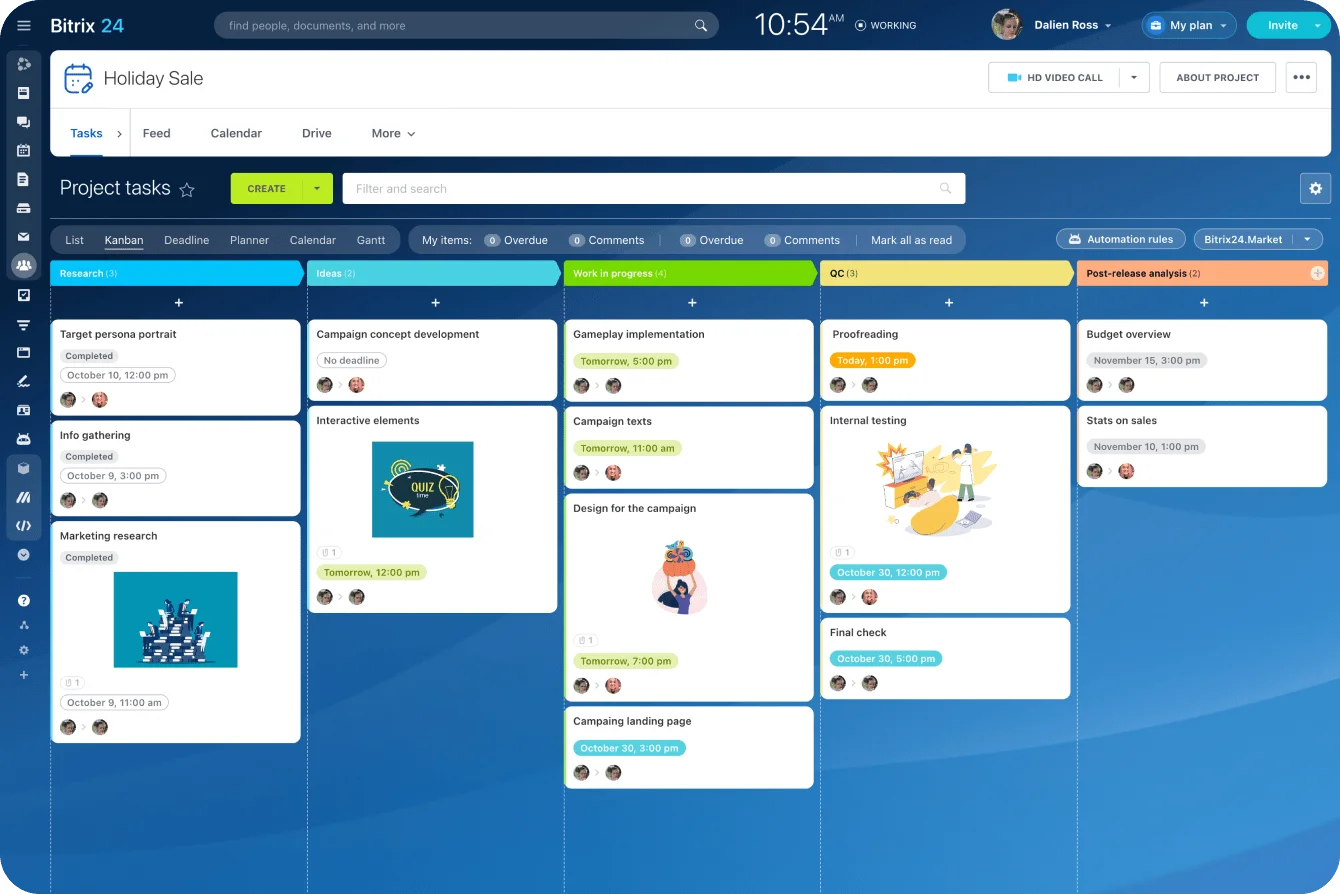
With Bitrix24 project management, the deal-to-delivery workflow builds structured work from a repeatable template and carries the CRM context into the project. That pays off when standard, premium, and custom services each need different milestones and owners.
3. Assign internal owners
Assign the primary delivery owner on rules like:
- Region or time zone.
- Product specialization.
- Service tier.
- Customer segment.
- Current team capacity.
- Named account ownership.
Define the fallback too. When the preferred owner is out or no rule matches, the record drops into an operations queue instead of sitting unassigned.
4. Open billing and finance tasks
Give finance what it needs to act without reopening the entire deal history:
- Legal customer name.
- Billing entity.
- Currency.
- Invoice schedule.
- Payment terms.
- Purchase-order requirements.
- Tax information.
- Contract or order reference.
- Internal approver for exceptions.
Don't hand finance a generic "Set up new customer" task. Spell out what to check and where the supporting information lives.
5. Generate kickoff preparation
Kickoff prep covers:
- Confirming customer attendees.
- Running an internal scope review.
- Sending an onboarding questionnaire.
- Preparing an agenda.
- Identifying technical dependencies.
- Requesting access or data from the customer.
- Proposing kickoff times.
Hold customer-facing scheduling until the owner, scope, and readiness checks all clear.
|
Immediately After Conversion |
After Required Fields and Approvals Are Confirmed |
|---|---|
|
Create a handoff record |
Create the full delivery project |
|
Assign a provisional owner |
Confirm the final delivery owner |
|
Generate internal review tasks |
Activate billing setup |
|
Prepare an AI-generated summary |
Release customer-facing kickoff tasks |
|
Flag missing information |
Assign specialist resources |
It keeps you from launching too early while internal prep still gets a head start.
Triggers, routing, and workflow logic for post-sale execution
The usual trigger is an opportunity moving to Closed Won. Full execution needs more than that one signal.
Choose triggers that reflect real readiness
Useful triggers include:
- The opportunity moved to Closed Won.
- The contract or order status changed to signed.
- Required CRM fields passed validation.
- Payment terms were confirmed.
- An operations or finance approval cleared.
- A deposit or first payment landed.
Stacking a few conditions cuts false starts. A rep marks a deal won for the forecast while procurement is still collecting signatures. Fire the full project and schedule kickoff off that alone, and downstream teams inherit the cleanup.
Route by the work that was sold
Different deal types belong on different paths.
Routing conditions include:
- Region or legal entity.
- Product line.
- Service tier.
- Implementation complexity.
- Contract value band.
- Customer segment.
- Required specialist skills.
- Missing readiness fields.
Translate the rules into clear branches
A simple rule set reads like this:
- Standard subscription, agreement signed, kickoff contact present: create the onboarding record and assign customer success by region or segment. If nothing matches, send it to the customer success queue.
- Enterprise implementation, agreement signed, readiness fields complete, delivery approval passed: create the implementation project and assign a professional-services or implementation lead by region, specialization, and capacity. Fallback is the operations queue.
- One-time service, scope and billing terms complete: create the fulfillment or delivery task, assign the service owner, and open the finance task, with no long-term customer success project.
- Custom engagement: hold execution until operations, finance, and delivery sign off on scope, dates, and resourcing.
- Any deal missing billing terms: open a finance review task and freeze customer-facing actions until it's resolved.
When finance, ERP, support, or provisioning systems live outside the CRM, use Bitrix24 integrations to push approved data into them.
Decide which system owns each field before you connect anything. Two-way sync without a clear source of truth will overwrite good data with stale values.
Pro tip: Name branches in plain business language, like Standard onboarding, signed agreement or Custom scope, finance approval required. Labels like Branch 4B make testing and troubleshooting harder than they need to be.
Human review, approvals, and exception handling before delivery starts
Some decisions stay with a human. Automation preps the record and routes it to the right reviewer; it doesn't make every commercial or delivery call on its own.
When human review is needed
Common review points include:
- Custom scope.
- Nonstandard pricing.
- Unusual payment schedules.
- Implementation dates that depend on resource availability.
- Account ownership conflicts.
- Data migration or security requirements.
- Contract terms that affect delivery.
- Products that don't map cleanly to a standard template.
A workable approval structure usually has four gates.
Operations review confirms the handoff data and service selections are complete. Finance approval covers nonstandard billing, currency, discounts, or payment arrangements. Delivery approval signs off on custom timelines, technical feasibility, and staffing. Legal or security review handles contractual obligations, data processing, and compliance.
Give every approval a named owner and an escalation rule. Drop an approval request into a shared channel with nobody responsible, and it can sit there forever.
For a simple RACI, put one person responsible for doing the review and one role accountable for clearing the gate. Example targets:
|
Approval gate |
Responsible |
Accountable |
Example SLA |
|---|---|---|---|
|
Operations readiness |
Operations or RevOps coordinator |
Operations lead |
Within 1 business day |
|
Finance exception |
Finance operations or billing owner |
Finance lead |
Within 2 business days |
|
Delivery feasibility |
Implementation or professional-services lead |
Head of delivery |
Within 1 business day |
|
Legal or security exception |
Assigned legal or security reviewer |
Legal or security lead |
Based on policy and risk level |
Note, these are operating targets, not universal benchmarks. Set them against your staffing, deal complexity, and customer commitments, and name an escalation owner for any review that blows its SLA.
Build a controlled exception path
When a deal is Closed Won but not ready to execute, route it into a dedicated exception path.
Typical exception triggers include:
- Unsigned paperwork.
- Missing kickoff contacts.
- Incomplete product or SKU mapping.
- Unresolved onboarding prerequisites.
- Missing purchase-order information.
- A mismatch between the sold scope and the available delivery template.
- A start date delivery hasn't approved.
The exception record should hold:
- The reason it's blocked.
- The missing requirement.
- The person responsible for resolving it.
- A due date.
- The next action after resolution.
- A visible status, like Blocked: Billing Terms Missing.
A manufacturing team closes an order with several product configurations. One SKU doesn't map to the fulfillment system, so the workflow holds that line, or the whole order, for review instead of pushing an incomplete delivery request downstream.
Review AI-generated handoffs
Bitrix24 CoPilot can summarize sales activity and draft internal content, but an AI-generated handoff still needs a human check before it becomes the source of truth.
The reviewer compares the summary against the signed scope and confirms:
- Deliverables.
- Dependencies.
- Customer responsibilities.
- Dates.
- Special commitments.
- Exclusions.
- Risks raised during the sale.
Use AI to shorten context transfer. Keep scope, staffing, billing, and customer commitments under human approval.
Operational risks and failure points in post-close automation
Post-close automation only buys you consistency if the data and the controls hold. Weak controls just distribute bad handoffs across several systems before anyone notices.
Poor CRM data
Required fields don't help when people type "TBD," grab the first dropdown option, or paste in data from another deal. Use validation, controlled values, and clear ownership. Save free-text fields for context that truly can't be standardized.
Incorrect field mapping
A billing term stored one way in the CRM can mean something else in finance. "Net 30 from signature" and "Net 30 from invoice" both look like Net 30 and produce completely different actions. Document the mappings and test them on real deals before you switch the workflow on.
Duplicate records
Weak account matching spawns a second customer record, splits the activity history, and hands the same organization to two different owners. Use a deterministic match, not company name alone: domain plus legal name plus billing country, with a tax identifier where you have one.
When the rule returns more than one candidate, send the record to review instead of auto-creating a new account.
Automations firing too early or more than once
Stages get reversed. Records get edited after close. Integrations retry failed requests. With no safeguards, a deal that's reopened and re-closed spins up duplicate projects or invoices. Give each downstream action an idempotency key, like deal ID plus action type plus workflow version, and store the ID of whatever it created.
A Handoff Created flag is a useful visible control, but the workflow should also check whether a specific project, billing record, or task already exists before making another.
Ownership gaps
Routing to a named employee breaks when that person switches roles, takes leave, or hits capacity. Route through teams or queues first, then assign the individual. Every branch gets a fallback owner.
Integration downtime
An external finance or provisioning system might be down when the CRM workflow runs. Log the failed step, retry only where it's safe, and open a manual-review task once retries run out. Never mark the handoff complete before the downstream system confirms it received the data.
AI extraction errors
Contract extraction misses a table, misreads an amended clause, or mistakes a proposed date for an agreed one. Send low-confidence output to manual review. Never let an uncertain AI value trigger billing or a customer-facing commitment without verification.
Define fallback behavior
When automation fails, the system should:
- Queue the record for manual review.
- Log the failed step and reason.
- Stop dependent actions from continuing.
- Alert the workflow owner.
- Preserve the original source data.
- Let the failed step rerun without duplicating earlier work.
Pro tip: Keep a dedicated exception queue for failed handoffs. Review it daily during rollout, then a few times a week once things settle. Every item carries an owner, a reason, an age, and a next action.

Scaling the workflow: optimization, SLAs, and governance
Once the first-action workflow runs reliably, the job becomes keeping it healthy as deal volume, products, and teams shift.
Standardize the Closed Won requirements
Sales, operations, finance, and delivery share one definition of handoff readiness. Document:
- Required fields.
- Field owners.
- Accepted values.
- Approval conditions.
- Source systems.
- Routing rules.
- Exception categories.
- Completion criteria.
Skip this agreement and the automation turns into a pile of patches for arguments between departments.
Define handoff SLAs
Choose targets that reflect the customer experience and the internal workload:
- Delivery record created within one business hour of readiness approval.
- Primary owner assigned the same business day.
- Billing review opened right after approval.
- Kickoff request released within one business day.
- Blocked handoffs acknowledged within a defined support window.
Set these against service complexity and team coverage, and revisit them when workload, products, or commitments change.
Measure the time between each stage, not just the total close-to-kickoff span. That's what tells you whether the delay is missing sales data, slow approvals, late owner assignment, billing review, or customer availability.
Define the formulas so every team measures the same interval:
- Close-to-readiness = Ready for Delivery timestamp − Closed Won timestamp.
- Readiness-to-project creation = Project created timestamp − Ready for Delivery timestamp.
- Readiness-to-owner assignment = Owner assigned timestamp − Ready for Delivery timestamp.
- Readiness-to-billing readiness = Billing ready timestamp − Ready for Delivery timestamp.
- Readiness-to-kickoff release = Kickoff released timestamp − Ready for Delivery timestamp.
Keep close-to-readiness separate from the later execution metrics. Otherwise a deal that sits for three days on incomplete sales data makes your project-creation workflow look slow when it isn't.
Bitrix24 CRM analytics and reporting tools track stage duration, workload, and workflow status. Review the results with the teams that own the process, not just the admins.
Prefer templates over excessive branching
Reusing templates by service tier is easier to maintain than a unique route for every sale. For most teams, three or four models cover it:
- Standard onboarding.
- Premium onboarding.
- Enterprise implementation.
- Custom or exception-based delivery.
Add a new branch only when the work, approvals, or ownership genuinely differ.
Review exceptions and failures
A RevOps or operations owner reviews exception data on a regular cadence. Look for:
- Fields that go missing repeatedly.
- Deals that keep landing on the wrong route.
- Approval steps that stay blocked.
- Templates that need frequent manual edits.
- Integration failures tied to one system or field.
- AI summaries reviewers keep correcting.
A high exception volume is almost always a process signal: unclear sales requirements, stale routing rules, an unrealistic template, or a product that needs its own delivery model.
Control workflow changes
Routing changes ripple into active deals, billing, resource assignments, and reporting. Use a simple change process:
- Document the requested change.
- Identify the affected deal types.
- Test it with sample records.
- Confirm the fallback behavior.
- Release it to a limited group where possible.
- Monitor errors and exception volume.
- Record the change date and owner.
At scale, a good post-close workflow makes standard work fast, exceptions visible, and ownership easy to trace.
FAQs
Which post-sale actions should be automated first?
Start with repetitive, rules-based, verifiable actions:
- Readiness checks.
- Project or onboarding record creation.
- Owner assignment.
- Billing task creation.
- Internal kickoff prep.
- Notifications, once the underlying work exists.
Don't start with complex custom deals. Prove the workflow on your most common standard service first.
What data must be required before triggering the workflow?
At minimum, require:
- Signed agreement status.
- Product or service package.
- Customer primary contact.
- Billing terms.
- Billing contact.
- Expected start timing.
- Confirmed scope.
- Any required approval status.
Anything missing routes to the exception path instead of failing silently.
How should teams separate standard from custom deals?
Route on implementation complexity, service tier, product mix, custom scope, pricing exceptions, or resource requirements. Standard deals run through fuller automation. Custom deals go to an approval-gated route with a named reviewer.
When should project setup be fully automated?
Use full automation when:
- The service maps to a standard delivery model.
- Required data is complete.
- Ownership rules are clear.
- Billing terms are approved.
- No custom delivery commitments exist.
Keep approval gates for custom scope, scarce specialist resources, unusual start dates, or risky commercial terms.
What about billing activation and kickoff preparation?
Automate billing setup when the terms are standard, complete, and verified; send unusual or incomplete terms to finance. Internal kickoff prep can start the moment the deal closes. Customer-facing scheduling waits until readiness, ownership, and delivery capacity are confirmed.
What shouldn't be automated yet?
Hold full automation for work that still depends on judgment or changes materially from deal to deal:
- Custom SOW provisioning.
- Nonstandard integrations.
- One-off data migrations.
- Unusual commercial or legal terms.
- Resource commitments that need a capacity review.
- Delivery plans that don't map to a tested template.
Automation still collects the inputs, opens review tasks, assigns owners, and enforces approval SLAs. The final execution call stays with a human until the process is repeatable enough to encode safely.
Who should own the workflow?
One person or function owns the whole process, even though several teams own individual steps. RevOps, business operations, or sales operations usually runs the CRM logic; finance and delivery approve the rules that touch their work. The owner watches failures, coordinates changes, keeps the documentation current, and makes sure no exception is left without a name attached.
Turn closed deals into organized delivery
Bitrix24 automates post-sale handoffs from CRM to tasks, projects, approvals, and billing so teams start delivery without gaps.
Get Started NowThe handoff is the work
Every stalled kickoff and late invoice traces back to the same assumption: that closing the deal was the hard part.
It wasn't.
The handoff is the work, and a deal that flips to Closed Won with no owner, no record, and no billing task is just a problem that hasn't surfaced yet.
Wire the first standard path so the handoff happens inside the system your teams already work in. In Bitrix24, CRM stages trigger the task and project automation that creates the record, assigns the owner, and opens the billing and kickoff tasks.
Sign up for free and build your first Closed Won workflow around the deal type you close most.