From Posts to Pipeline: Build a Social Media Workflow That Keeps Leads Moving


TL;DR (Quick Summary)
- A comment that shows real buying intent is worth more than a hundred likes, and it disappears just as fast when nobody records it.
- The fix is a managed queue: route every genuine signal into the CRM with a state, an owner, a next action, and a deadline.
- A post that "gets traction" is worthless until that traction becomes a tracked record someone is accountable for.
Takeaway: A signal isn't pipeline until it's a record someone owns — build the states, thresholds, and SLAs so a buyer's comment can't quietly die in a notification feed.
A founder posts about a new service. Someone comments, "Could this work with our current system?" The founder replies, "I'll DM you." Then a busy week swallows the promise, the notification scrolls off the feed, and three weeks later nobody can say whether that buyer ever heard back.
That comment was worth more than the hundred likes on the same post. It vanished anyway.
This is the standard failure in small-team social: plenty of people touch the conversation, nobody owns it end to end. A social-to-pipeline workflow fixes that. Every real buyer signal gets a state, an owner, a next action, and a deadline, then lands in the CRM instead of someone's memory.
Below: how to set capture thresholds, split ownership without building a bottleneck, automate the mechanical handoffs, and report which posts actually produce meetings and pipeline.
From engagement to revenue: why social media needs an operating workflow
In a small team, social sits between functions. Marketing owns the content calendar. The founder answers messages from a personal profile. Sales steps in when someone asks about pricing. Customer service takes the complaints, and partnership requests land straight in leadership's inbox.
That looseness lets the team respond fast and sound human. It also means everyone sees a slice of the conversation and no one owns the whole journey.
The hidden handoff problem
A reaction, a comment, a DM: any of these can signal buyer interest. None of it counts until it enters a managed process. Without one, high-intent comments get buried, promised introductions evaporate, and sales never learns the contact existed.
Take the community owner who answers a detailed product question in public. The reply is helpful, the commenter is satisfied, and the commercial context never reaches sales, because everyone treated the exchange as engagement instead of a lead signal.
The founder who promised a DM is the same failure from the other side: a public reply that looks handled while the internal follow-up never starts.
What a managed workflow gives you
A working process lets the team answer real questions:
- Which post, campaign, or profile started the conversation?
- What intent did the person show?
- Who responded first?
- When was the interaction assigned?
- Did it become a meeting, opportunity, support request, partnership, or closed conversation?
- What should the content team repeat or change?
Instead of reporting that a post "got traction", the team shows which conversations entered the pipeline, how fast they were handled, and what happened next.
30-Day Social-to-CRM Tracker With Follow-Up Scripts
Enter your email address to get a comprehensive, step-by-step guide

What a social-to-pipeline workflow actually is
A social-to-pipeline workflow connects content planning, publishing, response handling, lead capture, qualification, CRM logging, task creation, and outcome review. It's the operational work that starts the moment someone replies to a post, sends a message, or completes a campaign form.
Which interactions belong in the workflow?
The process applies when someone:
- Comments that they're interested
- Asks a product or pricing question by DM
- Fills out a form after clicking a campaign link
- Requests a demo, introduction, or call
- Mentions a business problem connected to your offer
- Refers another person in a comment thread
Routine reactions stay in the social channel. The workflow captures the signals that need a business response.
The five interaction states
Every meaningful interaction moves into one of five states:
- Ignore: no commercial, service, recruiting, or partnership relevance.
- Nurture: relevant to the business, but too early or too vague to qualify.
- Qualify: enough intent to gather fit, need, timing, or account details.
- Route: ready for sales, customer service, recruiting, partnerships, or another function.
- Close the loop: the outcome is recorded and there's no active next step.
These states describe the next action, not the person's long-term value. Someone parked in nurture today becomes a strong opportunity after a second interaction.
If the team can't name the state that applies, the interaction is still floating, and floating is exactly where leads get forgotten and reporting stops being trustworthy.
Define the capture threshold
Write down the capture threshold so community owners aren't running on instinct. A CRM record or intake task is warranted when the interaction includes one or more of these:
- A product, pricing, integration, implementation, or availability question
- A request for a demo, call, proposal, or introduction
- A stated business problem connected to your offer
- Repeat engagement from a relevant account or decision-maker
- A referral from a customer, partner, employee, or target contact
- Identifiable contact information paired with commercial intent
A like, a generic compliment, or a stray link click stays in nurture. A tracked click earns its place once it's paired with a form submission, a repeat visit, or a direct conversation.
Pro Tip: Keep a one-page signal guide next to the inbox process. Fill it with real "ignore," "nurture," and "qualify" examples from your own channels, then update it during the monthly workflow review.

Why social lead management breaks in small teams
The failure pattern is predictable:
- Content gets published.
- Comments and DMs arrive.
- People respond ad hoc.
- Some conversations continue privately.
- A few reach sales.
- Weeks later, no one can reconstruct what happened.
Almost every version traces back to three things: unclear ownership, scattered tools, and inconsistent follow-up.
Information is split across tools and people
Social messages live in one platform, internal notes in another, and contact records in a third. Founders reply from personal accounts. Community owners know how to engage but not always when to escalate. Sales expects complete lead records and gets a screenshot with no context.
Manual copy-and-paste makes it worse:
- Names are entered differently across systems.
- Social handles aren't recorded.
- The original post or message is lost.
- Promised follow-ups never reach the task system.
- Sales sees "Inbound lead from LinkedIn" with none of the person's stated need.
A team using custom fields in Bitrix24 CRM can build standard fields for platform, handle, thread link, signal type, campaign, owner, and next action. That gives everyone one place to hold context after a conversation leaves the social platform, while qualification stays a human decision.
Ownership changes mid-conversation
Social interactions cross functions fast. A public question starts with marketing, moves to a founder's DMs, and finishes on a sales call. Every one of those transitions is a chance for the conversation to fall through.
It happens most when someone replies, "I'll connect you with our team," and never names a person or a deadline. The public response makes the interaction look handled, even though the internal follow-up hasn't started.
Response expectations aren't defined
Without a response SLA, social leads get treated like soft interest even when the intent is obvious. Sprout Social's social media customer service research reports that nearly three-quarters of consumers expect brands to respond on social within 24 hours or sooner.
Set separate targets for acknowledgment, internal assignment, functional follow-up, and full resolution:
- High-intent comment or DM: acknowledge within two business hours during the stated coverage window.
- CRM capture: log the contact, source, thread, and promised action within one business hour of spotting the signal.
- Internal assignment: give the record a named owner and deadline the moment it's captured.
- Sales follow-up: work every qualified social-sourced lead the same business day.
- Support or service escalation: route it inside the published support window instead of leaving it in the sales queue.
- Full resolution: set a separate target based on the inquiry type and the information required.
A fast public reply can't be allowed to hide a slow internal handoff. Track the first reply, the assignment time, and the sales or service response as three separate numbers.
Revenue leakage shows up as buried intent, duplicate outreach, delayed responses, unlogged conversations, and no feedback from sales outcomes into content planning.

The end-to-end social media workflow: from content calendar to follow-up queue
Make the workflow visible as a sequence, with clear entry and exit criteria at every stage. Social work crosses tools and people fast, and vague transitions erase ownership.
|
Stage |
Trigger |
Required action |
System of record |
Decision point |
Next owner |
|---|---|---|---|---|---|
|
Plan and publish |
Campaign, launch, topic, or scheduled post |
Tag the theme, offer, segment, CTA, owner, and tracking method |
Content calendar or scheduling platform |
Is there a measurable intent path? |
Content owner |
|
Monitor engagement |
Comment, DM, mention, reply, or referral |
Triage by intent, urgency, and inquiry type |
Unified inbox or native platform |
Noise, nurture, service issue, or buyer signal? |
Community owner |
|
Capture signal |
Meaningful interaction detected |
Record the source, thread link, identity, context, and promised action |
CRM or intake form |
Create a new record, update an existing one, or hold in nurture? |
Community owner |
|
Qualify |
Lead record or active conversation exists |
Check fit, need, timing, authority, and account relevance |
CRM |
Nurture, route, disqualify, or request more information? |
Sales owner |
|
Assign follow-up |
Interaction meets a routing rule |
Create a task with an owner, due date, context, and response channel |
CRM or task system |
Who responds next, through which channel, and by when? |
Sales or functional owner |
|
Review outcomes |
Daily exception check or weekly review |
Compare signals with meetings, opportunities, losses, and unresolved items |
Dashboard and CRM |
Which sources, posts, and signals produce useful outcomes? |
Marketing, sales, and operations |
Worked example: LinkedIn comment to booked meeting
A software consultant comments on a LinkedIn post, asking whether the product integrates with their existing sales system.
The community owner answers the question publicly and moves the conversation into a DM. The message carries a specific integration question and identifiable company details, so the owner creates a CRM record: LinkedIn as the channel, the post URL, the comment thread, an intent summary, and the promised follow-up.
A qualification task goes to the sales owner for the same business day. Sales asks two short questions about the current system and implementation timing, then offers meeting slots. The meeting is logged against the same contact and source. At the weekly review, marketing sees which post created the conversation and whether it turned into an opportunity.
Stage 1: Plan posts with a response path
Before publishing, the content owner records:
- Campaign or content theme
- Target audience
- Call to action
- Expected response or signal
- Tracking method
- Person responsible for monitoring
A post inviting people to request a demo needs a different response process from a thought-leadership post built to start a discussion.
Decide up front where the conversation should move: a form, a landing page, a DM, a booking page, or a direct sales handoff.
Stage 2: Monitor on a fixed schedule
At low volume, the community owner runs two scheduled inbox reviews each business day, backed by alerts for high-intent messages. During launches, events, or founder campaigns, that cadence tightens.
Each review covers:
- Comments on recent posts
- DMs and message requests
- Mentions and tagged posts
- Replies on active campaigns
- Conversations under founder or employee accounts
Checking only the main company inbox misses everything happening under personal profiles.
Stage 3: Capture the full context
A useful lead record holds far more than a name and a platform:
- Social handle and profile URL
- Original post or campaign
- Direct link to the comment or conversation
- Short intent summary
- Relevant company or role information
- Public response already sent
- Promised next action
- Owner and deadline
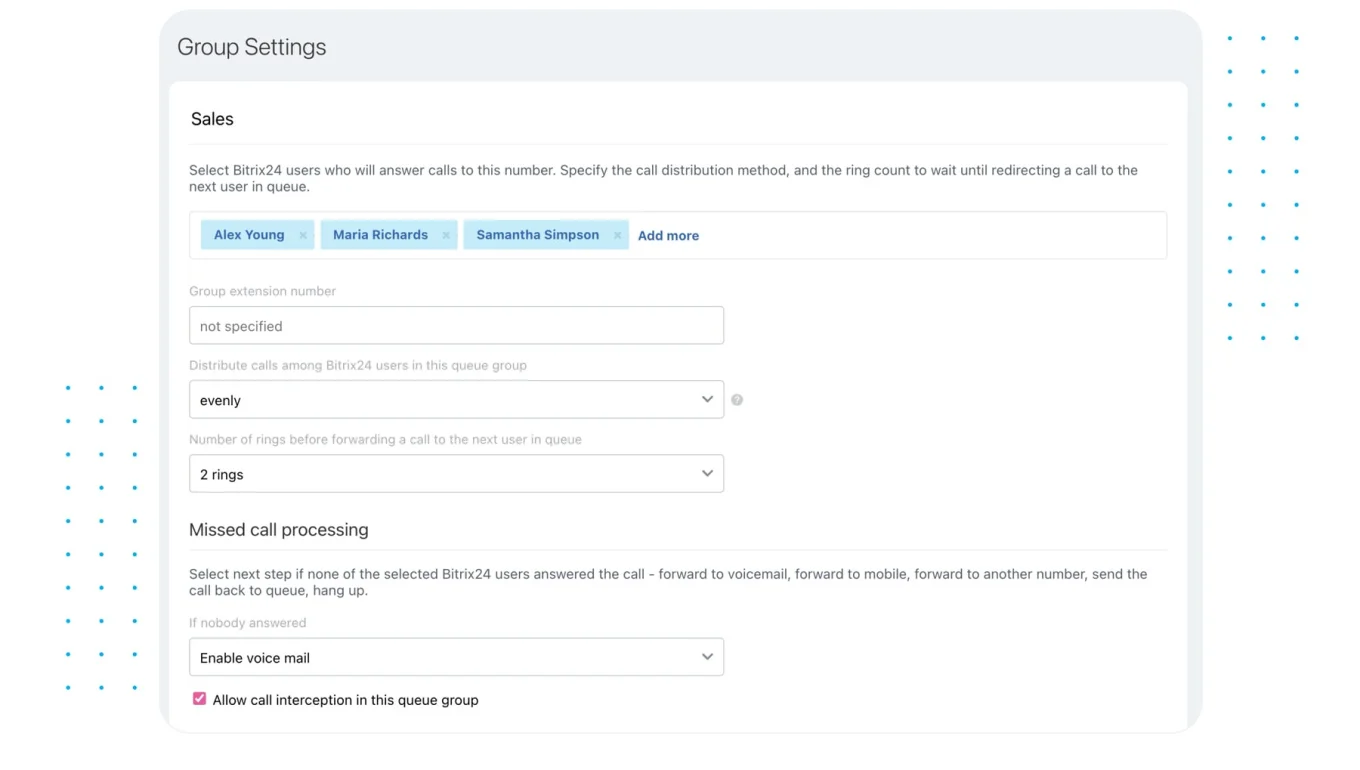
Where supported, Bitrix24 Contact Center connects customer conversations from supported messaging and social channels with CRM records. Where no direct connection exists, a short internal intake form still produces consistent records.
Stage 4: Qualify without interrogating the lead
Match the qualification to the channel. A social DM calls for a short, conversational exchange, not a discovery script. The sales owner might ask one or two questions about:
- The person's goal
- Their current setup
- Timing
- Business fit
- Who else is involved in the decision
If the conversation needs more depth, move it to email or a call rather than forcing a full discovery process into DMs.
Stage 5: Assign the next action
Every routed interaction needs four things:
- A named owner
- A due date
- A specific next action
- The channel where the response happens
"Sales to follow up" is impossible to manage. "Jordan replies by LinkedIn DM before 3 p.m. and offers two meeting times" is a plan.
Stage 6: Review outcomes
A weekly review runs about 30 minutes for a small team. Focus on:
- Unresolved high-intent interactions
- Overdue tasks
- Duplicate records
- Disqualified leads
- Meetings created
- Opportunities opened
- Signals marketing should feed into future content
Signals enter at different stages. Once they clear the handoff threshold, they all go to the same managed follow-up queue.
Roles, ownership, and handoffs across marketing, sales, and founders
Small teams don't need a big org chart. They need named owners. Without them, work defaults to whoever happens to see the message first.
Four owners cover it.
- The content owner plans posts, campaign tags, CTAs, and tracking.
- The community owner watches comments, DMs, replies, and mentions.
- The sales owner qualifies commercial signals and runs the follow-up.
- The operations owner maintains CRM fields, routing rules, duplicate controls, automation, and reporting.
One person can wear several of these hats; the responsibility still has to be written down.
Handle founder-led conversations without creating a bottleneck
Founders sit across content, community, sales, and partnerships, and their personal posts often pull stronger buying signals than the company account. Use a simple transfer rule:
- The founder sends the first natural response.
- The community or operations owner records the interaction.
- Sales takes ownership once buying intent is explicit.
- The founder stays in the loop when their relationship matters to the next step.
Founders hand the conversation to whoever logs and routes it rather than filling in every CRM field themselves. A dedicated internal channel or a structured message works, as long as it creates an actual task instead of one more notification.
Make handoff rules specific
Move the interaction from public to private when it touches:
- Pricing
- Account details
- Scheduling
- Personal information
- Technical setup
- Contract or procurement questions
A DM becomes a lead record when there's identifiable contact information plus commercial relevance. Support, recruiting, press, and partnership inquiries leave the sales queue immediately.
|
Activity |
Responsible |
Accountable |
Consulted |
Informed |
|---|---|---|---|---|
|
Post planning and source tagging |
Content owner |
Marketing lead |
Sales owner |
Founder |
|
Inbox monitoring and first response |
Community owner |
Marketing lead |
Founder |
Sales owner |
|
Lead qualification and follow-up |
Sales owner |
Sales lead |
Community owner |
Founder |
|
CRM rules, automation, and reporting |
Operations owner |
Operations owner |
Marketing and sales |
Founder |
Internal chat is fine for the discussion, but the handoff has to finish in a managed work record. Talk it through in chat, then create a Bitrix24 task with an assignee and deadline, or record the next step in the CRM.
Pro Tip: Log the handoff while the conversation is still open. Wait until end of day and you lose the exact wording, the promised action, and the urgency sales needs.
Automation, visibility, and the control points that keep leads moving
The minimum tool stack is modest:
- A scheduling platform
- A unified inbox or comment tracker
- A CRM
- Task automation
- Source and campaign tags
- Reporting that connects activity to outcomes
Native platform tools work at low volume, as long as status, ownership, and history stay visible in one place.
Automate mechanical steps
Automate the repetitive actions:
- Creating a CRM record from a campaign form
- Adding source and campaign tags
- Opening an intake or qualification task
- Assigning leads by account owner, territory, product, or inquiry type
- Sending alerts when tasks pass the response SLA
- Updating a queue when the lead changes state
- Notifying customer service when a sales-looking inquiry is actually a support issue
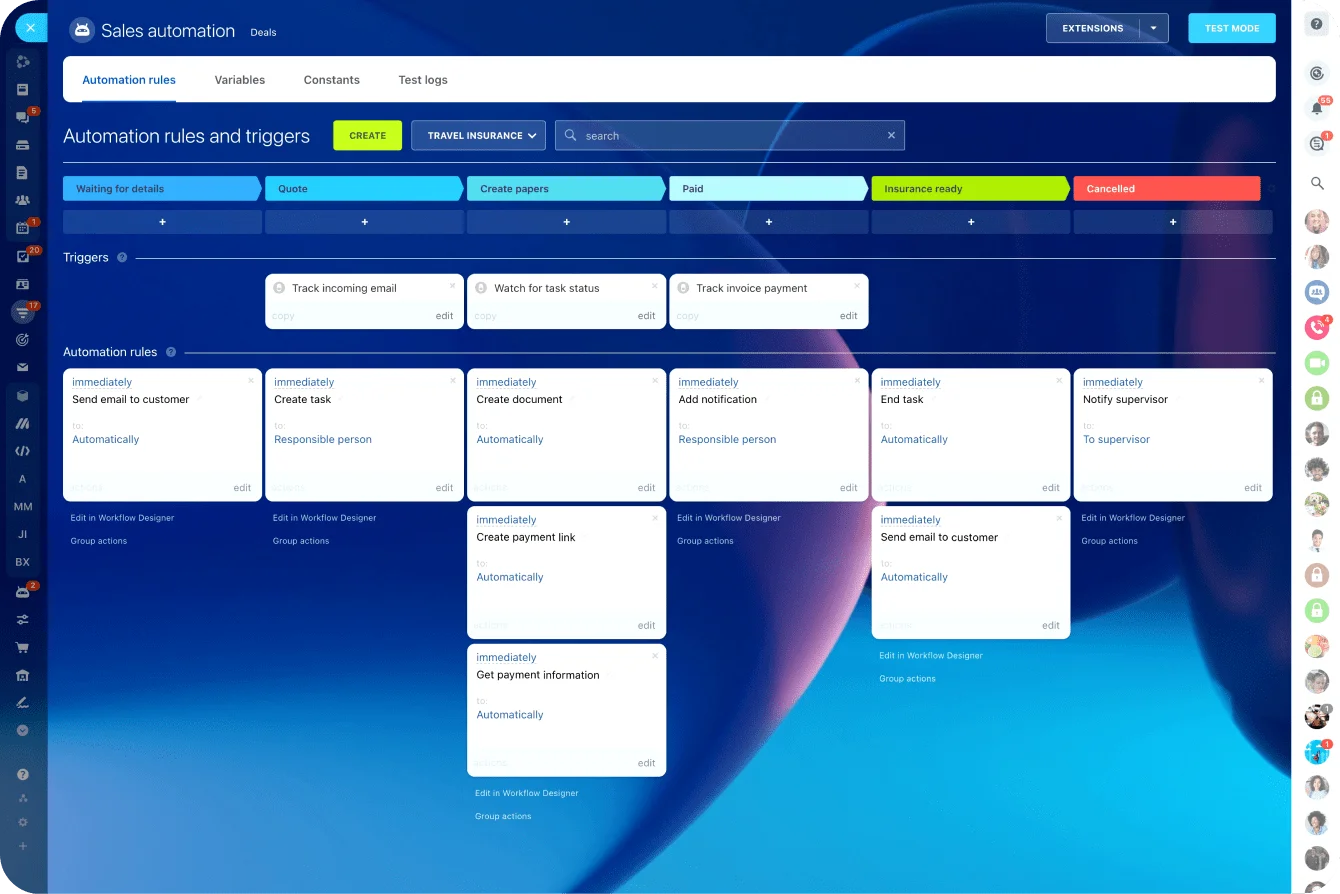
Bitrix24 CRM automation rules handle status-based actions, and Bitrix24 task features supply assignments, deadlines, and reminders once the interaction is captured.
Keep judgment with people
People still own the decisions that involve:
- Tone
- Qualification
- Account priority
- Sensitive information
- The move from public to private
- Whether an existing customer needs sales or support
Treat every engaged user as a hot lead and sales stops trusting the source. Automated replies do real damage too when they don't answer the person's actual question. Watch for the customer whose product question sounds like buying intent: before you open a new opportunity, check whether they already have an account or an open service case.
Use visible control points
Control points stop the workflow from drifting:
- Twice-daily inbox review: comments, DMs, mentions, and replies.
- Mandatory CRM fields: source, platform, thread link, signal type, owner, and next action.
- Duplicate check: search by email, company, handle, domain, and name variation.
- SLA alerts: flag high-intent interactions still unassigned or unanswered.
- Daily exception review: catch overdue and unowned items.
- Weekly reconciliation: compare social signals with CRM activities and outcomes.
- Monthly taxonomy review: update signal types, campaigns, and routing rules as new patterns appear.
A dashboard should answer one question at a glance: what's open, who owns it, and how old is it. Bitrix24 CRM reports handle this once source fields and activity logging stay consistent.
If a manager can't see how many meaningful social interactions are waiting for follow-up, the workflow isn't functioning as an operating process.
Common failure points in social-to-CRM execution
Broken social lead systems rarely break in one dramatic way. They break through small inconsistencies that pile up until the data is unreliable and the handoffs are hard to trust.
|
Symptom |
Root cause |
Fix |
|---|---|---|
|
Social leads can't be reported cleanly |
No shared lead-source taxonomy |
Standardize source, channel, campaign, post, and signal fields |
|
Sales receives low-context records |
Contacts are logged without conversation history |
Require the thread link, summary, stated need, and promised action |
|
Sales ignores social leads |
Every engagement is treated as qualified |
Set stricter capture and qualification thresholds |
|
Leads vanish between a comment and DM |
No comment-to-private handoff process |
Log both interaction points under one activity history |
|
Multiple people contact the same account |
No duplicate or ownership rules |
Check the contact and account owner before assignment |
|
Support issues enter the sales queue |
Routing is based on keywords alone |
Add inquiry-type review before sales assignment |
|
Founder conversations remain untracked |
Personal profiles sit outside the workflow |
Create a quick founder-to-operations handoff method |
|
Marketing and sales blame each other |
No shared outcome reporting |
Review source-to-meeting and source-to-opportunity outcomes together |
|
Fast acknowledgments hide slow follow-up |
The SLA measures first reply only |
Track acknowledgment, assignment, and sales response separately |
|
Old tasks stay open indefinitely |
No aging or closure rules |
Review stale records weekly and record a clear outcome |
Use a shared source taxonomy
A simple taxonomy stops every employee from describing the same interaction a different way:
- Source: Social
- Channel: LinkedIn, Instagram, X, Facebook, or another named platform
- Signal: Comment, DM, mention, form fill, referral, or profile reply
- Campaign or post: Campaign name, post ID, URL, or content theme
- Inquiry type: Sales, support, partnership, recruiting, press, or other
- Intent level: Nurture, qualify, route, or close
- Original source detail: Founder profile, company page, employee account, paid campaign, or organic post
Under that structure, "Inbound lead from LinkedIn" becomes: "Source: Social; Channel: LinkedIn; Signal: Comment to DM; Campaign: Integration launch post; Inquiry type: Sales; Intent: Qualify."
That record gives sales enough context to act and gives marketing enough structure to report the result.
Diagnose the broken layer
Read the symptom to find the problem:
- Inconsistent activity points to unclear process design.
- Incomplete records point to weak intake fields or rushed logging.
- Untouched leads point to ownership or SLA gaps.
- Duplicate outreach points to poor account matching.
- Unmeasurable conversion points to inconsistent source and outcome fields.
- Low sales trust points to overly broad qualification rules.
Resist the urge to answer every failure with another tool. A new platform won't fix a fuzzy definition of buyer intent or an owner who never checks the queue.
How to scale the workflow without losing response speed or lead quality
As volume grows, shift from watching inboxes to triaging a queue. Incoming social signals enter a managed queue with:
- Status
- Priority
- Owner
- Age
- Next action
- Due date
Now the team works by urgency instead of whichever platform someone happens to open first.
Introduce priority queues
A practical queue:
- Priority 1: pricing requests, demo requests, referrals, target-account replies, and active buying questions
- Priority 2: product fit, implementation, integration, and availability questions
- Priority 3: relevant early-stage engagement that needs nurture
- Route elsewhere: support, recruiting, media, partnership, and spam inquiries
Every relevant interaction gets an acknowledgment. Priority decides the deadline for deeper follow-up.
Score behavior, not popularity
Lead scoring earns its keep when it reflects real social behavior:
- Direct product or pricing questions
- Repeat engagement from the same account
- Campaign form submissions
- Replies from named target companies
- Customer or partner referrals
- Multiple contacts from the same organization
- Engagement followed by a visit to a high-intent page
Follower count and post reach qualify no one on their own. A person with a small audience can be the right buyer; a popular account can have zero commercial relevance.
Standardize the process by channel
LinkedIn comments, Instagram DMs, X mentions, and founder-post replies behave differently. Keep the core qualification questions consistent, and let the response style and escalation route change by channel:
- A detailed LinkedIn question moves into a professional DM exchange.
- An Instagram inquiry gets a shorter reply and a link to a form.
- An X mention that's a complaint moves fast into a private customer service channel.
- A founder-post reply from a target account gets direct sales involvement.
Plan for volume spikes
Webinars, product announcements, events, and founder-led posts create sudden inbound demand. Before you publish, confirm:
- Who monitors during the campaign
- Who provides backup coverage
- Which signals get priority
- Which response templates are ready
- How technical questions get escalated
- When the team runs the post-campaign review
Pro Tip: Run a weekly aging audit instead of watching average response time. A healthy average hides a small group of high-intent leads that have been sitting for days.
Feed outcomes back into content planning
Review which posts create qualified conversations, not just which posts rack up engagement. Compare signal types with:
- Meetings
- Opportunities
- Disqualifications
- Service inquiries
- Partnership requests
- Closed outcomes
Use what you find to adjust content topics, CTAs, target segments, qualification questions, routing rules, response templates, and staffing for the next likely demand spike.
FAQs
When should a comment become a lead in the CRM?
Capture it when it shows commercial intent or starts a conversation likely to move that way. "Interesting post" stays out. A specific question about fit, pricing, implementation, availability, or a demo gets recorded.
Who owns follow-up if the founder starts the conversation?
The founder owns the opening reply. The lead transfers to sales once intent is clear. The handoff carries the thread history, the promised next step, the owner, and the due date.
How fast should sales respond to social-sourced leads?
Treat direct buying signals like warm inbound. Same-business-day response is a reasonable baseline; pricing requests, demo requests, and direct referrals belong inside the current coverage window. Track acknowledgment and sales follow-up separately, because a quick "Thanks, we'll get back to you" doesn't mean the lead has been worked.
Can this workflow run without a social media management suite?
Yes, at low volume. Use native platforms, a shared intake form, and a CRM, backed by fixed daily review times. It gets harder once several profiles, platforms, or team members are involved. At that point, missed notifications and inconsistent ownership justify a unified inbox or integration.
What's the minimum viable process for one marketer and one salesperson?
The marketer monitors and logs interactions. The salesperson qualifies and follows up. Both review outcomes weekly. Required fields:
- Platform
- Handle
- Thread link
- Contact identifier
- Intent summary
- Owner
- Next-action date
How should after-hours messages be handled?
Set a clear coverage policy. Use alerts for named accounts or urgent high-intent inquiries where practical, and review overnight messages at the start of the next business day. Don't promise 24-hour coverage unless someone is assigned to provide it.
How should anonymous or incomplete social profiles be logged?
Create a provisional record only when the interaction has commercial value. Store the handle, profile URL, thread link, and known context, then mark the missing fields for later. Don't guess the person's employer, title, or email.
What if several contacts from one account engage?
Link them to the same company account, keeping separate contact records and activity histories. One person may be researching, another may be the user, another may hold purchasing authority. Account-level visibility also stops several salespeople from contacting the same organization independently.
How do you prevent duplicate records?
Check email, company, domain, social handle, profile URL, and name variations before creating a record. If the match is uncertain, send the interaction to a review queue instead of spawning another contact automatically.
How do you track a lead that moves from a public post to a private DM and then to a call?
Log the full sequence under one contact or account timeline:
- Original post or campaign
- Public comment or mention
- Public acknowledgment
- Move to DM
- Qualification notes
- Assigned follow-up task
- Scheduled call
- Meeting or opportunity outcome
Keep the original context reachable after the conversation moves to another channel.
Turn Social Signals Into Sales Follow-Up
Bitrix24 connects CRM, tasks, chats, automation, and reports so social leads are captured, assigned, and followed up on time.
Get Started NowTurn social engagement into a managed pipeline
A signal isn't pipeline until it's a record someone owns. Everything in this piece serves that one line: the states, the thresholds, the SLAs, the taxonomy, all of it exists so a buyer's comment can't quietly die in a notification feed.
You don't have to rebuild the whole social operation to get there. Run a two-week pilot on one channel:
- Define the five interaction states and your capture threshold.
- Set separate SLAs for acknowledgment, logging, assignment, and follow-up.
- Configure the required CRM fields and source taxonomy.
- Pilot the process on the channel producing your strongest commercial signals.
- Review missed handoffs, response times, meetings, opportunities, and closed outcomes.
The pilot's whole job is to surface unclear definitions and ownership gaps before you automate anything or expand to every profile. Skip it and you just scale the leaks along with the process.
Bitrix24 gives small teams one connected place for CRM records, tasks, internal communication, automation, and reporting.
Sign up for Bitrix24 for free, configure the core capture fields, and run the pilot on your highest-intent social channel. Add the heavier automation and analytics as your volume and plan grow.