One Customer Timeline Across Sales and Support


On Tuesday at 4:47 PM, a support agent closes a ticket for a customer hitting API rate limits. Thirty minutes later, an account executive at the same company emails that same customer with a "just checking in" note and misses the upgrade signal entirely. Two systems, one customer, zero connection.
This is what happens when sales and support work from different records. Context gets lost between tools, signals go unnoticed, and customers end up repeating themselves or slipping through the cracks.
A CRM software with a unified customer timeline fixes that by keeping every interaction in one place. Sales conversations, support tickets, emails, calls, and chats all appear on the same contact record in chronological order, visible to both teams. Nothing sits in isolation, and no team is working from a partial view.
For growing teams across sales and support, usually companies with 10-200 employees, this shift is less about features and more about removing friction. Teams that have outgrown shared inboxes but still rely on separate tools start to see the difference quickly. Follow-ups happen with full context, handoffs stop breaking, and opportunities that used to get missed stay visible.
Most articles promising the best CRM comparison focus on feature checklists. This one focuses on what actually breaks when sales and support work from different records - and the five things a CRM software with a unified customer timeline has to get right to fix it.

Why Separate Systems Quietly Cost You Customers
A sales rep opens the CRM and sees three closed-won deals, an NPS score from six months ago, and a list of contacts. The support agent opens the help desk and sees twelve tickets, two angry ones, and a feature request that's been open for a quarter. Neither of them sees what the other sees.
That's the gap. It shows up in four predictable ways:
- The "do you know my account?" moment. The customer explains the same issue twice in one week - once to support, once to the account manager - and loses confidence in both.
- Missed expansion triggers. Support sees the customer hit a usage ceiling. The ticket gets resolved with a workaround. Sales never hears about it. The upsell conversation doesn't happen.
- Renewal surprises. A renewal comes up. The AE pulls the CRM and sees healthy usage. They don't see that support has been firefighting integration issues for six weeks.
- Broken attribution. Marketing wants to know which support issues correlate with churn. Nobody can answer, since the data lives in two places with different customer IDs.
None of this is a tooling problem in isolation. Each system probably works fine. The problem is the seam between them - the handoff between sales and support where context drops.
Five Levers for a Unified Customer Timeline
A CRM software with a unified customer timeline isn't one feature. It's five things working together. Skip any one of them, and the timeline goes from useful to misleading.
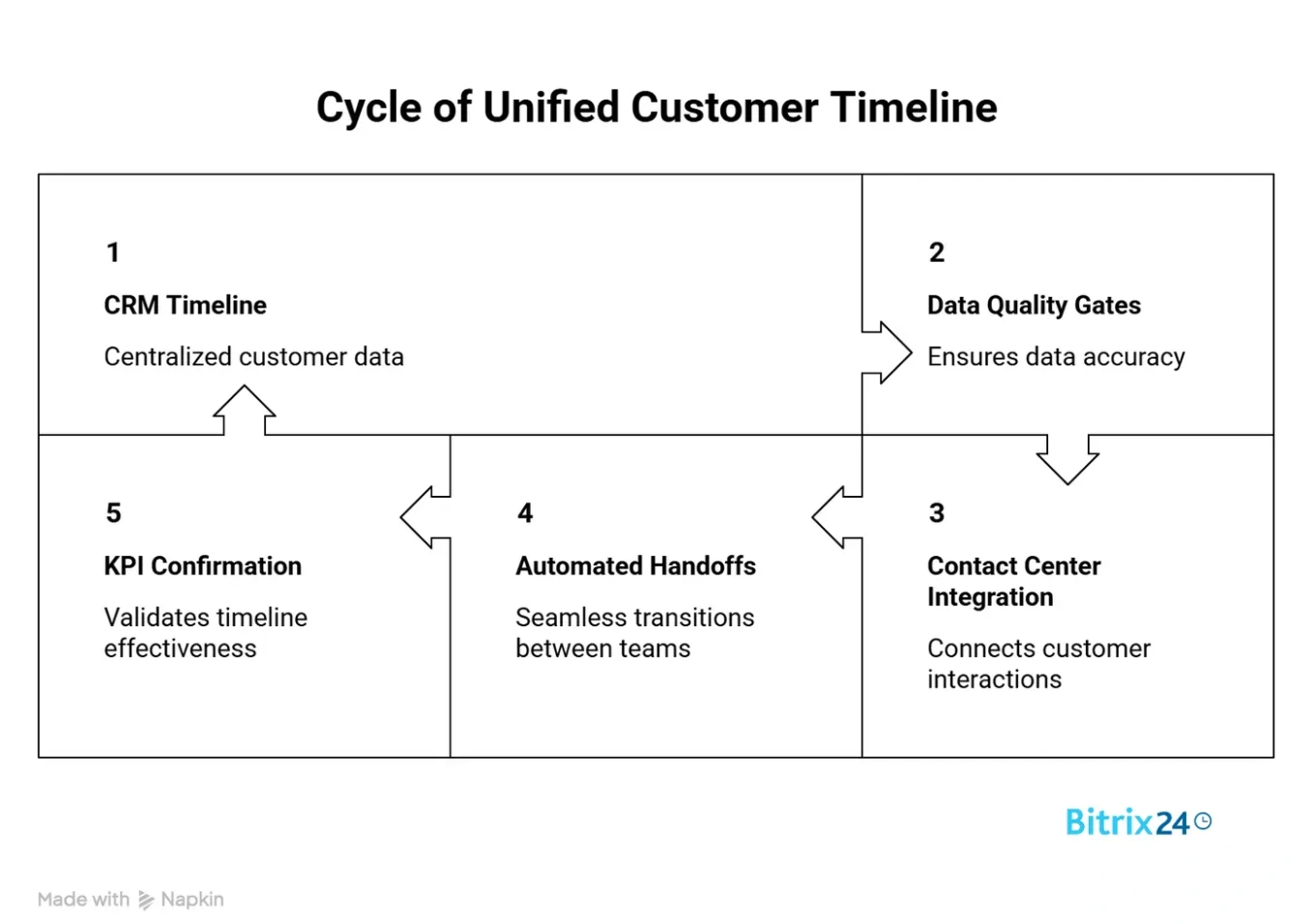
1. The CRM Timeline as the Shared Customer Record
The non-negotiable foundation of any CRM software with a unified customer timeline: every interaction writes to one record, and that record is the canonical source. Not a dashboard that aggregates data from four tools - the actual record, where both a sales rep and a support agent land when they type a customer's name.
A good customer timeline in the CRM shows, top to bottom: last email, last call, last ticket, last login, last invoice, last NPS response, last note. Mixed sources, one chronological view, no tab-switching.
What to check when evaluating platforms: can a support agent see the last sales call notes without changing apps? Can a sales rep see open tickets without requesting a login? If either answer is no, you don't have a unified view - you have two systems with a link between them.
2. Data Quality Gates Before Automation
Here's the rule nobody wants to hear: automation multiplies whatever data you feed it. If your contact records are 40% incomplete and 15% duplicated, a CRM software with a unified customer timeline will make that worse at machine speed, not better.
Strong CRM data quality practice means three things before you turn on a single automation:
- Deduplication rules that merge records by email + company domain, not just by exact-match email.
- Required fields on lead creation - at minimum: email, company, source, and owner.
- Validation at the edge - form fields that reject obvious junk, enrichment that fills in missing firmographics, and a weekly duplicate report somebody actually reviews.
Contact management in the CRM is where most implementations quietly fail. Teams skip the boring cleanup and jump to workflows. Six months later, the automation is firing on bad data, and nobody trusts the reports. The same rule applies to AI features layered on top - churn prediction, lead scoring, automatic summaries. They only work if the timeline underneath is clean and complete. Garbage timeline in, confident-sounding AI output out.
3. Contact Center Attached to the Record
Email, phone, WhatsApp, live chat, web forms - every inbound and outbound channel needs to write back to the same timeline. This is what turns a generic CRM into a CRM software with a unified customer timeline in practice, and what makes CRM for sales and support a real capability instead of a label.
The key test: if a customer emails support@, then calls the sales line two hours later, does the person answering the phone see the email? Not "can they find it if they search" - see it, as the most recent event on the timeline.
When this works, support-to-CRM integration stops being a project and becomes a default. When it doesn't, you're back to two systems.
4. Automated Handoffs Between Sales and Support
Handoffs are where context dies. A lead becomes a customer and moves from the CRM sales pipeline to the support queue. Without automation, the support agent starts from zero - no deal history, no known use case, no red flags from the pre-sales calls.
A working handoff does three things automatically:
- Copies key deal context (product tier, integration setup, named stakeholders) to the customer record when the deal closes.
- Notifies the assigned CSM or support pod with a link to the last three sales conversations.
- Flags the first support ticket within 90 days as a "new customer" event, so it gets prioritized differently than a routine issue.
The reverse handoff matters too. When support identifies an expansion signal - a usage limit hit, a feature request from a decision-maker, a new team getting onboarded - that signal has to land back in the sales pipeline in the CRM as a task, not a Slack message that disappears.
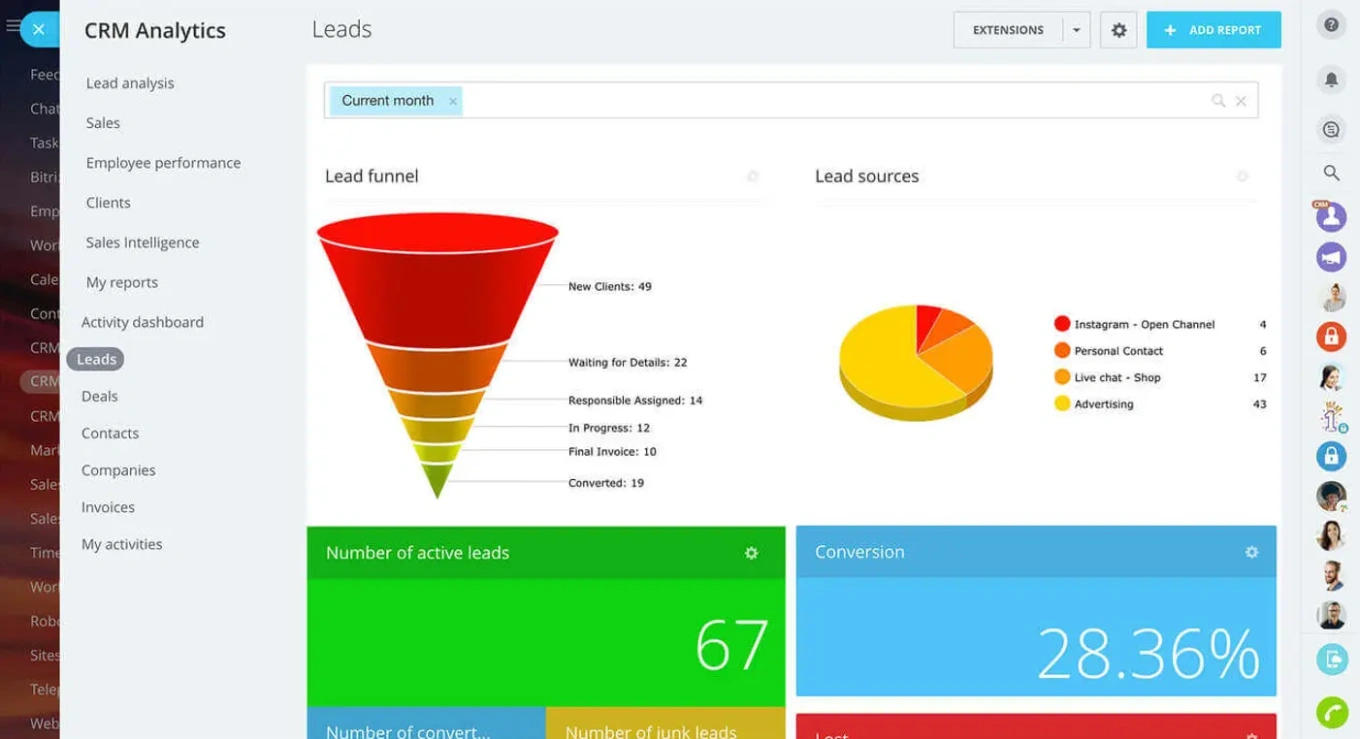
5. KPIs That Confirm the Unified View Is Working
A unified customer view is either measurably helping or quietly decorative. Four metrics tell the truth:
- First-response time after handoff (sales-to-support, support-to-sales). Should drop 20-40% within a quarter of rollout.
- Context switches per ticket - how often does an agent open another app to resolve a ticket? Should trend down.
- Expansion revenue from support-flagged accounts. If zero, either your handoffs aren't firing or support isn't trained to flag signals.
- Customer effort score in handoff interactions - ask customers directly after a support-to-sales or sales-to-success handoff whether they had to repeat themselves.
Without these, "unified timeline" is an architecture diagram. With them, it's a business result.
Customer Timeline Blueprint: Data Map, Fields, Automations
Enter your email address to get a comprehensive, step-by-step guide

Practical Rollout of a Unified CRM in Phases
Rolling out a CRM software with a unified customer timeline doesn't happen in a weekend for any mid-size team. A realistic schedule looks like this:
Phase 1 - Weeks 1-3: Audit and cleanup. Export your contacts. Count duplicates, missing fields, stale records. Fix the top three data issues before you touch any new software. This is the step that gets skipped, and it's the step that decides whether the project works.
Phase 2 - Weeks 4-6: Consolidate channels. Point email, phone, and chat into the CRM. Don't migrate history yet - just start writing new interactions to the right place.
Phase 3 - Weeks 7-9: Build the timeline view. Configure what shows on the customer record. Test with three real sales reps and three real support agents before rolling wider.
Phase 4 - Weeks 10-12: Automate handoffs. Turn on the workflows from section 4. One at a time. Monitor for a week before adding the next.
Phase 5 - Quarterly onward: Measure and adjust. Review the four KPIs from section 5 every quarter. Retire automations that aren't used.
Teams that try to do all five phases in four weeks tend to end up rebuilding the project at month six.
Comparison: Unified CRM vs. Separate Systems
The practical trade-offs look like this when you line them up side by side.
|
Dimension |
CRM software with a unified customer timeline |
Separate CRM + help desk |
|---|---|---|
|
Customer record |
One, shared |
Two, linked by email |
|
Handoff speed |
Minutes |
Hours to days |
|
Data quality work |
Once, centrally |
Duplicated across tools |
|
Reporting on churn drivers |
Direct |
Requires data warehouse |
|
Cost for a 30-person team |
Lower total |
Higher total, more integrations |
|
Implementation time |
8-12 weeks |
2-4 weeks per tool, then integration |
|
Best for |
CRM for growing teams that have outgrown shared inboxes |
Large enterprises with mature data ops |
|
Biggest risk |
Over-customization |
Data drift between systems |
A CRM for small businesses under 10 people can often skip this decision entirely and run everything from one tool from day one. The decision becomes real between 20 and 100 people, when shared inboxes stop scaling and the question shifts to whether to use two tools or one.

Limitations of CRM Software With a Unified Customer Timeline and Common Mistakes
A CRM software with a unified customer timeline isn't a silver bullet. Four honest limitations:
- It doesn't fix organizational silos. If sales and support have conflicting incentives, a shared record won't resolve them. The timeline surfaces the problem; the org chart has to solve it.
- Migration pain is real. Consolidating two years of tickets and deals into one system is messy. Plan for partial migration - current-year data in full, older data as read-only archive.
- Over-customization kills adoption. Teams that add 40 custom fields on day one end up with records nobody fills in. Start minimal, add only what's used.
- The timeline is only as good as what feeds it. If reps keep using personal email for customer conversations, the timeline is incomplete and misleading. This is a behavior problem, not a software problem.
The most common mistake: treating implementation as an IT project instead of a process redesign. The platform is 30% of the work. The other 70% is retraining sales and support to work from the same record and measuring whether they actually do.
Run Sales and Support From One Record With Bitrix24
At this point, the question isn’t whether a unified customer timeline makes sense. It’s whether your current setup can actually support it and spare you the addition of more tools, more integrations, and more points of failure.
Bitrix24 is built around a single customer timeline that writes sales and support interactions to the same record. The advanced CRM acts as the shared customer record where every deal, contact, and activity lives, while the Contact Center routes calls, emails, chats, and social messages directly into that timeline in real time. Whether a conversation starts with a sales rep or a support agent, it lands in the same place and stays visible to both teams without switching tools or losing context.
Because everything runs inside one platform, there’s no need to sync data across separate systems or reconcile conflicting records after the fact. What sales sees and what support sees is the same timeline, updated instantly. That shared record is also what lets AI features - from automatic call summaries to next-step suggestions - work on complete context instead of half a customer.
On top of that, Tasks & Projects connects the operational side of handoffs between sales and support. When a deal closes or a support issue requires follow-up, tasks are created with full context already attached, and simple automation rules ensure the right person is notified and the next step doesn’t depend on someone remembering to act. Forms and inbound requests can feed new conversations into the same record, but the core value stays the same: sales and support are working from one timeline, not reconciling two.
That’s what removes the friction in handoffs - not another integration, but a shared record that both teams actually use.
If you’re looking for CRM software with a unified customer timeline, you can create a free Bitrix24 account and see how sales and support work from the same record.
Unify your Sales & Support
Eliminate context loss and improve customer experience with Bitrix24's unified customer timeline. Track every interaction in real-time, enabling seamless handoffs between sales and support teams. Unlock valuable insights and opportunities with our advanced CRM.
Get Started NowFAQs
How does Bitrix24 build a unified customer timeline across sales and support?
Bitrix24 builds a unified customer timeline by writing every interaction - calls, emails, chats, WhatsApp messages, support tickets, and deal updates - to the same contact record in the CRM. Sales and support agents open the same record and see the full chronological history without switching tools.
What improves data quality before a CRM software with a unified customer timeline starts running automations?
Data quality improvements to complete before automation include deduplication by email and company domain, required fields on lead creation, form validation at the point of capture, and a weekly duplicate-report review. Clean the data first, then automate - automation multiplies whatever data quality you start with.
How does a unified customer timeline in the CRM keep follow-up reliable after a handoff?
A unified customer timeline in the CRM keeps follow-up reliable by copying deal context to the customer record at close, notifying the receiving team with links to the last conversations, and creating automatic tasks when handoff events fire. No Slack message, no email trail - tasks on the record.
Which KPIs confirm that a CRM software with a unified customer timeline is working?
The KPIs that confirm a CRM software with a unified customer timeline is working are first-response time after handoff, context switches per ticket, expansion revenue from support-flagged accounts, and customer effort score in handoffs. If these aren't moving within a quarter, the rollout has a process problem, not a tool problem.
When does a CRM software with a unified customer timeline pay off compared to keeping two separate systems?
A CRM software with a unified customer timeline pays off once a team passes roughly 20 people or starts losing context on handoffs between sales and support. For fewer than 10 people, a single shared inbox usually works. Above 20, the cost of duplicated data and missed signals outruns the cost of consolidation.
How long does it typically take a mid-size team to roll out a unified customer timeline?
Rolling out a unified customer timeline for a mid-size team of 30-100 people typically takes 8-12 weeks when done in phases: audit and cleanup, channel consolidation, timeline configuration, handoff automation, and measurement. Teams that compress this into 4 weeks usually rebuild the project at month six.