First Response Time Is a Design Decision, Not an Aspiration


TL;DR (Quick Summary)
Most first-response targets get published before anyone builds the routing, ownership, and coverage that would let a team hit them. Build those first, and the number you publish becomes one you can keep.
- What does "first response" actually mean? → A reply from a person that changes what the customer does next, defined per channel and per support hour.
- What has to exist before an SLA? → One visible queue, one accountable owner per request, and escalation tied to a named person.
- How fast should each channel be? → As fast as your team manages in an ordinary busy week, set channel by channel and tested before it's published.
- What happens after hours? → Pick one coverage model, say it plainly in the acknowledgment, and hide any channel nobody's watching.
- Where does automation help? → Confirming receipt and setting honest expectations, never posing as a human or stopping the clock.
- How do you know the promise holds? → Percentage within target and the age of the oldest cases, because averages hide the customers you failed.
- How do you stop the model drifting? → Short shift checks, weekly root-cause fixes, monthly target reviews, and a named owner for the rules.
Takeaway: Publish only the response time your team hits in its worst ordinary week, and make sure the team sees every delay before the customer does.
Telling a support team to "reply faster" almost never makes them reply faster. Agents rarely lose time typing. They lose it to the email nobody triaged, the chat nobody claimed, the case forwarded to finance and forgotten, the widget left open at 10 p.m. with no one behind it.
Fast first response comes from the workflow around the team: a visible intake path, one accountable owner, realistic targets per channel, clear support hours, and escalation that fires while there's still time to act.
Build those and customers know their request is under control, and managers can see exactly where delays start.
This guide shows you how to set a first-response commitment you can still keep when demand spikes, a specialist team goes quiet, or nobody's online.
Treat first response as a service design choice
"We respond quickly" commits you to nothing. Until you've defined it by channel, support hours, and staffing, every agent and every customer reads it differently.
A support email sent at midday, a live chat opened during a product outage, and a voicemail left on a holiday carry different expectations. One generic promise under-serves the urgent channels and sets unrealistic expectations everywhere else.
Define what "first response" actually means
Decide:
- Which channels you offer.
- Which hours each channel is actively monitored.
- When the response clock starts.
- What qualifies as a meaningful first response.
- Who is responsible for sending it.
- When an unanswered request escalates.
Base every one of those rules on the capacity you actually have.
Separate first response from resolution early. A first response confirms the request has been seen, gives the customer a next step, and puts the request into a defined workflow. Resolution is the fix, the answer, the fulfillment, or the closure.
Blur the two and you optimize the wrong behavior. Picture an agent who sends "we're looking into it" within minutes. The metric looks healthy. The case then sits untouched until late afternoon, and the dashboard never shows it.
Here's a practical test for "meaningful": would the reply change what the customer does next? A request for the error log passes. So does a confirmed workaround, or a realistic date for an answer. "Thanks, we've got it" fails, and so does every automated message. If your reporting lets either stop the clock, your first-response number is measuring your autoresponder.
Where informal support breaks
The failure pattern repeats across teams:
- Shared inbox messages have no triage order.
- Two agents answer the same email with different answers, or each assumes the other already replied.
- Chat requests are answered by whoever notices them.
- Internal handoffs happen in direct messages.
- Nobody owns the customer update while another team investigates.
- Delays become visible only after the customer chases.
None of this means people aren't working hard. It means the operating rules leave too much to individual judgment. And you find out the worst way: a customer forwards their third unanswered email to someone senior, and the thread shows two agents who each thought the other had it.
Pro tip: Audit your most recent delayed requests before you set a new response target. Twenty is enough to show a pattern without turning the audit into a project. Look for the causes that repeat: unassigned tickets, unclear priority, side-channel handoffs, coverage gaps. Those patterns tell you what has to change before a tighter SLA will hold.
First-Response Time Blueprint: SLAs, Routing, Staffing Calculator
Enter your email address to get a comprehensive, step-by-step guide

Define intake routes, ownership rules, and overdue escalation before setting any SLA
Decide how requests enter the system and where they become visible. Then set the target.
One queue or several clearly defined ones, either works. What matters is that email, chat, portal forms, phone-created cases, and internal escalations all land somewhere that shows age, priority, status, and owner.
More queues won't make you faster. Every extra queue is another place work sits unnoticed, and small teams that split by channel are better off with one queue and a channel field. Split only when a queue genuinely needs different people or a different target.
Give triage a small number of clear decisions
Triage answers five questions, fast:
- What type of request is this?
- Is it technical, billing, service-related, sales-related, or internal?
- Does it meet an urgent-response condition?
- Which queue should receive it?
- Who owns the next customer-visible step?
If the channel implies urgency, as live chat and inbound phone do, build that into the routing rule. Agents shouldn't be making the same routing call from scratch every time.
A workable customer service workflow collects requests from multiple channels into visible queues, assigns responsibility, and makes overdue cases easy to spot.
Give every request one accountable owner
A team mailbox isn't ownership.
One person owns the next customer-visible step from the moment the request arrives. Engineering, finance, or account management might contribute later, but the original owner keeps responsibility for movement and customer updates until ownership is formally transferred.
Most support leads will recognize this one: a billing dispute reaches support and needs finance approval. The agent forwards it to finance and mentally files it as handed off. Finance sees one item among many. The customer sees silence.
Inside a CRM, ownership, status changes, activities, and customer history stay attached to the same record instead of scattering across inboxes and direct messages.
Give overdue escalation both a clock and a destination
An "overdue" alert is useless unless someone's expected to act on it. Tie each condition to a person:
- Unassigned request approaching target: notify the queue owner.
- Assigned request with no action: notify the agent, then the team lead.
- Cross-team dependency nearing breach: escalate to the contributing team's lead.
- High-priority case at risk: notify someone with authority to reallocate work.
Once the workflow is standardized enough to define these rules in advance, task automation handles the reminders and escalations for you.
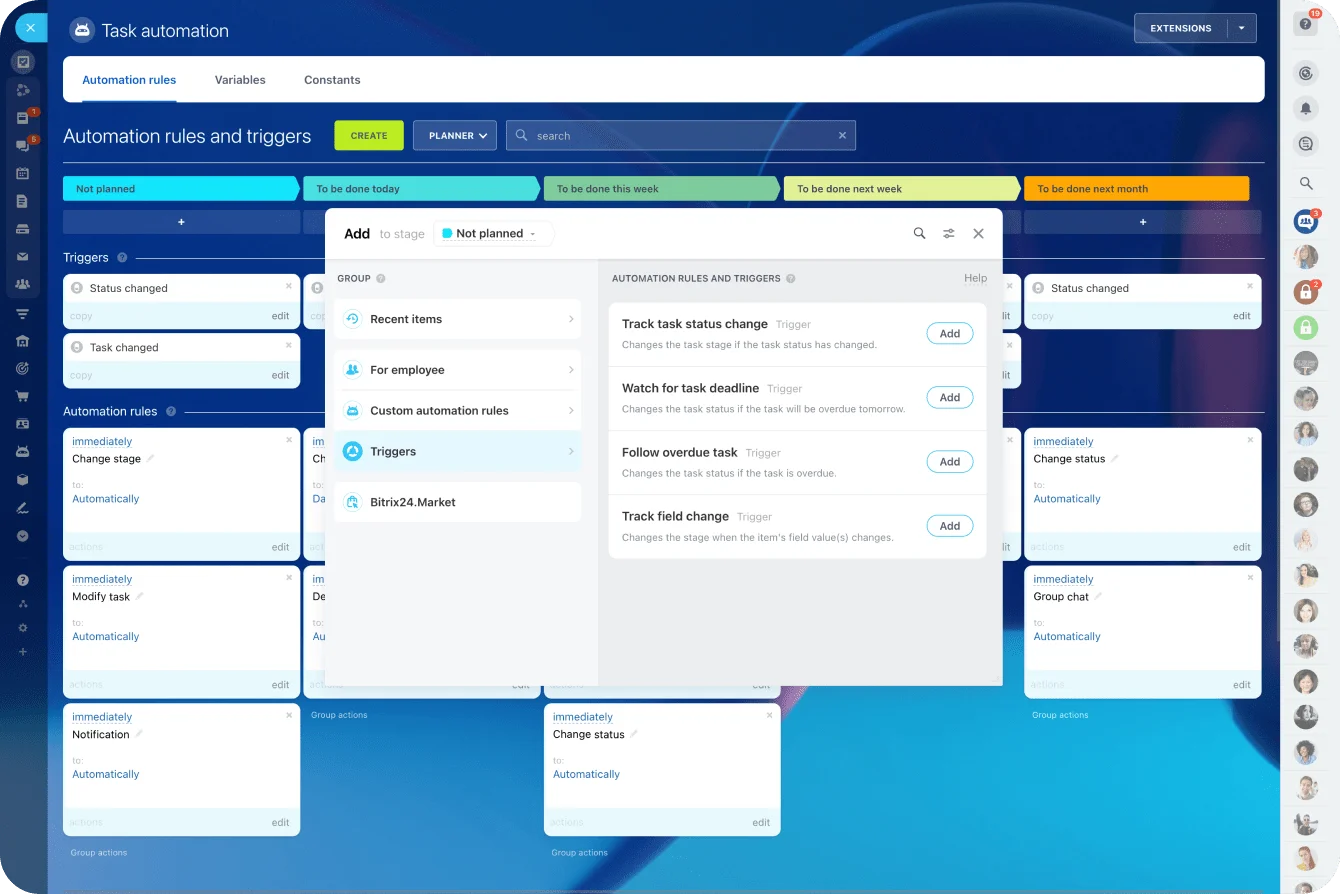
Escalation rules rot quietly. The rule still points at the team lead who left in the spring, so overdue alerts land in a deactivated inbox, and nobody notices until the monthly numbers come in and a whole category of cases has been breaching for weeks. Whenever someone changes role, check where their alerts go.
That ladder also assumes you have layers. In a three-person team, the agent and the team lead are frequently the same person, and a four-step chain is just noise. A small team needs a time-based alert to whoever's covering the queue and a named backup for when that person is out.
Keep handoffs visible
When support needs engineering input, the case stays visible as "waiting on engineering," with a due time for the contribution. It doesn't vanish into another department's backlog. The customer-facing owner still needs to know when to chase internally and when to update the customer.
Expect pushback. Specialist teams don't like support setting their deadlines, and a due time nobody agreed to gets ignored. The fix is an internal agreement (an operational level agreement, or OLA) signed off by the contributing team's lead: how fast they'll answer a support request, by priority. If your customer-facing target is shorter than that internal one, your customer-facing target is fiction.
Set channel-specific first-response targets that your team can actually keep
With routing and ownership in place, set a target per channel. A single blanket number fits none of them.
The right target depends on what customers expect, how complex the requests are, how much concurrent work agents carry, and whether the channel is live.
Match the target to how the channel is used
On a live channel, the customer is sitting there waiting, so the target is tight. Asynchronous channels run longer windows, provided the wait is stated and consistently met.
Complexity changes the math too. "Did you get my invoice?" over chat is a different job from an email with logs, screenshots, and replication steps for a technical fault.
The table below shows what a set of channel targets might look like for a small business-hours team. Treat the numbers as illustrative starting points to test against your own data (they aren't industry benchmarks).
|
Channel |
Illustrative first-response target |
Why it differs |
|---|---|---|
|
Live chat (staffed hours only) |
First human reply within 2 minutes |
The customer is watching the window |
|
Phone |
Answered within 2 minutes |
The customer is on hold and paying attention |
|
|
Within 4 business hours |
Asynchronous, but same-day matters |
|
Portal or web form |
Within 1 business day (standard), 1 hour (urgent category) |
Usually more detail, often less urgency |
For a sense of what large, fully staffed operations actually achieve on the phone, Ofcom's 2025 Comparing Customer Service report found that the average call waiting time for UK mobile customers was 1 minute 52 seconds in 2024, ranging from 15 seconds at Lebara to 3 minutes 27 seconds at O2. That's how widely the UK's mobile networks vary, with professional contact centers behind every one of them.
A small team has no business publishing a phone target it's never measured itself against.
Check the variables that change response capacity
Before you publish a target, review:
- How many requests arrive at once.
- How many conversations an agent can reasonably handle concurrently.
- Which request types require specialist input.
- Which hours regularly create backlog.
- How often the queue begins a shift with unfinished work.
- Whether holidays, campaigns, launches, or outages create predictable spikes.
A target that works at 10 a.m. on Tuesday and collapses every Monday morning isn't a commitment.
The target that gets teams into trouble is the one somebody picked during a quiet month and put on the website. Sales starts quoting it on renewal calls, a customer writes it into a contract, and the first launch week shows nobody ever checked it against a Monday. By then it's a promise you have to renegotiate account by account.
The trade-off most teams underestimate sits between chat and everything else. A tight chat target pulls agents off email, and an agent juggling several chats answers each one more slowly. If you can't staff chat consistently, offer it only during staffed hours. That beats offering it all day and missing the target half the time.
Test the target against predictable pressure
Test the target against an ordinary busy period. If the team misses the target there again and again, change something: the target, the capacity, the routing, or the channel coverage.
During an outage, chat and phone spike while email keeps arriving at its usual pace. A shared contact center shows where conversations are arriving, so one channel doesn't get forgotten while everyone's heads are down in another.

Design the after-hours model so customers know what happens when no one is online
After-hours support breaks for one reason more than any other: the customer can't tell whether anyone's watching.
Strong daytime coverage doesn't protect you. Evenings, weekends, holidays, and time zone gaps break response commitments unless the rules are written down. Most small companies don't need a staffed 24/7 desk. Every one of them needs explicit after-hours rules.
Choose an explicit coverage model
Three models work.
- With 24/7 coverage, someone is actively monitoring at all hours and response targets keep running.
- With severity-based on-call, defined urgent incidents trigger an out-of-hours response and standard requests wait.
- With next-business-hours support, you accept requests outside coverage hours and first response resumes when the next support window opens.
Trouble starts when a channel looks live but nobody's monitoring it, or when urgent and routine requests pour into the same after-hours queue unclassified.
The live-looking channel is the mistake I'd fix first. If nobody watches chat after 6 p.m., hide the widget at 6 p.m., or swap it for a message form that says so.
In Bitrix24, Open Channels lets you set business hours, tell customers who write outside them that they'll get a reply during business hours, and show the website widget only during working hours.
What each model tells the customer
Here's sample wording for the after-hours acknowledgment under each model. Swap the placeholders for your own hours and targets.
24/7 coverage
"Thanks, we've received your request (ref. [number]). Our team works around the clock, and a member of the team will reply within [target]. If you have more details, reply to this message and they'll be added to your case."

Severity-based on-call
"We've received your request (ref. [number]). Our support team is offline until [time and time zone]. If your service is down or you suspect a security problem, call [number] and our on-call engineer will respond; everything else will be picked up first thing when we reopen."
Next-business-hours support
"Thanks, your request (ref. [number]) is in our queue. Our support hours are [hours and time zone], so you'll hear from us by [time] on [next business day]. There's no need to send it again."
All three answer the only questions the customer has. Did it arrive? When will a person look at it? What do I do if it can't wait?
Define when the clock starts
Under next-business-hours support, timestamp the request on arrival and start the SLA clock when coverage resumes. Under on-call, start the clock immediately, but only for requests that meet your incident criteria.
Write the rule down, or agents, managers, and customers will each read the same target differently. And report against the clock you publish. A team that measures in business hours while customers read the promise in calendar hours looks on-target internally and slow to everyone else.
Build an exception path
Security events, major outages, named critical accounts, and business-wide access failures need their own treatment. For each exception, define:
- What triggers it.
- Who can declare the exception.
- Who gets notified.
- Which response target applies.
- How the case returns to the normal queue afterward.
Exception paths fail on the days nobody planned for. When the UK's air traffic control system crashed on the August 2023 bank holiday, the on-call engineer was at home and took 90 minutes to reach the site, the most senior engineer on duty wasn't called for more than three hours, and NATS waited four hours to ring the software supplier, according to the review commissioned by the Civil Aviation Authority. The panel also flagged a failure to rehearse for an incident like it. More than 700,000 passengers paid for that escalation chain.
Pro tip: Test the after-hours path yourself every quarter. Submit a request just after closing time and check the acknowledgment, the escalation route, the stated hours, the emergency instructions, and where the case lands in the next day's queue. Configuration that was right at setup drifts away from your staffing without anyone noticing.
Use automated acknowledgments to create certainty
Automation earns its place at the start of a case, where it removes ambiguity. A good acknowledgment confirms receipt, records a case reference, says what happens next, and asks for anything that's missing.
Match automation to the channel
Each channel needs different handling:
|
Channel |
Do |
Don't |
|---|---|---|
|
|
Confirm that the message entered the queue and state the expected response window. |
Auto-reply to out-of-office messages or other autoresponders (that's how ticket loops start). |
|
Portal form |
Provide a case reference and summarize what was submitted. |
Ask again for details the form already collected. |
|
Phone |
The agent can confirm the case verbally and send a written summary afterward. |
Send a generic "we received your request" after a call the agent already handled. |
|
Live chat |
Show expected wait time while the customer is queued. |
Send automated replies once a human is already responding. |
|
After-hours channels |
State the support hours and explain any emergency route. |
Leave a channel looking live when nobody is monitoring it. |
Avoid fake responsiveness
Customers can tell automation from attention, and they want a way past it. In a Gartner survey of 3,566 B2B and B2C customers conducted in February and March 2026, 87% said it's essential for companies using GenAI to provide an option to reach a human agent. An acknowledgment that says when a person will pick the case up does that job. One that implies a person already has does the opposite.
Automation also fails on autopilot. Someone sets up an email autoresponder, a customer's out-of-office replies to it, and the two systems answer each other all weekend. You come back on Monday to a queue stuffed with tickets two machines wrote, and the real requests are buried somewhere inside.
The quieter version is worse: the acknowledgment template still promises the response window you had before support hours were cut, so every customer gets told something untrue, automatically.
Ask for useful information early
Automation also cuts the time lost after first response. A technical support form, for example, asks for:
- Device or browser.
- Error message.
- Relevant screenshots.
- When the issue began.
- Whether other users are affected.
- Steps already attempted.
The customer gets confirmation straight away, and the first human reply starts with the context it needs.
Measure whether response commitments hold under load
The metric that matters is whether the team keeps its promise every time, bad days included.
Track reliability across the whole queue
Percentage within target, by channel, is the headline. Track these alongside it:
- Queue age by open-time band.
- Backlog at the start of each shift.
- Overdue rate by priority.
- Overdue rate by team or queue.
- Unassigned request age.
- Handoff waiting time.
Averages hide bad service. Run the arithmetic on some illustrative numbers: ten requests answered in 5 minutes and two answered after 6 hours average out to about 64 minutes. Against a 2-hour target, that report looks comfortable. Two of twelve customers waited three times longer than promised, and they're the two writing the review. Percentage within target (83%) shows them. The average doesn't.
Watch the pause rules, too. Most systems stop the clock when a case moves to "waiting on customer." That's fair when you genuinely need something from the customer. It's also the easiest way to flatter the numbers. If pending rates climb while response times improve, find out which statuses are doing the work.
The pattern is familiar: the dashboard is green at the quarterly review, and the account that just gave notice spent a week in "waiting on customer" because an agent asked for a log file the customer had already attached.
Break performance down by operating period
Slice results by:
- Hour.
- Day of week.
- Channel.
- Support shift.
- Priority.
- Normal demand versus surge periods.
Report business-hours and after-hours performance separately whenever they run under different rules. Otherwise, the Monday backlog and the weekend spillover vanish into a weekly average.
Turn each metric into an operating decision
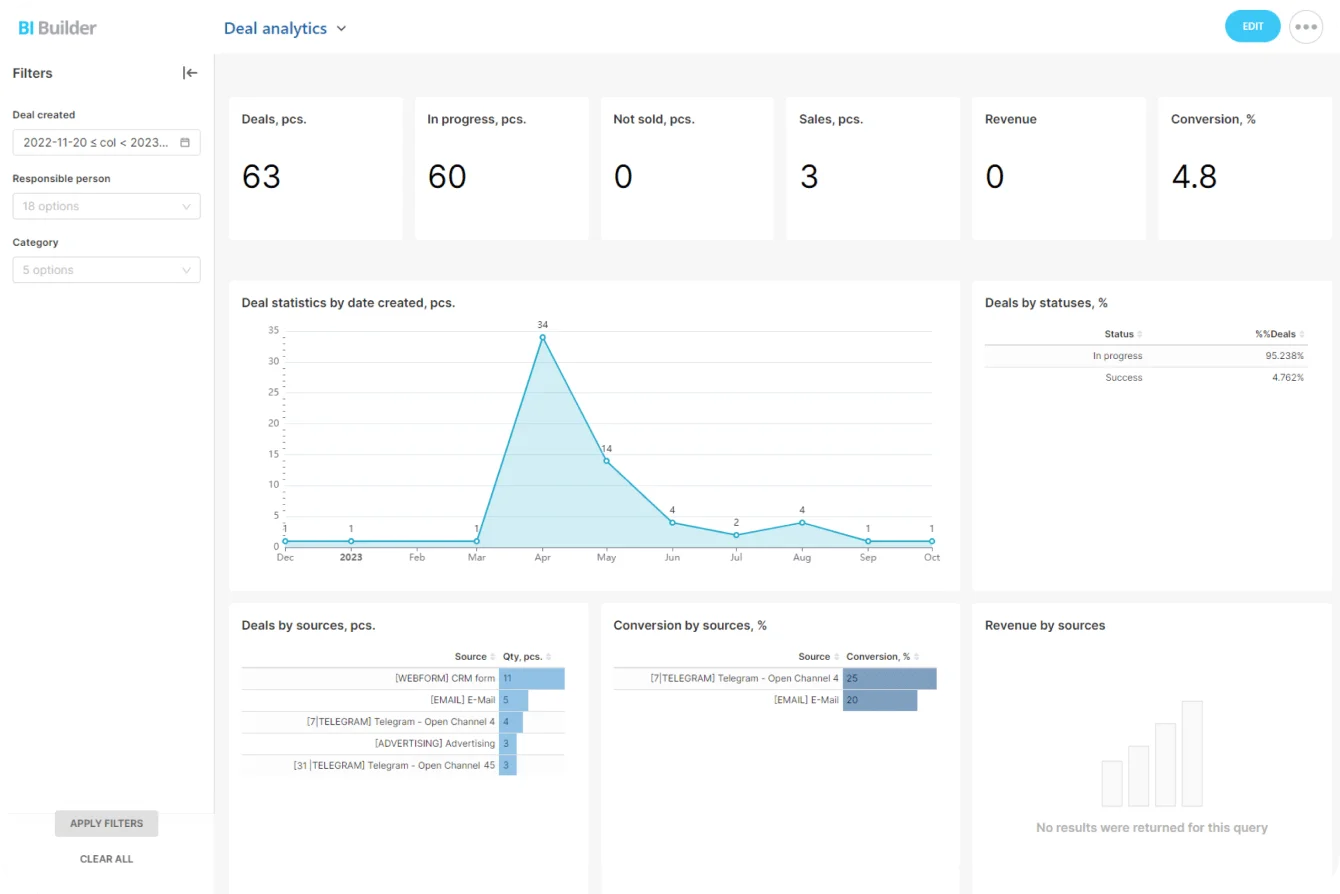
Analytics and reporting tools pay off when every report ends in a workflow decision:
- Cases sit unassigned → fix routing.
- One queue starts every shift with backlog → review staffing or hours.
- Handoffs repeatedly stall with one specialist team → set contributor deadlines or escalation.
- One channel misses target during predictable peaks → rebalance coverage.
- The target works only during quiet periods → reconsider the published commitment.
Pro tip: Look at the oldest open cases before you look at the average. A small cluster of aging requests points straight at broken handoffs and ownership gaps that a headline response-time number never shows.
Run a lightweight operating rhythm that keeps the target real as demand changes
Leave a first-response model alone and it drifts. You don't need a heavy service-management process to stop that, just a few recurring checks.
At the start of each shift
The queue owner or team lead checks that:
- New requests landed in the correct queues.
- No urgent case is sitting unassigned.
- Overnight or previous-shift backlog has an owner.
- Cases approaching target have been escalated.
- Known incidents have the correct priority.
A quick look at the queue. No meeting required.
Every week
Review missed commitments by channel, queue, time window, and root cause. Ask what actually happened:
- Was the case unassigned?
- Was it routed incorrectly?
- Was the priority wrong?
- Did a handoff stall?
- Was the team overloaded?
- Did work happen in a side channel where the queue couldn't see it?
Each answer ends in a specific correction to routing, staffing, ownership, or process. A list of reasons isn't an outcome. The weekly review that dies is the one where the same causes get read out every Friday and nobody leaves with a fix assigned to their name.
Every month
Revisit the commitments themselves. New products, staffing changes, seasonal demand, new customer segments, and rising incident volume all turn yesterday's target into an unrealistic one. Check:
- Channel targets.
- Support hours.
- Escalation thresholds.
- Repeated handoff problems.
- Queue capacity.
- Public service messaging.
Give the operating model an owner
Three things need an owner: the queue rules, the published response commitments, and the review of whether assignments, acknowledgments, and escalations work as designed.
In a small business, one support lead owns all three. Fine, as long as everyone knows it. The failure mode is the unowned rulebook: the person who wrote the routing rules moves to another team, nobody inherits them, and requests for a newly launched product land in a queue nobody watches for weeks. The shift check gets skipped the week the lead is on holiday, which is exactly the week the backlog builds.
Watch for work that bypasses the system
Direct messages, personal emails, account-team favors, and requests handed to support in the corridor all eat capacity that reporting never sees. So do managers who skip intake for "just this one" request, and agents who drop a ticket's priority to keep the SLA report green. Each one distorts the queue and makes the promise harder to keep.
Much of that side-channel work exists because the people who need to contribute aren't in the system. When finance or engineering can't see the case, support forwards it by email, and the clock disappears from view.
Bitrix24 is built around that problem: the CRM record, the open channel conversation, and the internal handoff task sit in one workspace. Bitrix24 files a support conversation on the customer's record instead of as a standalone ticket, which suits teams where support, billing, and account management all touch the same customer.
Teams that run formal ITIL-style incident and change processes model those stages with pipelines and automation rules rather than getting them prepackaged.
FAQ
What counts as a first response?
A reply from a person that changes what the customer does next: a request for specific information, a workaround, or a realistic date for an answer. Automated acknowledgments don't count, however fast they go out.
What's a good first-response target?
One your team hits during an ordinary busy week. Set it per channel, measure against it privately before you publish it, and use the illustrative targets above as a starting point to test.
Does a small team need 24/7 support?
Most don't. Every team needs a written after-hours model (24/7, severity-based on-call, or next-business-hours) and an acknowledgment that tells customers which one applies and what to do if their problem can't wait.
Why isn't average first response time enough?
Because a few very slow cases disappear inside it. Track percentage within target alongside the age of your oldest open cases.
Design Faster First Responses With Bitrix24
Unify queues, ownership, channels, and escalations in Bitrix24 so your team sees delays early and keeps response promises.
Get Started NowThe customer shouldn't have to chase
Every delay in this article ends the same way: the customer spots it first. From then on they’re running your escalation for you, and every chase is one more contact in a queue that’s already behind.
A first-response target only holds if your team sees the delay first. That means everyone who touches a case works where the clock is running, including the finance and engineering people two steps from support.
Bitrix24 charges a flat rate per plan rather than per seat, so bringing them in costs nothing extra up to the plan’s user limit. “Waiting on finance” then sits in the support lead’s queue, aging in plain sight. The customer never has to chase.
Takeaway: A believable first-response target is built from queue design, ownership, hours, and control points, and weakness in any one of them turns the target into a promise the team repeatedly misses.