The First Hour After an Enquiry: Why Response Speed Beats Almost Everything Else


TL;DR (Quick Summary)
Small teams lose inbound deals in the gap between an inquiry landing and a person replying, and that gap is a routing and ownership problem you can fix without hiring.
- How do you measure response speed? → Time to the first reply from a person, per channel, with the no-reply rate on its own line
- Where do inquiries stall? → Before anyone owns them: shared inboxes, buried chat pings, manual CRM entry
- How should routing work? → One named owner within minutes, plus a fallback that fires when that person doesn't act
- What does the first reply have to do? → Confirm a person has it, show you understood, answer what you can, set a next step
- When do you trade speed for completeness? → Send what's known now and verify anything that becomes a promise
- What about nights and weekends? → Pick a coverage model you'll actually staff and write the escalation rules down
- How do you keep it fast? → Review slow inquiries weekly and decide up front whether a holding message counts
Takeaway: Most slow replies are routing failures you can spot in a week of your own records, so measure before you hire.
Most small teams could win more of the inquiries they already get without spending another dollar on marketing. The fix is simple: reply faster. And the delay itself sits somewhere most managers never look: the stretch before anyone realizes the inquiry is theirs.
A 2011 Harvard Business Review study analyzed 1.25 million sales leads received by 42 US companies (29 B2C and 13 B2B). Firms that tried to contact a prospect within an hour of the inquiry were nearly seven times as likely to qualify the lead (defined as having a meaningful conversation with a decision maker) as firms that waited even one hour longer. The same article reports an audit of 2,241 US companies, each sent a test web inquiry. Nearly a quarter of them (23%) never replied at all.
That data is American and 15 years old, so don't read "seven times" as a forecast for your pipeline. But the direction holds, and buyers certainly haven't gotten more patient since…
This is written for teams whose prospects compare options: property, trades, professional and B2B services. If you mostly answer formal tenders with fixed deadlines, accuracy beats speed and parts of this won't apply. Everyone else will come away with a setup that gets a named person replying inside the hour, every time, without anyone sleeping next to their phone.
Measure the real gap between inquiry arrival and first human response
Pick one metric and define it so nobody can argue with it: the time between an inquiry arriving and a person sending a reply. Throughout this guide, "first reply" means exactly that.
Autoresponders don't count. Neither does a CRM status change, someone opening the message, or a notification pinging team chat. The clock stops when a person responds.
Expect pushback the first time you apply this. Strip the autoresponders out and the median jumps, and someone will argue the old number was the real one. The old number was measuring how fast your software sends email.
Use the same definition across every channel
The clock starts the moment a prospect contacts you expecting an answer, whichever way they came in:
- Website form submissions
- Inbound calls that need follow-up
- Emails sent to shared inboxes
- Web chat inquiries escalated to a person
- Marketplace messages
- Social DMs treated as sales inquiries
A sales pipeline management system turns all of these into trackable CRM records instead of messages scattered across inboxes and apps.
Audit records instead of impressions
Teams remember the inquiries they handled fast. The ones that sat unnoticed never come up in conversation.
Pull a sample of recent inquiries across channels and times: weekday mornings and afternoons, evenings, weekends, and your busiest stretches.
Report business hours and out-of-hours separately, because one blended average hides an evening or weekend problem.
Build a simple baseline scorecard
Track five numbers:
- Median first-response time by channel
- Percentage answered within 15 minutes
- Percentage answered within 30 minutes
- Percentage answered within 60 minutes
- Percentage receiving no human reply
Use the median. One inquiry that sat for a week wrecks an average. The threshold percentages show how consistent the process is.
Give the no-reply figure its own line. In 2024, real estate analyst Mike DelPrete secret-shopped more than 25 US brokerages through their own websites, always during weekday business hours. Nearly half the inquiries (47%) never got an answer. The replies that did arrive had a median time of 39 minutes and an average of 8 hours 17 minutes. Same replies, two very different stories, depending on which number you report.
Here's what a finished scorecard looks like. The figures are illustrative to show the format (they aren't from a real business, and they aren't benchmarks).
|
Channel |
Median first reply |
Within 15 min |
Within 60 min |
No human reply |
|---|---|---|---|---|
|
Website form |
20 min |
40% |
85% |
0% |
|
Shared inbox |
3 hours |
10% |
35% |
10% |
|
Social DMs |
Next day |
5% |
15% |
20% |
Blended together, those rows say the team is a bit slow. Split out, they say the website form works fine and the shared inbox is where leads go to die.
Do the audit by hand at least once. A dashboard gives you the median; individual records show you the cause. Expect one channel to be humming along while a shared mailbox gets missed again and again. A classic: the contact form still sends its notifications to someone who left the company months ago.
If pulling these numbers takes hours of digging through different systems, that's a finding too. It means timestamps, ownership, or reply activity aren't being captured consistently.
15-Minute Enquiry Response Playbook: Scripts, Triggers, Follow-ups
Enter your email address to get a comprehensive, step-by-step guide

Map where new inquiries stall before anyone takes ownership
Once you know how long leads wait, find out where. In most small companies, the longest pause comes before any sales work starts.
Trace the handoff from arrival to ownership
Map every step from the prospect pressing "send" to a named person becoming responsible. These are the usual stall points:
- A shared inbox receives the message, but nobody treats it as theirs
- A notification lands in a busy chat channel and gets buried
- A website form sends an email that depends on somebody checking it manually
- Someone has to copy the inquiry into the CRM before it can be assigned
- New leads are pulled from the system in a daily batch rather than as they arrive (one of the causes the HBR authors identified)
- Two people see the lead and each assumes the other will respond
- The normal owner is out, and the routing rule doesn't account for it
A typical manual chain looks like this:
Website form → shared inbox → internal notification → manual CRM entry → assignment → first reply
Every handoff is another place for the inquiry to wait.
The two-people-saw-it case is the one that stings. Nobody finds out until the "I thought you had it" conversation a few days later, by which point the prospect has booked a viewing with someone else.
Look for ownership gaps
Property inquiries make the cost easy to see. Take this example: a prospective buyer sends the same questions to several agents in quick succession. Is the property still available? Can I see it this week? What fees apply?
The agency that drops that message straight into the CRM with a named owner starts the conversation. The agency with a shared inbox is still waiting for someone to notice the email.
Separate process problems from capacity problems
Several inquiries land at once and every rep is already with a customer: that's capacity. Inquiries sit untouched because they hit the wrong inbox, have no owner, or need manual CRM entry first: that's process.
To tell them apart, check when the slow inquiries arrived. Capacity problems cluster around your busiest hours. Process problems show up as long delays at quiet times, when someone was free to reply and nobody knew the inquiry was theirs.
In most small teams, that second pattern is the one you'll find, and hiring another salesperson won't touch it.
Set routing rules so every new inquiry gets a named owner immediately
Every new inquiry needs one named owner in the CRM within minutes of arriving. "Sales team," "general inbox," and "to review" are destinations. Nobody is accountable for a destination.
Choose routing rules that match the way your team works
Keep the logic simple.
- Route by channel, with different people handling phone, email, forms, or chat. Route by territory, so inquiries go to the rep responsible for that area.
- Route by product or service, so specialists get the relevant inquiries.
- Route by availability, rotating new leads among whoever can respond.
- Or route by customer type, so existing customers and new prospects follow different paths.
For a small team, one or two clear rules beat a routing tree nobody understands.
Be careful with territory and fair-share rotation. The HBR authors named lead-distribution rules based on geography and fairness as one reason companies respond slowly. The right rep is on vacation, or it isn't their turn, so the lead waits. Route the first reply for speed and the account for fit. Whoever's free sends the first reply, and the territory or specialist owner takes it from there.
In Bitrix24, CRM records give each inquiry a responsible person, and CRM automation handles steps such as lead assignment, follow-up tasks, notifications, and escalation rules.
The Free plan (one to two users) covers the part that matters most here: every inquiry lands as a CRM record with one responsible person, so ownership never defaults to a team label. Time-based reassignment and escalation run through automation on the paid plans. A two-person team can run the fallback by hand from a daily overdue view. A busier team needs the rule to fire on its own.
Build the fallback before you need it
Routing works while everyone's at their desk. It breaks when the owner is:
- In a meeting
- Visiting a customer
- Off shift
- On leave
- Out sick
- Already buried in a backlog
The worst version looks fine on screen. Round-robin keeps handing leads to someone on two weeks' leave because nobody changed their status, and every one of those leads shows an owner, so nobody else touches them.
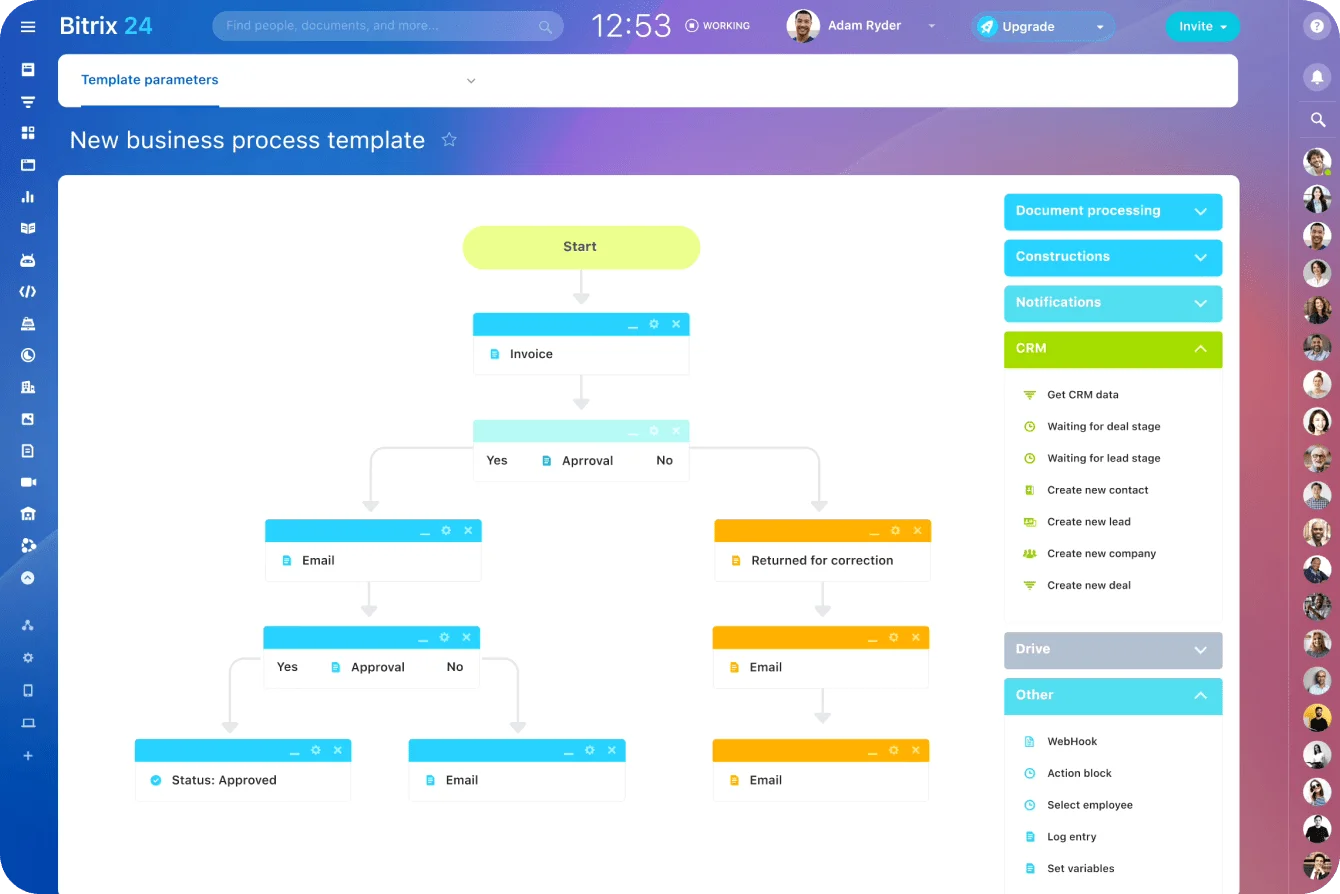
Ownership needs a second path. Here's a practical fallback. The timings are suggested starting points for business hours. They aren't industry standards, so adjust them once you have your own baseline.
- Assignment to a named owner within 5 minutes of arrival (automatic routing makes this close to instant)
- Time-based reassignment or team queue escalation if no first reply is recorded within 15 minutes, so another available employee picks it up
- Manager notification if there's still no reply at 30 minutes, or if the threshold is breached again
- Temporary routing changes when an owner is away for the day
The point is to stop one person's calendar from becoming a dead end.
Test every routing change with a dummy inquiry. Check who receives it, what notification they see, whether the CRM record carries the original message, and what happens when the first owner does nothing.
Skip the test and you find out the rule broke when a rep asks why it's been so quiet all week.

Define what the first reply must achieve in the first hour
A fast first reply doesn't have to answer everything. It has four jobs:
- Confirm that the inquiry reached a real person
- Show that the request has been understood
- Answer the most immediate question where possible
- Give the prospect a concrete next step
Those four jobs map onto what the prospect is wondering after hitting send:
Did they get it? Is anyone on it? Can they help? What happens next?
Every question you answer is one less reason for them to keep shopping.
Give enough information to keep momentum
For a property inquiry, acknowledge the request, confirm the listing is available if you know that reliably, and offer a viewing or callback window.
For a service inquiry, refer to the problem they described, confirm it fits your service area, and ask for the one missing detail you need to move forward.
Two examples to demonstrate:
Hi Sarah, thanks for asking about the two-bedroom apartment on Mill Lane. It's still on the market as of this morning. I can show you around on Thursday at 5:30 p.m. or Saturday at 11 a.m. Which works better for you?
Hi Tom, thanks for the details about your boiler losing pressure. That's work we cover in your area. Could you send a photo of the pressure gauge and the boiler's make and model? I'll get back to you with next steps by 3 p.m. today.
Neither answers everything. Both prove someone read the inquiry, and both end with something the prospect can act on.
Personalize enough to prove the message was read
Minimum viable personalization does the job:
- Use the prospect's name
- Refer to the property, product, or service they asked about
- Mention one relevant detail from their inquiry
- State the next action
Weak replies fail by sounding generic or by asking for information the prospect already gave. The worst template asks for details the inquiry form already collected, which tells the prospect nobody looked. Templates give you structure. The judgment still has to come from the rep.
Lean on templates long enough and one goes out with "Hi [First Name]" still in it, or with last week's property address because someone edited the wrong draft. Prospects forgive a slow reply faster than they forgive that one.
Decide where to trade speed for completeness and where not to
Small teams lose time trying to make the first reply complete. A prompt partial answer does more, as long as the rep is clear about what's confirmed and what's still being checked.
Send what you already know
Safe to send right away:
- Confirmation that the inquiry was received
- The name of the person handling it
- Basic process information
- Available meeting or callback windows
- Broad service fit
- Clarifying questions
Hold back anything that needs verification
Check before sending:
- Exact availability
- Final pricing
- Contract terms
- Regulatory information
- Technical feasibility
- Delivery commitments
- Anything that creates a binding promise
Here's a workable test. If the prospect forwarded your reply to a colleague as your company's position, would you stand behind every line? If not, check the doubtful line or rewrite it as "I'll confirm by…".
Availability is where this bites hardest. A rep confirms from memory that the place is still free, it went under offer yesterday, and the first real conversation with that prospect is an apology.
Guess and you'll spend next week issuing corrections. Wait for every detail and the prospect hears nothing while your team researches answers the first reply never needed.
Use a simple response pattern
Respond with what's known → state what needs checking → give the next update time.
A service business quoting a job needs photos, measurements, or technical details before it can put a final price on it. The first reply still acknowledges the request, names who's reviewing it, asks for what's missing, and says when the next response will arrive.
The conversation stays alive while the detailed work happens.
Build out-of-hours coverage so leads do not sit untouched overnight or all weekend
If inquiries regularly land after hours, daytime routing covers less of the week than it feels like. A 9-to-6 weekday schedule is 45 of the week's 168 hours. You need a written coverage policy for the other 123.
Decide what happens after the team signs off
For evenings, weekends, and holidays, the policy has to answer six questions:
- Which channels are monitored?
- Who is responsible?
- What gets only an automatic acknowledgment?
- Which inquiries deserve escalation?
- When does the next-morning queue get reviewed?
- Who covers when the scheduled person is unavailable?
The Bitrix24 Contact Center brings email, telephony, website forms, callbacks, and other customer communication settings into the same CRM workflow.

Pick a coverage model the team can sustain
Four models hold up in practice:
- Rotating coverage, for leads that are high value or time-sensitive
- A limited evening window that covers the busiest after-hours stretch without expecting all-night availability
- A next-morning priority queue, for when overnight human coverage isn't realistic
- On-call escalation, reserved for urgent or high-intent inquiries
Whichever you pick, make it part of someone's job. A rotation that runs on goodwill rarely survives the first few busy months.
When coverage fails, it fails quietly. Two people swap weekends over text, the routing rule still points at the original name, and Saturday's urgent viewing request escalates to someone at a wedding with their phone off. Nobody hears about it until the prospect's Monday email asks whether you're still in business.
On-call escalation works only with narrow, written criteria. Escalate when waiting would cost the opportunity itself. A bit of lost goodwill doesn't qualify. A rental agency, for example, could send any request to view a property within the next 24 hours to whoever's on call, and leave questions about fees or the application process for the morning queue.
Be straight in the acknowledgment about what happens next, and don't imply someone's working on the inquiry when nobody is. "Someone will be in touch shortly," sent at 6 p.m. on a Friday, is a promise the business has already broken.
Make the next handoff clean
Take an illustrative case: a small service company gets a request late on Saturday and nobody works weekends. An honest acknowledgment confirms receipt and gives a realistic follow-up window. On Monday morning, that inquiry sits above routine admin instead of sinking into an old email thread. In an inbox sorted newest-first, it's buried under a weekend's worth of newsletters and delivery notifications by 9 a.m.
Whoever picks it up needs to see:
- The original inquiry
- When it arrived
- Which channel it came through
- Any automated messages already sent
- Details supplied after the initial contact
- Previous calls, emails, or messages
Without that context, the team replies fast and still frustrates the customer by making them start over.
Use checkpoints to keep response speed reliable week after week
Response speed stays fast when a manager looks at it every week. Telling people to "reply faster" never explains why inquiries get missed.
Use a few lightweight controls
A simple routine covers it:
- A daily overdue-inquiry review to catch leads without a first human response
- Weekly response-time reporting by channel and owner
- Reply-quality spot checks to make sure speed isn't producing poor answers
- An exception review for unassigned, duplicated, or misrouted leads
When a follow-up needs another action, task automation turns it into an assigned, trackable task instead of one more reminder lost in chat or email.
Once you report the metric by person, expect someone to game it. The standard trick is a one-line "Got it, will get back to you" that stops the clock and moves nothing forward. Spot checks catch it, but decide in advance whether a holding message counts as a first reply.
Our view: it counts only if it passes the four jobs from the first-reply section.
Review patterns over bad days
Look for the recurring causes:
- Does one channel produce most of the missed inquiries?
- Do weekend leads wait much longer than weekday leads?
- Are inquiries repeatedly assigned to people who are unavailable?
- Does one form fail to carry enough information into the CRM?
- Are duplicate records causing two reps to contact the same person?
- Are fast replies acknowledging the inquiry without answering the immediate question?
Each one points to a specific fix in routing, coverage, forms, ownership, or training.
Close the loop every week
- Measure response times
- Find the recurring bottleneck
- Change the rule behind it
- Check the result the following week
- If the delay's still there, go after the next failure point
Pair the weekly report with a handful of slow inquiries. The number shows where performance slipped. The inquiry history shows why.
FAQ
What counts as a first reply?
A message from a person that responds to the inquiry. Autoresponders, CRM status changes, and opened messages don't count. A holding message counts only if it does the four jobs: confirms a real person has it, shows the request was understood, answers the immediate question where possible, and gives a next step.
How fast is fast enough?
The HBR research puts the line at one hour: firms that tried to make contact within an hour were nearly seven times as likely to qualify the lead as firms that waited even one hour longer. For internal targets, the 5, 15, and 30-minute fallback timings in this guide are starting points. Set your own once you have a baseline.
Do we need someone on call every weekend?
No. A next-morning priority queue works when overnight coverage isn't realistic, as long as the acknowledgment is honest about timing and Monday's queue gets worked before routine admin. Keep on-call for inquiries where waiting would cost the opportunity itself.
Will hiring another salesperson fix slow response times?
Only if the problem is capacity. Check when your slow inquiries arrived. If they cluster at peak hours, you're short of people. If they sat at quiet times with nobody assigned, you have a routing problem, and a new hire inherits it.
Reply faster to every new inquiry
Bitrix24 routes leads into CRM, assigns owners, and automates follow-ups so no inquiry waits in an unwatched inbox.
Get Started NowSpeed is an ownership problem
Slow replies lose deals without leaving a trace. The prospect who gave up waiting doesn’t complain, and nobody logs them as lost. They sign with someone else, and nothing in your pipeline report says so.
Bitrix24 puts two mechanics where that silence starts: a responsible person on every CRM record from the moment it lands, and an automation rule that moves the inquiry on when that person doesn’t act. The first makes every inquiry somebody’s problem. The second keeps it somebody’s problem when the owner is in a meeting, on leave, or at a wedding with their phone off.
Your win rate already counts the deals you lost to a better offer. It has never counted the ones you lost to an unwatched inbox.
Takeaway: Any inquiry that can sit without a name on it eventually will. Put a name on every one, then give that name a deadline.