How to Integrate CRM, Project Management, and Collaboration Tools Seamlessly in Small Businesses


TL;DR (Quick Summary)
- Disconnected tools create most of the friction small businesses blame on their software.
- When sales, delivery, and communication live in separate apps, every handoff is a chance for context to vanish.
- Map your real customer-to-delivery workflow first, build it in one platform like Bitrix24, and enforce it through clear ownership.
Takeaway: Map your real customer-to-delivery workflow first, build it in one platform like Bitrix24, and enforce it through clear ownership.
When sales, delivery, and communication live in separate apps, every handoff is a chance for context to vanish, and it usually does: a deadline shifts on a call and the project plan never hears about it, a signed scope sits in one person's inbox, delivery starts a week late because the "won" status lived in an app nobody in delivery opens.
The fix isn't better tools; it's mapping the real path from first contact to delivery, building it in one platform, and making ownership explicit at every handoff, so the apps stop fighting each other.
What you'll get here is that workflow built end to end, with a way to test each handoff before anyone relies on it.
Why small businesses struggle with disconnected CRM, project management, and collaboration tools
Watch what a single lost update does. A deadline changes during a sales call, the salesperson nods and notes it in the CRM, and the project plan never hears about it. The delivery team builds against the old date. The client notices before anyone internal does.
App switching creates hidden work
That switching has a measurable cost. Researchers studying 137 workers across 20 teams at three Fortune 500 companies found that employees switched between apps and websites roughly 1,200 times per day and spent just under four hours per week reorienting after those switches, according to Harvard Business Review.
Small companies run the same tax with fewer people to absorb it. Sales records the signed scope in the CRM, the account manager builds the project somewhere else, and the delivery team asks its questions in chat. When the customer moves a deadline mid-conversation, that change reaches the project plan only if a person carries it there by hand.
Small teams feel every gap
The cost shows up everywhere. Handoffs get missed. The same data gets entered twice. Customers wait while someone hunts for the latest status, managers ask for screenshots to see where things stand, and people spend their afternoons chasing work that should already be visible.
Small teams feel it fast because the same people wear several hats. A salesperson helps with onboarding. A founder approves proposals while checking overdue projects. Every disconnected step turns into one more thing somebody has to remember.
The target is a system that carries customer work from first contact to project completion, with shared records, visible handoffs, and the relevant conversation attached to the work itself.
Small Business Tool Stack Blueprint: Data Flow Map + Setup Checklist
Enter your email address to get a comprehensive, step-by-step guide

What it means to integrate CRM, project management, and collaboration tools
Integration means shared data, shared workflows, and shared communication. Customer information, deal status, tasks, files, and updates move together instead of getting re-created in separate systems.
Three things have to stay connected
The customer record built during the sale carries straight into delivery instead of getting rebuilt. A deal reaching the right stage starts the next piece of operational work on its own. And the conversations that affect the work live with the record, task, or project they belong to, not in private messages.
Picture a small marketing agency closing a monthly-retainer client. The won deal creates the Workgroup, generates the standard kickoff tasks, assigns the delivery owner, and carries the deal details into the work the team picks up. Files stay with the Project or Workgroup. Delivery decisions get recorded against tasks, CRM records, or the relevant Activity Stream or Chat instead of scattering across separate conversations.
For the person receiving the handoff, that's the whole difference: no asking sales what was sold, no digging through an inbox for the latest scope, no rebuilding the first week of delivery from memory.
Native connections vs. patched-together tools
Wiring several separate products together works fine, especially when a business has specialist requirements. But every connection is one more thing that needs attention.
Common failure points include:
- Field mappings that stop matching
- Authentication that expires
- Delayed syncs
- Duplicate alerts from overlapping automations
- Uncertainty over which system holds the current version of the data
These break at handoff points. Sales assumes the closed deal created the onboarding task. The project manager assumes sales hasn't finished the handoff. Neither realizes the automation failed until the customer asks why nothing has started.
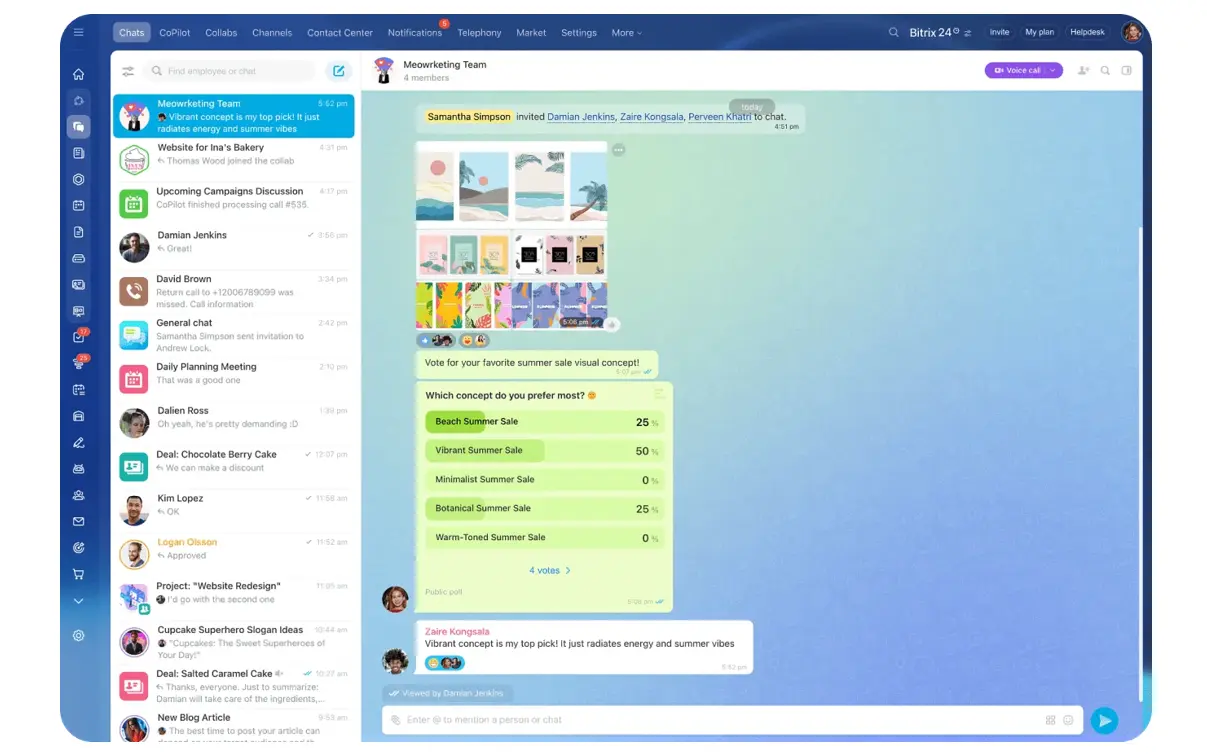
One platform cuts the number of transfers you have to maintain. Bitrix24 combines CRM with tasks and project management in the same place. Its communication tools give teams somewhere to keep work discussions instead of spreading them across separate channels.
Why this process breaks in small businesses
Most failed integrations start with an unclear workflow. When ownership is vague before setup, configuration locks that ambiguity in rather than fixing it.
Ownership isn't defined
Sales thinks operations will pick up the deal after close. Operations assumes sales will finish the handoff first. Nobody explicitly owns the transition, so the project sits untouched until someone happens to notice.
Every important handoff needs a clear answer to three questions:
- Who owns the next action?
- What information must be present?
- What tells that person it's time to act?
If any answer is unclear, the best automation in the world won't save you!
Data doesn't match the workflow
Then the technical problems stack up:
- Customer names appear in different formats
- Deal fields don't match project fields
- Scope notes stay buried in email
- Employees create duplicate contacts
- Important information isn't required before a stage changes
The software can be connected while the data underneath stays unreliable.
Employees keep using side channels
Adoption is its own failure point. People keep texting updates, saving files to personal drives, tracking tasks in notebooks, and asking for status in private chats.
Before long the official system holds only part of the story. Once employees stop trusting it, they check elsewhere before acting, which manufactures even more duplicate work.
Exceptions get ignored
A standard customer runs through a five-step onboarding. An unusual deal needs legal review, custom billing, or an extra approval. Build the system as if every deal takes the same route, and users will route around it.
So treat integration as an operating-design project before any software gets configured. That gives the eventual setup real ownership, rules, and data requirements to build on.

Step 1: Map the full customer-to-delivery workflow
Before you touch configuration, map the workflow from lead capture to final follow-up. Write down how work actually moves, including the awkward manual steps people leave out when they describe the "official" process.
Map the stages and owners
Start with the major stages:
- Lead capture
- Qualification
- Proposal
- Negotiation
- Close
- Project kickoff
- Execution
- Approvals
- Delivery
- Post-project follow-up
Shorter path? Keep it shorter. Map the workflow your business runs, even if it looks nothing like this example.
For each stage, name one role responsible for moving the record forward. Plenty of people can contribute, but one person owns the next action.
Run the mapping session with the people who do the work. A founder or operations lead can facilitate, but sales and delivery employees are the ones who explain what happens after they click a button, send an email, or hand work to someone else.
Find weak handoffs
Mark every point where information passes between roles. That might include:
- Signed scope
- Customer contact details
- Budget or contract value
- Delivery deadline
- File attachments
- Product or service specifications
- Special customer requirements
- Approval status
These transfer points earn extra attention, because they're exactly where disconnected systems lose context.
A home-services company shows the pattern. Office staff confirm the appointment; field techs need the address, job notes, photos, and access instructions on their phones. Transfer only the appointment time, and the technician is back on the phone to the office chasing everything else.
Mark the manual work
Document the bottlenecks too. Look for:
- Repeated data entry
- Delayed approvals
- Missing files
- Duplicate notifications
- Status updates outside the system
- Tasks created from memory
- Managers repeatedly asking for progress updates
If project kickoff depends on someone remembering to send a message by hand, that's a weak point. Mark it.
Workflow mapping checklist
Before moving on, make sure you have:
- Every stage from lead to completion
- One owner for each stage
- Required handoff data between teams
- Repeated manual actions
- Approval points
- Exceptions that need a different path
- Places where records or context get lost
Pro Tip: Ask each person, "What do you check before you can start your part?" Their answers surface missing handoff data faster than asking them to describe the whole process.
This map is the blueprint for everything you configure next. Skip it, and you'll design around assumptions instead of the actual work.
Step 2: Set integration goals, rules, and required data
With the workflow mapped, decide what the integrated system should improve. "Better visibility" tells you nothing about what to configure or how to know it worked.
Define concrete outcomes
Tie each goal to a specific workflow problem. For example:
- Enter customer information once instead of rebuilding it at kickoff
- Create delivery work the moment a deal reaches the required stage
- Give project managers the final sales scope without making them ask
- Make overdue work visible to the responsible manager
- Keep customer-facing communication attached to the right record
Keep the list short. Two or three priorities carry the first rollout.
Decide which data needs to travel
Sort the required information into four groups.
Customer data
- Company name
- Primary contact
- Phone number
- Billing details
Deal data
- Service type
- Deal value
- Expected close date
- Approved scope
- Promised deliverables
Project data
- Project owner
- Kickoff date
- Deadline
- Task set
- Dependencies
- Milestones
Communication data
- Relevant emails
- Call notes
- Decisions
- Files
- Customer approvals
Don't shove every field into every part of the system. If delivery doesn't need the lead source to do the work, it probably doesn't belong in the project view. Too many fields slow down data entry and bury the information that actually matters.
Map fields to operational rules
A field earns its place by changing what happens next. Before you configure anything, write down how each important CRM field affects delivery.
|
Deal field |
Delivery use |
Example rule |
|---|---|---|
|
Service type |
Determines the delivery path |
Run the appropriate Workgroup or task setup |
|
SLA |
Sets timing expectations |
Use it when calculating task deadlines |
|
Approved scope |
Gives delivery the agreed work |
Carry the relevant details into kickoff work |
|
Delivery deadline |
Controls scheduling |
Use it when setting task and milestone dates |
This catches a common mistake early. A team dutifully captures "Service type" in the CRM and then never uses it to change the delivery process. The data sits there doing no operational work.
Set governance before launch
Decide who edits critical fields, who closes tasks, who maintains templates, and what has to be complete before a record moves forward.
|
Area |
What to define |
|---|---|
|
Goals |
Faster handoffs, less duplicate entry, clearer status tracking |
|
Data |
Customer, deal, project, and communication fields that must carry forward |
|
Rules |
Naming, permissions, update ownership, required stage actions |
|
Reporting |
Pipeline status, project progress, overdue tasks, handoff timing |
Permissions deserve real thought. A salesperson might need to see project progress without editing delivery deadlines. A contractor might need one Project or Workgroup without the run of the full CRM. Set access around what each job requires instead of handing everyone the same keys.
Required data works the same way. If delivery can't start without the service type, approved scope, and promised deadline, don't count on sales to remember them. Make those fields part of the stage requirement before the deal hits "Won" or "Ready for Kickoff." That turns data quality from a training plea into a workflow rule.
Step 3: Build the unified system in one platform
Build around the process and rules you already defined. Configure CRM pipelines, Projects and Workgroups, task templates, communication, and document flows so they support one continuous path.
Configure the sales-to-delivery path
Inside the CRM, create stages that stand for real decisions or actions. A label like "In Progress" is dead weight; it doesn't tell anyone what happens next. "Proposal Sent," "Awaiting Approval," and "Ready for Kickoff" carry operational meaning.
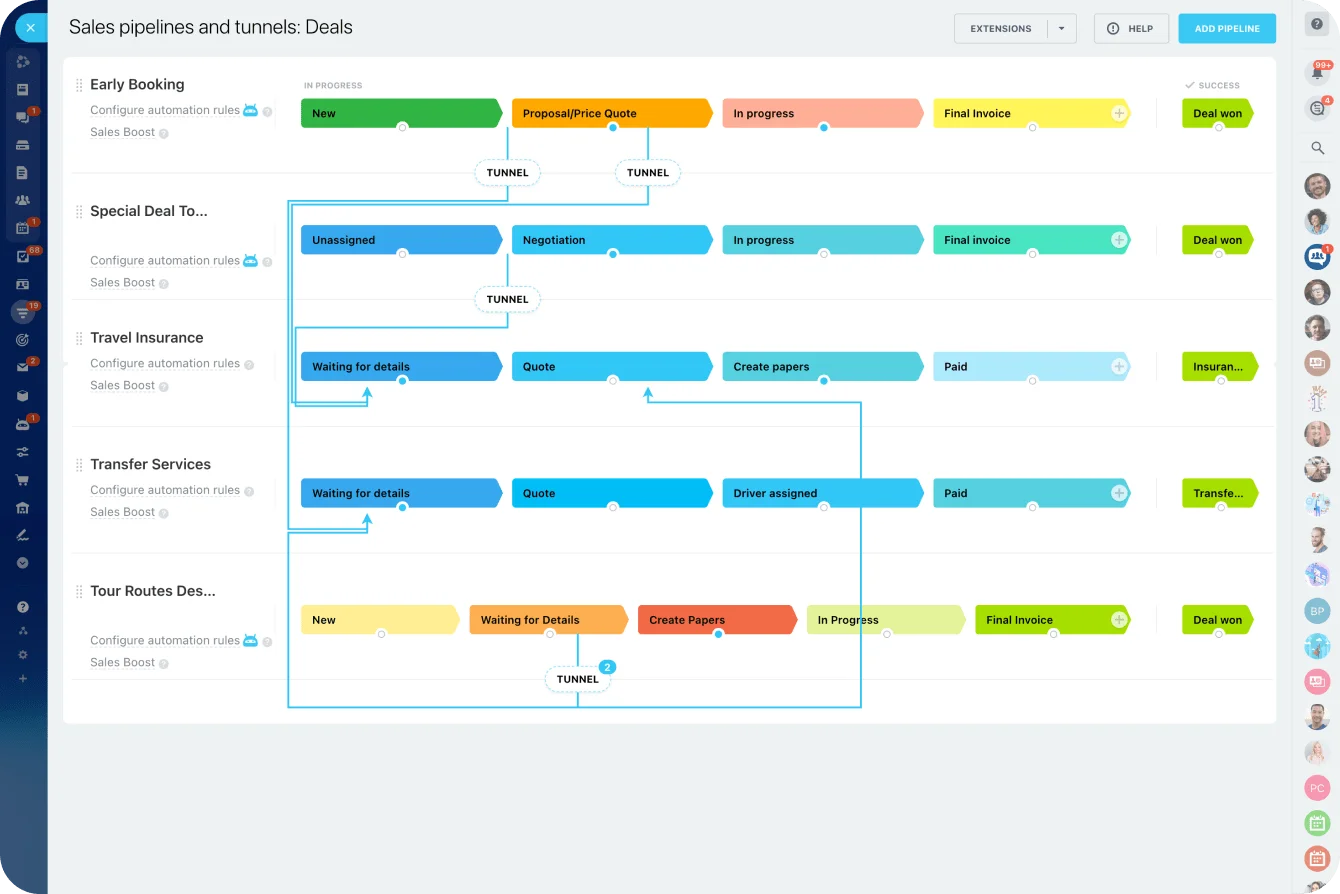
When a deal reaches the point where delivery begins, connect that stage to the next action. For a repeatable service business, that usually means:
- Marking the deal as won
- Creating or selecting the required Project or Workgroup
- Assigning a delivery owner
- Creating the standard task set
- Carrying customer and scope information forward
- Alerting the delivery owner that kickoff can begin
Bitrix24 supports automation rules and triggers for task workflows, including actions like creating tasks, sending notifications, adding participants, and responding when a task reaches a specified stage.
Translate the workflow into Bitrix24
Keep the setup tied to the map from Steps 1 and 2:
- Configure stage-based CRM Automation rules and Triggers around the relevant CRM pipeline.
- Use Projects or Workgroups to give delivery work a defined home with the right participants and permissions.
- Build reusable task templates for recurring work instead of recreating the same checklist for every customer.
- Keep project files in the relevant Drive so nobody hunts through separate storage locations.
- Make essential CRM fields required at the stage where the next team depends on them.
- Use role-based permissions so sales, delivery, contractors, and managers see or edit only what their work requires.
The goal isn't to switch on every Bitrix24 feature. Each setting should map to a handoff, an ownership rule, an information requirement, or a repeated action you identified earlier.
Standardize recurring delivery work
Task templates pay off when the same work happens again and again. If every new client needs account setup, an internal scope review, asset collection, a kickoff meeting, and a launch deadline, build those into the standard workflow instead of trusting each project manager to remember them.
Give each task enough context for the assignee to act:
- Relevant files
- Deadline
- Customer record
- Required notes
- Responsible person
- Dependencies
- Approval requirements
Keep collaboration on the work, too. A comment about a missed deadline belongs on the task. A customer approval belongs with the record or project. General chatter can stay in chat, but decisions that affect delivery need a traceable home.
Pro Tip: Automate handoffs before reminders. Creating the correct next piece of work automatically removes more friction than one more notification telling someone to create it by hand.
Keep the first version maintainable
Resist building dozens of conditions in the first setup. Start with:
- Your highest-volume customer journey
- A small number of required fields
- The most predictable handoffs
- Standard task or project structures
- Automations that replace genuinely repetitive actions
If a workflow carries several exceptions, keep some of them manual until you know how often they actually come up. An automation that fires wrong creates more cleanup than a clearly assigned manual step.
Step 4: Test handoffs, train users, and launch in phases
Don't launch because the configuration screen looks finished. Test what happens from the user's side.
Test the complete workflow
Run realistic scenarios through the whole path. Create a sample lead. Move it through qualification. Mark the deal won. Confirm the next Project, Workgroup, or task appears the way it should. Check that the right person receives it, the files are visible, and the due dates make sense.
Then test the exceptions that break real setups:
- A required field is missing
- The customer changes the deadline
- The project owner is unavailable
- A task becomes overdue
- A user lacks permission
- An automation fires twice
- A deal is reopened after being marked closed
One broken handoff sends people straight back to their manual workarounds.
Use a go-live acceptance checklist
Before the workflow goes into general use, confirm that:
- The correct delivery work starts when the deal reaches the agreed handoff stage
- Standard tasks populate with the right owner, deadline, and context
- Required CRM fields block incomplete handoffs
- Permissions work correctly for each role
- Notifications reach the people who actually need to act
- The workflow holds up in the Bitrix24 mobile app wherever mobile use matters
- Common exceptions don't create duplicate or abandoned work
If one of these fails, fix it before rollout instead of training people to paper over it.
Test the mobile experience separately
Field staff and anyone working away from a desk need fast access to the few things they need to act. The Bitrix24 mobile app includes tools like CRM, tasks, files, calendar, documents, messaging, and workflows. You still have to confirm your specific setup works on a small screen.
Ask:
- Can employees find their assigned tasks quickly?
- Can they reach the right customer details?
- Are key files easy to open?
- Can they update status without filling out unnecessary fields?
- Do permissions hold up outside the office?
A process that's perfect on desktop can still fall apart on a phone.
Train people on their actual responsibilities
Skip the generic platform tour. Teach each role its own job. Sales completes the required information before moving a deal to "Won." The project manager reviews the new delivery work and confirms the deadline. Delivery employees post completion notes inside the task instead of messaging the manager privately. Those instructions stick better than an hour walking through features people rarely open.
Be blunt about side channels. When a decision changes scope, deadline, ownership, or customer expectations, everyone should know exactly where that decision gets recorded.
Roll out one workflow first
Start with the clearest revenue-to-delivery path. A small marketing firm might launch its standard monthly-retainer onboarding before touching website builds, one-off design jobs, and consulting engagements.
Run that first workflow with a limited group, watch for failure points, then:
- Adjust templates
- Remove unnecessary fields
- Correct permissions
- Fix confusing stage names
- Review automation failures
- Note where people still work outside the system
Pro Tip: Keep a short "friction log" for the first few weeks. Every time someone works around the system, write down why. Some workarounds point to a training gap; others expose a bad field, a missing permission, or a badly designed step.
Once the first flow runs consistently, extend the same principles to more services, departments, or project types.
Common mistakes, scaling tips, and reliability checks
Over-customizing before proving the process
Small businesses love to build elaborate fields, conditions, and automations before anyone has run the basic workflow even once. Add a field only when it helps someone make a decision, do the work, or report on it.
Migrating bad data
Old duplicates, half-finished contacts, dead deals, and inconsistent names don't improve by moving into a new CRM. Clean the active records first. Standardize the key fields, kill the obvious duplicates, and archive the history nobody references instead of forcing it into the new structure.
Automating an unclear handoff
If sales and operations disagree about who approves a kickoff, automation won't settle the argument. Define the owner and the trigger first. Configure the system around that decision second.
Letting templates drift
Templates save time right up until every project manager runs a slightly different version. Give each major template one owner. Review changes on a schedule instead of letting people duplicate and tweak templates forever.
Ignoring system maintenance
Integration needs routine checks after launch. Put an administrator or operations owner on the setup regularly; for a small team, a short weekly review is plenty at first.
Check:
- Records stuck between CRM stages
- Missing or misconfigured required fields
- Automation rules that fail, duplicate actions, or no longer match the process
- Automation test logs when a handoff behaves unexpectedly
- Overdue tasks
- Permission problems
- Unused fields
- Duplicate records
- Templates employees regularly override
- Workload or reporting patterns that show recurring bottlenecks
Keep a simple admin change log, too. When someone changes a pipeline stage, required field, permission, task template, or automation condition, record what changed and why. That log earns its keep the day a workflow that worked last month starts misbehaving and nobody remembers what got edited.
As usage grows, role-based reporting matters more. Sales needs pipeline actions, delivery needs deadlines and workload, and leaders need eyes on overdue work and bottlenecks. Bitrix24's CRM analytics and reporting tools include sales funnel, performance, marketing, and reporting features that support these reviews once the underlying data stays consistent.
FAQ
What if email sync is limited or inconsistent?
Keep customer-critical decisions attached to CRM records wherever you can. With mailboxes connected to Bitrix24 CRM, correspondence stays against the relevant CRM item. Decide which messages employees keep there, and which information they record by hand when it arrives through another channel. A personal inbox shouldn't be the only record of a change to scope, deadline, price, or approval.
Can field teams use this on mobile?
Yes, but test the workflow from a phone before launch. Field employees need quick access to tasks, notes, files, contact details, and status controls. A desktop process with a long list of required fields can be unworkable on site.
How long does migration usually take?
There's no useful universal number. Data quality, number of workflows, required integrations, and cleanup volume matter far more than headcount. Keep the first migration tightly scoped: active records and one high-volume workflow before every historical record and edge case.
How do we handle permission conflicts?
Start with role-based access. Give people what their jobs require, then add permissions when a specific workflow needs them. Test while logged in as each role, not as an administrator. A workflow isn't ready just because an admin account can finish it.
What about legacy records that don't fit the new structure?
Prioritize active customers, open deals, current projects, and records people actually reference. Archive older material when forcing it into the new structure would mean excessive manual cleanup, and document where staff can find it.
Connect Sales to Delivery in One Workspace
Bitrix24 brings CRM, tasks, projects, chat, files, and automation together so every handoff stays visible, timely, and owned.
Get Started NowMap the workflow before you touch the software
A mapped workflow is what makes any of this work. Get the process clear, name the owners and rules, and the platform finally has something worth automating. Skip that step and you've bought a faster way to lose the same context every week.
For a small business, that's the case for keeping CRM, delivery work, and the conversations around them in one platform like Bitrix24: the handoff stops depending on someone remembering to carry context from one app to another.
One place to see what happened, what's next, and who owns it.
If you're ready to put the workflow into one system instead of stitching it across apps, Bitrix24 is free to start.