9 Basic Criteria for CRM Selection


TL;DR (Quick Summary)
- Pick the wrong CRM and it shows up as missed follow-ups, duplicate records, reports nobody trusts, and customer history scattered across five tools.
- The fix is to stop comparing feature lists and test each system against how your business actually captures leads, runs sales, and hands customers between teams.
- Match the CRM to your workflow, not the demo.
Takeaway: Match the CRM to your workflow, not the demo — test each system against how your business actually captures leads, runs sales, and hands customers between teams before you commit.
A CRM that doesn't fit your workflow rarely announces itself. It leaks out as shadow spreadsheets, duplicate contacts, and forecasts you have to caveat. By the time it's obvious, the workarounds have hardened into habits.
Which is why comparing feature lists is the wrong place to start. Features tell you what a system can do, not whether your team will use it the way the demo promised.
What follows is nine criteria that decide how a CRM performs day to day, each with a way to test it against your real workflows instead of a feature checklist, so you can judge fit before you commit.
Why CRM selection becomes an operational decision
A CRM stops being a contact database the moment sales, marketing, service, and management start depending on it to do their jobs. From then on, gaps in the system become gaps in the work. When it doesn't support how a team operates, people build their own fixes.
The rep keeps a spreadsheet because the pipeline feels unreliable. Marketing exports leads because campaign data won't flow cleanly into sales. Support digs through inboxes to piece together what a customer was promised. Managers then burn forecast meetings arguing about whether the numbers mean anything.
Where poor CRM fit usually shows up
The failure lands in predictable places. New inquiries wait for someone to assign them, or two reps grab the same one. Customer history splinters across tools, with calls, emails, chats, notes, and deals each living somewhere different. Follow-up runs on memory instead of tasks and reminders, so it's inconsistent. Dashboards lose credibility once fields and stage definitions drift. And handoffs between sales, service, and account teams break because nobody shares the same context.
Small teams paper over this with informal process. A larger customer-facing organization can't. And the cracks just widen as volume climbs.
CRM Fit Scorecard Template: Compare Options in 30 Minutes
Enter your email address to get a comprehensive, step-by-step guide

What teams should clarify before shortlisting any CRM
Define what the CRM has to support before you compare anything. Team structure, sales complexity, channel mix, reporting expectations, and the people you have to run it all decide which products are worth a demo.
Run this shortlist check first
Clarify:
- Team size and expected user growth
- Number and complexity of sales or service processes
- Number of inbound and outbound communication channels
- Reporting and forecasting requirements
- Internal CRM administration capacity
- Time and people available for implementation
- Who owns the budget and the final decision
- Integrations that are genuinely non-negotiable
A five-person sales team with one pipeline and referral leads shouldn't evaluate a CRM the way a 50-person team does when it's juggling multiple territories, products, lead sources, approval stages, and service handoffs.
Map the customer workflow first
Start where the customer does: the moment a prospect appears.
Ask:
- Where do new leads come from?
- Who decides who owns each lead?
- What has to be captured immediately?
- Which follow-up actions happen every time?
- When does another department get pulled in?
- Where do conversations currently live?
- What does management need to see each week or month?
A business taking leads through forms, calls, email, social, and chat has a different requirement from one that runs mostly on referrals.
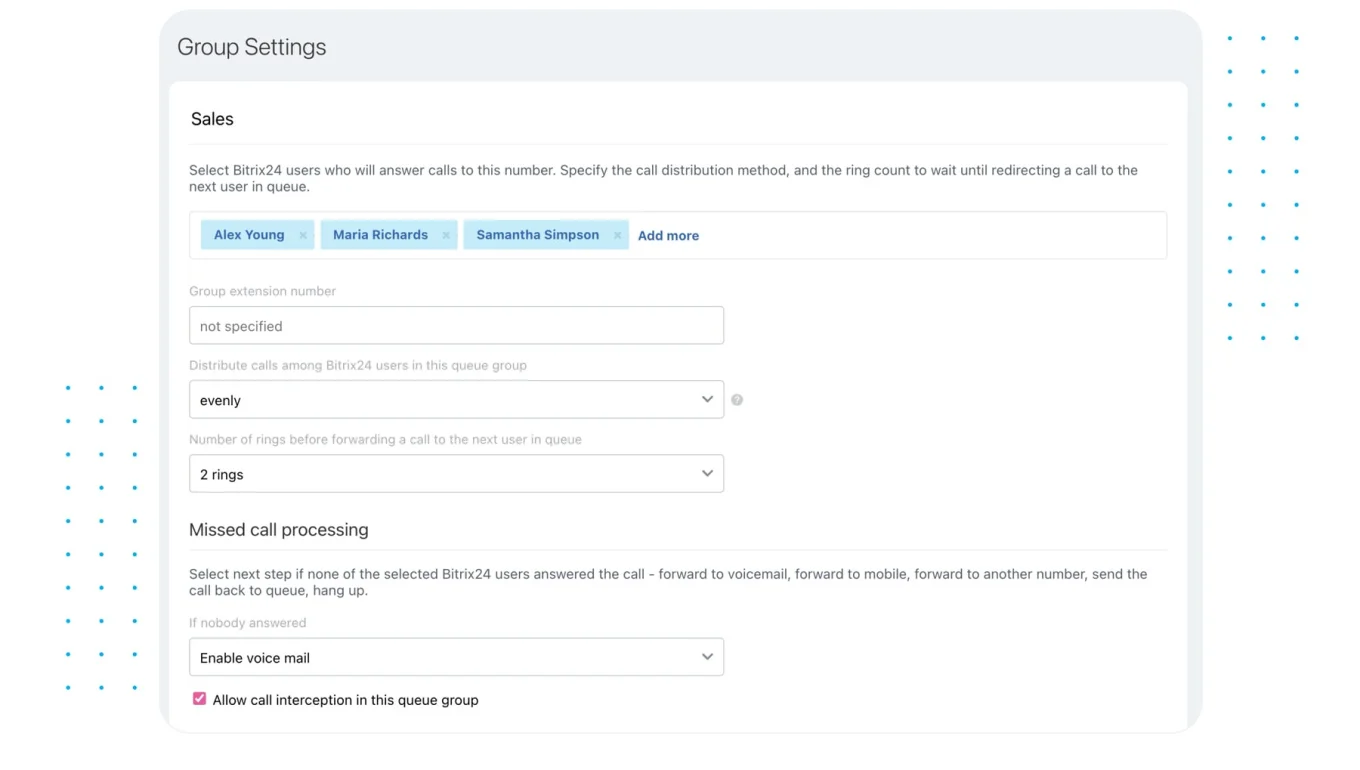
When several channels feed the same team, intake and deduplication matter right away: the CRM has to spot an existing contact, record the source, route the inquiry, and keep every later message attached to the right record.
Platforms with an integrated Contact Center cut down the number of separate tools in play when customer communication arrives across multiple channels.
Define your non-negotiables
Separate what you actually need from what looks impressive in a demo. Common non-negotiables:
- Email synchronization
- Telephony
- Website forms
- Marketing tools
- Accounting or ERP connections
- Payments and invoicing
- Custom fields
- Approval processes
- Role-based permissions
- API access
- Mobile access
- Reporting and forecasting
Pro tip: Give each requirement an owner. Sales ops assesses pipeline and automation, marketing reviews lead capture and attribution, service tests communication history and handoffs. That keeps the decision from being won by whichever department shows up to the most demos.
Where current CRM setups commonly break down as the business grows
CRM problems build slowly. Duplicates creep in, conversations scatter, lead assignment hangs on one manager, and every rep invents a personal follow-up method. And growth makes all of it harder to ignore.
Disconnected tools create incomplete customer records
The usual setup: marketing captures demand in one platform, sales works opportunities in another, support lives in a separate inbox or ticketing tool, finance handles invoices somewhere else, and managers stitch the reports together by hand. Each tool works fine alone. The problem hits when someone needs the whole customer history at once.
A rep prepping a renewal has to check the CRM, search an inbox, ask support what was said recently, then confirm payment status in yet another system. A simple account question turns into a scavenger hunt.
Centralizing internal conversations and work through communication tools helps when customer-facing teams need shared context instead of information stuck with individual employees.
Governance becomes more important as the team grows
CRM quality rests on rules nobody thinks about during a demo:
- Which fields are mandatory?
- Who can change deal stages?
- What counts as a qualified lead?
- How are duplicates handled?
- Who owns the automation rules?
- Which teams see sensitive customer data?
- Who reviews data quality?
Without clear answers, people work around the CRM no matter how capable it is.

A practical framework for evaluating CRM options
Treat the evaluation as an operating-model review. Start with how revenue, customer information, and responsibility move through the business. The same criteria deserve different weight at different companies.
Weight criteria around your operating model
High-volume inbound teams care most about:
- Lead capture
- Deduplication
- Assignment
- Response speed
- Automated follow-up
Consultative sales organizations lean toward:
- Opportunity management
- Activity tracking
- Account history
- Forecasting
- Approval processes
Recurring-revenue businesses need:
- Renewal visibility
- Customer history
- Upsell workflows
- Account ownership
- Service continuity
Service-heavy businesses care more about:
- Communication history
- Ticket or request visibility
- Internal handoffs
- Customer context
- Cross-team ownership
Test depth, not feature labels
A feature list tells you almost nothing about what happens after you switch the feature on. "Automation" in one product is a reminder that pops up when a deal hits a stage. In another it's routing, task creation, notifications, approvals, ownership changes, and the actions that follow.
Reporting is the same. A manager rarely wants a dashboard with deal totals and nothing else. They want conversion by source, stage movement, rep activity, forecast visibility, and the ability to click into the records behind a number. Bitrix24, for one, ships dedicated CRM analytics and reporting alongside its core CRM.
Pro tip: Bring two or three real workflows into every demo and ask the vendor to run them end to end instead of giving the standard tour. You learn more from watching one real lead assignment or customer handoff than from another feature screen.
Which type of CRM fits best: Operational vs analytical vs collaborative
Your main requirement usually leans toward one of three models.
Operational CRM
Operational CRM fits businesses that need tighter execution. Typical requirements:
- Lead routing
- Pipeline stages
- Task assignment
- Sales automation
- Approval processes
- Follow-up reminders
- Service triggers
It earns its keep when inconsistency between employees causes missed opportunities or busywork.
Analytical CRM
Analytical CRM fits organizations already generating plenty of sales activity but flying half-blind on what it means. Typical priorities:
- Segmentation
- Sales forecasting
- Conversion analysis
- Channel performance
- Employee performance
- Revenue trends
The data underneath matters as much as the reporting tool. Weak stage definitions and half-empty records produce weak analysis, every time.
Collaborative CRM
Collaborative CRM matters when customers move between departments. Typical requirements:
- Shared customer history
- Communication records
- Internal notes
- Account status
- Cross-team handoffs
- Shared ownership
Most established platforms now blend all three. Your shortlist should reflect the model you rely on most today, with room for what's coming as you grow.
The 9 basic CRM selection criteria that actually affect day-to-day operations
Skip generic categories like "easy to use" or "has automation." These nine criteria decide what employees can actually do with the system.
1. Lead generation and capture
The CRM has to collect leads from the channels you actually use:
- Website forms
- Calls
- Live chat
- Advertising
- Social media
- Messaging platforms
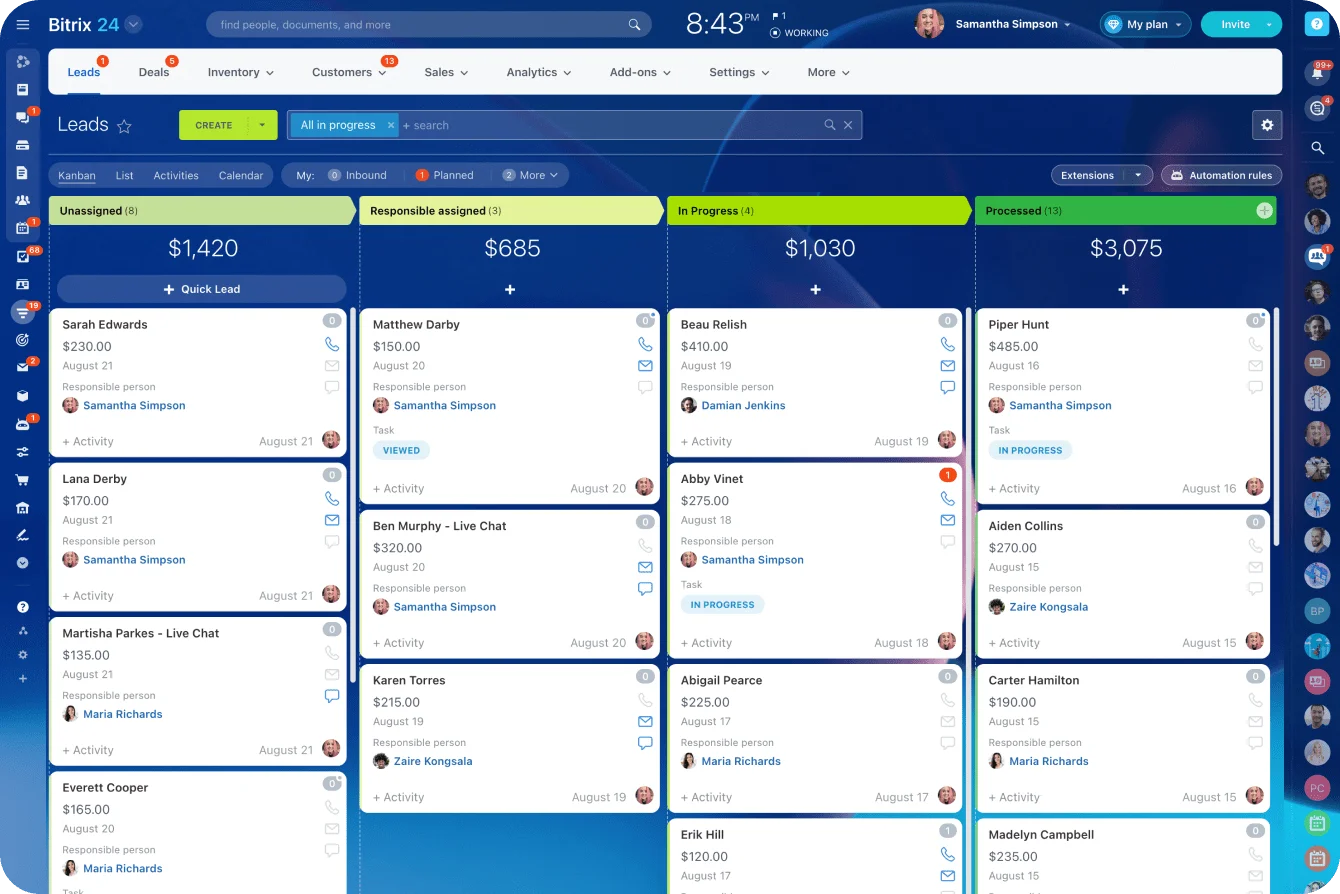
Capture is the easy part. Test what happens the second after: does it catch duplicates, keep the original source, assign the inquiry on its own, and make sure the right person knows a lead is sitting there?
In the demo, submit the same prospect through two channels and watch whether the CRM recognizes the existing record, holds onto the source, and routes correctly. Then push on the edges: no rep available, the assigned rep goes quiet, a lead that arrives at 2 a.m.
What to track:
- Time from capture to ownership
- Share of leads assigned within your SLA
- Duplicate rate
- Unworked-lead rate
With Bitrix24, test the exact channels your team runs on and confirm that capture, routing, deduplication, and the conversation that follows all stay attached to the CRM record.
2. Data management
Customer data needs enough structure to stay useful as the database grows. Check for:
- Duplicate management
- Custom and required fields
- Account, contact, and deal relationships
- Searchable activity history
- Permissions
- Import and export controls
Bad data design comes back to bite you at reporting time. So does the opposite mistake: cramming in every possible field at implementation hurts as much as capturing too little. In the demo, import a realistic sample with duplicate contacts, inconsistent company names, missing fields, and former owners still attached to accounts, then see what the system does with it.
Settle the governance up front too: who can merge records, create fields, change what's mandatory, and edit core customer data.
What to track:
- Duplicate rate
- Share of records missing required information
- Import error rate
- Time employees spend fixing records
With Bitrix24, put its deduplication and merge controls, fields, permissions, and import process through that same messy sample rather than judging data management from a feature list.
3. Sales automation
Automation should take predictable admin off people's plates while keeping ownership obvious. Useful examples:
- Assigning new leads
- Creating follow-up tasks
- Sending notifications
- Triggering actions when stages change
- Starting approvals
- Updating ownership
- Creating post-sale tasks
Bitrix24's task automation tools can sit alongside CRM processes when customer activity needs to kick off internal work. In the demo, run one lead all the way through: assignment, qualification, approval, a stage change, follow-up, and a post-sale handoff.
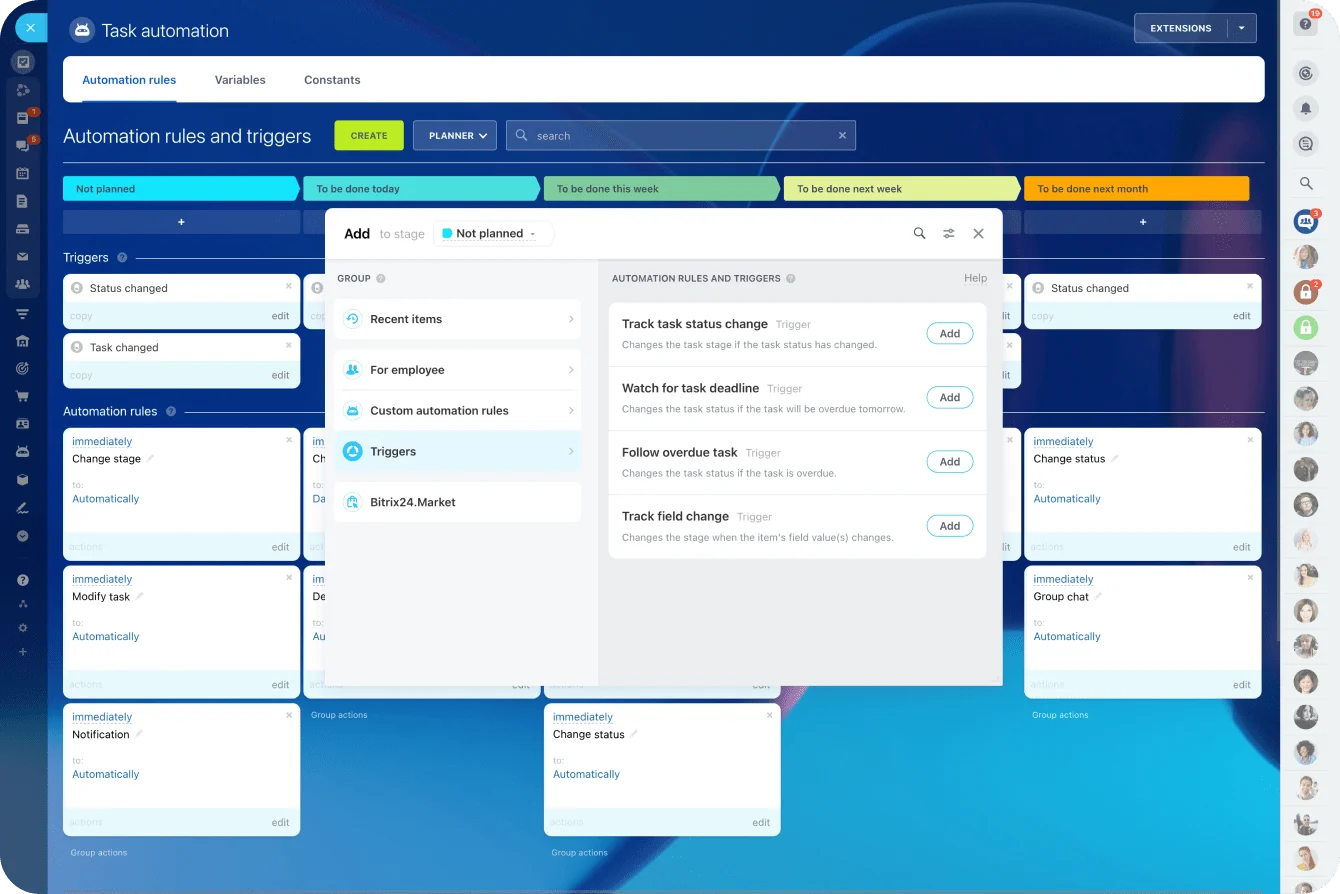
Then break it on purpose. What happens when an approval is rejected, a task goes overdue, an owner leaves, or a record doesn't match the rule?
What to track:
- Manual touches per opportunity
- Follow-up completion
- Response SLA compliance
- Overdue tasks
- Share of routine actions completed automatically
Pro tip: Automate stable processes first. If the sales team can't agree on when a deal moves between stages, automating those stage changes just manufactures confusion faster.
4. Customer communication
Email, calls, messages, chat, notes, and internal context all need to stay reachable from the customer record. The test is whether an employee can answer, in seconds:
- Who last spoke with this customer?
- What did they ask for?
- What did we promise?
- Is another department already on it?
- What's the next scheduled action?
This gets critical when accounts move between sales, onboarding, support, and account management. In the demo, send an email, log a call or chat, add an internal note, then hand the account to someone else and ask them to reconstruct what happened. Check what's captured automatically versus what a user has to log by hand, and which teams can see each interaction.
What to track:
- Activity-capture rate
- Handoff time
- Missing communication records
- Time needed to reconstruct recent history
With Bitrix24, if telephony, chat, and email matter, test how its CRM and contact-center functions keep those conversations pinned to the customer.
5. Analytics and reporting
Managers need numbers they can trust without rebuilding them in a spreadsheet every Monday. Depending on the business, that means:
- Pipeline movement
- Conversion rates
- Lead sources
- Sales activity
- Forecasts
- Employee performance
- Channel results
- Revenue trends
Check who can build and change reports, too. If every new management question needs a technical person, reporting becomes a bottleneck. In the demo, build reports for conversion by source, stage movement, current forecast, and sales activity off your own sample.
Then try to trace a dashboard number back to the records behind it without exporting anything first.
What to track:
- Forecast variance
- Missing-stage data
- Report preparation time
- Reporting errors
- Recurring reports still maintained outside the CRM
With Bitrix24, test its CRM analytics and reporting against the actual questions managers ask each week, not a generic dashboard demo.
6. Support for repeat business
A CRM's value keeps running after the first sale. If you deal in renewals, repeat orders, subscriptions, or account expansion, check whether it supports:
- Renewal dates
- Upsell opportunities
- Reorder workflows
- Customer history
- Account ownership
- Retention activity
A sales team calls a deal done at close. The account manager who inherits it six months later still needs the decisions, conversations, and commitments that led to the sale. In the demo, close a deal, reassign the account, schedule a renewal or reorder, and fire the next task. Make sure ownership stays clear as the customer moves from sales into onboarding, service, or renewal.
What to track:
- Renewal-task coverage
- Overdue renewal actions
- Accounts with no owner
- Repeat-business opportunities with no scheduled follow-up
With Bitrix24, model your real renewal or repeat-order process with stages, tasks, and automation, and see whether it survives once the initial deal closes.
7. Payment handling
For businesses that send quotes, invoices, or payment requests, the commercial side should sit close enough to the CRM that a rep can read a customer's status without hopping between systems.
How much this matters depends heavily on your model, so pin down early whether payment functions are native, connected through integrations, or handled entirely in an outside accounting or payment tool.
In the demo, create the commercial document your team actually uses, move it through approval or sending, and confirm where payment status shows up for the salesperson or account owner. Sort out who handles failed payments, invoice corrections, disputes, and missing accounting data.
What to track:
- Time from deal approval to invoice or payment request
- Payment-status mismatches
- Manual finance handoffs
- Repeated data entry
With Bitrix24, if invoicing or payments belong inside your workflow, test the invoice and payment options against the exact process your finance and sales teams follow.
8. Scalability and integrations
A CRM that fits today should still make sense when users, customer volume, processes, and reporting all grow. Check:
- User and data limits
- API availability
- Integration options
- Email connections
- Accounting connections
- Telephony
- Marketing applications
- ERP connections
- Service tools
In the demo, connect one or two systems you can't live without and test record creation, updates, field mapping, failure handling, and permissions. Ask what changes when user counts, pipelines, records, automations, reporting, or connected apps all increase at once.
What to track:
- Synchronization failures
- Manual exports
- Integration-related support work
- Administration hours
- Disconnected systems employees still need for routine work
Bitrix24 keeps a directory of available CRM and business integrations worth checking against your stack before you commit. Then test the connections that would hurt most if they broke.
9. Ability to keep pace with changing technology
Requirements shift as customer channels and internal processes shift. Consider whether the platform is ready for:
- Mobile work
- AI-assisted tasks
- Workflow automation
- New communication channels
- API-based connections
- Changing reporting requirements
Don't buy the longest feature list. Buy the system your team can adapt as the workflow changes.
In the demo, change a field, a workflow rule, a report, or a customer process and see whether an admin can do it without rebuilding everything around it. Then hand the mobile app to the people who work away from a desk and have them do their real tasks on it, not review screenshots.
What to track:
- Admin time for routine changes
- Mobile task completion
- Adoption of AI-assisted functions people actually use
- Changes that need outside technical help
With Bitrix24, fold its mobile access, automation, and AI-assisted features into workflow tests where they'd genuinely save time, instead of scoring them as standalone buying criteria.
Representative CRM options and fit
These platforms show different approaches to the nine criteria. It's not a ranking, and none earns a shortlist spot just for doing well in one category. What matters is where each fits your operating model and where you'd need extra administration, integrations, or companion tools to fill the gaps.
Broader CRM and business platforms
- Bitrix24 combines CRM with communication, automation, customer contact tools, collaboration, invoicing, and integrations. It fits best when operational and collaborative needs span several departments and cutting handoffs between separate systems is the point. Teams still need setup standards so unused fields, automations, and processes don't pile up.
- Salesforce Sales Cloud suits complex sales processes, heavy customization, approvals, forecasting, and large-scale reporting. The operational and analytical depth is there; so is the administration and implementation effort to run it.
- Microsoft Dynamics 365 Sales is a natural pick for companies already deep in Microsoft. Its fit strengthens when CRM activity has to connect with Outlook, Teams, Power BI, and the wider Power Platform.
- Zoho CRM covers lead and deal management, automation, multichannel communication, and ties into the broader Zoho suite. Small and mid-sized businesses reach for it when they want real CRM functionality without jumping straight to an enterprise platform.
Sales-focused platforms
- HubSpot CRM leans on adoption across marketing, sales, and service. Its lead capture, pipelines, forms, email, marketing, tickets, and reporting suit teams that want those pieces tightly connected. Watch the plan tiers as automation and reporting needs climb.
- Pipedrive centers on visual pipelines, sales activities, reminders, email sync, and straightforward automation. It fits teams whose main job is organized sales execution; broader service and cross-department work usually pulls in extra tools.
- Freshsalespairs sales pipelines with communication, workflow automation, customer timelines, and AI-assisted features. It suits SMB and mid-sized teams that want calls, email, and deal activity in one place.
Relationship and project-oriented options
- Insightly links CRM activity with project and delivery workflows, which makes it worth a look for service and project-based businesses where the work after the sale has to stay tied to the customer.
- Nimble focuses on relationship management, contacts, email activity, and simple pipelines. It suits smaller, relationship-driven teams more than organizations that need layered approvals and complex cross-functional processes.
Migration and implementation: what it takes to make a CRM work in practice
Migration exposes process problems fast. Move messy, poorly structured data into a new system and all you've done is give the mess a new address.
Clean before you import
Review the old data first. Look for:
- Duplicate contacts
- Outdated accounts
- Former employees listed as owners
- Unused fields
- Inconsistent field values
- Broken account relationships
- Old pipeline stages
Don't recreate a field just because it existed. Ask who uses it and what decision it drives.
Set duplicate rules before the import runs: decide whether matching emails auto-flag two contacts, what happens when phone numbers match but names don't, and who's allowed to merge records. Skip that, and the migration team spends days cleaning data while users recreate duplicates the day after launch.
Map the workflow
Before you configure anything, document:
- How leads enter
- How ownership is assigned
- How qualification works
- When deals change stages
- Which tasks fire automatically
- Where approvals happen
- What happens after a sale
- Which team takes over next
This is also where you decide what shouldn't survive the move. Stage definitions are the usual offender. If one rep marks "Proposal Sent" only after a formal quote goes out and another flips it the second pricing comes up, migrating that inconsistency poisons the new forecast on day one.
Agree on the definition, the required information, the owner, and the exit condition for each important stage before you rebuild it.
Test communication history
Email, notes, files, and conversation history matter long after the original deal closes. If those records feed renewals, service, account transitions, or contract discussions, test how they'll carry over before the main migration.
Run a small integration test instead of assuming the connection works because authentication succeeded:
- Send and receive an email, and confirm where both show up.
- Make or record a test call, and confirm which record it lands on.
- Change record ownership, and check that the next employee can still reach the conversation history.
- Test permissions with normal user roles, not admin access.
Roll out in stages
CRM adoption goes better with:
- A named system owner
- Documented stage definitions
- Role-based training
- Clear data entry standards
- Integration testing
- A phased rollout
- Regular reviews after launch
A sales ops or CRM owner should be reviewing problems in the first weeks, not waiting for workarounds to set like concrete.
Measure adoption before workarounds become normal
Logins don't tell you whether people use the CRM correctly. Better early signals:
- Weekly active-user rate
- Share of sales activity captured in the CRM
- Share of open deals with no scheduled next action
- Share of deals with missing or outdated close dates
- Duplicate records created after launch
- Manual spreadsheets still running CRM work
If weekly active use looks healthy but half the pipeline has no next action, adoption is weak where it counts.
Common CRM selection mistakes
A capable CRM can still underperform, and the reasons repeat.
- Teams pick on brand recognition, when a familiar name can be a poor fit if it needs more administration than the team can staff.
- They compare feature counts, even though two products both listing "automation" can offer wildly different levels of control.
- They anchor on the entry price instead of checking which tier actually contains the capabilities their workflow needs.
- They recreate the old CRM field for field, wasting the one real chance migration offers to drop obsolete processes.
- And they expect software to fix a process that was never defined, when no amount of automation compensates for unclear lead ownership, inconsistent stages, or weak follow-up standards.
Frequently asked questions
Which CRM type is best for a small business?
Operational CRM is usually the most practical starting point, because smaller businesses need reliable lead handling, sales visibility, follow-up, and task management before they need advanced analytics. The exact call still depends on the model. A small consulting firm leans toward relationships and project handoffs; a high-volume inbound or ecommerce business needs much stronger automation.
When should a team switch CRMs?
When workarounds become part of normal operations. The common warning signs:
- Duplicate records
- Disconnected communication channels
- Low trust in CRM reports
- Repeated manual data entry
- Weak cross-team visibility
- Heavy spreadsheet use
- Too many companion tools for routine customer work
Can one CRM handle sales, service, and payments?
Some platforms cover all three, but test how the pieces actually work together. Check whether each function is built in, connected through the same customer record, or dependent on an outside application.
Is Bitrix24 suitable if the business wants all core criteria covered?
Bitrix24 is a strong candidate when broad coverage matters. Its CRM runs alongside customer communication, automation, reporting, collaboration, and connected business tools, which helps organizations trying to cut the number of separate apps in a routine customer workflow. As with any broad platform, define processes and ownership carefully during setup.
Choose a CRM that fits your workflow
Bitrix24 unites CRM, communications, automation, reports, and payments so teams capture leads, manage handoffs, and grow with less tool sprawl.
Get Started NowYou're buying fit, not features
The best CRM is the one that matches how your business already captures leads, runs sales, coordinates communication, and keeps customers engaged as volume climbs. That match never shows up on a feature grid. It shows up when you run your own workflows through the system, all the way to the messy parts: a duplicate hits the database, an owner goes dark, an approval stalls, an integration drops, a customer gets handed to another team. How a CRM behaves there tells you more than any demo.
Skip that test and the workarounds start the day after launch. A spreadsheet here, an export there, a forecast everyone silently caveats, until you've bought a new system and rebuilt the old problem inside it. That's the cost, and it compounds.
If you want broad coverage across all nine criteria while leaning on fewer separate sales, communication, and workflow tools, Bitrix24 CRM belongs on the shortlist. Open it, run two or three of your real workflows through it, a lead capture, a cross-team handoff, a management report, and see how it handles the messy parts before you decide.