The Friday-Afternoon Outage Test: What Happens When Your Main Work App Disappears?


At 3 p.m. on Friday, the CRM goes down.
Reps can still send emails, managers can still message the team, and customers keep calling. But nobody can see which renewal is waiting for approval, which account was promised a response that morning, or whether someone has already contacted the customer.
That’s the Friday-Afternoon Outage Test.
It shows whether one unavailable app merely causes inconvenience or exposes unclear ownership, fragile approvals, scattered records, and workflows nobody knows how to continue manually.
Use the test to find what breaks first, who becomes the bottleneck, and which fallback steps need to exist before the next outage.
What the “Friday-Afternoon Outage Test” actually means
The Friday-Afternoon Outage Test is a business continuity lens for a specific disruption: one critical work application becomes unavailable at the worst possible moment, and the organization needs to keep operating anyway.
It asks what happens when the main system for coordination, records, or execution goes down under real conditions:
- Deadlines are already in motion.
- Approvals are waiting.
- Customers expect answers.
- Managers need accurate status.
- People are reacting quickly with partial information.
This is narrower than disaster recovery, which focuses on restoring systems and data. It’s also different from cybersecurity response, which centers on containment, investigation, and risk control.
The Friday-Afternoon Outage Test asks whether teams can continue day-to-day work if one app fails.
Pro Tip: Run this test against one workflow at a time. Start with the workflow that has the clearest customer or revenue impact, such as renewal approval, support escalation, invoice processing, or project handoff.

Why critical-app outages matter to business performance
When a critical app goes down, business performance drops because work doesn’t pause evenly. Some tasks can wait. Others create immediate downstream delays.
For example:
- An unapproved contract can hold revenue.
- An unreplied customer issue can threaten SLA performance.
- An unprocessed invoice can affect cash timing.
- A missed internal handoff can delay delivery.
The risk is highest when one application acts as system of record, communication layer, task tracker, reporting source, and workflow trigger. That setup is efficient when the app works, but it concentrates failure into one point.
The real cost is lost coordination
If that application disappears, cycle time expands. Teams reconstruct status, managers chase updates manually, and staff repeat work because they can’t tell what was already completed. Even short outages can create a backlog that lasts beyond system recovery.
There’s also a confidence cost. Internal handoffs rely on shared information and status. Once that shared view breaks, departments become cautious. Sales hesitates to promise. Operations slows approvals. Finance delays processing until records are verified.
A 2024 PagerDuty survey of 500 IT leaders at companies with more than 1,000 employees found that customer-facing incidents took an average of 175 minutes to resolve, with respondents estimating downtime at $4,537 per minute. Those figures won’t reflect every smaller business, but they do show how quickly costs rise when teams spend the outage rebuilding context and coordinating manually.
What readiness protects
Outage readiness ties directly to measurable outcomes:
- Cycle time: how long work takes from request to completion
- SLA performance: whether response and resolution commitments are met
- Revenue protection: whether deals, renewals, billing, or delivery continue without avoidable delays
- Employee productivity: time lost to status reconstruction, duplicate effort, and manual coordination
Outage readiness affects speed, reliability, and commercial predictability.
Outage Response Playbook: Roles, Steps, and Templates
Enter your email address to get a comprehensive, step-by-step guide

How teams typically respond when a main work app disappears
Most teams drift into disorder in a recognizable sequence.
First comes uncertainty: is the app down, slow, local, or already being fixed?
Then work fragments. People move to email, chat, calls, and personal notes. Managers ask for updates in parallel. Different versions of the same task start circulating.
Duplicate work follows. One person restarts an item manually. Another assumes it is already assigned. A third creates a spreadsheet to track exceptions.
This is what people do when the system that normally coordinates shared activity disappears.
Why the response gets messy
The deeper issue is that many workflow dependencies are procedural, not technical. The app may not execute every task, but it tells people what to do next, who can approve, what changed, and what counts as complete.
That’s why the response often breaks in predictable places:
|
Response pattern |
Reactive team |
Resilient team |
|---|---|---|
|
Ownership |
Unclear who decides fallback mode |
Named owner triggers temporary plan |
|
Communication |
Ad hoc messages across channels |
Predefined outage channel and update cadence |
|
Work tracking |
Multiple side lists appear |
Single temporary tracker is used |
|
Approvals |
Bottlenecked around unavailable workflow |
Backup approval path is accepted |
|
Recovery |
Data is re-entered inconsistently |
Reconciliation owner and process are clear |
The difference is clarity. Resilient teams usually have simpler fallback behavior, not more elaborate plans.
Bitrix24 can give teams an accepted place for communication, ownership, files, and temporary tracking when a separate CRM, ticketing system, or specialist app becomes unavailable.
But every critical platform, including Bitrix24, should also have a fallback outside the system being tested. That may be a designated external channel, an exported record, or a simple temporary tracker.
Pro Tip: Create a short “outage mode” message template. It should say what system is affected, which workflows are moving to fallback, who owns decisions, where temporary tracking happens, and when the next update will be posted.
The Core Workflow Vulnerabilities an Outage Test Reveals
Most outage tests expose four weak points:
- System-of-record dependency: One app holds the only trusted version of customer, project, or operational status.
- Approval chokepoints: Work can’t continue unless one tool, role, or manager confirms the next step.
- Knowledge trapped in one interface: Notes, decisions, and workarounds exist, but employees can’t reach them during the disruption.
- Role-specific access constraints: Only certain users can export reports, see queue status, or trigger downstream actions.
A team can have reliable data backups and still lack the context needed to continue working. That’s the difference between restoring a system and maintaining operational continuity.
Connect systems to business consequences
Resilience depends on alternative communication paths, offline or exportable access to key data, manual workarounds people know how to use, and escalation rules that clarify who can make temporary decisions.
|
Critical workflow |
App dependence |
Fallback option |
Owner |
Impact if delayed |
|---|---|---|---|---|
|
Customer renewal approval |
High |
Email approval with shared tracker |
Sales director |
Revenue timing risk |
|
Project task assignment |
Medium |
Team channel plus temporary spreadsheet |
Delivery manager |
Schedule slippage |
|
Support queue triage |
High |
Exported queue snapshot and manual prioritization |
Support lead |
SLA breach risk |
If customer records are the main dependency, your fallback design should start with the CRM. Which fields must be accessible during an outage? Which deals, renewals, or escalations need manual tracking? Who has the authority to approve a temporary update before the CRM is restored?
If delivery coordination is the risk, focus on task management.
The fallback doesn’t need every task comment and subtask. It needs today’s owner, priority, status, blocker, and next action.

Common Mistakes in Outage Planning and Response
The biggest mistake is assuming backups equal continuity. Backups restore data. They don’t restore active approvals, task sequencing, customer context, or in-flight coordination.
A company may recover the database and still lose half a day of coherent execution.
Another failure is relying on tribal workarounds. Experienced employees often know unofficial paths when systems fail, but those workarounds are person-dependent, lightly documented, and hard to scale under pressure.
Planning mistakes that weaken the response
Most weak outage plans fail in three ways:
- They confuse backup with continuity. The data may be safe, but active work remains stalled.
- They depend on specific people. If one experienced manager is unavailable, the workaround disappears.
- They try to recreate the full app manually. The fallback becomes too heavy to use under pressure.
The opposite mistake is building expensive parallel systems for every workflow.
A useful contingency plan is narrower: it keeps the most important work moving temporarily, identifies who can make decisions, and defines which temporary record counts as official.
Recovery can create its own problems
The return to normal work can be messy. Teams may re-enter data from personal notes, duplicate approvals, or forget to add decisions made in chat back into the official system.
That’s why every fallback process needs a recovery step. The question is simple: who reconciles the temporary record with the official system, and what has to be checked before the workflow is considered clean?
NIST’s contingency planning guidance recommends using a business impact analysis to identify business process criticality, resource requirements, and system recovery priorities. For business teams, that means mapping which workflows need immediate fallback and which can wait without serious impact.
A practical outage plan doesn’t need to recreate the full app experience. It needs to define the minimum structure required to keep critical work moving for a limited period.
Pro Tip: Assign a reconciliation owner before the outage happens. Otherwise, the team may restore the tool but leave the business record messy for days.
Real-World business use cases: What changes across functions
The operational impact of an outage depends on the function affected. Sales loses customer context, delivery loses coordination, and support loses prioritization. Each team therefore needs a fallback built around the specific information and decisions it can’t afford to lose.
Sales and customer management
For sales teams, the fallback should cover current opportunities, renewal dates, customer commitments, and next-step ownership. A temporary tracker may be enough for a short outage, but it must be reconciled carefully with the CRM afterward.
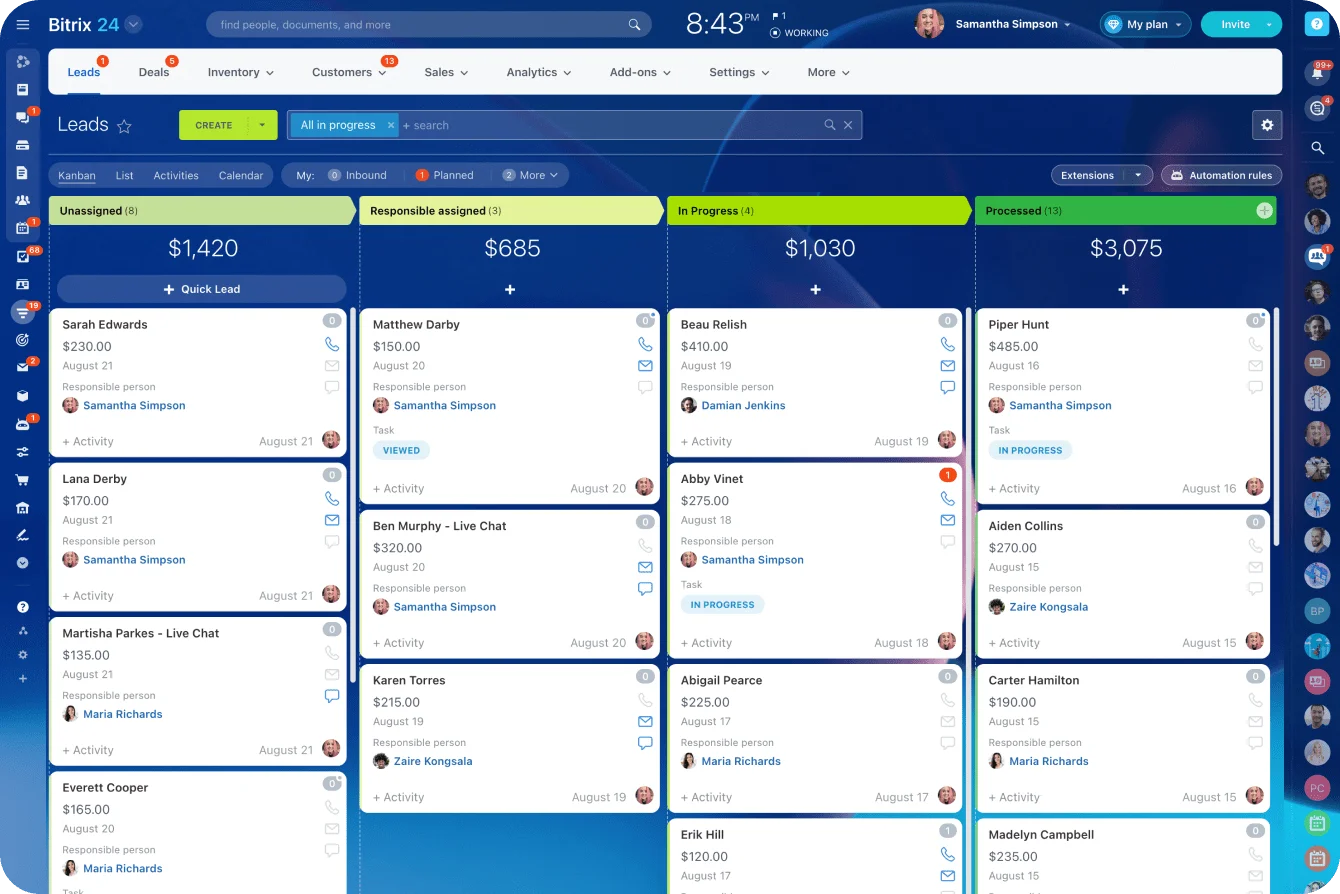
In Bitrix24, teams can use CRM records, activities, and pipeline views during normal operations, then define a lighter manual process for outage mode. The point isn’t to replace the CRM; it’s to know which customer actions still need to move if access is degraded.
Delivery and internal projects
For operations, marketing, implementation, or service delivery teams, the priority is usually task ownership. Who is doing what today? What’s blocked? What depends on approval? What customer-facing deadline is at risk?
Document the fallback process in a shared knowledge base during normal operations, but keep an exported or separately accessible copy for use if the main platform itself is unavailable.
Support and service teams
For support, the fallback needs triage rules. If ticketing is down, teams still need to identify urgent customer issues, route escalations, and log what was done manually.
This is also where post-incident learning matters.
Atlassian gives a concrete example of why post-incident reviews should examine the process rather than hunt for someone to blame. A syntax error in a critical configuration file took down the entire company for 45 minutes. The resulting review found a process weakness, not merely an individual mistake: one error could reach a critical system without an automatic check. Atlassian added a “will it start” test and later removed human interaction from the configuration process.
The same principle applies to business workflows. Ask why employees had to improvise, which information they couldn’t access, and what control would prevent the same confusion during the next outage.
Operational impact at scale: Building practical contingency without slowing the business
At small scale, teams often survive outages through relationships and memory. At larger scale, that stops working. More people, handoffs, and specialization mean contingency has to become an operating standard.
That starts with basics:
- Designated fallback channels
- Regular export or offline access for critical data
- Simple incident communication norms
- Clear decision rights for temporary approvals
- A recovery owner for record reconciliation
None of this needs to be heavy, but it does need to be shared and accepted.
Choose where resilience is worth the effort
There are tradeoffs. Duplicate systems cost money and create maintenance burden. Manual fallback paths reduce efficiency and introduce error risk. Not every workflow deserves the same resilience investment.
A useful prioritization framework asks four questions:
- Criticality: how essential is this workflow to core operations?
- Outage tolerance: how long can it pause before business impact becomes serious?
- Customer impact: does disruption affect external commitments or service quality?
- Recovery complexity: how hard is it to reconstruct work accurately after the app returns?
Workflows that score high on all four deserve stronger contingency design. Others may only need a communication plan and a basic manual fallback.
Keep the test lightweight
A practical test can be simple. Pick one main work app. Choose one critical workflow. Ask the people who run it to explain what they would do if the app went down at 3 p.m. on Friday.
Then check the answers:
- Do they name the same fallback channel?
- Do they agree on who can approve exceptions?
- Do they know where temporary tracking happens?
- Do they know who updates customers?
- Do they know who reconciles the records afterward?
If the answers differ, the outage has already revealed the risk.
FAQ’s
What counts as a “main work app” if teams use multiple overlapping tools?
It’s the application whose loss creates the biggest coordination bottleneck: the main source of truth, approval path, or queue manager. If work cannot be prioritized, approved, or trusted without it, it’s probably the main work app.
How long does an outage need to last before a manual fallback becomes worthwhile?
Use business urgency, not duration alone. If customer-facing deadlines, SLA risk, or high-priority work are active, a narrow manual fallback may be justified even for a short outage.
What if the app is technically available but unusably slow, integrations are failing, or only one department is locked out?
Treat it as an operational outage for affected workflows if the system can’t support reliable execution, trusted records, or normal handoffs. The response can be narrower, but the logic is the same.
Who should own the outage fallback plan?
The workflow owner should own the plan, not only IT. IT may restore the system, but the sales director, support lead, finance manager, or delivery manager usually knows which work must continue manually and which can pause.
How often should teams test this?
Start quarterly for the workflows with the highest customer, revenue, or compliance impact. For lower-risk workflows, test after major process changes, software changes, or team restructuring. The test should be short enough that teams actually do it.
Keep work moving when key apps go down
Bitrix24 connects CRM, tasks, chats, files, and approvals so teams keep context, assign owners, and recover faster after outages.
Get Started NowTest the workflow before the outage does
The goal isn’t to recreate the full app manually. It’s to know which work must continue, who can make temporary decisions, where updates will be recorded, and how the official system will be cleaned up afterward.
Choose one high-impact workflow, such as a renewal approval, support escalation, invoice process, or project handoff. Run the Friday-Afternoon Outage Test and note every point where the team hesitates or gives a different answer.
Bitrix24 makes those dependencies easier to see by keeping customer records, tasks, approvals, communication, files, and reporting connected during normal operations.
Sign up for free, map one critical workflow, and use it to identify the fallback steps your team still needs.