Leveraging Bitrix24 for Financial Services: Client Management and Compliance


The fastest way to fail an exam is to do every check and record none of them. And most compliance trouble at a small financial firm starts right there, as an admin problem.
The suitability review happened, but nobody can show when. A document request sat for weeks because the person chasing it went on leave. Someone approved a client letter in a corridor and never wrote it down.
The work itself lives in inboxes, spreadsheets, shared drives and one senior person's memory. Which holds, sure. Right up until an examiner or an unhappy client asks you to reconstruct a single file…
Bitrix24 puts the client record, tasks, approvals and documents in one place. It won't decide what your regulator requires, and you shouldn't configure it as though it could.
This article walks you through setting up Bitrix24 so any client file can answer an examiner's questions without a reconstruction exercise, showing you where the platform should stop and specialist systems take over.
You'll come away knowing what to build, what to automate and what stays with your compliance team.
TL;DR (Quick Summary)
Bitrix24 works as the operating layer for advisory, lending and insurance firms because it keeps the client record and the work around it in one place, with a history you can show an examiner. It isn't a compliance system. Write your rules first, then configure the platform to enforce them.
- Where Bitrix24 fits → it runs the work between your systems of record and doesn't replace them
- One client record → design it around review dates and evidence, with one named owner per record
- Internal collaboration → a handover is a task with a definition of done, and a chat reply is never an approval
- Automation → automate the chasing and keep a person on every stage that needs judgment
- Documents and approvals → an approval means a named person, a decision, a specific version and a timestamp
- What Bitrix24 can and can't do for compliance → it enforces the controls your firm defines, and retention and regulatory fit stay with you
- Evaluating and rolling out Bitrix24 → write the field list, permission matrix and reports before anyone configures a pipeline
Takeaway: Set up Bitrix24 so any client file shows who did what, when, on which version and with whose sign-off, without anyone's memory filling the gaps. Regulatory and records decisions still need your compliance team's approval.
Where Bitrix24 fits in a financial services operating model
Bitrix24 is the layer between your systems of record. Your custodian, portfolio platform, loan origination system or policy admin system holds the regulated data. Bitrix24 holds the work around it: who's chasing what, which review is due, who approved the pack.
That work is mostly handovers. An advisory firm moves a client from inquiry through fact-finding, document collection, internal review and meeting prep into ongoing service. A lender runs lead qualification, application intake, underwriting prep and post-decision servicing. Each journey crosses three or four people, and the delay sits in the gaps between them.
Here's how I'd split the jobs in a typical small firm:
|
Job |
Bitrix24's role |
Specialist system |
|---|---|---|
|
Client relationship, pipeline stage, next action |
Holds it as the working record |
Not needed |
|
Internal handovers, tasks, deadlines |
Holds it |
Not needed |
|
Document collection and internal sign-off |
Holds the working file and approval trail |
Records archive, if your rules set format requirements |
|
Sanctions, PEP and adverse-media screening |
Records the result, date and reviewer |
Screening provider runs the check |
|
Regulated books-and-records archive |
Not the archive |
Archive that meets your rule's format requirements |
|
Portfolio, loan or policy data |
References it |
Core platform stays the source of truth |
Connect to core systems by reference
Bitrix24's integrations bring data in from other tools. For regulated fields, I'd still hold a reference instead of a synced copy: store the core system's client or account ID on the record and link out. Two-way sync of addresses or risk ratings is exactly where two systems start to disagree without telling anyone.
You find out the hard way. Someone updates a client’s address in one system after a move, the annual statement goes to the old house, and the first you hear of it is the client asking why the people who bought their home know their portfolio balance. Give each field one owning system and make the other read from it.
When Bitrix24 is the wrong tool
If your core platform already runs the client workflow well, don't bolt a second CRM on top. Plenty of wealth platforms and loan origination systems ship with their own pipelines and task tools, and two systems that both claim the client record drift apart within months. Use the core system's workflow, and either keep Bitrix24 for internal projects and team communication or skip it.
Bitrix24 earns its place where the core system stores data but doesn't manage work. That's a lot of small advisory practices and insurance brokerages.
Bitrix24 Compliance Workflow Pack: Templates, Checklists, Audit Logs
Enter your email address to get a comprehensive, step-by-step guide

Using one client record to connect interactions, documents, and next steps
A sales CRM record has to help you close. A client record in a regulated firm has to prove, months later, that the right checks happened at the right time. Bitrix24's CRM holds contact details, notes, activity history, ownership, linked tasks and files on one record, so the real design question is which fields carry evidence.
Build fields around dates and evidence
A checkbox marked "KYC complete" tells an examiner almost nothing. A date, a method and a name answer what they'll actually ask. Custom fields worth making required at onboarding (adjust to your regime):
- KYC status, with the verification date, method and who did it
- Risk rating and the date it was set
- Beneficial owners for entity clients, if you're covered by FinCEN's beneficial ownership rule (25% ownership, plus one control person)
- Source of funds or wealth note for anything rated above low
- Product suitability or risk-profile date, for advice firms
- Next review or renewal date, calculated from the risk rating
Entity onboarding is too slow to do twice. FinCEN's own burden estimate puts identifying, verifying and recording beneficial owners at an average of 80 minutes per legal entity customer, with a range of 40 to 120. All of that is wasted if the result ends up in an inbox.
Pipelines and custom fields then mirror the stages you actually run: suitability review, underwriting prep, policy renewal, annual review. The stage tells you where a client is. The dates tell you whether they're overdue. FATF Recommendation 10 expects ongoing due diligence on existing customers based on materiality and risk, so review frequency follows the rating (as an example, many firms review high-risk clients annually and lower-risk clients every two or three years; your AML program sets the real numbers).
Households, joint accounts and entities
A household and a client aren't the same thing. Two spouses with a joint account are one relationship and two identity checks. A family trust is a third record with its own beneficial owners. Link contacts to a household or company record for the relationship view, and keep verification fields on each person.
Every record gets one named owner and a named cover for leave. Shared ownership reads as nobody's.
The notes field is where this breaks down. Free text slowly becomes the real record, and risk ratings and review outcomes end up in prose nobody can filter. Then a manager asks which high-risk clients are overdue, and someone loses a day reading.
Pro tip: Add a stale-relationship list to the weekly review: every active client with no logged activity in a set window (60 days is a reasonable example for advisory). It catches drifting relationships before the client starts shopping around, and once activity logging is consistent it costs nothing to run.
Turning internal collaboration into a controlled workflow instead of ad hoc coordination
Cases stall between desks. An advisor sends a case to operations, operations needs two documents from the client, and the case sits in a gap neither side owns. Bitrix24 task management and workgroups pin the owner and the deadline to the case, with the discussion underneath.
What a handover task must contain
A handover the next person can act on without a phone call includes:
- The client record it belongs to
- What's attached and what's still missing
- What "done" means, in one sentence
- The deadline and the reason for it (a rate lock, a renewal date, a regulatory clock)
- Who picks it up after this step
When the receiving team has more than one person, assign the handover to a workgroup or queue owner. A task assigned to an individual stops dead the day they're out.
The worst handover is the one the sender marks done. The advisor closes their task the moment the case goes over. Operations never opens theirs. For a week, each side believes the other has it, so make the receiving task the one that counts.
A comment isn't an approval
"Looks good" in a chat thread feels like sign-off and fails as evidence. An approval is a discrete step with a named approver, the exact version they saw, a decision and a timestamp. For US broker-dealers, FINRA Rule 2210 requires a registered principal to approve retail communications before use, and a chat reply won't show which draft got approved. Build approvals as approval steps and keep the discussion in comments.
Keep client conversations on recorded channels
Business conversations on personal messaging apps are a books-and-records problem, and regulators price it accordingly. In one February 2024 sweep, the SEC charged 16 broker-dealers and investment advisers over off-channel recordkeeping failures, with combined penalties of more than $81 million, and the adviser firms admitted staff had discussed client recommendations on unapproved channels.
Bitrix24 keeps internal case discussions next to the case, which beats a personal phone. Whether it counts as a compliant record of business communications depends on your rules and your archive setup. Put that question to compliance before anyone relies on it.

Automating routine client and back-office processes without over-automating exceptions
Automate the chasing. Keep people on the deciding.
In Bitrix24, automation rules sit on each pipeline stage in the CRM and fire when a record reaches that stage, with Workflow Designer for longer chains. Robotic Process Automation runs internal processes, such as a document approval, through their own stages.
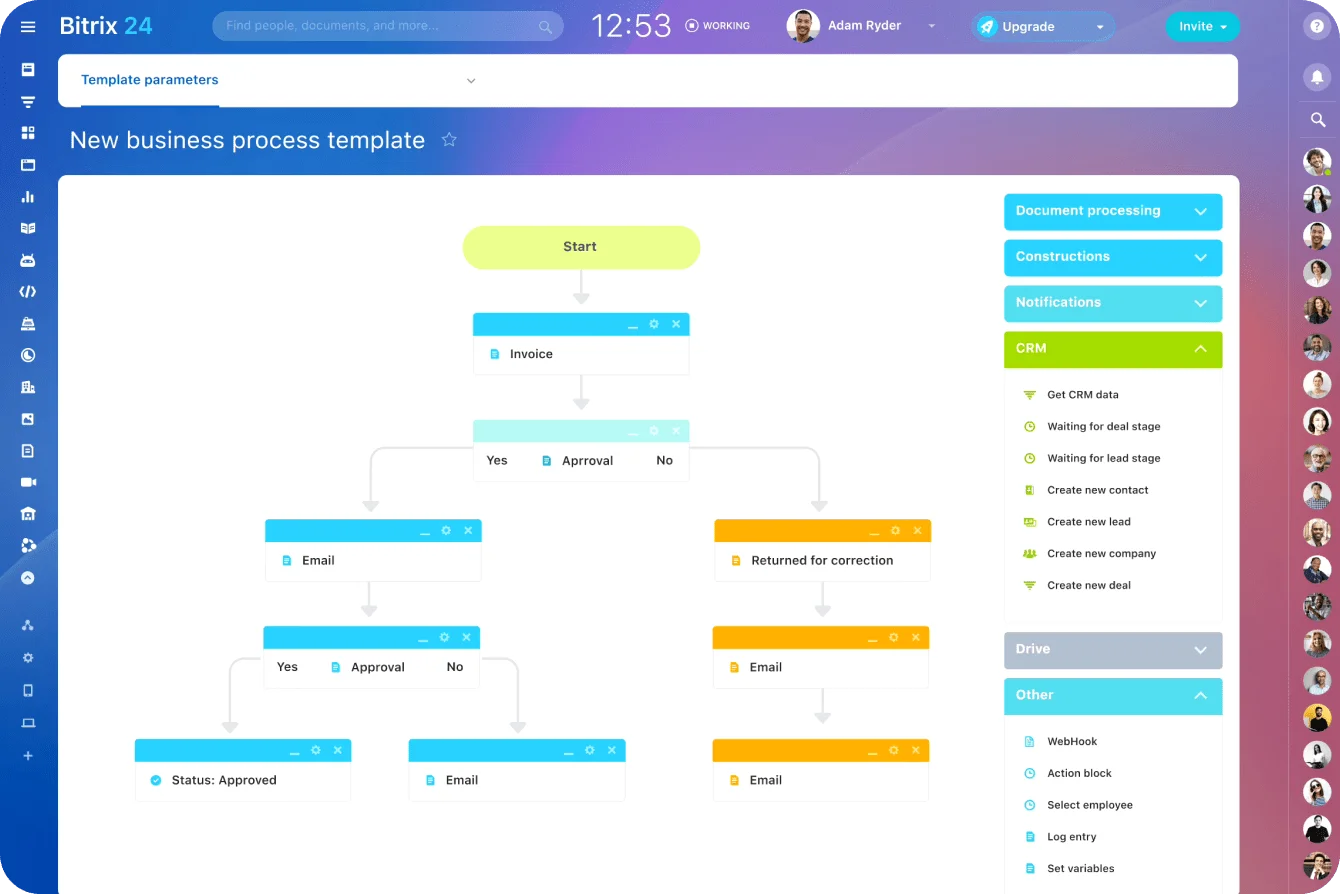
What to automate and what to leave alone
Automate these:
- An onboarding checklist created when a client enters the onboarding stage
- Review or renewal prompts to the owner ahead of the date (90, 60 and 30 days out is a common example pattern)
- Document chasers while a required item is still missing
- Escalation to a manager when a case stays blocked past your threshold
Keep a person on anything that moves a case past a judgment point:
- Suitability or affordability conclusions
- Accepting non-standard documents, like a foreign ID or an unusual trust deed
- Moving a case to approved, declined or complete
- Closing an exception
Write the chasing thresholds down
An escalation rule without a number never fires. As an illustrative starting point for client document requests:
- 5 business days: reminder to the client
- 10 business days: call task for the owner
- 15 business days: alert to a manager
Tune the numbers to your own cycle times, but write them down so everyone escalates on the same clock.
One Bitrix24 behavior catches teams out: when a record moves to another stage, that stage’s pending automation rules stop. A chaser that has to survive a stage change needs its own rule on the new stage, and every new rule goes through automation test mode before it touches a live client.
Client-facing automation is a communication
An internal reminder and an automated client email look identical when you set them up. Regulators don't see them that way.
Under FINRA Rule 2210, a written message sent to more than 25 retail investors within any 30 calendar-day period is a retail communication rather than correspondence, with different approval and supervision requirements. Whether a template chaser needs principal pre-approval depends on what it says, so have compliance review the wording once, record that review and lock the template.
Over-automation looks like success for weeks. A rule moves the case to complete when the last required file arrives, and nobody notices the upload was the wrong document until the file review. I wouldn't let any automation move a case past a review stage on its own.
Pro tip: Keep an automation register listing every rule with its trigger, its action, its owner and the date someone last checked it. When a regulator or a new ops lead asks why a client got a particular email, you answer from the register in minutes instead of reverse-engineering the setup.
Managing documents and approvals in a way that supports process discipline
Client files fall apart at the documents. Bitrix24's document management attaches files to client or deal records and routes them through approval flows under defined access permissions. Four things change when you move off ad hoc handling:
- Files move from mixed locations onto the client or case record
- Approval requests move from email into a tracked approval flow
- The latest version is visible in context instead of guessed
- Access follows defined permissions instead of informal sharing
A naming and version rule that survives an audit
Use one convention for every client file and enforce it at upload:
- Client ID first, so files sort by client
- Document type from a fixed list (IDENTITY, ADDRESS, FUNDS, APPLICATION, REVIEW)
- Date in ISO 8601 format (YYYY-MM-DD), which sorts correctly
- A version number that only goes up, with "FINAL" banned
An illustrative result: C10482_REVIEW_2026-03-14_v3.pdf.
What an approval record has to show
An approval holds up under review when the record shows:
- Who approved, by name and role
- The exact version approved
- The decision and any conditions
- When, by system timestamp
Watch the edit after approval. If someone changes v3 after sign-off, the approval no longer covers what goes to the client. Lock the file at approval, or send any change back through as v4.
Retention is a separate decision
Retention is a rule about time and format, and it varies by license:
- US broker-dealers keep records for three or six years depending on type under SEC Rule 17a-4, which also sets requirements for electronic records
- Registered investment advisers generally keep books and records for five years under Rule 204-2
- Firms under GDPR must keep personal data no longer than necessary, so keeping everything forever carries its own exposure
Decide which documents Bitrix24 holds as the working file and which get exported to a records system that meets your rule.
Signatures are where teams assume too much. A client disputes a fee change, and the file holds an internal approval stamp and an unsigned PDF, which proves the firm agreed with itself. Confirm your signing method meets the legal baseline (the E-Sign Act also requires consumer consent, after specific disclosures, before required documents go out electronically) and keep the signed copy with its audit trail on the record.
What Bitrix24 can do for compliance-related work, and what it cannot do on its own
Controls Bitrix24 enforces once your compliance team defines them:
- Required fields that block a stage change until the evidence is in
- Approval steps before a case advances
- Deadlines and escalations tied to workflow stages
- Role-based access permissions on records and files
- Task and activity history showing who did what, and when
Decisions it can't make for you:
- Whether a recommendation is suitable or a loan affordable
- Whether a document is genuine
- Which retention periods and formats apply to you
- Whether your setup meets a specific regulation in your jurisdiction
Usually the firm knows what should happen, but the workflow lets one team skip a field another team always fills. Software closes that gap only after someone has written the rules, so get compliance to sign off on mandatory fields, approval points, exception escalation, access rights and documentation practice before go-live.
Do vendor due diligence before client data goes in
A cloud platform holding client data is a third party you're expected to assess:
- FTC-regulated non-bank firms must oversee service providers under the GLBA Safeguards Rule
- SEC-registered broker-dealers and advisers carry service-provider oversight duties under the 2024 Regulation S-P amendments
- EU financial entities have managed ICT third-party risk under DORA since January 2025
Oversight doesn't stop at signing. Morgan Stanley Smith Barney hired a moving company with no data-destruction experience to decommission old servers and hard drives, never properly monitored the work, and devices holding customer data ended up resold on an internet auction site. That cost the firm a $35 million SEC penalty.
Don't assume any certification, encryption standard or hosting region. Read Bitrix24's security documentation and get these answers in writing from current sources:
- Where is our data hosted, and can we choose the region?
- Which certifications or audit reports apply to the hosting option we'd use?
- Can we enforce multi-factor authentication for every user?
- How quickly will the vendor tell us about a breach, and is that fast enough for our own notification duties?
- How do we export everything if we leave?
Audits expose the gap between a closed task and a completed review. The examiner asks what the annual review found, and the record says "Done." Nothing shows what was reviewed or what the reviewer concluded. Put the outcome in required fields on the record, and the closed task becomes evidence.
Good rule of thumb: Bitrix24 enforces how your team works. Regulatory, legal, records and data-handling requirements get validated separately before any part of the setup counts as compliance-critical.
How financial firms should evaluate and roll out Bitrix24 responsibly
CRM projects at financial firms go wrong in the design meeting. Someone builds pipelines from the sales view, and operations and compliance find the gaps after clients are already in the system. Put operations, compliance, IT and two frontline users in that meeting, because each of them sees a different failure point in the same process.
Write these down before anyone configures anything
The design documents that save the most rework:
- The field list for each stage, marked required or optional
- Every approval point, with the approver's role
- The trigger for each handover
- The documents that belong on each record type
- The handful of reports managers will run every week
Statuses get the hardest scrutiny. Each one leads to a different next action. If two lead to the same action, merge them.
Map roles to permissions
An illustrative permission matrix for a small advisory or lending firm:
|
Role |
Sees |
Edits |
Approves |
|---|---|---|---|
|
Advisor or loan officer |
Own clients and team cases |
Own records and tasks |
Nothing regulated |
|
Operations |
Cases in their queue |
Documents, checklists, stages up to review |
Document completeness |
|
Manager |
Their team's work |
Assignments and deadlines |
Exceptions and escalations |
|
Compliance |
All records |
Review fields only |
Communications, high-risk onboarding |
|
Admin support |
Contact details |
Contact details |
Nothing |
Too loose, and nobody can show who changed a risk rating. Too tight, and staff go back to email.
Test with your worst recent cases
Before go-live, I'd push three recently closed cases through the configured setup, and pick ones that went badly: the client with a trust structure, the application that stalled for a month. If the setup can't represent those, it won't survive real volume. I'd run this test even at a ten-person firm.
Clean the data before you import it
Deduplicate against a written matching rule:
- Match on email, phone or tax ID, never on name alone
- Send near-matches (same name, different address) to a person
- Keep the legacy system's ID in a custom field so every record traces back
Skip the rule and years of spreadsheets become three records for the same client, each holding part of the history. Advisors use whichever one they find first, and the split widens every week. Cleaning it after go-live costs far more than cleaning it before.
Bitrix24's analytics and reporting tools give managers the case-level views they need, like stalled cases and overdue reviews, only if the fields behind them are structured.
Pro tip: Write a short "how we use it" guide before launch and pin it where staff already work in Bitrix24. Cover what each stage means and why each mandatory field exists. New staff copy whatever their neighbor does, and a written guide is the only thing that stops one person's workaround from becoming the process.
FAQ
Is Bitrix24 compliant with SEC, FINRA or FCA rules?
No software is compliant on its own. Regulators assess the firm's controls. Bitrix24 enforces many of them once you define them, and your compliance team decides whether a specific setup meets your obligations.
Can Bitrix24 be our books-and-records archive?
Treat it as the working file. If your regime sets format rules for electronic records, as SEC Rule 17a-4 does for broker-dealers, confirm with compliance and your archive provider before relying on any platform as the archive.
Does this suit a five-person firm?
Yes. Small firms gain the most, because every case runs through the same two or three people and nothing catches a dropped step. Keep the build lean: fewer stages and fields, and only the approvals your rules require.
Keep financial client work audit-ready
Use Bitrix24 to centralize client records, tasks, approvals, and documents so teams can track evidence and reduce compliance gaps.
Get Started NowBitrix24 runs the process, your firm owns the rules
Try this before you change anything. Pick any client file and answer four questions without opening an inbox or asking a colleague:
- Who owns this client, and who covers when they're away?
- When was the last review, and when is the next one due?
- Which version of each document was approved, and by whom?
- What is this case waiting on right now?
If you need a colleague for any of them, that colleague is your system of record, and nobody can audit a memory.
The gap stays invisible in a normal week. It shows up the week an examiner asks for one file and three people spend days rebuilding it.
When you book a Bitrix24 demo, bring that file and ask to see exactly where each of the four answers would live.
Takeaway: In a regulated firm, the best setup is one where doing the work and recording the evidence happen in the same step.