From Website Visits to Revenue: Track Lead Sources and Follow‑ups End to End


Your paid campaign generated 300 clicks and 42 form submissions. Sales closed three deals. But you can’t trace which clicks actually produced the revenue or which campaigns are worth investing in.
This is a common problem for businesses running multi-channel marketing. Traffic and leads are visible, but the connection to revenue breaks between marketing and sales systems.
End-to-end lead tracking (also known as marketing attribution or lead attribution) solves this by linking every lead and closed deal back to its original source inside a single system. When implemented correctly, it shows exactly which campaigns, channels, and pages generate customers, not just activity.
In this guide, you’ll learn how to capture lead sources, connect web forms to your CRM, automate follow-ups, and track source-to-deal conversion so you can see exactly what drives revenue and invest with confidence.
TL;DR: Most businesses can track traffic and count leads, but the connection to revenue breaks between marketing and sales systems. End-to-end tracking links every closed deal to its original source (campaign, channel, and landing page) so you invest in what actually works.
Why most businesses can't connect traffic to revenue
Marketing and sales typically rely on platforms that operate independently:
- Analytics tools for traffic
- Form builders for inquiries
- Email platforms for nurturing
- CRM software for deals
Each captures a fragment of the customer journey, but they rarely share data automatically. According to an Ascend2 and RevSure survey on marketing attribution:
- Only 29% of marketers consider themselves very successful at attribution
- 46% cite limited resources and complexity as the top barriers
- Just 31% are extremely confident in the accuracy of their attribution data
The majority are making budget decisions based on metrics they don't fully trust.
Lead source information gets lost
Even when leads enter the CRM, the original marketing source is often missing. A visitor might discover you through organic search, a paid campaign, social media, a referral, or email, but the CRM record may contain only contact details. No source, no campaign, no landing page. Over time, this makes it impossible to evaluate which marketing activities drive customer acquisition.

Follow-ups are inconsistent
When inquiries arrive through separate inboxes, forms, chat tools, and messaging apps, some leads get immediate responses while others wait hours or days. Research published in Harvard Business Review found that:
- Companies contacting leads within one hour were nearly 7x more likely to qualify them
- Those who waited 24 hours were 60x less likely to qualify the lead
Inconsistent follow-ups reduce conversion rates and make it harder to measure the true impact of any campaign.
Marketing ROI becomes guesswork
Without a clear link between traffic, lead sources, and sales outcomes, you can't determine:
- Which campaigns generate real customers
- Which channels produce the most valuable deals
- Where marketing investment delivers the strongest return
All of this leads to the same outcome: you can generate traffic and leads, but you can’t reliably connect them to revenue.
What end-to-end lead tracking looks like
To understand which efforts generate revenue, you need to follow the full path from first visit to closed deal:
|
Stage |
What happens |
What gets tracked |
|
Visit |
A visitor arrives from search, ads, social, referral, or email |
Traffic source, campaign, landing page |
|
Conversion |
The visitor fills out a form, starts a chat, or requests a demo |
Contact details + source metadata captured automatically |
|
Lead created |
A CRM record is created with full context |
Source, campaign, landing page, date, and time |
|
Follow-up |
Sales receives a notification or automated task |
Response time, assignment, initial outreach |
|
Pipeline |
The lead moves through qualification, proposal, negotiation |
Stage progression, time in each stage, deal value |
|
Closed deal |
Revenue is linked back to the original source |
Campaign, channel, and page that generated the customer |
When these stages connect in one system, any closed deal traces back to the activity that started the relationship. With disconnected tools, the chain breaks — usually between conversion and pipeline.
1. Capture website leads with source data
Once you understand where tracking breaks down, the first step is to capture leads with their source data intact. If this information isn’t recorded at the point of conversion, it can’t be recovered later.
Common sources include:
- Organic search
- Paid advertising (Google Ads, social ads)
- Social media (organic posts, shares)
- Email campaigns
- Referral links
- Direct visits
Tracking these reveals which channels consistently attract potential customers — and which produce leads that actually convert.
Record source information automatically
Manual tracking rarely works. Sales teams don't have time to ask every prospect how they found the company, and self-reported responses are often inaccurate. Automated source tracking captures key metadata at the moment a form is submitted:
- Traffic source
- Campaign or ad group
- Landing page URL
- Timestamp
With Bitrix24 web forms, each submission automatically creates a new lead record in the CRM, including both contact details and source information, so your team always knows where a lead came from. (Check out our full range of solutions here).
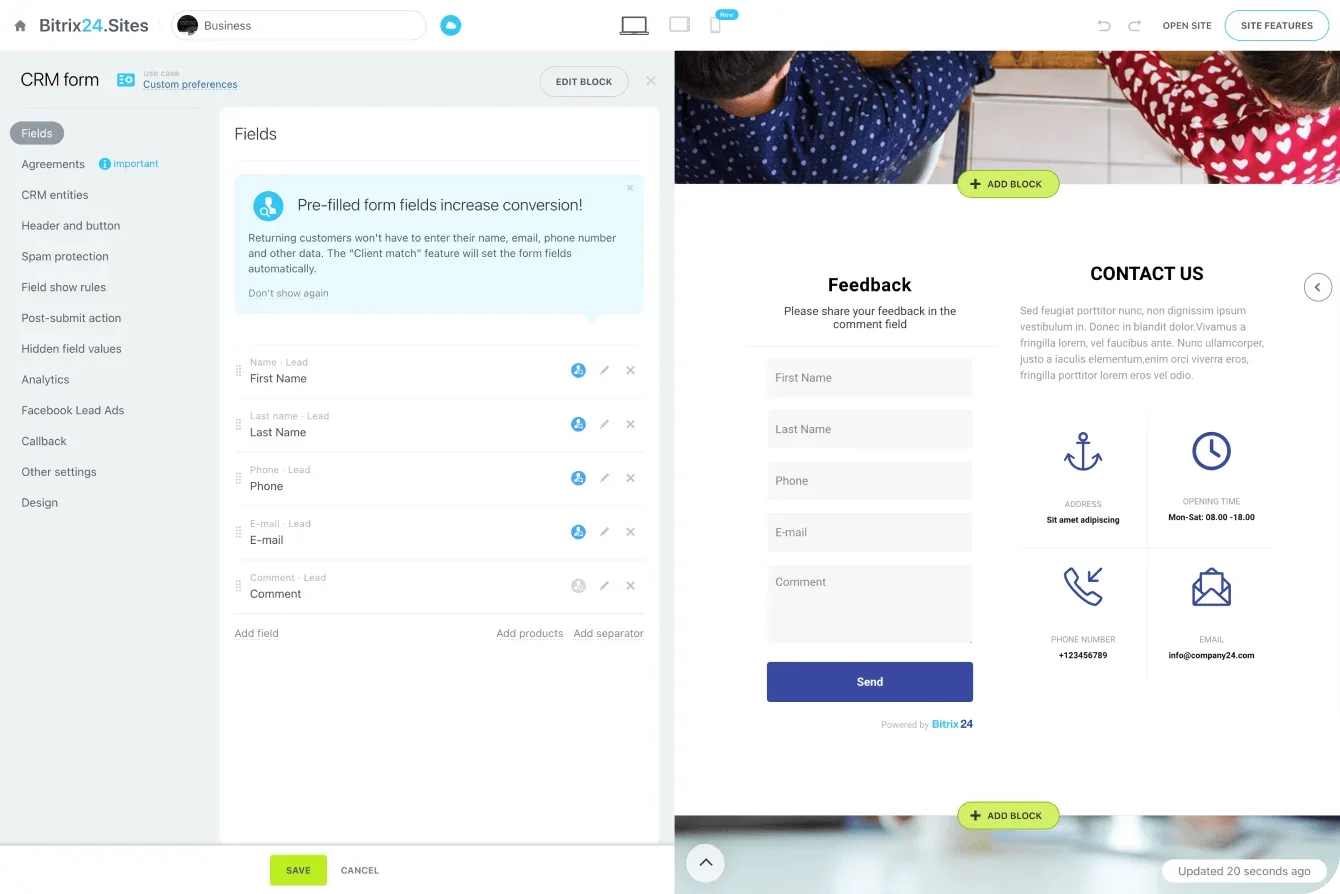
With source data captured at the point of conversion, every lead enters your CRM with the context needed to track it through to revenue.
2. Connect leads to CRM and automate follow-ups
Website forms are just one entry point. Prospects also reach you through live chat, email, phone calls, social media, and messaging apps. When all channels feed into the same CRM, every interaction becomes part of a single lead record. Bitrix24's contact center links conversations from multiple channels to CRM records automatically.
Automate assignment and response
Speed matters. Automation ensures every lead receives immediate attention:
- Assigning leads to the correct salesperson based on source, territory, or deal size
- Creating follow-up tasks when new inquiries arrive
- Sending notifications to reps
- Triggering acknowledgment emails to the prospect
Pro tip: Route leads based on source. Paid campaign leads might go directly to your fastest closers, while organic leads enter a nurture sequence. Matching the follow-up to the source improves both response speed and conversion quality.
Lead Source Tracking Kit: Attribution Templates and Follow-Up Maps
Enter your email address to get a comprehensive, step-by-step guide

3. Track lead source to deal conversion
After creation, a lead typically progresses through stages: new lead, qualification, needs assessment, proposal, negotiation, and closed deal. Tracking movement through these stages reveals how efficiently leads convert (and, just as importantly, where they drop out).
For example:
- Leads from certain campaigns may move quickly through qualification while others stall early
- Organic search leads might convert at lower volume but produce higher deal values
- Referral leads may close faster but have smaller average deal sizes
Without source-to-stage tracking, these patterns remain invisible.
Connect every deal to its original source
When source data stays attached throughout the sales pipeline, you can identify:
- Which campaigns produce the most customers
- Which channels generate the highest-quality leads
- Which landing pages attract prospects who convert
- Which sources produce the largest deal values
These insights let marketing and sales focus on what consistently delivers, rather than relying on assumptions or traffic volume alone.
4. Use dashboards to measure marketing ROI
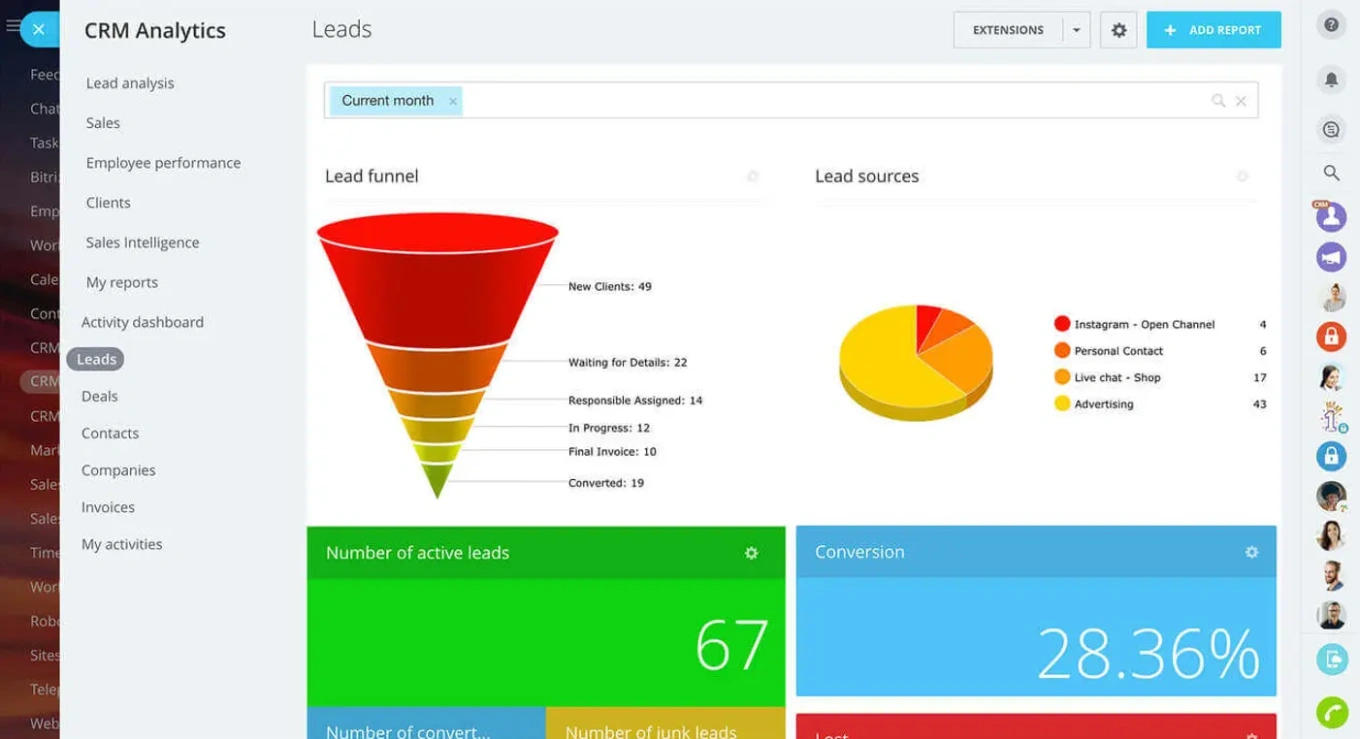
Instead of reviewing separate reports across multiple tools, track the metrics that connect marketing activity to revenue:
- Leads generated by source or campaign
- Conversion rates across pipeline stages
- Pipeline value by channel
- Closed deals by lead source
Identify high-performing campaigns
Dashboards may reveal that:
- Certain landing pages consistently generate qualified leads
- Some ad campaigns produce higher-value deals
- Specific channels convert leads faster than others
These insights help marketing teams focus budget on campaigns that actually drive revenue, not just traffic.
Share visibility across teams
When marketing and sales see the same performance data, alignment improves. Marketing understands which campaigns produce the most valuable leads; sales gains visibility into how prospects first engaged with the business.
Bitrix24's analytics and reports let teams track sources, monitor pipeline performance, and analyze deal outcomes in one place.
When end-to-end tracking may not work as expected
This approach assumes a certain level of CRM discipline and consistent lead capture. It may need adjustment in these situations:
- Offline lead sources. Trade shows, phone referrals, and walk-ins don't generate automatic source data. For these, build a simple intake process where reps tag the source manually at the point of entry — otherwise these leads become "unknown source" and distort your attribution.
- Long sales cycles with multiple touchpoints. When a prospect interacts with your brand over months across many channels, first-touch attribution oversimplifies the picture. Consider tracking both first touch (what brought them in) and last touch (what triggered the conversion) to get a more complete view.
- Small lead volumes. If you're generating fewer than 50 leads per month, source-level reporting may not produce statistically meaningful patterns. At low volume, focus on qualitative review of individual deals rather than channel-level dashboards.
- Teams that don't update the CRM. If sales reps skip deal stages, don't log activities, or close deals without progressing leads through the pipeline, the source-to-revenue chain breaks regardless of how well marketing tracks the front end. CRM discipline is a prerequisite, not a nice-to-have.
End-to-end tracking still works in all of these scenarios, but only if your data is complete and consistently maintained. The more disciplined your lead capture and CRM processes are, the more accurate your connection between marketing and revenue becomes.
From clicks to closed deals
Driving traffic is easy to measure. Revenue is not.
The difference comes down to whether you can follow the full path from first click to closed deal. When lead sources, follow-ups, and pipeline data are connected, you can see exactly which campaigns generate customers and which ones only generate activity.
That clarity changes how you invest, how you prioritize, and how you grow.
With Bitrix24, you can capture lead sources, connect your website to your CRM, automate follow-ups, and track every deal back to its origin in one system.
Start for free and turn your marketing data into measurable revenue.
Boost Your Marketing ROI
Leverage Bitrix24 CRM to seamlessly track lead sources, automate follow-ups, and evaluate ROI. Turn your website engagement into quantifiable revenue.
Get Started NowFrequently asked questions
What is end-to-end lead tracking?
End-to-end lead tracking follows a prospect from their first interaction with your website through to a closed deal. It connects the marketing source (campaign, channel, or page) to the CRM record, the follow-up process, and the sales outcome, so every deal traces back to the activity that generated it.
Why does lead source data get lost between marketing and sales?
It usually happens because marketing and sales use separate systems. Analytics tracks traffic, form builders capture inquiries, and CRM manages deals, but these tools rarely share data automatically. When a lead enters the CRM without source metadata attached, the connection between marketing activity and sales outcome disappears.
How quickly should we follow up with new leads?
As fast as possible. Research published in Harvard Business Review found that companies contacting leads within one hour were nearly seven times more likely to qualify them (and more than 60 times more likely than those who waited 24 hours). Automated workflows help ensure no lead waits for a manual response.
Can I track which specific landing page generated a deal?
Yes, if your forms capture page-level data at submission. When web forms create CRM records, they can store the landing page URL alongside contact details and source information. This data stays attached as the lead moves through the pipeline, so you can trace any closed deal back to the specific page that captured it.
What metrics should I track to measure marketing ROI?
Focus on metrics that connect marketing activity to revenue: leads by source, lead-to-opportunity conversion rate by campaign, pipeline value by channel, and closed revenue by original source. These tell you which investments actually produce customers, rather than just measuring traffic or form submissions.
How do I track leads that come from offline sources like events or referrals?
Build a simple intake step where the rep selects the source at the point of lead creation: event name, referral partner, or "phone inquiry." This manual tag is less precise than automated web tracking, but it's far better than leaving the source blank. Over time, you'll still see which offline channels produce pipeline and revenue, even without automatic attribution.