A Lean CRM Buying Guide for Small Teams That Need Adoption More Than Extras


TL;DR (Quick Summary)
- Small teams pick a CRM on price or feature count, then pay for it in setup work, messy data, and a system nobody keeps current.
- Judge it instead by total adoption cost: the effort to implement, learn, maintain, and use it every day.
- The cheapest tool on paper is usually the most expensive to run.
Takeaway: The cheapest tool on paper is usually the most expensive to run, so judge a CRM by total adoption cost rather than price per seat or feature count.
Two CRMs sit side by side in a comparison spreadsheet. One's $12 a seat with forty features listed. The other's $30 with twenty. On paper, the cheap one wins by a mile.
Three months in, the cheap one's the one nobody updates. Not because it's missing something the expensive one has. Logging a call means six clicks and four required fields, so people quietly stop, and the subscription turns into a line item nobody checks.
The feature count and the seat price never told you whether the team would keep the thing current. That's the number that actually decides whether the CRM earns its keep or turns into another tool everyone routes around.
This guide covers how to price that in: what to test before you buy, which components actually matter for a small team, and when a lean setup stops being enough.
Why small teams often buy the wrong CRM
Most teams compare two numbers: price per seat and length of the feature list. A low price feels safe. A long feature list feels future-proof. Neither number tells you how the thing behaves once real customer work runs through it.
The hidden cost appears after launch
A CRM is supposed to hold the working record: contact history, pipeline movement, ownership, reminders, follow-up. When it's awkward to configure or murky to maintain, people quietly route around it.
Industry research on CRM failure backs this up at any company size: over 60% of failures trace to people and process, poor adoption, unclear ownership, thin training, and only 6 to 10% come from the platform itself. The tool is rarely the actual problem.
You've seen the symptoms:
- Notes that live in one person's inbox
- Tasks people remember instead of record
- Deal stages that go weeks without a touch
- Duplicate contacts piling up after every import
- Managers rebuilding the pipeline in a spreadsheet
- Everyone logging information their own way
The subscription still looks cheap. The running cost tells a different story.
Small teams feel the friction faster
Nobody on a small team does CRM administration full time. The founder, the sales lead, the account manager, the office manager: whoever set the thing up is doing it between customer-facing work.
Picture a founder finishing several prospect calls in an afternoon. Recording one means opening several screens and filling a dozen fields, so the updates wait until Friday or never happen. That isn't a discipline problem. A workflow that demands too many steps during the one week nobody has spare minutes produces exactly this result.
Pro tip. During a trial, skip the feature tour. Take one real lead from inquiry to follow-up: log the conversation, assign the owner, schedule the next action, move the stage. What you feel doing that tells you more than any feature comparison.
Small-Team CRM Adoption Scorecard + Vendor Demo Script
Enter your email address to get a comprehensive, step-by-step guide

What a lean CRM actually means for a small team
A lean setup is built around the work the team does now, and it doesn't demand a months-long implementation project before anyone can log a lead.
Start with the work that already happens
Lean doesn't mean bare. The setup still needs enough structure to hold:
- Contacts and companies
- Leads or deals
- Pipeline stages
- Notes and activity history
- Owners and responsibilities
- Tasks and reminders
- A few useful automations
The point is to capture something once and have it show up where it's needed. A call note joins the contact history. Moving a deal spawns the next task. An overdue follow-up surfaces on its own, with no one building a report to find it. Bitrix24 CRM fits this when a team switches on the functions it needs and leaves the rest alone.
Avoid building for hypothetical complexity
A five-person team has little use for dozens of permission layers, a heavily customized data model, or elaborate reporting. It needs something people grasp fast and use correctly while live customer work is happening.
Add complexity when the work demands it. Five custom fields built today for a maybe-next-year requirement add maintenance now and value later, if ever.
Use the disappearance test
Here's a blunt test. If the CRM vanished overnight, would the team feel it by lunchtime?
If customer history, next actions, and ownership would suddenly be hard to reconstruct, the CRM is part of how work gets done. If everyone would shrug and carry on from email and spreadsheets, adoption still has a long way to go.
Why adoption matters more than extras
CRM value comes from behavior, not from the box of features. If people don't log activity, move stages, and act on reminders, the platform turns into a database somebody checks now and then instead of a system the team runs on.
Daily usage matters more than feature count
Small teams have no slack. One unassigned inquiry, one forgotten callback, one deal going stale can sit unnoticed when nobody clearly owns it.
Extra features get sold as future readiness. Advanced customization, complex reporting, wide integration options: each one might earn its keep later, and each one hands somebody a decision now.
- Which fields are required?
- What does each pipeline stage mean?
- Who owns each automation?
- What happens when there's an exception?
- Who fixes the workflow when it breaks?
More capability raises the effort to get the basics right.
Calculate total adoption cost
Most CRM buyers land somewhere between $35 and $105 per user per month once they've actually priced it out, according to Capterra's 2025 buyer survey. A seat price that looks cheap against that range is worth a second look: the gap is often paid back later in setup work, cleanup, and manual entry nobody budgeted for.
Total adoption cost, for this guide, is everything it takes to get the CRM into dependable daily use:
- Onboarding and training
- Data migration and cleanup
- Field and pipeline setup
- Duplicate management
- Reporting maintenance
- Troubleshooting
- Ongoing user reminders
- Manual work created by missing automation
A cheaper subscription can carry a higher total once these keep eating team hours.
Protect trust in the data
The moment people decide the CRM is incomplete, they stop trusting it enough to check it before acting. Then the loop turns. They fall back on inboxes, spreadsheets, private notes, and memory. Fewer updates land in the CRM, so the data gets worse, so more people stop trusting it.
Breaking that loop means keeping the system good enough that opening it is the fastest way to find out what's going on.
Build habits around existing work
Adoption climbs when CRM actions ride on work people already do. Updating a deal creates the follow-up task automatically, so nobody has to remember a separate step. Bitrix24 task management keeps deadlines and ownership tied to the customer activity that generated them, instead of asking people to keep a second to-do list alive.
Practical summary. Pick the CRM that makes the right daily behavior the easy behavior. Extra capability earns its place once those habits hold.

How lean CRM evaluation works: Compare total adoption cost, not just subscription price
Turn the estimate into a buying test. Set each CRM's subscription price next to the recurring work it'll create for the people who actually run it, and ask two questions:
- What does it cost per month?
- What work does it create before the team can depend on it?
Compare the areas that create recurring work
Run each contender across the areas that generate ongoing work.
|
Evaluation area |
What to look for |
Hidden cost if weak |
|---|---|---|
|
Usability |
Clear menus, fast updates, low training burden |
Low compliance, side spreadsheets, skipped logging |
|
Setup speed |
Useful defaults, simple pipeline creation, limited required configuration |
Delayed launch, excessive admin work, confusion |
|
Migration and cleanup |
Clear imports, field mapping, owner assignment, duplicate controls |
Messy data from day one, fragmented contact history |
|
Basic automation |
Task reminders, stage triggers, email or activity logging |
Manual follow-up, dropped leads, inconsistent process |
|
Workflow fit |
Practical mobile access, inbox connection, quick note entry |
Delayed updates, tool avoidance, stale pipeline data |
|
Reporting simplicity |
Easy views for overdue work and pipeline status |
Manual status chasing, hidden follow-up gaps |
A cheap tool with weak imports and thin reminders can generate more admin than a pricier one with cleaner defaults. Highly configurable platforms carry the opposite risk: a five-person team ends up maintaining processes built for a much larger sales org.
Test the operating workflow, not the demo workflow
Test with your own messy data, not the vendor's tidy demo set. Import a handful of contacts carrying the same formatting problems you'll hit in the real migration, and watch what happens to:
- Duplicates
- Blank values
- Ownership
- Phone number formats
- Custom fields
Then hand the system to two or three future users with no hand-holding. Can they find a contact, add a note, update a deal, schedule a next action, and see what's overdue?
If a chunk of the team works away from a desk, put the Bitrix24 mobile app through the same run. A CRM that's fine at a desk but painful after a customer visit trains people to postpone updates.
Pro tip. Build an adoption checklist before you talk to vendors. List only the actions users repeat daily or weekly, score each CRM on those first, and treat secondary features as tiebreakers.
The core components of a CRM small teams will actually adopt
1. Usability and setup speed
Teams need clear record layouts and a pipeline that works without weeks of design work. Bury a common action under too many clicks, or force a field decision nobody's ready to make, and updates start slipping.
Keep the first version deliberately plain. A sales team can start with:
- New
- Contacted
- Qualified
- Proposal
- Won
- Lost
Add a stage only when it marks a real change in what someone does next.
Setup has one more job: ownership. Every active lead and deal gets a named person and a next action. Without that, the CRM logs activity but controls nothing.
2. Data cleanup and automation basics
A lean CRM keeps imports manageable, holds down duplicates, enforces a required field only where it earns one, and automates the repetitive stuff.
This is where teams overbuild. They wire up five automated steps before checking that anyone uses the first one. Automating on top of incomplete data just moves bad information faster.
Start with one or two repetitive actions:
- Create a task when a new inquiry is assigned
- Remind the owner when a deal goes quiet for a set period
- Log emails against the right contact
- Alert someone when a deal hits a specific stage
Once those hold up under real conditions, add more. If data has to move between systems, check the available Bitrix24 integrations before assuming someone will handle exports by hand. A weekly spreadsheet transfer has a way of becoming an unofficial process that exactly one person knows how to run.
3. Follow-up discipline and visibility
Teams need a clear next action, an overdue view, activity timelines, and reporting simple enough to surface neglected leads. Keep reporting pointed at this week's priorities before anyone builds fancier analysis.
Before a weekly pipeline meeting, a sales lead should open the CRM and see:
- Which deals haven't moved
- Which activities are overdue
- Which opportunities have no next action
- Where ownership is unclear
- Which stages are getting crowded
If that takes a data export and a rebuilt spreadsheet every week, the CRM isn't pulling its weight. Bitrix24 analytics and reporting tools earn their keep once they're wired to decisions the team actually makes: open pipeline, overdue activities, conversion between the major stages, and work by owner.
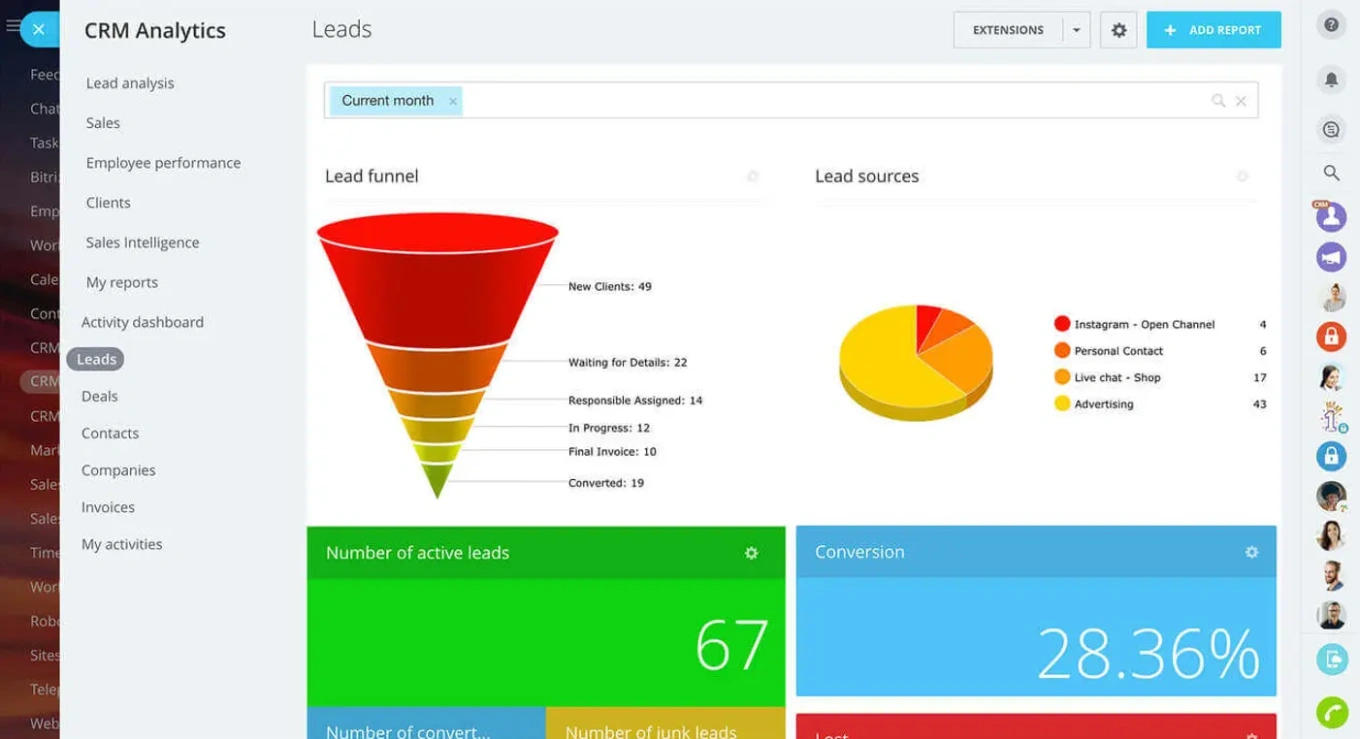
Quick adoption check. You're in good shape if a new user can find contacts, deals, tasks, and notes without a tour, and if overdue work and next actions show up without a custom reporting project. Be wary if the CRM needs heavy customization before it can handle the first lead, or if data quality rests on people remembering an undocumented set of cleanup rules.
Common CRM buying mistakes that create hidden work
Choosing based on seat price alone
A low monthly bill reads as efficient until the tool starts generating manual admin. That hidden work shows up in imports, record maintenance, reporting fixes, and nagging people to use the system.
Ask who does that work. If the sales manager spends part of every Friday fixing owner fields, merging duplicates, and chasing missing updates, that time is part of the price.
Overbuying for future complexity
Some small teams reach for an enterprise CRM to avoid switching down the line. That's reasonable when the complex requirements already exist. It's a bad trade when they're still hypothetical.
A platform that needs heavy configuration before it supports basic selling slows the launch and dents confidence. People learn that CRM work is hard before they've felt any payoff from it.
Underestimating source-data problems
Messy spreadsheets, duplicate contacts, inconsistent naming, unclear ownership: none of it fixes itself on import. It just becomes everyone's problem.
Before you migrate:
- Decide which fields are worth keeping
- Standardize the obvious variations
- Remove or archive dead records
- Resolve the clear duplicates
- Assign ownership where you can
Don't drag every column across just because it exists.
Mistaking process friction for a motivation problem
A badly designed process looks a lot like a lazy team. Ask people to fill too many fields, guess at vague stage definitions, or type the same thing three times, and skipped updates become the predictable result.
Required fields are the classic case. One or two protect data quality. Require something the user doesn't know yet and you invite guesses, placeholder text, and workarounds.
Pro tip. After the first month of real use, review unused fields and automations. If a field isn't informing a decision, triggering useful work, or feeding a report, take it out of the daily workflow.
Each of these leaves you with a CRM that looks implemented and behaves like a half-abandoned database. Worse, its reports look authoritative while the records behind them don't match reality.
Real-world CRM use cases for small sales and customer-facing teams
Founder-led sales teams
A founder-led team needs somewhere to capture conversations and next actions before early pipeline lives entirely in email and memory. A founder walks out of a prospect call into delivery work, a hiring call, or a support fire. The CRM has to make the update quick: log the outcome, set the next action, move on. Anything that has to be reconstructed on Friday has already lost half its value.
Small service businesses
Service businesses catch inquiries from everywhere: website forms, referrals, email, phone. Without a shared record, two people chase the same prospect, or both assume the other one replied.
A simple workflow gives every inquiry:
- An owner
- A pipeline stage
- A next action
- A due date
- A visible communication history
Win the work, and customer details connect straight to delivery tasks instead of getting re-keyed into another spreadsheet.
For a business leaving spreadsheets for the first time, Bitrix24's small-business tools support the same lean approach: start with shared records, ownership, and follow-up, then add broader functions when one clears a specific bottleneck.
Account management and customer success
Account management and customer success run on the same basics. Renewal dates, outreach, customer history, and task ownership don't always need a dedicated success platform.
Picture an account manager whose customer conversations happen across email, calls, and the occasional meeting. Bury the renewal context in those channels and nobody can cover during leave or a handoff. A maintained CRM timeline keeps that context in reach of the whole team.
What these workflows have in common
All three come down to continuity. The CRM gives customer information a place to survive across time and across people. That matters most on small teams, where responsibility shifts informally and a single dropped handoff reaches the customer fast.
Scaling realistically: Operational impact, tradeoffs, and when lean stops being enough
A lean CRM pays off fast while the workflow stays simple enough to maintain. Records stay useful, ownership stays clear, and follow-up stays easy to check because nobody's fighting the tool.
Watch for real complexity signals
A lightweight setup starts to pinch once a company grows into:
- Several teams running different pipelines
- More complicated permission requirements
- Multiple sales motions
- Advanced forecasting needs
- Deeper automation across sales and service
- More systems sharing the same customer data
Past that point, simplicity itself starts breeding workarounds. Other tells:
- Managers rebuilding CRM data outside the system
- Teams keeping their own unofficial spreadsheets
- Manual handoffs that keep causing errors
- Automations nobody can maintain anymore
- Different teams needing incompatible field structures
These are real requirements. They outrank any feature that might be handy someday.
Buy for the next stage, not the final stage
Buy too much too early and you pay in admin. Buy too little too late and you pay in a migration under pressure. The useful test: can the CRM support the team you have and still hold up when headcount and lead volume climb?
You don't need to forecast every future requirement. Check that the system can add:
- More owners
- Additional pipelines
- Permissions
- Reporting
- Integrations
- Automation
without making you rebuild today's workflow first. A minimal setup runs out when complexity turns real instead of hypothetical, and the same rule still holds: add structure to control work the business actually has, not work it might.
FAQs
Are spreadsheets still enough for a small team?
Sometimes. A spreadsheet holds up when one person owns the process and nobody needs automated reminders, activity history, or messy handoffs. It breaks the moment several people need to know who owns a lead, what happened last, and what's supposed to happen next.
When does a free CRM become expensive?
When the team keeps spending time to make up for weak usability, thin automation, loose data controls, or missing follow-up views. Free can still be the right call. Just price the upkeep the way you'd price a paid tool.
How much automation does a small team really need?
Less than the vendor wants to sell. Start with actions that are frequent, easy to define, and expensive to forget:
- Task creation
- Follow-up reminders
- Owner notifications
- Email logging
- Simple stage-based triggers
Add more only once the team knows what should happen when an exception hits.
How should teams think about switching costs?
Switching disrupts work. So does staying in a CRM nobody trusts. Weigh the one-time migration against the recurring drag of bad data and weak adoption. Before you move, document the fields, stages, automations, integrations, and reports people genuinely use, and leave the obsolete ones behind.
Is poor adoption a tool problem or a process problem?
Either, and usually both at once. A confusing process stays confusing inside great software, and a sluggish interface can wreck a sensible process. Find the point where people stop updating the system. That spot tells you whether the culprit is unclear rules, needless data entry, thin training, or the tool.
What if the current data is already messy?
Treat cleanup as part of the implementation, not a someday project after you've imported everything. Judge CRMs partly on imports, field mapping, duplicate controls, ownership assignment, and cleanup. Decide what's trustworthy before the migration and quarantine the doubtful records.
Choose a CRM your team will actually use
Bitrix24 unites CRM, tasks, automation, and reporting so small teams keep leads current, owners clear, and follow-ups on track.
Get Started NowThe real test comes after a busy week
Every choice in this guide reduces to one number: total adoption cost. Setup, training, cleanup, maintenance, and the ongoing effort to keep follow-up honest.
You'll know you got it right after a genuinely brutal week. The records are still current, the next actions are still visible, and no one spent Friday afternoon policing the CRM.
Pick the system that makes that outcome realistic, and the software starts paying you back instead of billing you in hours.
Want to test it? Bitrix24's free tier covers the same things this guide tells you to check: usability, setup speed, basic task automation, mobile access.
Compare what you find against a paid tool you're considering, and let the friction, not the feature list, make the decision.