The Multi-Role Team Problem: When One Person Sells, Delivers, and Supports


In small teams, one person often starts the day chasing leads, jumps into a delivery issue by lunch, handles support emails by afternoon, and ends on admin nobody planned for. That's normal.
The problem isn't wearing multiple hats; it's that every switch between selling, delivering, and supporting carries a hidden cost.
The fix isn't more process or heroic hustle. It's a lightweight workflow that answers four questions for every customer: Where do they stand? Who owns the next step? What is it? When is it due? Keep those current and the same person can move between sales, delivery, and support without losing track of what matters.
You can build it in a few hours, and the payoff is real: an extra day or two of focus a week, fewer deals dying in silence, and customers who move through the pipeline instead of stalling in it.
What a multi-role customer management workflow actually means
A multi-role customer management workflow is a simple system for tracking what's happening with each customer across sales, fulfillment, support, and follow-up.
In practical terms, it answers four questions: Where does the customer stand right now? Who owns the next action? What is that action? And when does it need to happen?
The real purpose: Continuity
A customer shouldn't disappear into a gap just because the same person switched from selling mode to delivery mode, or because one teammate thought another teammate was covering support. The workflow keeps the customer journey visible from first contact through active service and onward to renewal, upsell, or issue resolution.
Not what you might think
This is different from department-level specialization — you don't need separate teams, formal handoff meetings, or layers of management. You need a consistent way to move customer work forward even when the same few people are doing everything.
It's also different from a full CRM rollout or operations redesign. A workflow is the minimum operating system for customer work. It can live in a lightweight CRM, a project board, or even a structured spreadsheet if the rules are solid.
The key is that the system reflects how work actually moves, not how you wish a larger company might run it.
What a usable workflow does
- Makes customer status easy to understand at a glance
- Shows the next action needed to move work forward
- Creates enough consistency that anyone on the team can step in if needed

Why this process breaks in small teams
When one person moves between prospecting, delivery, and support all day, each switch carries a hidden cost. Details get lost. Follow-ups slip. Something that felt urgent at 10 a.m. is forgotten by 3 p.m.
Here's what failure looks like:
A sales rep promises a client a callback by Friday. They log it in their calendar but nowhere else. By Friday afternoon, they're knee-deep in a delivery emergency and forget the callback entirely. The client assumes they've been deprioritized. Two weeks later, the deal dies quietly.
Or: A customer is ready for onboarding, but the scope details are scattered across email, chat, and a proposal document. The delivery team doesn't know what to build. They start without confirming the exact timeline or deliverables. Two weeks in, the customer complains the project isn't what they expected. Now you're reworking for free.
Or: A support issue arrives while the team is focused on closing a deal. Nobody marks it as received. The customer waits 18 hours wondering if anyone's helping. They leave a one-star review.
No single place tells the truth
Customer context ends up scattered. Some details are in email, some in chat, some in a proposal document, a few in a spreadsheet, the rest in someone's head. The team can't trust any single place to show the real status of an account, so they spend time searching, asking, and reconstructing history instead of moving work forward.
Tools before rules
Another common issue: founders add tools before they define rules. They buy a CRM, connect a support inbox, create a project board, and maybe add automation on top. But if nobody agrees on stage definitions, required fields, handoff timing, or what "followed up" actually means, the extra tools just create more surfaces for confusion.
Typical break points in small teams:
- Missed follow-ups caused by task switching
- Inconsistent handoffs between selling, delivery, and support
- Scattered customer information across multiple systems
- Unclear ownership for the next action
- More tools than operating rules
Role-Clarity Scorecard and Handoff SOP Template Pack
Enter your email address to get a comprehensive, step-by-step guide

Step 1: Map the few customer stages you actually need
Start by reducing the customer journey to the smallest set of stages that still helps the team act clearly. Most small teams need fewer stages than they think. If your pipeline has twelve labels but nobody remembers what half of them mean, it isn't helping.
A practical example
A practical stage map usually covers the path from lead to active customer to support or renewal. The exact names can vary, but keep them plain and operational. For example:
- New Lead — not yet qualified
- Qualified — meets minimum criteria, has a next sales step scheduled
- Proposal / Decision Pending — commercial terms discussed, waiting for yes or no
- Won / Ready for Delivery — customer said yes, all scope and kickoff details confirmed
- Active Delivery — onboarding, implementation, or service work underway
- Support / Open Issue — customer needs help or resolution
- Renewal / Expansion — account review or growth conversation due soon
Make each stage operational
The important part isn't the labels themselves. It's assigning a clear outcome to each stage.
A stage should mean something operational, not just descriptive. "Qualified" should mean the lead meets your minimum criteria and has a next sales step scheduled. "Won / Ready for Delivery" should mean the commercial agreement is done and delivery has what it needs to begin.
This matters because status labels often become vague shortcuts. Teams mark something "in progress" or "active" without being able to say what should happen next. A good stage map removes that ambiguity.
Stage design rule: If a stage doesn't change what the team does next, it probably doesn't need to exist.
Keep the workflow short enough that any team member can understand it in a minute or two. If someone new can't look at your stages and quickly understand how customer work flows, simplify further.
Step 2: Set one source of truth for customer status and next action
Once the stages are defined, choose one place where customer records live. This is your source of truth: the place the team checks first to understand status and next action.
It can be a lightweight CRM, a task board with customer records, or a structured spreadsheet. The tool matters less than the discipline around it.
What fields actually matter
The source of truth should store only the fields needed to move work forward. For most small teams, that means:
|
Field |
Why it matters |
|---|---|
|
Customer or company name |
Clear identification |
|
Primary contact |
Know who you're talking to |
|
Current stage |
Shows where the customer is in the workflow |
|
Owner |
Makes responsibility explicit—no guessing |
|
Next action |
Prevents vague status with no forward movement |
|
Due date |
Creates timing and review priority |
|
Key notes or last update |
Helps anyone quickly understand recent context |
That's enough to run a lot of customer operations well. You don't need to capture every possible detail on day one. If a field doesn't help someone decide what to do next, it may be unnecessary.
Keep side systems in their place
What matters most is that side systems don't become unofficial records. Quotes may live in your proposal tool, messages in email, and support conversations in helpdesk software. That's fine. But the current status and next required action should still be reflected in the main system. Otherwise, the real workflow drifts back into hidden places.
A simple rule helps here: if work is important enough to remember, it's important enough to record in the source of truth. That includes promised callbacks, delivery start dates, unresolved issues, and renewal conversations.
A spreadsheet can hold all of this, and for the smallest teams, it should. But the moment more than one person is updating records, a tool built for it removes the friction a spreadsheet creates: version conflicts, no reminders, no shared view of who owns what.
This is where Bitrix24 fits: its CRM keeps customer data, pipeline stages, owners, and due dates in one workspace, so the whole team reads the same record instead of reconstructing last week from email.

Step 3: Build rules for handoffs, follow-ups, and daily triage
With stages and records in place, the next step is defining a few operating rules. These rules tell the team when work changes hands, how fast it should move, and how to keep urgent tasks from drowning out revenue work.
Define handoff rules
Be explicit about what has to happen before a task moves from selling to delivery, from delivery to support, or from active service back into account growth. For example:
- A sale shouldn't move to delivery until payment terms, scope, and kickoff details are confirmed in writing
- A support issue shouldn't be considered handed off unless the owner and severity are recorded
- A customer shouldn't move to renewal until their current project is marked complete and invoiced
Without these rules, delivery starts late, scope creeps, or support issues get forgotten.
Set follow-up windows
These don't need to be complicated service-level policies. They just need to be clear enough that the team can work consistently. Industry benchmarks suggest responding to email within 24 hours for most small businesses, though faster is better. For instance:
- New inbound leads get a first response within one business day (ideally within a few hours)
- Qualified prospects with open proposals get a scheduled follow-up every five business days
- Active customer issues receive an update within the same business day, even if the fix isn't ready
- Renewal or expansion opportunities are reviewed 30 days before the target date
Post these windows somewhere visible. When everyone knows the expectation, follow-ups stop slipping.
Define escalation triggers
These are the moments when normal handling isn't enough. A customer issue might escalate if it affects service delivery, hits a promised deadline, or comes from a high-value account. A stalled deal might escalate if a decision date passes without an update.
Define who handles escalations. Without this clarity, urgent issues bounce around.
Add a simple daily triage routine
This is where small teams regain control. Spend 10 to 15 minutes once a day reviewing:
- Urgent customer issues that need immediate attention
- Overdue follow-ups (anything past its due date)
- Accounts ready for handoff to the next stage
- Today's revenue-critical actions
This isn't a full team meeting unless you need it to be. It can be a quick owner review or a short standup. The point is to keep both urgent work and important work visible at the same time. Most teams drift toward reacting to urgency and forgetting the work that drives growth.
Daily triage block: If a task is due, blocked, or customer-visible, it should appear in the review.
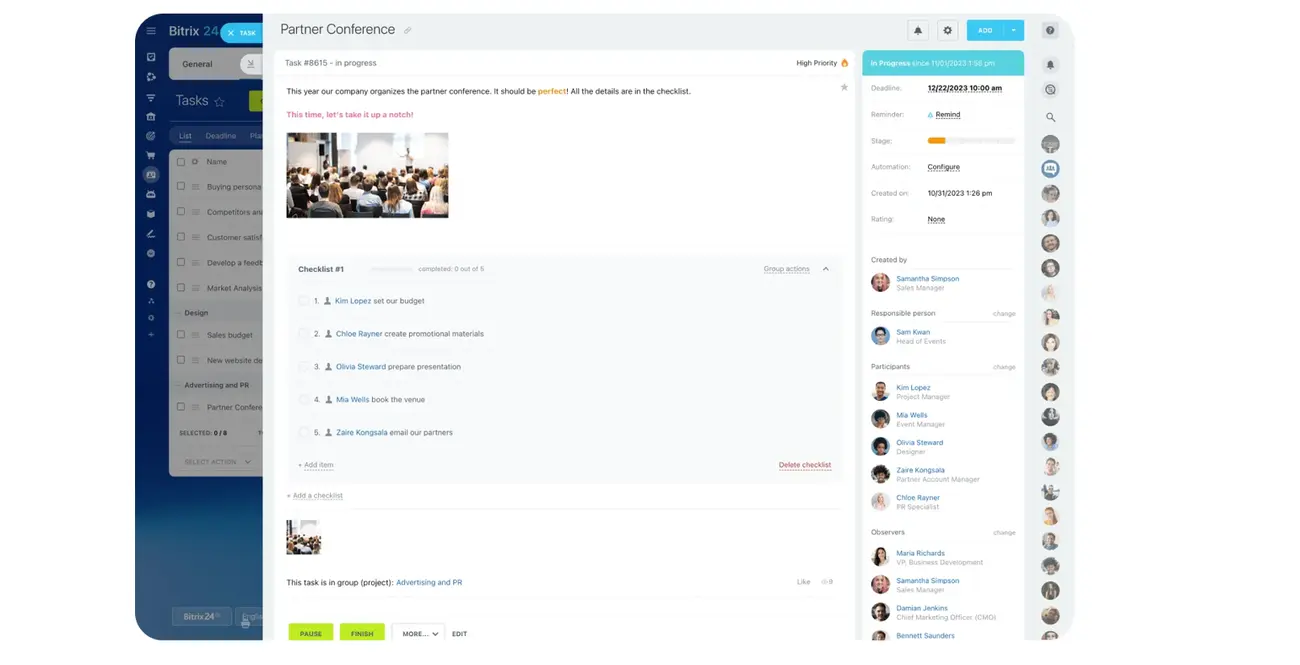
Once the manual habit sticks, the review can start surfacing itself. In Bitrix24, the task and CRM tools can flag overdue items automatically and pull today's critical work into a single dashboard view, so the daily pass becomes checking one screen instead of hunting through email to rebuild the list each morning.
Step 4: Standardize repeatable communication and admin work
Once the movement rules are clear, reduce the amount of thinking required for repetitive work. That starts with standard communication.
Most small teams send the same kinds of messages again and again: initial outreach replies, proposals, onboarding emails, support updates, and internal notes. If every message starts from scratch, quality varies and time gets wasted.
Build communication templates
Create templates for the communication you repeat often. Keep them flexible, not robotic. A good template gives structure without sounding canned. For example, an onboarding email can always include:
- Timeline for the engagement
- Date and time of next meeting
- Required inputs from the customer
- Support contact info and hours
A support update can always include:
- Issue summary (one sentence)
- Current status
- Next expected update date
Use checklists for recurring tasks
Use checklists the same way for recurring service tasks. If your team regularly runs onboarding, launches a service, gathers approvals, or closes support requests, document the basic steps. Checklists reduce memory-based work, which is especially important when the same person is juggling unrelated responsibilities during the day.
Remove the low-value admin
This is also the right moment to remove low-value admin. Some teams keep extra approval steps, duplicate data entry, or detailed note-taking habits that don't improve customer experience or reporting. If a step exists only because "we've always done it," challenge it.
Good candidates for standardization:
- Proposal emails and follow-up sequences
- Customer onboarding messages
- Service kickoff checklists
- Support acknowledgment and status updates
- Internal note formats after calls or issue resolution
The goal here isn't to make customer interactions feel generic. It's to make routine work reliable so people can spend their judgment on the parts that actually need it.
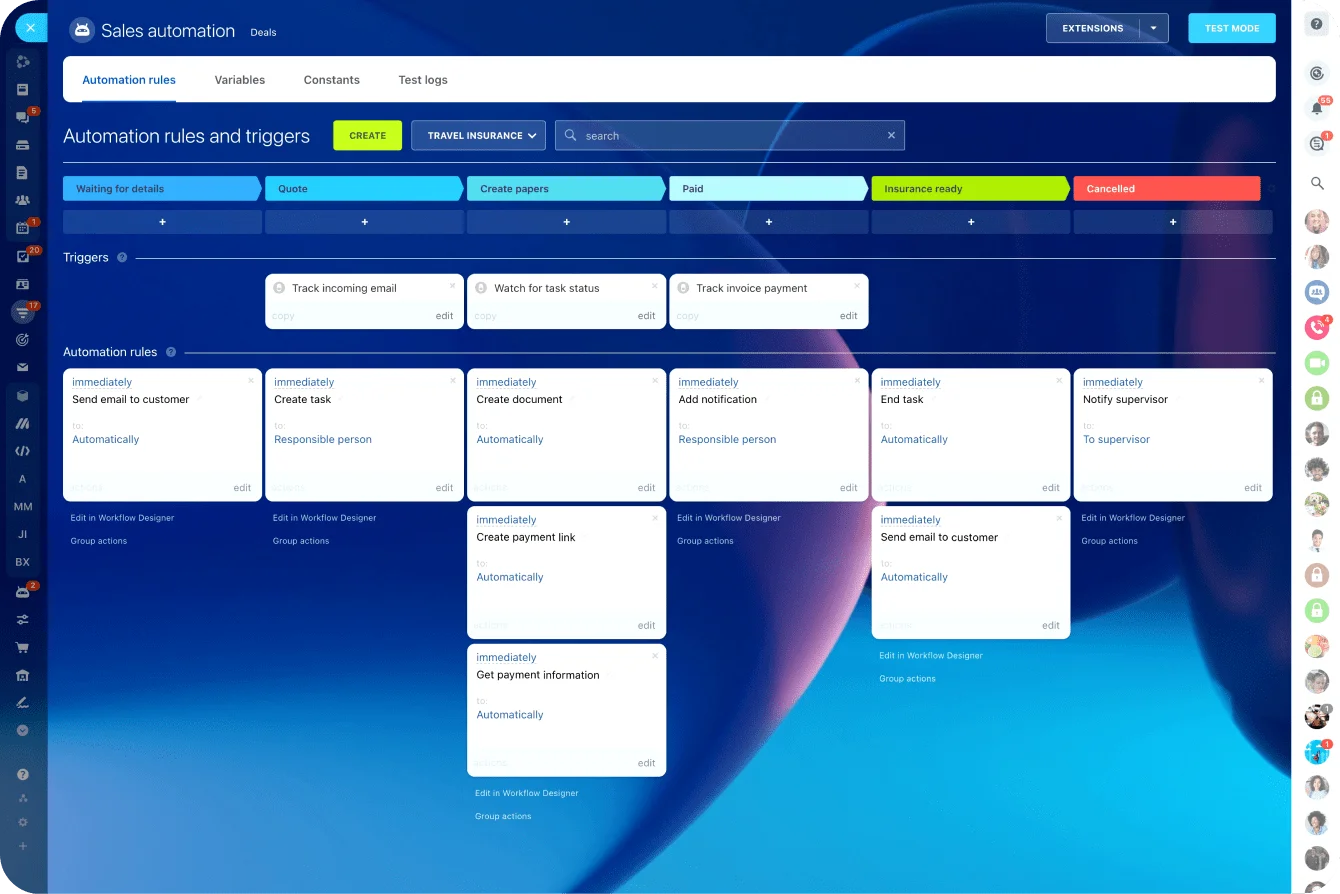
The same templates can run on their own. When a customer moves into a new stage, an onboarding email goes out without anyone drafting it; when a support issue arrives, a triage form opens already filled with the key fields.
In Bitrix24 this lives in the communication and automation tools, and it does more than save typing, it means a step can't be forgotten just because the person who usually does it is mid-delivery.
Step 5: Measure reliability, then scale without adding bureaucracy
Before you add automation or more process, check whether the workflow is reliably being used. A small set of indicators is enough. You're not trying to build an analytics program. You're trying to see whether customer work is moving the way it should.
Start with simple metrics
Start with a few practical measures:
- Response time — how long it takes to acknowledge leads or customer issues
- Overdue follow-ups — how many promised next steps are late
- Handoff delays — how long work sits between sales, delivery, or support stages
- Customer backlog — open items that have no clear next step or due date
These indicators tell you whether the system is dependable. If follow-ups are constantly overdue, the issue may be workload, stage design, or weak triage. If handoff delays are common, your move-to-next-stage criteria may be unclear.
Metrics should show where the friction is, not just produce a dashboard.
Add automation gradually
Only add automation after the manual workflow is stable and the team understands it. Otherwise you automate confusion. Good early automation examples include:
- Reminder tasks for due dates
- Template-triggered emails when a customer moves to a new stage
- Alerts for overdue customer issues
Those are useful because they support an already-defined process.
Scale without bloat
As the team grows, scale by tightening the basics: clearer role boundaries, more explicit service rules, and a stronger review cadence. You don't need to layer on unnecessary approvals just to feel organized. In many small businesses, extra approval steps slow down customer response without improving quality.
Scaling rule: Add structure where reliability is breaking, not where it merely feels informal.
Common Mistakes
A few mistakes show up again and again in small teams.
The first: using too many stages. If people can't remember the difference between stages, the workflow becomes decoration. Simplify ruthlessly.
The second: duplicate tools. Once the spreadsheet, inbox, CRM, and chat all contain conflicting status, no one trusts the system. Pick one source of truth and stick to it.
The third: unclear ownership. "We're all covering it" usually means nobody is fully accountable. Name an owner, even if others contribute.
The fourth: skipping scheduled cleanup. Old records, stale due dates, and closed issues left open will slowly make the workflow useless. Clean up once a month.
The core idea
Small teams don't need heavy process to manage the full customer journey. They need a consistent, lightweight workflow that makes status visible, the next step clear, and handoffs dependable. Build that, and you protect revenue and service quality without burying anyone in bureaucracy.
It takes a few hours to set up. After that, the person who sold the deal can drop into a delivery problem and back out again without anything going quiet in their absence.
And that’s the whole point when that person is also you.
Keep customer work moving in one place
Bitrix24 brings CRM, tasks, reminders, and automations together so small teams track owners, next steps, and deadlines without tool sprawl.
Learn MoreFAQs
What if multiple people touch the same account?
Keep one primary owner in the system, even if others contribute. Shared access is fine. Shared accountability is where things break.
What happens when an urgent customer issue arrives during a sales call?
Use your escalation rule. If the issue meets the urgent threshold, route it immediately to the defined backup or log it with a due-now status for the next available handoff. Don't rely on remembering it after the call.
When should we migrate from a spreadsheet to a CRM?
Move when the spreadsheet no longer supports reliable updates, reporting, or shared visibility. Not earlier. A messy workflow in a CRM is still a messy workflow. Bitrix24 offers tools for small businesses, including a free CRM plan if you want to test this out without cost.
How do we choose the right tool?
Pick the simplest tool that supports your stages, ownership, next action, due dates, and basic reporting. Ease of use matters more than feature depth for small teams. Look for tools that let everyone see the same customer record at the same time—no syncing headaches, no conflicting versions.
Can we adopt this workflow gradually?
Yes. Start with active deals and current customers first. Then add support tracking and renewal tracking once the basic motion is working. Don't try to map your entire history on day one.