7 Signs Your Spreadsheets Are Costing You Deals - and Why a CRM System Fixes All of Them


A CRM system is a centralized platform that manages customer interactions, tracks sales activity, and automates repetitive workflows across your entire revenue operation. It replaces scattered spreadsheets with a single source of truth for leads, deals, and client history. Small and mid-sized businesses with growing pipelines, multiple salespeople, or any kind of recurring follow-up cycle benefit most from making this switch - yet the majority wait until spreadsheets have already cost them real money.
Most SMBs don't migrate from spreadsheets because their current setup is "working." The leads come in, someone updates a row, and deals close - sometimes. The problem is that spreadsheets don't tell you what you're missing. They don't flag the follow-up that slipped through the cracks last Tuesday, and they definitely won't show you that three reps are chasing the same prospect. By the time you notice the damage, it's already baked into your quarterly numbers.
This article identifies seven specific signs that your manual systems are quietly stalling growth - and lays out a practical, risk-free roadmap for migrating from spreadsheets to a CRM system without disrupting your daily operations.
Why most SMBs wait too long to switch from spreadsheets to a CRM system
The spreadsheet-to-CRM migration conversation usually starts after something breaks. A major deal falls apart because nobody followed up. A new hire spends two weeks trying to make sense of a color-coded Excel file that only one person understands. Revenue reporting takes three days instead of three minutes.
These aren't edge cases. They're the natural outcome of pushing spreadsheets past what they were designed to do. Excel is brilliant for budgets, forecasts, and one-off calculations. It was never built to manage customer relationships, track multi-stage sales pipelines, or coordinate a team of reps working the same territory.
The migration delay usually comes down to three things: fear of disruption, underestimating the cost of the status quo, and the false comfort of "good enough." But "good enough" has a price tag, and it shows up in the seven signs below.

Sign 1: Duplicate and conflicting customer data is eating your credibility
When two reps call the same prospect on the same day with different offers, your company looks disorganized. That's a spreadsheet problem. In the absence of a centralized system, there's no reliable way to prevent duplicate entries, and no mechanism to flag when contact records conflict.
Spreadsheets don't enforce data integrity. Anyone can type anything into any cell. Misspell a company name, and you've just created a phantom account. Paste a phone number into the wrong column, and good luck finding it later.
A CRM system solves this at the structural level. Duplicate detection runs automatically. Required fields prevent incomplete records. And every interaction - calls, emails, meetings - gets logged against a single contact profile, so your entire team sees the same picture.
The credibility issue matters more than most people realize. Prospects notice when your outreach feels disjointed, and that impression is hard to reverse.
Sign 2: Your sales pipeline exists only in someone's head
Ask a sales manager who relies on spreadsheets where their pipeline stands right now, and you'll get one of two answers: a guess, or "let me pull the numbers together and get back to you." Neither is acceptable when you're trying to forecast revenue or allocate resources.
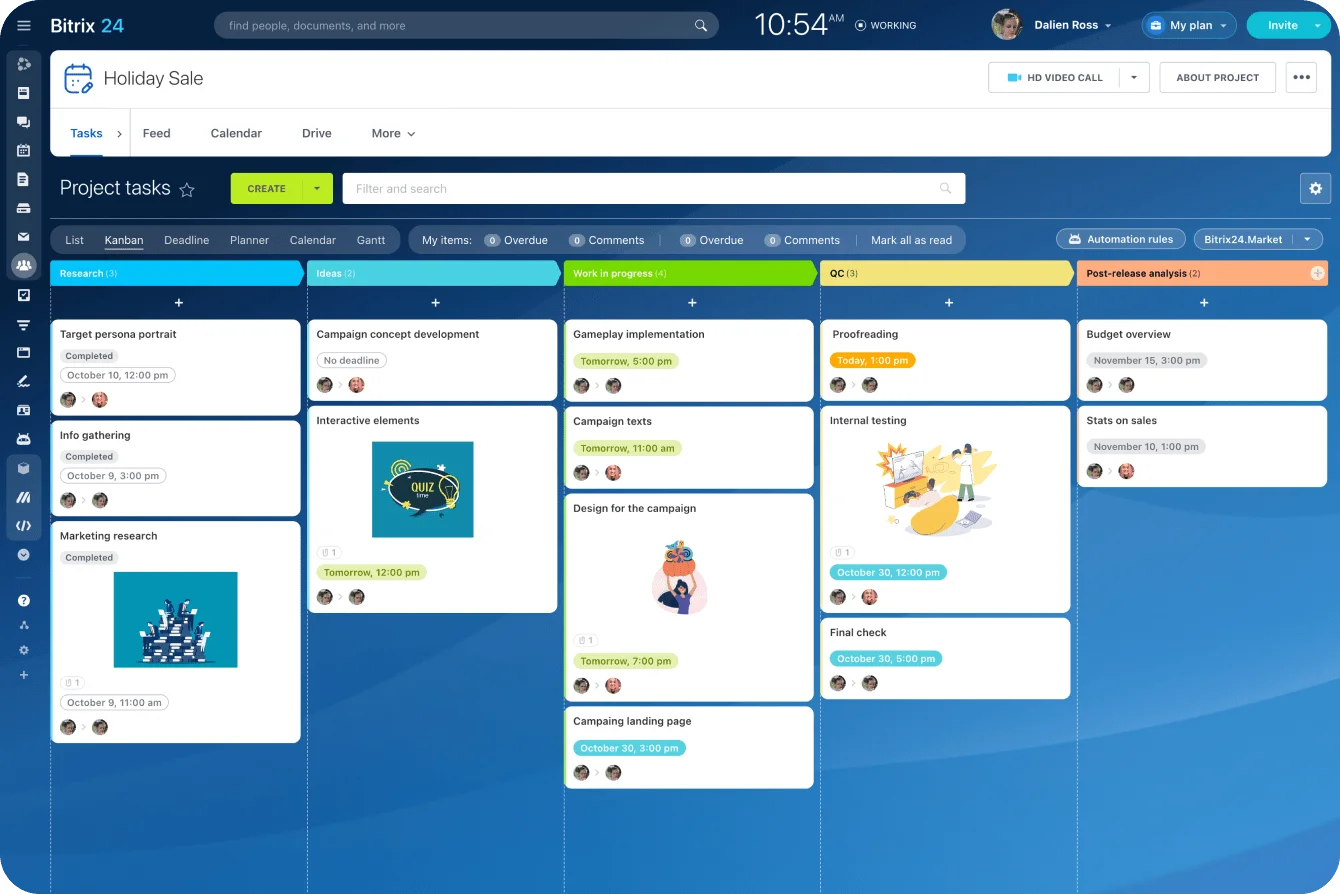
A sales pipeline tool - software that visualizes every deal as it moves from first contact through negotiation to close - gives you instant visibility into every stage of every opportunity. You can see which opportunities are progressing, which ones have stalled, and where the bottlenecks sit. Spreadsheets can approximate this with filters and conditional formatting, but the data is only as current as the last manual update - which might have been yesterday or last week.
Pipeline visibility isn't a luxury. It's the foundation of accurate forecasting. Without it, you're making hiring decisions, inventory commitments, and marketing investments based on incomplete information.
Manual Process Exit Audit: 25 Growth Leaks Hiding in Spreadsheets
Enter your email address to get a comprehensive, step-by-step guide

Sign 3: Follow-ups fall through the cracks on a regular basis
This is the sign that hurts the most, because every missed follow-up is a deal that might have closed. Spreadsheets have no built-in reminder system. You can set calendar alerts manually, but that depends on someone remembering to create them, which defeats the purpose.
Sales automation - the use of software to handle repetitive sales tasks like follow-up scheduling, lead assignment, and status updates rather than relying on manual intervention - handles this with no human involvement required. When a lead fills out a form, the system assigns it to a rep and schedules a follow-up task. When a proposal goes unanswered for 3 days, a reminder fires. When a deal moves to a new stage, the next set of actions triggers automatically.
The difference between "we try to follow up" and "the system makes sure we follow up" is the difference between hoping for revenue and building it systematically.
Sign 4: Reporting takes days instead of minutes
If pulling together a weekly sales report requires copying data from multiple tabs, reformatting columns, and reconciling numbers that don't match, your reporting process is broken. Manual reports don't just waste time - they introduce errors at every step.
Sales management software with built-in analytics generates reports in seconds. Pipeline value by stage, conversion rates by source, rep performance by period - all available on demand, all calculated from live data. No copy-pasting, no formula errors, no version confusion.
The real cost of slow reporting isn't the hours spent building spreadsheets. It's the decisions you delay because the data isn't ready, and the patterns you miss because nobody has time to dig that deep.
Sign 5: You have zero visibility into team activity
Spreadsheets tell you what someone typed into a cell. They don't tell you whether a rep actually made that call, sent that email, or attended that meeting. There's no activity log, no timestamp trail, and no way to verify what's real versus what's aspirational.
Customer management software tracks activity automatically. Every email sent through the system gets logged. Every call gets recorded and attached to the contact record. Every deal update carries a timestamp and a user ID. Managers can coach based on actual behavior rather than self-reported summaries.
This isn't about micromanagement. It's about having enough information to identify what's working, replicate it, and fix what isn't.
Sign 6: Your channels don't talk to each other
Leads come in through your website, social media, email, phone calls, and referrals. In a spreadsheet world, each channel lives in its own tab - or worse, its own file. There's no unified view of where leads originate, how they move through your funnel, or which channels produce the best conversion rates.
A CRM system connects all your channels into a single pipeline. Whether a prospect first reached out via a web form or a LinkedIn message, their entire history lives in one place. Marketing can see which campaigns drive qualified leads. Sales can see which sources produce the fastest closes. Leadership can allocate budget based on actual channel performance.
Channel integration is where the gap between Excel and a CRM becomes impossible to ignore. Spreadsheets simply weren't designed to aggregate multi-source data in real time.

Sign 7: Human error is your biggest operational risk
Fat fingers. Wrong formulas. Accidentally deleted rows. Overwritten cells. Sorting a column without selecting the entire sheet. Every spreadsheet user has a horror story, and in a sales context, those errors translate directly into lost revenue.
A CRM system reduces human error through structured data entry, validation rules, and permission controls. Reps pick values from dropdown menus instead of typing freeform. Critical fields can't be left blank. Historical data is protected by access levels, so a junior rep can't accidentally wipe out a year of deal history.
The comparison between Excel and a CRM system on error prevention alone justifies the switch for most teams. When your revenue data lives in a tool designed to protect it, you sleep better.
Spreadsheets vs. a CRM system: where the gap shows up
|
Capability |
Spreadsheets (Excel/Google Sheets) |
CRM System |
|---|---|---|
|
Duplicate detection |
Manual search only |
Automatic flagging and merging |
|
Pipeline visibility |
Static snapshots, updated manually |
Real-time, always current |
|
Follow-up reminders |
Calendar alerts set by hand |
Automated task triggers |
|
Reporting speed |
Hours to days |
Seconds |
|
Activity tracking |
Self-reported |
Auto-logged from calls, emails, meetings |
|
Multi-channel integration |
Separate tabs or files per channel |
Unified view across all sources |
|
Error prevention |
None - any cell is editable |
Validation rules, dropdowns, permissions |
|
Collaboration |
File sharing with version conflicts |
Single shared database with role-based access |
This comparison isn't meant to dismiss spreadsheets entirely. For businesses with fewer than 20 active contacts, a simple sales cycle, and a single person managing all client relationships, a well-organized spreadsheet might genuinely be enough. The breaking point arrives when you add a second salesperson, when deal volume exceeds what one person can track mentally, or when your sales cycle involves multiple touchpoints over weeks or months. If none of those conditions apply to you yet, bookmark this article for when they do.
A risk-free roadmap for spreadsheet to CRM migration
The fear of migration is almost always worse than the reality. Here's a practical plan that keeps your daily cash flow intact while you make the transition.
Step 1: Audit your current spreadsheets
Before you move anything, document what you have. Which spreadsheets are actively used? Who owns them? What data do they contain? Identify the fields that matter - contact info, deal stages, revenue amounts, dates - and flag anything that's outdated or redundant.
Step 2: Clean your data
CRM implementation fails most often because of dirty data. Remove duplicates, standardize naming conventions, and fill in missing fields where possible. This step is unglamorous but non-negotiable. A CRM loaded with garbage data just automates your existing problems.
Step 3: Start with your core pipeline
Don't try to migrate everything at once. Begin with your active deals and current contacts. Import them into the CRM system, map your pipeline stages, and get your sales team working in the new environment for two to four weeks before adding historical data or secondary processes.
Step 4: Run parallel systems briefly
Keep your spreadsheets accessible (read-only) for reference during the first month. This gives your team a safety net and reduces anxiety. Set a firm date for retiring the old system, and stick to it.
Step 5: Train on workflows, not features
Don't dump a feature list on your team. Instead, walk them through their daily workflows inside the new tool. Show them how to log a call, move a deal forward, and pull their own reports. Hands-on training tied to real tasks beats abstract demos every time.
Step 6: Measure and adjust after 30 days
After the first month, review adoption metrics. Are reps logging activity consistently? Are pipeline stages being updated? Where are the friction points? Use this data to refine processes and address resistance before it calcifies.
Stop losing deals to spreadsheet limitations - switch to Bitrix24
The signs are clear: duplicate data, invisible pipelines, missed follow-ups, slow reports, zero visibility into activity, disconnected channels, and constant risk of errors. Each one chips away at your revenue, and together they create a ceiling that no amount of spreadsheet optimization can break through.
Bitrix24 replaces spreadsheets with a structured CRM that centralizes contacts, deals, and every customer interaction in one place. Sales leaders get real-time visibility into pipeline health, team activity, and conversion performance through integrated analytics dashboards and real-time reports. Managers can track follow-ups, monitor rep workload, and identify stalled deals instantly, while automation ensures that no lead, reminder, or task gets missed. Multi-channel lead capture, activity tracking, and role-based access controls give your entire team a shared, reliable operating system for revenue.
The migration path is straightforward: import your contacts, define your pipeline stages, and start working. Bitrix24 supports direct CSV import from Excel and provides automation, reporting, and team management tools from day one - so you gain control, visibility, and scalability immediately.
Sign up for Bitrix24 and replace the spreadsheets that are holding your team back.
Switch to Bitrix24 now!
Bitrix24 replaces limiting spreadsheets with an all-encompassing CRM. Power your sales with real-time reports, automated follow-ups, error-free data, and enjoy smooth operations without missing a beat.
Learn MoreFAQ
How do I clean my data before importing it into a CRM system?
Cleaning data before importing it into a CRM system starts with removing duplicate records and standardizing formats. Make sure names, phone numbers, and email addresses follow consistent conventions. Delete contacts that haven't been active in over 12 months unless they have strategic value. Verify that deal amounts and dates are accurate. Most CRM platforms, including Bitrix24, accept CSV files, so run your cleanup in Excel first, then import the polished dataset.
What are the signs that Excel is hurting my sales process?
The signs that Excel is hurting your sales process include duplicate or conflicting customer records, an inability to view your pipeline in real time, follow-ups that slip through the cracks, reports that take hours to compile, and no reliable way to track rep activity. If your team spends more time managing spreadsheets than talking to prospects, that's the clearest signal that your sales management software needs an upgrade.
How do I get resistant team members to use new software?
Getting resistant team members to use new software requires showing them what's in it for them personally. Skip the feature presentations and instead demonstrate how the CRM system saves them time on tasks they already dislike - like manual data entry or searching for contact details. Pair early adopters with skeptics, and set clear expectations: after a defined transition period, the spreadsheet goes away. People adapt faster when the old option is no longer available.
What's a realistic first CRM rollout plan for small teams?
A realistic first CRM rollout plan for small teams covers about 30 days. During week one, import your active contacts and configure pipeline stages. Weeks two and three focus on daily use - logging calls, updating deals, and running basic reports. By week four, evaluate adoption and fine-tune any workflows that cause friction. Avoid loading every feature at once; start with pipeline management and expand from there.
How much does it cost to migrate from spreadsheets to a CRM system?
The cost to migrate from spreadsheets to a CRM system varies widely depending on the platform and team size. Many CRM solutions, including Bitrix24, offer free tiers that cover basic pipeline management for small teams. Paid plans typically range from $50 to $200 per month for teams of 5 to 10 users. The highest hidden cost isn't the software - it's the time your team spends on data cleanup and training, which usually takes 20 to 40 hours total for a small business.
Which data should I prioritize when moving from Excel to CRM?
The data to prioritize when moving from Excel to a CRM system is your active pipeline: current deals, associated contacts, deal stages, and expected close dates. This gives your team immediate value from day one. After that, import your broader contact list and any historical deal data you want for reporting. Leave archived or inactive records for last - they add bulk without adding urgency, and you can always bring them in later.