Boost Productivity: Sprint-Based Workflow Efficiency


Why workflow drift kills productivity in fast-moving teams
In fast-moving teams, productivity usually dies from workflow drift, not lack of effort. Priorities shift midstream, dependencies surface too late, and no one can say which commitments are still real. The team stays busy while delivery gets uneven and hard to trust.
The fix is a fixed execution cadence. A sprint-based workflow plans, executes, reviews, and improves a defined batch of work on a repeatable schedule. Decide scope once per cycle, protect it long enough to finish, then review and adjust.
Why it works comes down to the cost of re-deciding. Gloria Mark’s research at UC Irvine found that once a task is interrupted, the worker gets back to it an average of 23 minutes and 15 seconds later. As she put it, “we don’t have work days — we have work minutes that last all day.” Sprints reduce those resets by giving teams a clearer commitment window.
This guide is for project managers and team leads dealing with incoming requests, resource limits, specialist dependencies, and stakeholder expectations. It shows how to set up a sprint-based workflow, where it breaks, and how to scale it without losing reliability.
What a Sprint-based workflow actually is
A sprint-based workflow is a time-boxed execution system that converts a prioritized backlog into committed work, using clear capacity limits, ownership rules, and end-of-sprint review criteria. The idea is simple: teams commit to a realistic scope for a fixed period, then protect that scope long enough to finish meaningful work.
That's different from generic task management. A task list can hold work, but it doesn't control how work is admitted, sequenced, or completed. Sprint workflows add structure where teams usually lose control. Planning windows are fixed, new work intake is constrained during execution, handoffs are explicit, and completion is judged against defined standards rather than opinion.
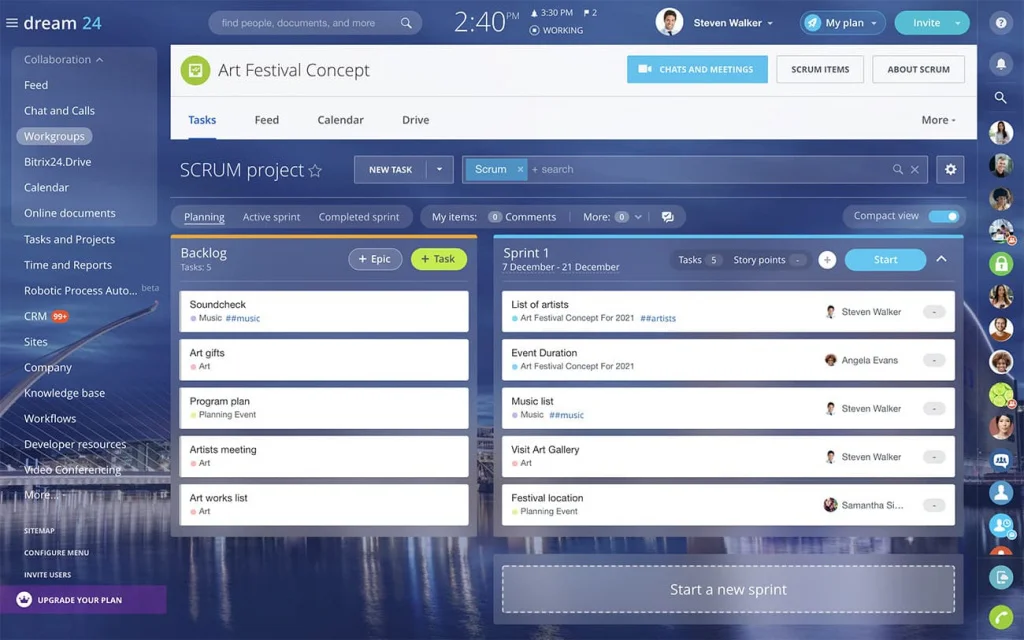
The value isn't in the ceremony itself. Daily check-ins, planning meetings, and retrospectives only help if they support the underlying execution model. The real mechanism is this: backlog items are shaped before they enter the sprint, capacity is set before commitment, and changes during the sprint follow a rule instead of a debate.
Where it fits
Sprint-based workflows work best when demand is recurring, work moves through repeatable stages, and teams need predictable throughput.
Common examples include:
- Marketing operations: campaign builds, asset production, approvals, and launch tasks.
- Product delivery: design, development, QA, release planning, and handoffs.
- Sales enablement and RevOps: lead routing updates, scoring changes, reporting requests, and process improvements.
- Implementation teams: onboarding milestones, configuration tasks, access setup, and customer handoffs.
They also work well for lead qualification when several steps or roles are involved. Inbound leads may need enrichment, scoring, routing checks, compliance review, and rep assignment. A sprint-based workflow gives that work a queue, a readiness standard, and a review cycle instead of leaving it to scattered inboxes or ad hoc follow-up.
In plain terms, use sprints when you need a repeatable unit of execution, not just a place to store tasks.
Two-Week Sprint Planner: Roles, Rituals, Ready Templates
Enter your email address to get a comprehensive, step-by-step guide

Why Sprint workflows usually break in practice
Most sprint workflows fail for a simple reason: teams adopt sprint meetings without changing how work actually enters and moves through the system. They keep the old habits and add new rituals on top. The result is more process overhead without more control.
What actually goes wrong
Vague work enters the sprint
The most common pattern looks familiar. Backlog items are vague. Work is pulled into the sprint before dependencies are understood. Stakeholders override priorities at the last minute. No single person can make an in-sprint tradeoff, so the team quietly absorbs extra work instead of formally changing scope. On paper, the team is "running sprints." In practice, it's still a reactive queue.
Bottlenecks hide inside the workflow
System bottlenecks make this worse. One specialist becomes a hidden gatekeeper for approvals, analytics, QA, legal review, or technical setup. Another team controls a dependency but works on a different timeline. A request marked urgent skips intake rules and lands straight on a contributor's desk. Each exception seems reasonable on its own. Together they break sprint stability.
Urgent requests bypass the rules
Weak intake controls do the most damage. If teams let work bypass backlog review, they lose the ability to compare demand against capacity. The sprint stops being a commitment window and becomes a list of whatever arrived loudest. That undermines forecast accuracy and creates tension between planned delivery and what executives think they were promised.
Three weaknesses that compound
Three operational weaknesses usually show up together:
- A weak definition of done, where tasks get marked complete before review, approval, or downstream readiness.
- Inconsistent estimation, where teams commit based on optimism rather than historical throughput or actual effort.
- Missing feedback loops, where carryover gets accepted without anyone analyzing why the work slipped.
Once that happens, velocity becomes unreliable. Teams can't tell whether low output came from poor estimation, blocked dependencies, scope changes, or bad task shaping. Stakeholders stop trusting sprint commitments because every sprint ends with unfinished work and a fresh explanation.
That’s the real failure mode. The sprint no longer tells the business what the team can finish, when it can finish it, or what needs to change next. Missed tasks are only the visible symptom.
The Sprint operating framework: From intake to review
To stay operationally useful, the workflow needs clear stages with entry rules, exit rules, and escalation points.
The core sequence runs from intake and triage, through backlog refinement, sprint planning, active execution, daily coordination, and review or demo, to a retrospective whose actions carry into the next cycle.
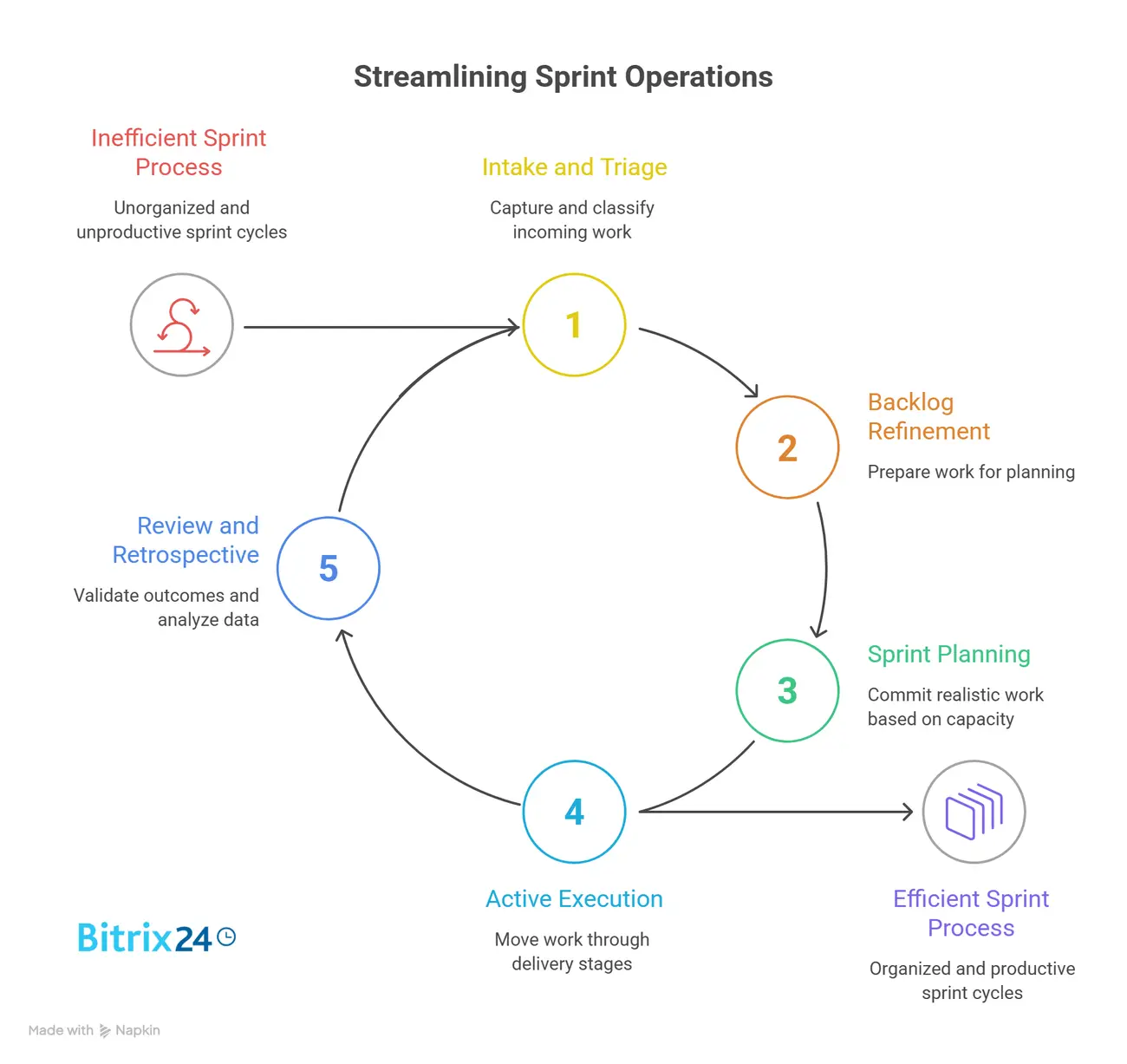
A project management workspace is where most teams hold these stages together, so the board itself shows what's committed, what's in motion, and what's blocked.
|
Stage |
Objective |
Entry Criteria |
Exit Criteria |
Key Metric |
Escalation Trigger |
|---|---|---|---|---|---|
|
Intake and triage |
Capture and classify incoming work |
Request submitted with required fields |
Accepted, rejected, or sent back for clarification |
Intake cycle time |
High-priority request lacks required information |
|
Backlog refinement |
Prepare work for planning |
Request accepted into backlog |
Item meets sprint-ready standard |
Ready-item rate |
Dependency or scope remains unresolved |
|
Sprint planning |
Commit realistic work based on capacity |
Prioritized ready backlog and available capacity |
Sprint scope locked and owners assigned |
Planned vs available capacity |
Committed scope exceeds capacity threshold |
|
Active execution |
Move work through delivery stages |
Task assigned and ready to start |
Task completed or formally blocked |
Throughput, WIP |
Blocker breaches agreed SLA |
|
Daily coordination |
Resolve blockers and manage flow |
Open sprint board |
Updated owners, blockers, next actions |
Blocked item count |
Dependency issue affects multiple items |
|
Review/demo |
Validate completed outcomes |
Items meet done criteria |
Accepted, rejected, or sent to rework queue |
Acceptance rate |
Stakeholder rejects completed scope |
|
Retrospective |
Improve the system |
Sprint data and observations available |
Process actions assigned to next cycle |
Carryover rate, blocker patterns |
Same failure repeats across sprints |
Intake rules for lead and delivery work
For lead qualification and delivery-focused teams, intake logic matters early. A lead-related request should enter through a standard form or queue with mandatory fields: source, expected business impact, urgency reason, required output, dependency owner, and due date.
If those are missing, the request doesn't go straight to execution. It goes back for clarification. In practice this is the step teams skip most often, because saying "send me more detail" feels slower than just starting the work. It isn't.
What sprint-ready means
"Sprint-ready" should mean the team can start without chasing basics. The item has a clear objective, an owner, acceptance criteria, the assets or inputs it needs, and known dependencies.
If a lead-scoring update depends on CRM field mapping or a sales-policy approval, it isn't sprint-ready until that dependency is resolved or explicitly scheduled.
Pro tip: Create a “not ready” lane
Don’t just reject weak requests verbally. Add a “not ready” lane to the workflow for items missing scope, inputs, owners, or acceptance criteria. That gives requestors a visible reason why work hasn’t entered the sprint and stops half-formed tasks from slipping into execution because someone asked loudly enough.
Handling blockers and unplanned work
Blocked work shouldn't sit quietly on a board. Set a rule: if a blocker lasts beyond the agreed SLA, the item escalates to the team lead or dependency owner.
Unplanned requests follow a separate path. They either wait for the next sprint, consume a reserved urgent-work buffer, or trigger a formal scope swap approved by the sprint owner.
That preserves the sprint instead of letting exceptions slowly erase it.
Pro tip: Track interruption debt
When urgent work enters mid-sprint, log what it displaced. Don’t just mark the new task as urgent and move on. Capture the original item that was paused, delayed, or removed from scope. Over time, that shows whether “urgent” work is genuinely rare or whether the team is quietly running two workflows: the planned sprint and the hidden interruption queue.

Roles, ownership, and handoffs inside the Sprint System
Stable sprint execution depends on decision ownership being obvious. If several people can reprioritize work, accept incomplete items, or approve scope changes, the sprint loses integrity fast. Teams don't need heavy governance. They need clean decision lines.
Who owns each decision
At minimum, four ownership areas should be explicit:
- A prioritization owner decides backlog order based on business value and timing.
- A sprint-readiness owner validates that items are shaped well enough to enter planning.
- A dependency owner manages external inputs, cross-team commitments, and follow-up on blockers.
- An in-sprint change approver decides whether new requests enter, wait, or force a scope tradeoff.
Those roles might sit with a project manager, team lead, product owner, RevOps manager, or another function depending on the team. The job title matters less than the rule behind it: each decision needs a named owner and a visible trigger.
Handoffs and escalation
Handoffs need the same clarity. Each item should move through a visible path:
- The requestor submits work through intake.
- The sprint owner accepts it, rejects it, or sends it back for more detail.
- Accepted work moves to refinement, where readiness is checked.
- During planning, the item is assigned with dependencies and completion criteria attached.
- After execution, the item moves to review.
- If rework is needed, it returns through a defined queue instead of side messages.
- Completion signoff happens only when the designated approver confirms the item meets the done standard.
That handoff map matters because many sprint delays are waiting problems, not execution problems. Work waits for missing inputs, approval, assignment, review, or a stakeholder response. When those transitions aren’t owned, tasks look active while actually sitting idle.
Escalation points should sit where delay becomes operationally expensive:
- Blocked tasks unresolved past the SLA
- Cross-team dependencies that slip against promised dates
- Capacity shortfalls from absences or overruns
- Stakeholder requests that conflict with committed sprint work
Escalation doesn’t mean drama. It means moving the issue to the person who can make a tradeoff, reassign effort, or reset expectations before the sprint degrades further.
Automation, visibility, and control points that keep Sprints stable
Good sprint systems reduce manual coordination without removing human judgment. The tooling layer should make work visible, route routine updates automatically, and keep a record of changes. It shouldn't force the team to produce separate reporting just to explain what the workflow already knows.
Keep sprint health visible in one place
The basics are straightforward: a backlog, a sprint or Kanban board, dependency tracking, automated notifications, and a view of sprint health. Connect these well and project managers can see committed work, blocked items, aging tasks, and scope changes in one place.
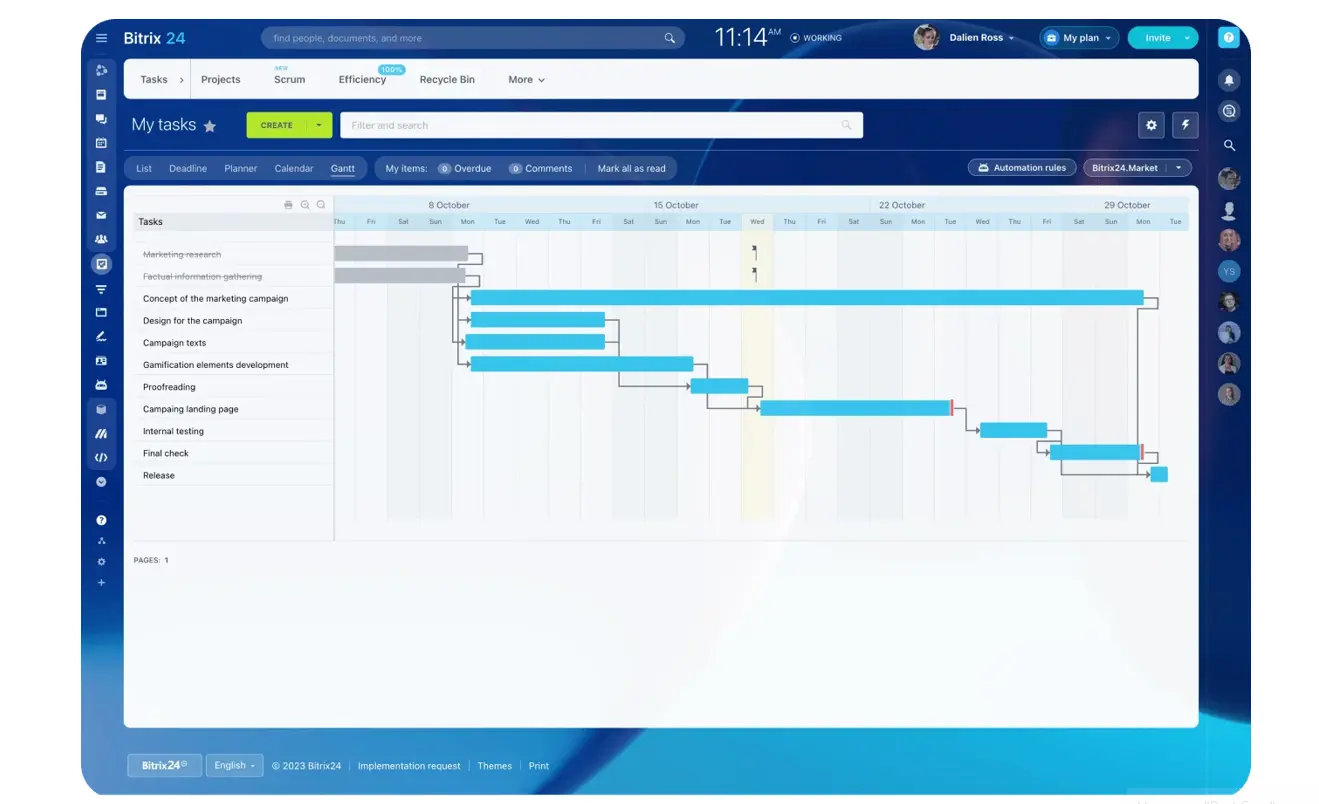
That single-view point isn't cosmetic. Knowledge workers use around 10 apps and switch between them up to 25 times a day, and every switch is one more chance for a status update to get lost. Pulling sprint state into one workspace removes a class of "I didn't see that" failures.
Use control points that protect the sprint
The most useful control points are operational, not decorative:
- Work-in-progress limits, to stop teams from starting too much at once.
- Intake forms with mandatory fields, so work arrives with enough detail for triage.
- Blocked-work alerts, when an item sits beyond the agreed threshold.
- Burndown or throughput tracking, to compare planned scope with actual movement.
- Audit trails for scope changes, so mid-sprint overrides stay visible and reviewable.
Automate the routine, keep judgment human
Automation helps most when the rule is stable and repeatable. Intake forms can auto-route work by type, source, or urgency. Boards can update status when a prerequisite is completed. Dependency alerts can fire when linked tasks miss due dates. Task automation can calculate carryover, cycle time, or blocked duration without anyone maintaining a spreadsheet on the side.
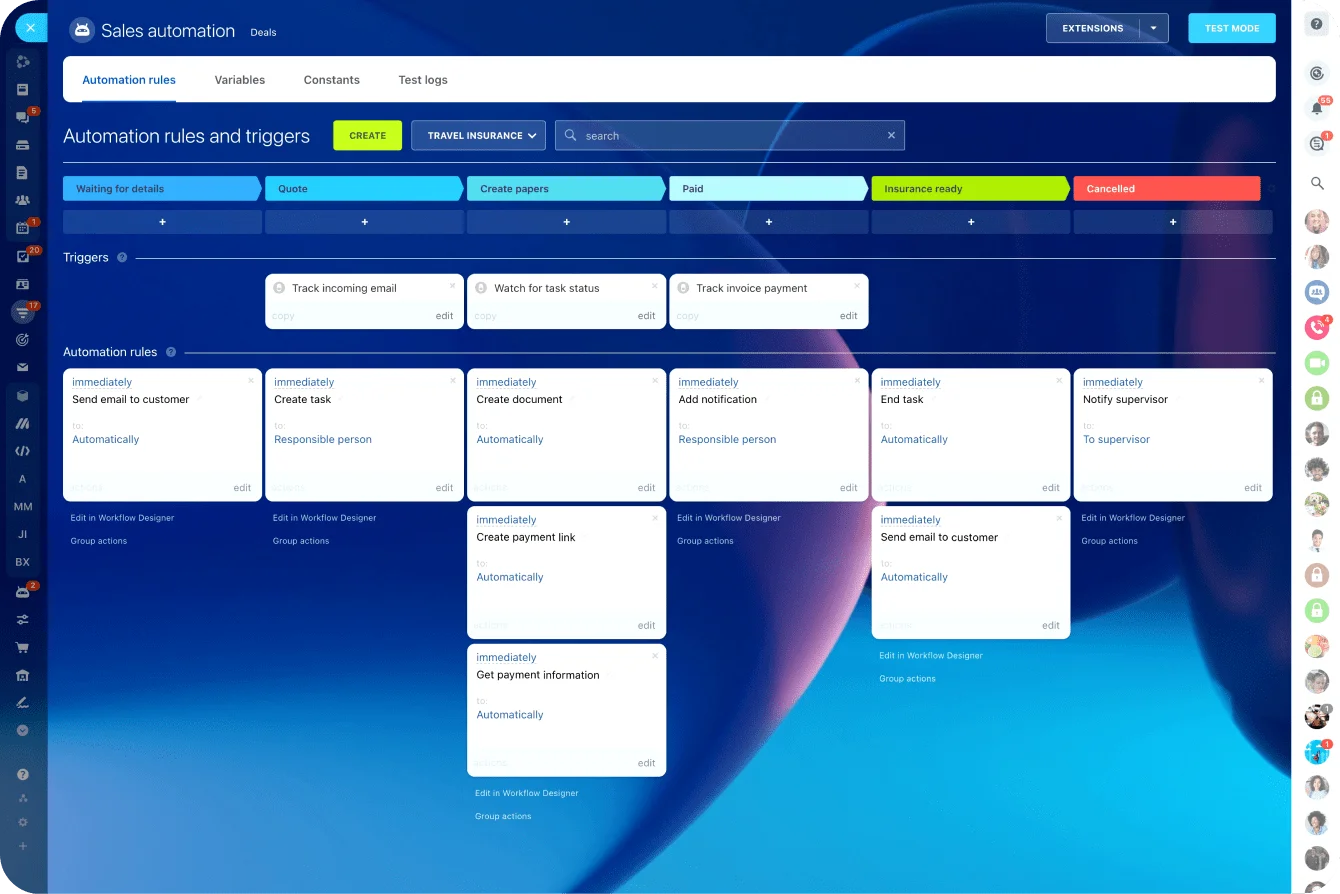
Some decisions still need human review. Task scoring often needs context automation can't infer cleanly, especially when business value depends on timing or stakeholder impact. Lead qualification may need sales judgment, data review, or exception handling. End-of-sprint acceptance also needs human confirmation, because "done" should mean a validated outcome rather than a card that moved to the last column.
A practical split: automate routing, reminders, and reporting; keep tradeoffs, exceptions, and acceptance under named human ownership. That gives teams speed without losing control.
The most common failure points in Sprint-based execution
Most sprint failures show up before the sprint ends. The signals are there: too many items start at once, blockers pile up, reviewers become bottlenecks, and unfinished work quietly slides forward.
More meetings won't fix that. The fix is spotting the operational cause early and correcting the behavior behind it.
|
Failure Point |
Operational Symptom |
Likely Root Cause |
Immediate Corrective Action |
|---|---|---|---|
|
Overcommitted sprint |
Multiple items unfinished at sprint close |
Capacity planned from optimism, not historical output |
Reduce next sprint scope and plan using recent throughput |
|
Everything treated as urgent |
Frequent scope disruption during execution |
No intake gate or urgent-work policy |
Create urgent-request criteria and reserve limited buffer capacity |
|
Too many approvers |
Work stalls waiting for decisions |
Split ownership across managers and stakeholders |
Assign one decision owner per approval type |
|
Carryover without analysis |
Same tasks reappear every sprint |
No root-cause review of slippage |
Review carryover by cause and fix one systemic issue per sprint |
|
Poorly defined tasks |
Contributors spend time clarifying basic requirements |
Weak backlog refinement |
Enforce sprint-ready criteria before planning |
|
Missing acceptance criteria |
Completed work is rejected or reworked late |
Definition of done not specified per item |
Add acceptance criteria at the refinement stage |
|
Late reviews |
Items look done but aren't accepted in time |
Reviewer capacity not planned inside the sprint |
Schedule review windows and assign reviewer ownership upfront |
|
Activity mistaken for output |
High task movement but low completed value |
Too much partial work and weak completion control |
Lower WIP and measure accepted outcomes, not touches |
Quality problems are especially costly because they tend to stay hidden until late. A task enters with incomplete details, no clear acceptance criteria, or vague review expectations. Contributors make progress, but the item was never truly finishable.
By the time the gap is obvious, there's no room left to fix it.
Another common mistake is letting unfinished work roll forward automatically. It makes reporting look cleaner in the moment, but it hides whether the team has a planning problem, a dependency problem, or a quality problem. Tag carryover with a reason every time. Otherwise, teams learn nothing from a missed commitment.
How to scale Sprint efficiency without losing reliability
Scaling sprints across multiple teams doesn't mean making every team identical. The goal is to standardize the parts that affect coordination while leaving room for local execution style. The shared rules should cover cadence, readiness, completion, and escalation.
What to standardize across teams
Start with a common sprint rhythm. Teams that depend on each other do better when planning and review windows line up. They don't all need the same board or estimation method, but they should share enough cadence to coordinate cross-team dependencies without constant rescheduling.
Shared definitions matter just as much. If one team calls an item ready when the request is described, while another requires validated dependencies and acceptance criteria, cross-team planning becomes unreliable. The same goes for "done." Multi-team sprint systems need a common baseline definition of ready and done so handoffs don't break at team boundaries.
Dependency review should be lightweight but regular. A short cross-team check before planning surfaces blocked inputs, conflicting priorities, and specialist constraints early. This matters most for RevOps, implementation, or marketing operations teams that rely on shared systems, data owners, or approval functions.
Tune from data, not guesswork
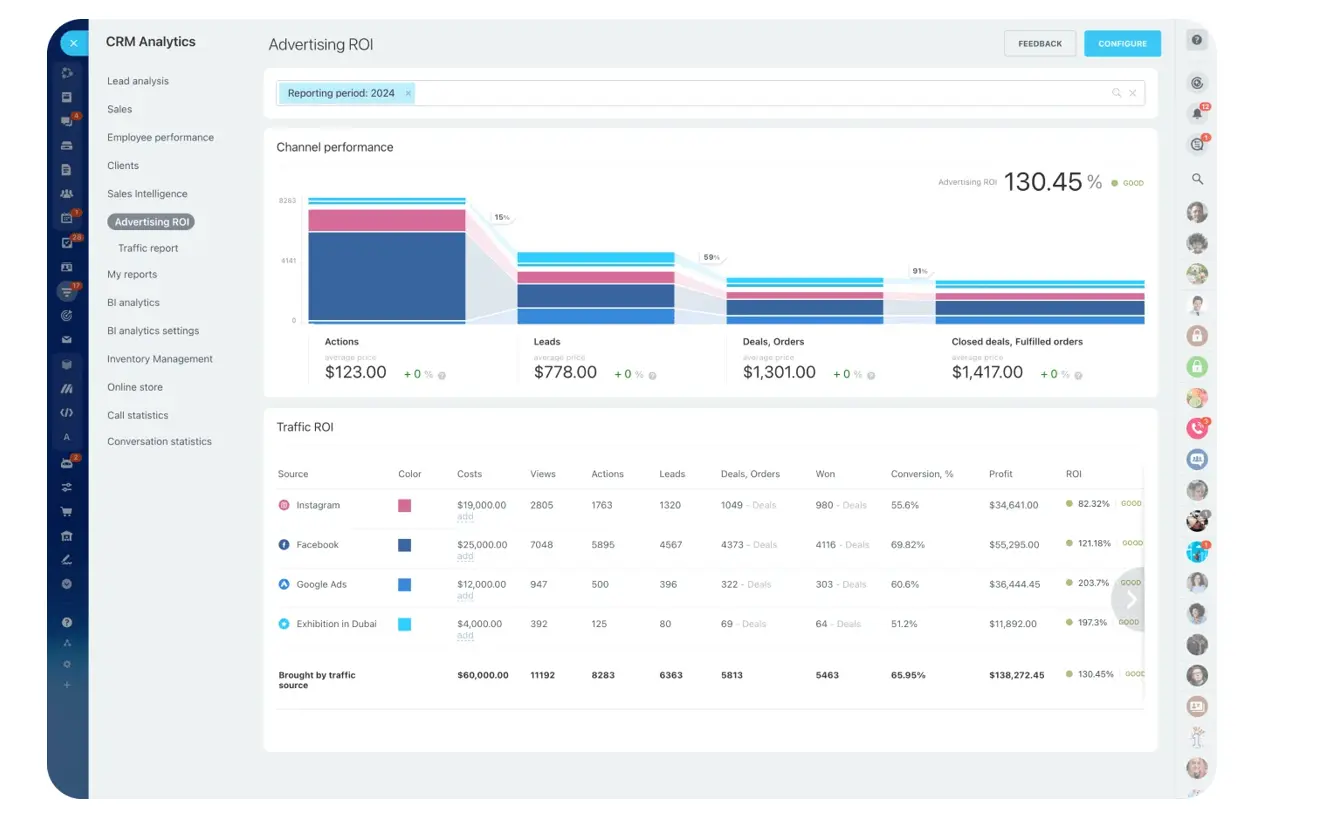
Mature teams improve accuracy from historical data, not guesswork. The most useful signals are throughput, carryover rate, blocker patterns, and retrospective themes, and an analytics and reporting view keeps those visible across cycles. If a team consistently carries over analytics work, the cause may be reviewer capacity or data-dependency latency rather than estimation. If support requests keep breaking sprint focus, the team may need a reserved buffer or a separate service lane.
Reliability at scale comes from a few mechanisms:
- Capacity buffers for urgent work that genuinely can't wait.
- Service-level expectations for support or operational requests outside planned sprint scope.
- Cross-functional planning governance for work that spans departments or shared systems.
- Periodic workflow redesign when the same bottleneck survives multiple retrospectives.
That last point is easy to miss. Some bottlenecks are structural rather than bad habits: a workflow may depend on a specialist role that's permanently overloaded, or on an approval chain no sprint ritual can fix.
When that happens, the fix is a process redesign, and tighter discipline alone won't get there.
Pro tip: Review carryover by cause, not by task
A carryover list tells you what slipped. A carryover reason tells you what to fix. Tag each unfinished item with one cause: unclear scope, missing input, late approval, underestimated effort, dependency delay, urgent work displacement, or capacity loss. After a few sprints, the pattern usually points to one operational constraint worth fixing first.
Turn sprint planning into predictable delivery
Sprint-based workflow efficiency isn’t about adding ceremonies to an already busy team. It’s about giving work a reliable operating rhythm: clear intake, realistic scope, visible execution, controlled exceptions, and a feedback loop that improves the next cycle.
When those pieces hold, productivity becomes easier to measure and easier to protect.
Teams spend less time restarting work, chasing status, and arguing over priorities. Stakeholders get clearer commitments. Managers get better signals on capacity, blockers, and delivery risk.
Start with one workflow, one team, and one recurring work type. Prove the cadence there, then extend it to the teams and processes that depend on each other.
Bitrix24 gives you the tools to run that system in one place, with tasks, projects, CRM pipelines, automation, communication, and reporting connected in the same workspace. That makes it easier to protect sprint focus, track progress, and turn busy work into predictable delivery.
Run focused sprints without workflow drift
Bitrix24 connects tasks, CRM, automation, chat, and reports so teams plan capacity, manage blockers, and deliver reliably.
Learn MoreFAQs
How long should a sprint be for mixed project and support work?
For most mixed environments, one or two weeks works best. One week increases responsiveness and surfaces problems faster. Two weeks gives more room for deeper project work. If support volume is volatile, keep the sprint short and reserve explicit capacity for unplanned work.
What should happen when executives inject urgent requests mid-sprint?
Don't absorb them informally. Route them through an exception rule. The request either uses reserved urgent capacity, replaces existing sprint scope through an approved tradeoff, or waits for the next sprint. The point is that the change becomes visible and owned.
Who owns the backlog when multiple departments submit work?
There should be one operational backlog owner, even when prioritization input comes from several departments. Without a single owner, intake turns into negotiation and the queue fills with unresolved competing requests.
What if the team is only partially dedicated?
Plan sprint capacity from actual available hours, not headcount. Part-time contributors need explicit allocation assumptions during planning. Otherwise the sprint is overcommitted before it starts.
How do you handle inconsistent stakeholder participation?
Build review windows into the sprint calendar and assign named approvers in advance. If a stakeholder misses the review window, the issue escalates by the agreed process instead of leaving work in limbo.
What about tool migration?
Don't redesign everything at once. Settle the operating rules first: intake fields, sprint-ready criteria, ownership, blocked-work escalation, and review standards. Then configure tools to support those rules. Tool changes without workflow discipline usually just move the mess to a new platform.
What's the best way to start?
Run one pilot workflow with one team and one clear work type. Pick a process with recurring demand and visible pain, such as lead qualification updates, campaign operations, implementation tasks, or internal process requests. Measure carryover, blocked time, and throughput for a few cycles before expanding.