Lead Scoring Without Guesswork: Build Rules Sales Will Actually Trust


Most lead scoring systems fail for one simple reason: they look smarter than they are. A lead hits 82 points, lands in the "hot" bucket, and sales still can't close it. Or reps ignore the score entirely because the top of the list is full of students, job seekers, and low-intent browsers who just happened to click around.
According to SiriusDecisions research cited by Woopra, 68% of B2B companies use some form of lead scoring, but only 40% of salespeople get value from it.
The gap is usually not the data. It's that the model doesn't reflect how sales actually decides who to call.
This guide covers how to build a rules-based scoring model that marketing and sales will both trust: how to define the right signals, set thresholds that match your team's capacity, and run short review cycles that keep the model accurate as your pipeline grows.
What lead scoring means in a small or mid-sized business
In a small or mid-sized business, lead scoring is a simple rules-based method for ranking follow-up priority. You assign points to signals that matter, subtract points for bad-fit indicators, and use the total score to decide what happens next.
That definition matters because many teams overcomplicate this early. They assume scoring has to mean AI models, predictive analytics, or a fully automated funnel. It doesn't. For most SMBs, a rules-based model is the right starting point — easier to explain, test, and fix.
What a useful model actually does
A useful model does three jobs at once. First, it reflects fit: whether the company or contact matches the kind of buyer you can serve well. Second, it captures intent: whether the lead is behaving like someone who may be evaluating a purchase. Third, it respects capacity: whether your team can act on the volume the model produces.

Why capacity is the part teams forget
If your sales team can only properly work 40 fresh leads per week, a scoring system that flags 120 as urgent is not a good system. It may be technically accurate in parts, but operationally, it’s broken.
A B2B software company targeting 50–500-person firms, for example, could set a capacity-based threshold so only 15–20 leads per rep per week reach "urgent" status, regardless of how many score above an arbitrary cutoff.
In SMB environments, practicality beats sophistication almost every time.
Quick summary:
- Lead scoring is a prioritization tool, not a forecasting system
- Rules-based scoring is usually enough for SMB teams
- The score should reflect fit, intent, and actual team bandwidth
Why lead scoring breaks down before teams trust it
The most common failure is scoring based almost entirely on activity. A person downloads two guides, opens three emails, visits the website four times, and suddenly becomes "sales-ready." But activity isn’t the same as buying intent. A marketing manager researching competitors, a student writing a thesis, and a VP actively evaluating vendors can generate identical behavioral scores.
The content engagement is real; the purchase intent isn’t.
Trust also breaks when sales feedback never makes it back into the model. Reps know which leads looked good in the CRM but fell apart on first contact. They know which titles are too junior, which industries rarely convert, and which form submissions are junk. If that feedback never changes the rules, the score keeps making the same mistakes.
As one ops practitioner put it, "once sales has been burned by enough false positives, they develop a different workflow. They ignore the queue and work their own sources instead."
Messy data and unclear definitions
Another problem is unclear qualification. If marketing says a qualified lead is anyone who requests a checklist, while sales thinks a qualified lead is a company with budget and active need, the score sits on top of a broken definition. Teams then argue about leads when the real issue is that they never agreed on what "high priority" means.
Operational sloppiness makes it worse. Missing company size fields, inconsistent industry labels, duplicate records, and no clear lead owner all undermine the score.
A classic example: if your forms capture free-text job titles, contacts may enter "VP," "Vice President," "VP Ops," and "VP of Operations" — and your scoring rules treat these as four different values, most of which match nothing.
So does having too many score tiers. A five- or six-band model often looks organized, but in practice it creates confusion. Reps usually need a small number of clear action paths, not a complicated grading system.
When teams say they "don't believe in lead scoring," they usually mean they don't believe in the way it has been implemented. Luckily, that's fixable.
Sales-Approved Lead Scoring Rulebook Template + Examples
Enter your email address to get a comprehensive, step-by-step guide

Step 1: Define the sales outcome the score should support
Start with one operational decision: not three, not the whole funnel. Pick the decision the score is meant to drive. For many teams, that decision is simple: who should get called first.
This step matters because the model changes depending on the outcome. A score built to prioritize SDR outreach differs from one built to decide who goes straight to an account executive or who gets routed into nurture. If you skip this, the model becomes vague and tries to do too much.
Choose the right conversion point
Next, choose the conversion point that matters: the outcome you want the score to improve. Good options include:
- Meeting booked
- Sales-accepted lead
- Qualified opportunity created
- First meaningful conversation completed
Pick one that your team already tracks with reasonable consistency. For most SMB teams, "qualified opportunity created" or "meeting booked" works well because those are visible and concrete. "Revenue won" is important, of course, but it often takes too long to use as an early scoring benchmark.
Align the definition of High Priority
Then align marketing, sales, and ops around what a high-priority lead actually means. Keep the definition practical. For example: "A high-priority lead is a company in our target segment showing direct buying intent and worth same-day outreach." That’s much more useful than "an engaged lead with strong behavioral signals."
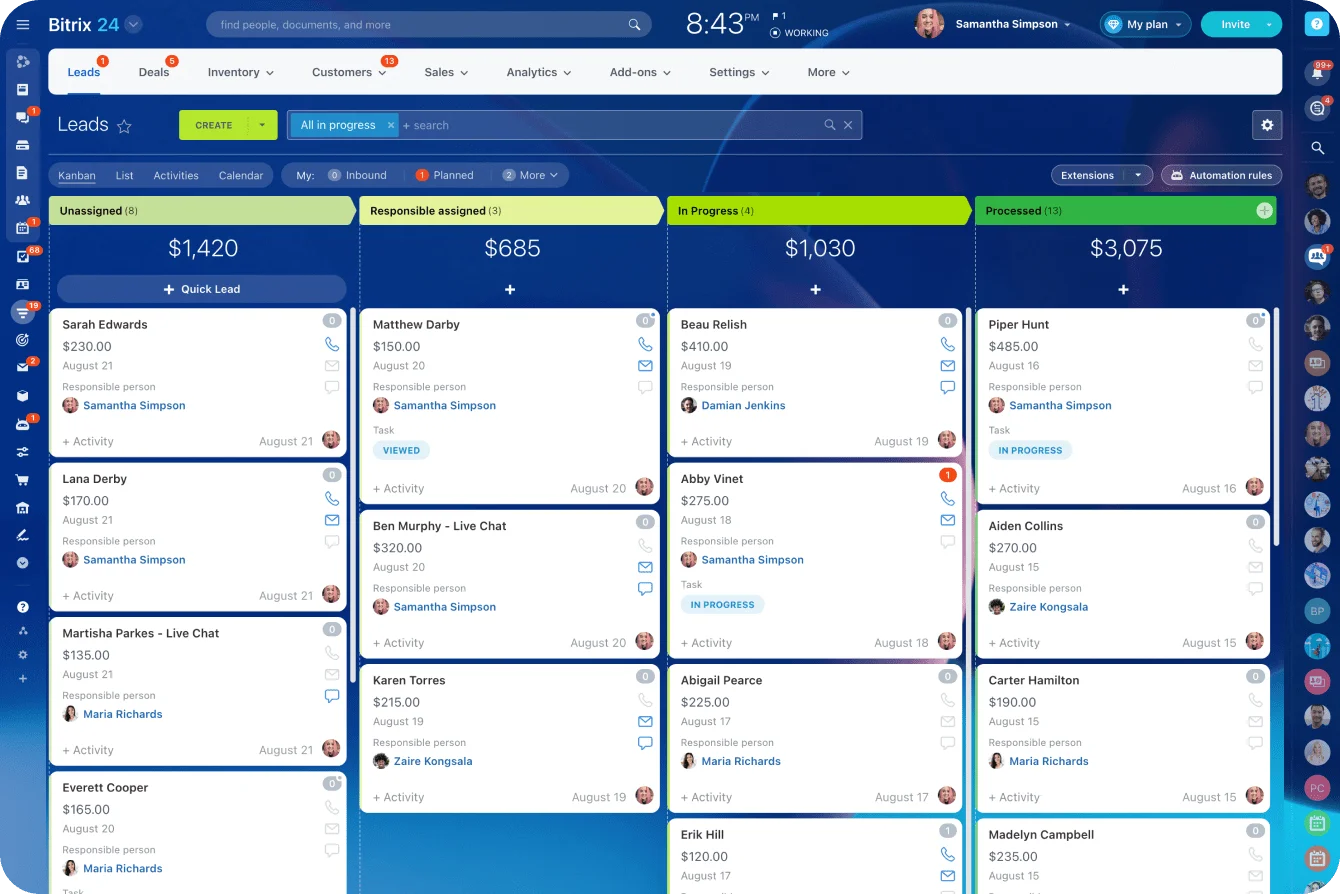
In Bitrix24 CRM, this definition feeds directly into lead routing: once fields like company size, lead source, and lifecycle stage are standardized, you can build automation rules that put the right leads in front of the right rep without manual triage.
Decision checklist:
|
Question |
Example answer |
|---|---|
|
What decision will the score drive? |
Which inbound leads reps contact first |
|
What conversion point matters? |
Qualified opportunity created |
|
What does high priority mean? |
Target-fit lead showing active evaluation behavior |
|
Who must agree? |
Sales manager, marketing lead, CRM/admin owner |
Once this is clear, the rest of the model gets much easier. You’re no longer designing a scoring system in the abstract; you’re building a tool for a specific sales action.
Step 2: Build scoring rules around fit, intent, and disqualifiers
Now build the rules. Keep them simple enough that a rep can understand why a lead got its score without needing a spreadsheet decoder.
Fit Signals
Start with fit. Fit means the lead looks like the kind of customer your business can win and serve effectively. Typical fit signals include company size, industry, geography, business model, or job role.
A B2B software company selling to 50–500-employee firms in North America should score those traits directly instead of hoping behavior alone will sort it out.
Intent Signals
Then add intent signals.
Intent is evidence that someone may be actively evaluating a solution. Strong signals usually come from actions tied to commercial interest, not general engagement. A pricing page visit from a target-size company in the right industry carries far more weight than five blog reads from an unknown contact.
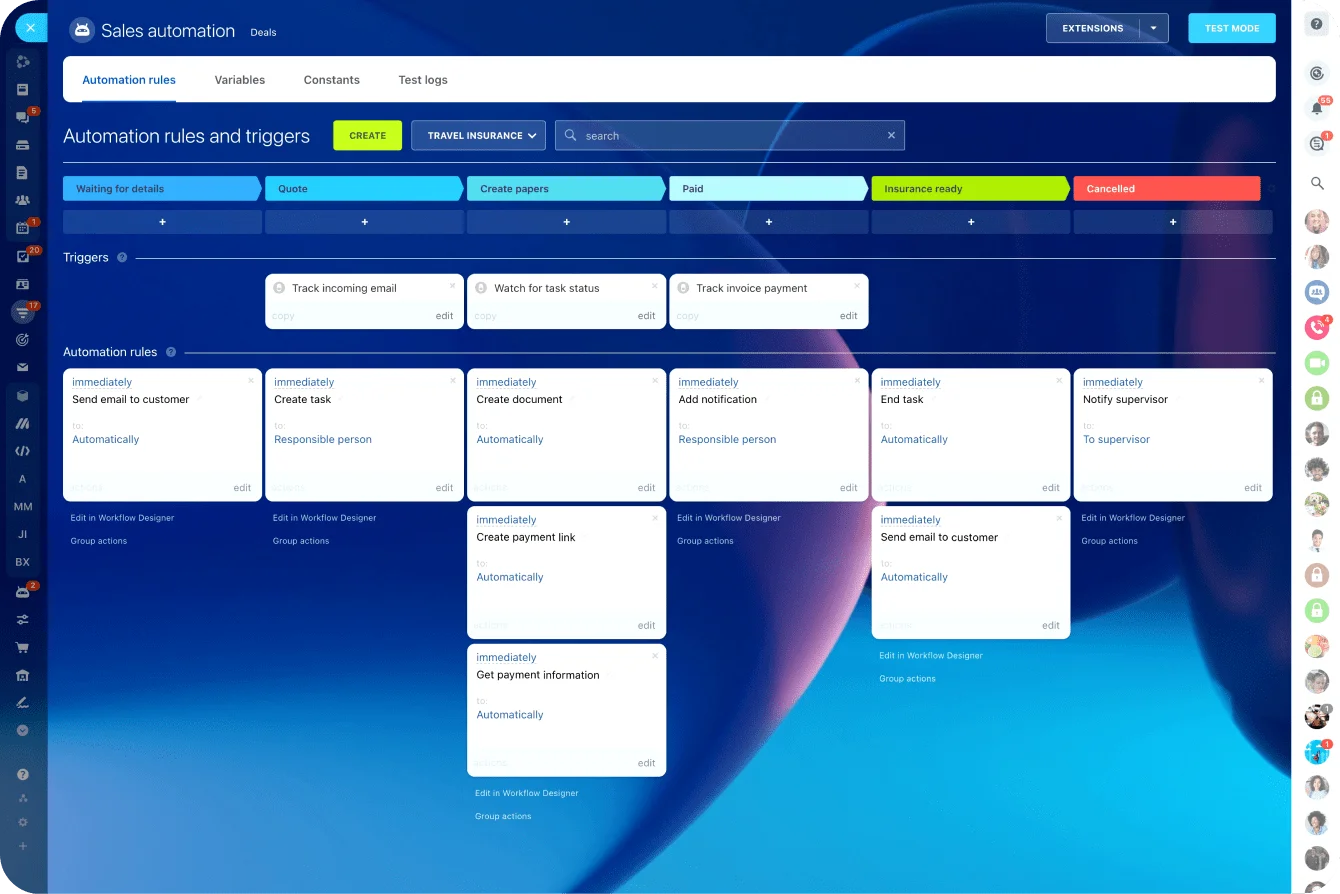
In Bitrix24, CRM automation lets you trigger score updates automatically when a lead completes a form, returns to the site, or requests a demo (without relying on reps to manually flag behavior).
Disqualifiers
Finally, include disqualifiers. These are negative points or exclusions that prevent obvious bad-fit leads from floating to the top. This is where many teams clean up a lot of noise fast.
Here's a simple structure:
|
Category |
Example rule |
Sample points |
|---|---|---|
|
Fit |
Company size matches ideal range |
+15 |
|
Fit |
Target industry |
+10 |
|
Fit |
In supported geography |
+5 |
|
Intent |
Requested demo |
+25 |
|
Intent |
Visited pricing page twice in 7 days |
+15 |
|
Intent |
Returned to site 3+ times in 14 days |
+10 |
|
Disqualifier |
Student or personal email for enterprise form |
−20 |
|
Disqualifier |
Competitor domain |
Exclude |
|
Disqualifier |
Out-of-region account |
−15 |
A few practical rules help here too:
- Give more weight to direct buying actions than passive engagement
- Use points only for fields you can capture consistently
- Limit the number of rules in the first version
- Make exclusions explicit so reps understand why some leads never surface
If you're unsure whether to score something, ask a simple question: when this signal is present, does it consistently make the lead more worth contacting right now? If the answer is weak or mixed, leave it out for the first pass.

Step 3: Calibrate thresholds using sales feedback and follow-up capacity
With rules in place, you need thresholds. This is where many scoring projects go off track. Teams spend time debating whether a webinar attendee should get 6 or 8 points, when the real issue is whether the final score bands create a workable queue.
Review real lead outcomes first
Start by reviewing recent leads across three groups: won, lost, and ignored. The ignored group is especially useful because it shows what the team did not believe was worth pursuing.
Look for patterns. Did most won deals come from target-size companies that viewed pricing and requested a demo? Did low-converting leads often come from the wrong segment despite high content activity?
Match bands to rep capacity
Use that review to set score bands, but don't stop at conversion logic. Bring in follow-up capacity. If three reps can each handle 15 fast-turn inbound leads per week, your top score band should produce something close to that number, not triple it.
A practical example:
|
Score band |
Meaning |
Action |
|---|---|---|
|
50+ |
High fit and strong intent |
Same-day outreach |
|
30–49 |
Promising but not urgent |
Call within 2 business days |
|
10–29 |
Light intent or partial fit |
Nurture or marketing follow-up |
|
Below 10 |
Low priority or unclear value |
Hold or disqualify |
Then pressure-test the bands with sales. Ask blunt questions: "If these 20 leads hit the queue tomorrow, would you want the reps to work them in this order?" That kind of review usually surfaces bad assumptions quickly.
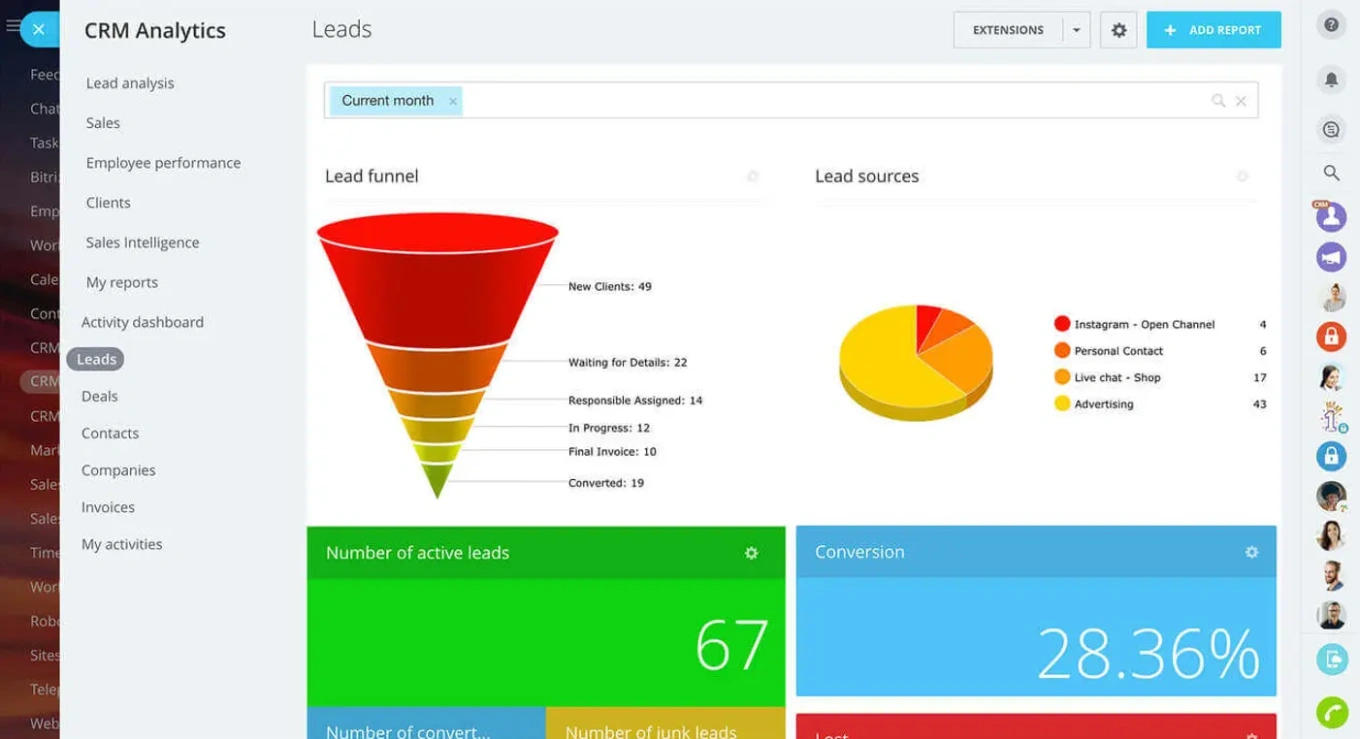
In Bitrix24, the sales pipeline view makes this easy to run: pull leads by score band and walk through them with the team in a short weekly meeting.
Calibration checklist:
- Test against real lead outcomes, not opinions alone
- Size the top band to match real rep capacity
- Define one action per band so nothing sits in limbo
Step 4: Launch, review, and tighten the model in short cycles
Launch the first version with the tools you already have if possible. In many cases, that means basic CRM fields, workflows, and a few automation rules in your marketing platform. You don’t need a major system rebuild to get started.
Keep the rollout lightweight. Turn on scoring for a limited set of inbound leads or one business unit first.
Make the score visible to the team, but pair it with the required next action. A score without routing or follow-up instructions tends to get ignored.
Track two things closely
After launch, track two things. First, are high-score leads getting faster response times? Second, are they converting better at the chosen stage — meetings booked or opportunities created? Those two checks tell you whether the score is changing behavior and whether that behavior is producing value.
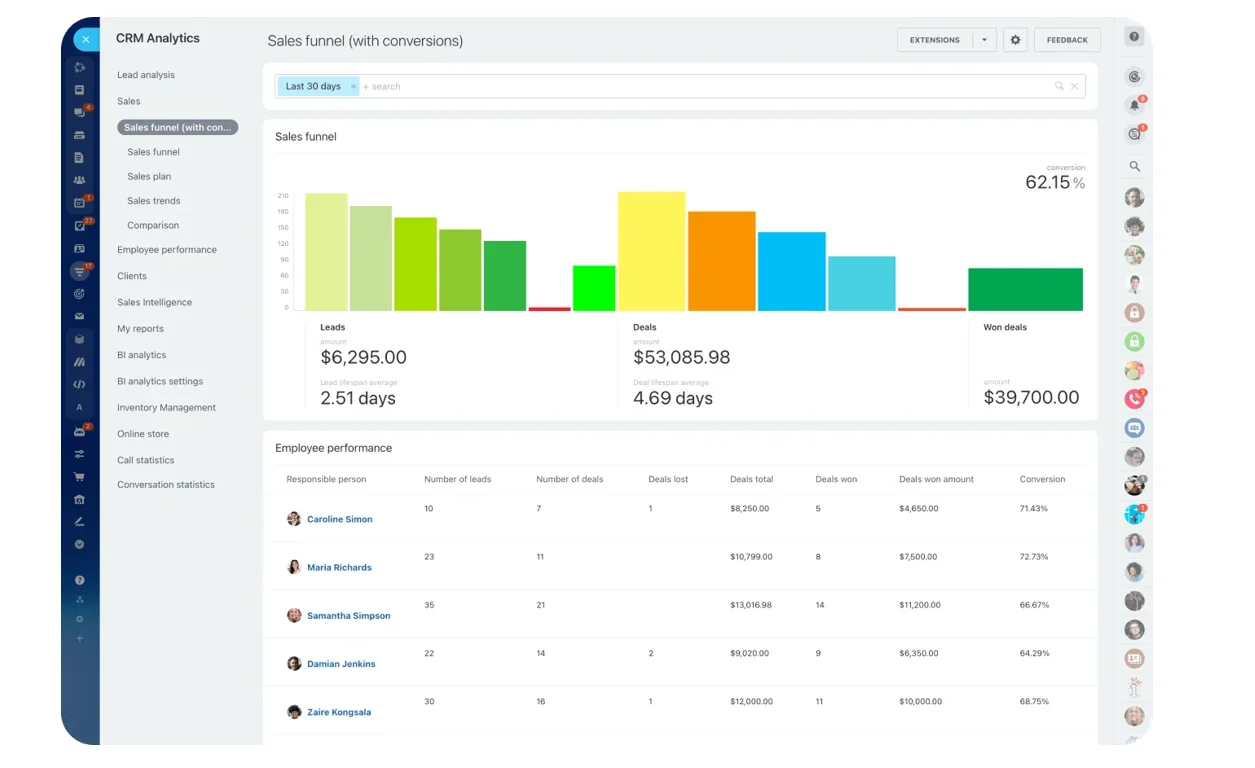
Bitrix24's analytics and reporting tools let you track lead progression by source, score band, and rep, so you can spot gaps without building a separate report.
Run short review cycles
Review the model on a fixed cycle every two to four weeks at the start. In each review, look for weak signals that are generating points without improving outcomes. Also, look for missing signals that reps keep mentioning during lead review calls.
Document every change. If point values keep shifting without a record, the team loses visibility into why lead priority changed. A simple log is enough:
|
Field |
Detail |
|---|---|
|
Date of change |
— |
|
Rule adjusted |
— |
|
Reason for change |
— |
|
Expected impact |
— |
|
Owner who approved it |
— |
Short cycles keep the model grounded. Instead of trying to build the perfect score upfront, you improve it based on actual sales use.
Common mistakes and how to make the model reliable at scale
Three traps catch most teams.
Overfitting: too many rules and edge cases until the score becomes fragile and hard to maintain.
Score inflation: points accumulate but nothing subtracts them, so the database fills with leads that all look "warm" and prioritisation breaks down. That's why decay rules matter — a pricing page visit from six months ago is not the same signal as one from last Tuesday.
And copying enterprise models: SMB teams need fewer fields, fewer stages, and simpler routing. A 12-field predictive model maintained by a RevOps team of one will collapse quickly.
Getting the basics right
To make the model reliable, get the basics right:
- Field standardization: industry, employee count, country, lead source, and lifecycle stage should use controlled values — not free-text fields where "Director" and "Dir." are treated as two different roles
- Routing logic: high-priority leads must go to the right owner fast; a lead that sits unassigned for 48 hours loses most of its intent value
- Ownership: one person should be responsible for score maintenance
- Audit cadence: review rule accuracy, field completeness, and action compliance on a schedule
As volume grows, you may need to segment scoring by territory, product line, or motion. But do that only when there is a clear operational reason. If enterprise leads and SMB leads follow very different paths, separate models may make sense. If not, a single well-run model is usually better than multiple half-maintained ones.
The test for scale is simple: can new reps understand the score quickly, can ops maintain it without heroics, and does it still produce clear priorities as lead volume rises? If yes, the model is doing its job.
The standard that matters
Manual setup is often enough to start. A CRM with custom fields, lists, and basic automation can support an effective first model in days, not months — if the rules are simple and the decision is clear. More automation helps later, but it is not the starting requirement.
The main thing to remember: trusted lead scoring is not complicated. It’s clear enough for sales to believe, simple enough for ops to maintain, and tied directly to a real follow-up action.
If the model helps the team contact better leads faster, it’s working. That’s the standard that matters.
Prioritize leads your sales team can trust
Use Bitrix24 CRM to score, route, and track leads with clear rules, automation, and reports that keep reps focused on real opportunities.
Get Started NowFAQ: Practical questions teams ask before rolling out lead scoring
How many points should a demo request be worth if sales capacity is limited?
Enough to push it into the top action band when paired with reasonable fit, but not enough to override obvious disqualifiers. In practice, many teams give demo requests one of the highest intent weights because they signal direct commercial interest. If capacity is tight, raise the threshold for urgent follow-up rather than inflating every other signal around it.
Which CRM fields are mandatory before scoring starts?
At minimum: company name, contact email, lead source, owner or queue, geography, and the core fit fields you plan to score (such as industry and company size). If those fields are missing or inconsistent, the model will be noisy from day one. In Bitrix24, you can set required fields on forms and enforce standardized picklists so the data going into the score is clean before the first rule fires.
How long should inactive intent signals stay in the score?
Not forever. High-intent actions should have a time window. A pricing page visit from yesterday matters more than one from 90 days ago. Tie the decay window to how quickly buying intent typically fades in your market: shorter for fast sales cycles, longer for complex ones.
Can one person at a target account inflate the score unfairly?
Yes, especially if the model stacks repeated activity from a single contact without limits. Use caps on repeat behaviors, and if account-level buying matters, separate contact score from account score. That prevents one curious user from making an entire account look sales-ready.
What should we do if reps ignore scored leads?
First, check whether the leads actually deserve attention. If they do, the issue is workflow, accountability, or routing. Make the expected action explicit, track response by score band, and review misses with managers. If reps keep skipping high-score leads and those leads convert well when contacted, that is a process issue, not a scoring issue.