Bitrix24 Software Management Made Easy: New Subscription Features Explained

Every modern company depends on digital structure.
Sales teams rely on CRM data. Project managers coordinate deadlines and workloads. Teams communicate, share documents, and automate routine processes. Bitrix24 is designed as an all-in-one environment where CRM, project management, communication, collaboration, and automation work together seamlessly. That unified structure reduces complexity and keeps processes connected.
But even within one platform, effective software management remains essential. Understanding its subscription, limits, and capabilities is not just administrative work. It is part of responsible business management.
Why Software Management Is a Business Priority
There’s a moment every business leader knows too well.
A marketing team hits “send” on a 1,000-customer campaign, and the system stops cold. The monthly email cap ran out at 9 a.m. on routine alerts. Thousands never get the message. The design team tries to upload final campaign assets, but the server rejects them. Another department’s overnight backup used the last available megabyte. The deadline is missed.
These interruptions aren’t just frustrating — they steal time, focus, and momentum. This is the hidden cost of unclear system limits: not the subscription itself, but the mental energy and friction caused by unexpected roadblocks.
Many companies struggle to scale because they lose track of their digital tools. Effective software management is not just about revenue or licenses — it’s about knowing exactly what the system can handle at any given time.
With the updated Bitrix24 Subscription section, administrators get a clear, real-time view of storage, emails, users, and plan details. Teams can spot potential issues before they disrupt work, keeping operations smooth and focused.
A Clear View of Plans in Bitrix24
The redesigned Subscription section brings together key subscription details in one structured space. From here, companies can:
- Check plan expiration dates
- Review usage limits
- Renew or upgrade a plan
- View installed apps and integrations
- Activate trial access
The section is available directly from the main Bitrix24 menu by clicking Subscription.
For businesses that value clarity, this makes everyday software management more straightforward.
Plan: Understanding the Current Subscription
The Plan block provides a simple overview of the current subscription. It displays the plan name, expiration date, and the number of remaining days. For example: Professional until 02/08/2026 (19 days left).
This clear presentation removes uncertainty. There is no need to search for renewal details or track dates separately.
From this same area, companies can renew their current plan or move to a higher one if their needs change. A built-in calculator helps estimate how a new plan’s expiration date will be calculated, supporting internal budgeting and approval processes.
For a full comparison of available options, the Bitrix24 plans and pricing page outlines features and limits in detail.
The value here is confidence. When subscription details are transparent, decision-making becomes easier and more structured.
Apply Coupon: Managing Subscription Costs
Subscription management also includes financial oversight.
The Apply coupon option allows companies to enter a valid coupon when connecting a plan, renewing a subscription, or switching to another plan. This feature integrates cost management directly into the platform.
For finance teams and business owners, this flexibility supports controlled spending and planned subscription updates. Instead of treating renewals as routine transactions, companies can align them with internal budgeting strategies.
It is a small but meaningful part of responsible software management.
Trial Mode: Exploring Professional Features
At times, companies may consider unlocking additional capabilities within Bitrix24. The question is whether those features match real operational needs.
The Trial mode provides 15 days of access to Professional plan features for organizations currently on Free, Basic, or Standard plans. The trial can be activated once.
During this period, teams can explore advanced tools, expanded limits, and enhanced automation within their existing Bitrix24 account. This is not a separate environment — it is the same workspace, with additional functionality temporarily enabled.
The Free 15-day trial makes it possible to evaluate higher-tier features without immediate commitment. This supports informed decisions based on real usage rather than assumptions.
For many companies, this clarity is essential before making subscription adjustments.
Limits: Clear Insight into Capacity
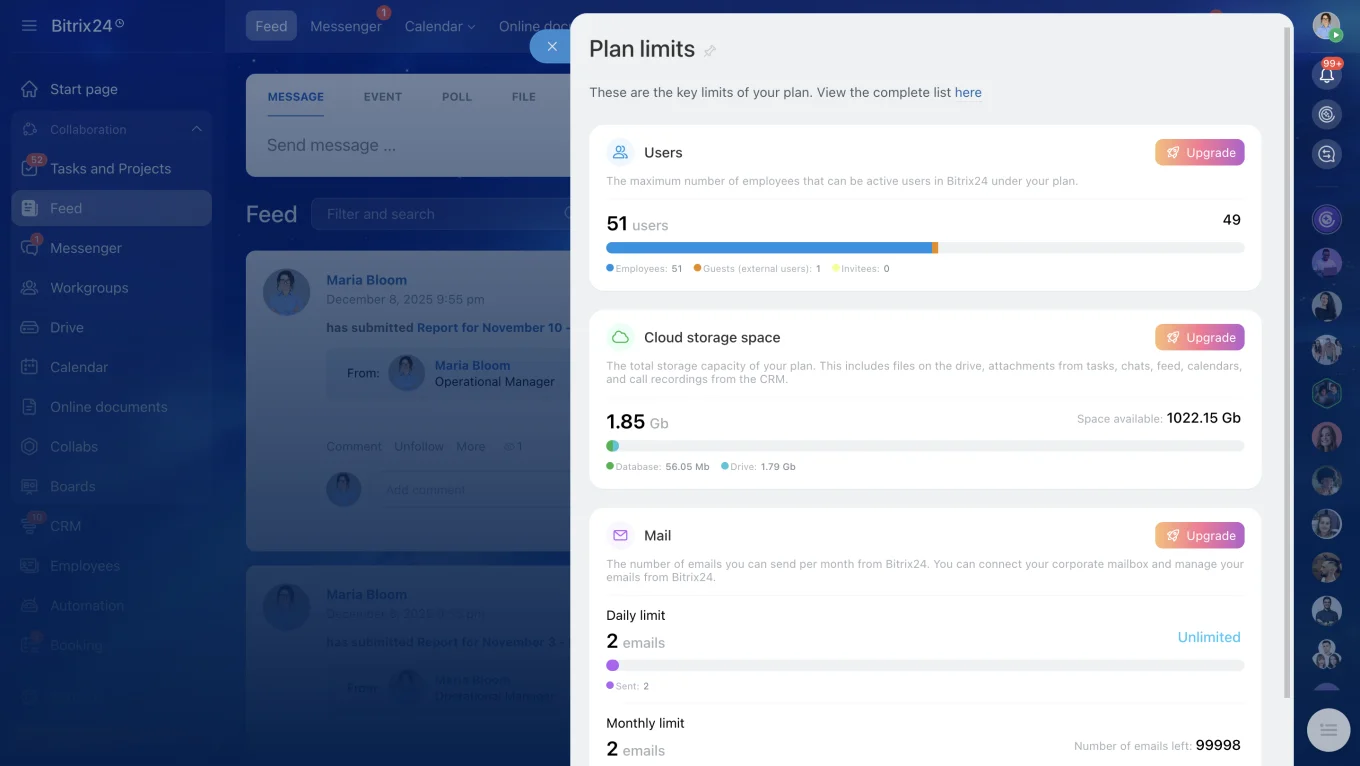
The Limits section offers detailed information about plan restrictions and current usage. This visibility helps prevent surprises and supports proactive management.
Cloud storage details show total capacity, used space, and available storage. Since documents, client files, and internal records are often stored inside Bitrix24, understanding storage levels is important for continuity. Additional information about Cloud storage options helps evaluate future needs.
Email limits display how many emails can be sent monthly through connected services. For teams working inside the CRM, especially in sales and marketing, this ensures campaigns and communication remain uninterrupted. More details about Bitrix24 Mail features and plan options help align email usage with plan capabilities.
User limits indicate how many employees and external collaborators are allowed under the current plan, as well as how many are already registered. As companies expand their teams, reviewing the Number of users on Bitrix24 Cloud plans helps maintain balance between access and subscription capacity.
By clicking View limits, companies can review all restrictions in one place. The Plan compatibility check provides additional insight into whether the current plan fits operational requirements.
This level of transparency strengthens everyday software management. It allows businesses to monitor capacity calmly and adjust when necessary.
The Business Value of Structured Subscription Management
The updated Subscription section brings clarity and stability to a unified platform. It helps prevent interruptions caused by expired plans or exceeded limits, reduces administrative effort by centralizing key information, and supports financial planning with visible timelines and details. Trial mode also allows teams to explore advanced features before committing, encouraging informed decisions.
For small and medium-sized businesses, this structure makes oversight simple. For larger organizations, it supports coordination between management, finance, and IT teams. Most importantly, it reinforces that software management is part of overall business management.
Conclusion
Bitrix24 brings CRM, project management, and communication together in one environment. Managing that environment responsibly requires clear subscription oversight.
The updated Subscription section enhances transparency and simplifies everyday software management without changing the familiar workspace teams already use.
Companies that value structure, visibility, and control can register a Bitrix24 account and explore how improved subscription management supports stable, well-organized operations.